
Businesses collect large amounts of customer, sales, financial, and operational data, but turning it into useful insights can be challenging. Power BI and Dynamics 365 integration connects operational data with interactive analytics, helping teams understand performance more clearly. Together, these Microsoft platforms can simplify reporting, improve data visibility, and support faster, more informed business decisions.
What Is Dynamics 365 Integration?
Dynamics 365 is a collection of business software for CRM and ERP by Microsoft. The suite covers managing business operations in different areas – sales, customer service, finance, supply chain, and operations. One of its major features is Dynamics CRM integration, allowing businesses to link their Microsoft products and other third-party business tools together.
Businesses will need to make only minimal setups through these integrations to connect their core systems, enhance the transfer of data, and synchronize operational workflows from different teams. As a result, this unified business process management will enable the company’s end-to-end business tasks to become significantly more manageable, as well as give them more benefits from Dynamics 365 than ever before.
What is Power BI?
Microsoft Power BI is a suite of business intelligence, dashboards, visual analytics tools, and software services helping the organization collect and present valuable information from various sources to different business stakeholders in the easiest possible way. The data from spreadsheets, databases, cloud applications, and business systems are connected into interactive dashboards, reports, and visualizations that help business performance comprehension.
Another way Power BI offers to business people is the use of natural language queries or data preparation with AI-assisted insights for exploration of information and uncovering meaningful trends in a more efficient way.
6 Benefits of Integrating Dynamics 365 and Power BI
Businesses are being assisted by Microsoft Dynamics 365 and Power BI in the areas of data management, analysis, and presentation. Integration of these two is bringing together business information, thereby making it easy for users to find insights and enhance their decision-making process. The following are the reasons why businesses would want to merge Dynamics 365 with Power BI.
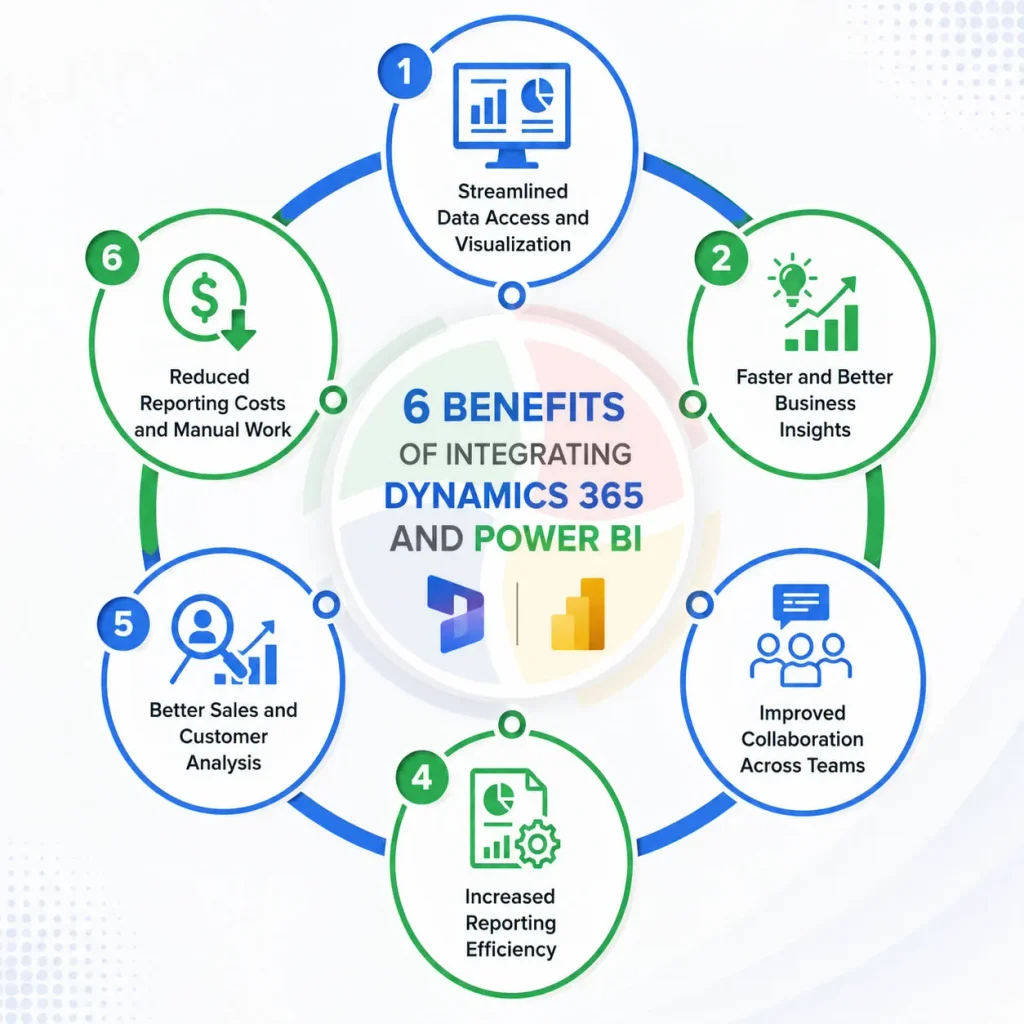
1. Streamlined Data Access and Visualization
Dynamics 365 holds various pieces of information: sales, customers, finance, and operations, whereas Power BI helps in displaying it graphically and in the format of reports to the extent of interactivity. With this combination, the teams get a clear picture of the complex business processes in the form of dashboards and visual illustrations only.
Teams can visualize:
- Sales and revenue patterns
- Customer activities
- Cash flow statements and the company profit/loss account
- Operating KPIs
- The comparison of actual figures with the targets
Instead of dealing with the volume of data in various places and exporting manually, a decision-maker has a much bigger and cleaner view of his company s performance at a glance.
2. Faster and Better Business Insights
The combination of Power BI and the dynamics 365 of Microsoft has given teams a way to move from data collection to data interpretation even faster. With an integrated view, managers are able to check key KPIs and explore data changes right away without having to get manually generated reports first.
Taking a sales manager as an example, he/she could start to look at the total value of the sales pipeline and then dissect it according to:
- Sales Rep
- Geographical areas or regions
- Products/services
- Stages of Opportunity
- Achieving Closing Date
This way of breaking down data helps in spotting changes, identifying where improvement is needed, and understanding drivers at work behind any shift resulting in changes in results!
3. Improved Collaboration Across Teams
Mismatched figures and different perspectives on business performance are often due to the habit of departments within an organization generating their own spreadsheets and reports.
Getting Power BI connected with Dynamics 365 is a way to provide the different business teams with the ability to have common views on the company performance by means of sharing the same dashboards based on the standard data of the company. That is also how it works:
- Sales can check the sales pipeline and conversion stats.
- Financer is in the position to analyze the business and financial performance.
- The Operations team is the one who follows operating KPIs closely.
- Management is able to assess the performance of the entire company.
Better insight from the different business aspects will lead teams to less time reconciling different reports and to more focused discussions on which actions to take.
4. Increased Reporting Efficiency
Repeatedly exporting Dynamics 365 data, updating spreadsheets, creating charts, and distributing reports takes time. It can also lead to inconsistencies in recurring reports. With Power BI, you can create reusable reports and dashboards that allow end-users to drill down and navigate through the data.
In this way, the teams are enabled to:
- Preventing the necessity of report creation
- Keeping spreadsheet-based reporting to a minimum
- Look into the data without the necessity of requesting new reports all the time
- Dedicating greater time to the analysis of outcomes
In the case of more and more complex reporting tasks, Power BI dashboards are the most scalable approach, as one dashboard can replace the need to continually produce individual reports.
5. Better Sales and Customer Analysis
Dynamics 365 records thorough data on leads, accounts, contacts, opportunities, customer interactions, and sales activities. With Power BI, you can visualize insights and thus support Sales and customer teams in identifying performance areas where they are strong or weak.
Some of the core metrics are:
- Sales pipeline value
- Lead conversion rate (number of leads turning out to be a successful sales opportunity)
- Opportunity win rate (percentage of closed opportunities that you win compared to what’s in play)
- Revenue by salesperson
- Sales by region or product
- Customer trends (what products/services/regions are customers purchasing and how much)
- Actual sales compared with the targets
With the information revealed through the dashboards, sales managers will see if there is something to address, find differences in how different salespeople perform, and understand the gaps in the sales processes. Also, the team that works directly with customers will have means to understand the behavior of their clients better by looking at interaction and account data.
6. Reduced Reporting Costs and Manual Work
Reporting done through separate systems and requiring manual procedures can raise your administrative costs and make you run into reporting delays. Staff can waste several hours exporting data, managing spreadsheets, verifying calculations, and making similar reports over and over.
Combining Dynamics 365 and Power BI will decrease the burden of these jobs because of the possibility of generating repeatable data models and dashboards.
The company can get several advantages:
- Limited data exports by manual effort
- Minimum time is spent on doing repetitive spreadsheet tasks
- Reuse of a single dashboard for many similar reports
- Hassle-free access to up-to-date business info
- Better usage of the existing resources
With reduced workload for preparing reports employees will have more time for analysis, strategic planning, and taking decisions that really human judgment is a must for.
Time to empower your Sales Team
Dynamics 365 and Power BI integration would enable businesses, for instance,e to access their sales data as well as financial, customer, and operational aspects more thoroughly. When teams can get the right kind of dashboards and the data models are well-structured, the time of preparing reports gets reduced, which results in saving time for using the insights for making decisions in a timely and well-informed manner.
Aegis Softtech specializes in connecting Dynamics 365 with Power BI and other major enterprise applications by using its Dynamics 365 Integration Services. Besides integration planning and making the data connected, we offer our experience in the field so that the teams can create such a Dynamics 365 environment that would suit the reporting and operational aspects of the organizations well.
FAQs
1. What are the advantages of Power BI and Dynamics 365 integration?
Major benefits include: enhanced graphical representation of data; accelerated gaining of insights; improved team collaboration; greater efficiency when making reports; a deeper understand customer and sales situations; and significant savings from fewer manual reporting tasks.
2. What is the way to Power BI’s connection to Dynamics 365?
Yes. Power BI will allow access to Dynamics 365 data by using Microsoft connectors (if available). The apps built on Microsoft Dataverse by Dynamics 365 will connect through the Power BI Dataverse connector for analysis.
3. What kind of Dynamics 365 data can be analyzed using Power BI?
Depending on the type of Dynamics 365 applications, it is possible to analyze the data of leads, opportunities, customers, sales, financial transactions, orders, inventory, services, and other business operations data.
4. Is the integration of Dynamics 365 Business Central Power BI supported by Power BI?
Yes. Power BI is being used for reporting and analytics with Dynamics 365 Business Central. For analysis purposes, companies may use Power BI for financial, sales, customer, and operation-related information available from Business Central.
5. Is it possible to use Power BI as a tool to cut down your manual Dynamics 365 reporting?
Yes. Employees can save significant time by avoiding manual report production after every data export. It can help the company create a more standardized workflow and reporting procedure if you use reusable Power BI dashboards.