
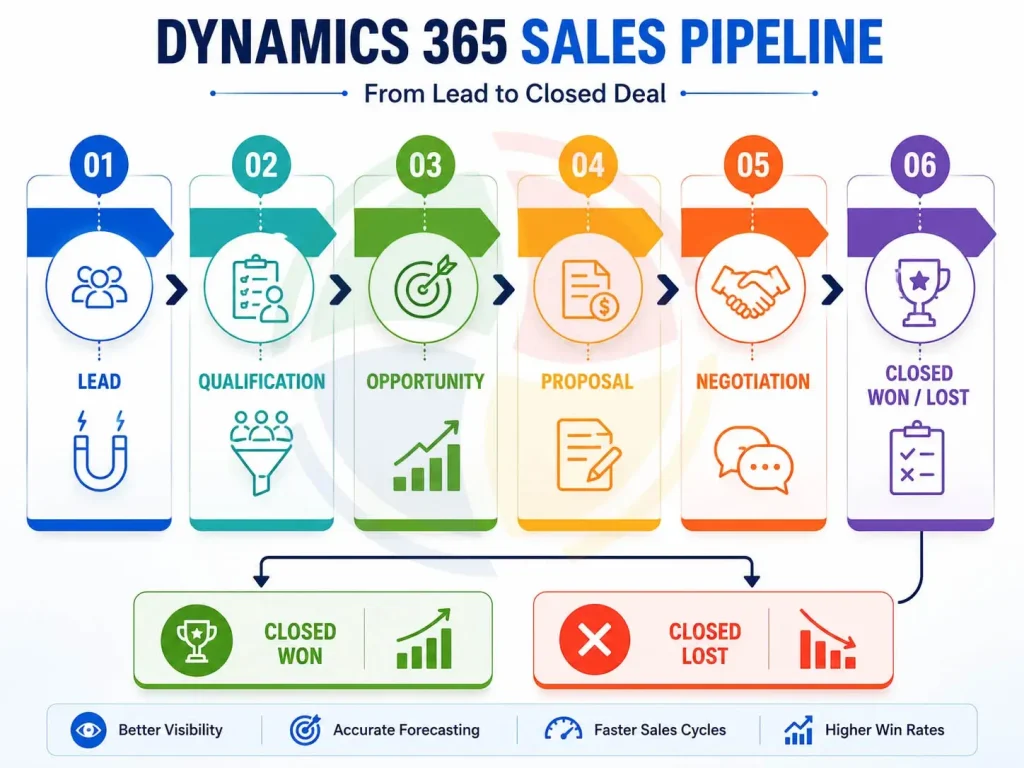
A sales pipeline in Dynamics 365 gives the sales team a clear picture of their prospects’ progress from qualification to closing a deal. Through that, they can have a better forecast, visibility, productivity, etc. By combining customizable sales stages with automation, AI-based insights, and live dashboards, Dynamics 365 gives companies a way to control their pipeline better and achieve faster results.
This article presents, in detail, 10 techniques that have been successfully applied while managing the sales pipeline on Microsoft 365. It further gives a walkthrough on how to work with the Dynamics 365 sales pipeline dashboard to make the most of your sales efforts.
What Is a Dynamics 365 Sales Pipeline?
A Dynamics 365 sales pipeline is a bird’s-eye view of all the leads currently trickling down the sales pipeline. A sales pipeline is something salespeople use to follow up on where their leads are in the sales process, which ones are stuck, what deals are about to close, and how much money they expect to make in the next couple of months.
Why Managing the Sales Pipeline Effectively is Important
The Dynamics 365 sales pipeline is not only a tool for sales teams to zero in on the most promising deals, but also empowers managers by making sure they always have the whole picture of what happens in sales as well as an accurate sales and revenue forecast.
| Benefit | Business Impact |
| Better pipeline visibility | Track every opportunity in one place |
| Improved forecasting | More accurate revenue predictions |
| Faster sales cycles | Reduce delays between stages |
| Higher win rates | Prioritize high-value deals |
| Better collaboration | Sales, marketing, and service work from the same customer data |
| Increased productivity | Less manual CRM administration |
* Insight: Sales process can be accelerated with automation, AI, and real-time reports.
How Dynamics 365 Sales Pipeline Works
Business Process Flows (BPFs) in Dynamics 365 Sales Pipeline are a feature where the sales team is given the path to follow while they are guiding a deal through each stage. At the same time, these deals are being automatically captured with the customer’s interactions, activities, and forecasts.
8 Dynamics 365 Sales Pipeline Management Techniques
1. Set Your Sales Pipeline Stages Consistently
The chief reason pipelines get out of sync is that people are not following similar sales processes. One salesperson might view ‘Qualified’ as another might have interpreted ‘Proposal Sent’, which leads to discrepancies in reports and wrong predictions.
Dynamics 365 through Business Process Flows enables a sales organisation to standardise all the stages of the sales pipeline. The exit criteria of each stage that are laid out will ensure a consistent flow for every opportunity through the sales pipeline.
Some of the advantages include:
- Sales process alignment between the opportunities
- Predictive analytics reporting based on accurate data
- Hassle-free induction for new team members
- Average sales figures that forecast sales accurately
- Enhancement in business rule compliance at each stage.
2. Configure the Pipeline as per Your Sales Procedure
With the help of Dynamics 365, the stages of the pipeline, Business Process Flows, forms, and other business logic features can be tweaked to represent precisely how your sales team gets the deals done.
You can customise the following in the organization using Dynamics 365:
- Stages of the sales pipeline
- Business Process Flows
- Mandatory fields
- Approval request processes
- Opportunity forms
- Sales manuals and guides
Want to know how our Dynamics 365 Customization Services can bring about changes in the CRM workflow, forms, dashboards, and automations that reflect your business requirements?
3. Use Automated Lead Qualification and Opportunity Assignment
Automatic assignment of leads to the right salesperson by way of qualification not only leads to faster response, but also minimises human intervention.
For such tasks, Power Automate of Dynamics 365 can save you countless hours of repetitive work, including but not limited to:
- Lead scoring
- Area assignment
- Opportunity generating
- Email notification, assigning sales tasks to the person concerned
- Approval request. Reminder for next customer conversation.
4. Get Insights from The Dynamics 365 Sales Pipeline Dashboard
The Sales Pipeline Dashboard of Dynamics 365 is a sales manager’s go-to tool for an instantaneous snapshot of their sales performance at the individual, team, and territory levels.
Expected dashboard metrics are:
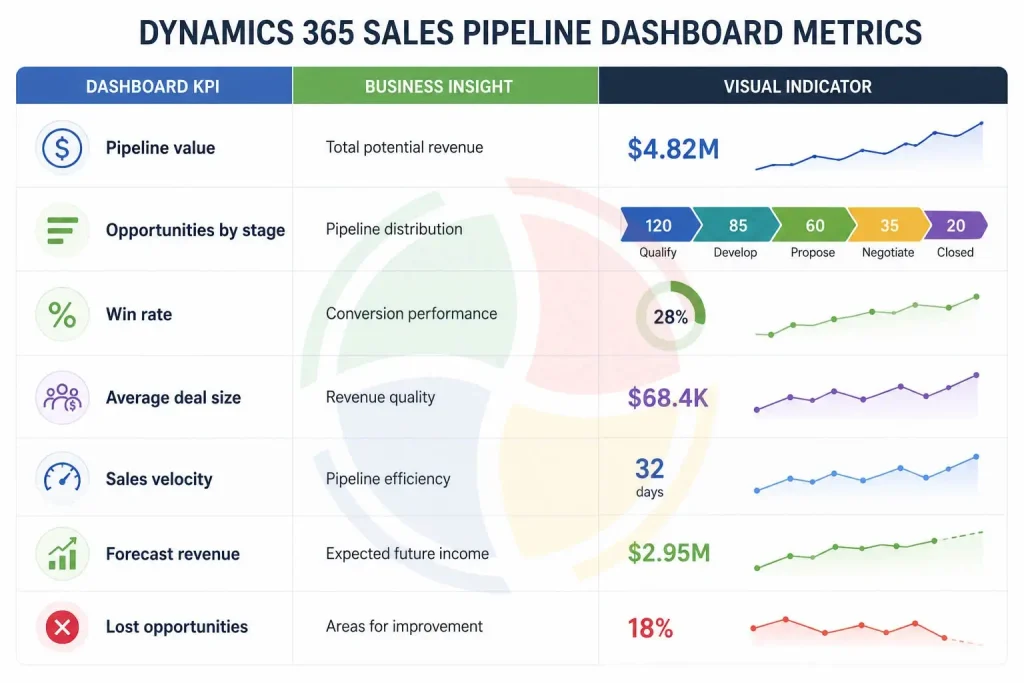
Manager dashboards are interactive; they give managers the possibility to check individual deals, find stalled ones, and use real-time data for sales team coaching.
5. Monitor Deal Health Using AI
Using AI-powered insights from Dynamics 365 Sales, salespeople will be able to spot deals that are under threat, prioritize the deals with the highest return, and avoid letting prospects slip away.
AI-Based Deal Health Tools
- Highlight opportunities where nobody is responding or where deals are slow-moving.
- Get a follow-up alarm when you’re late.
- Rank deals from lowest to highest probability that they’ll end in a contract.t
- Monitor engagement by email and meetings
- Flag deals that need attention urgently
6. Design Superior Sales Pipeline Views within Microsoft Dynamics 365
Having a neatly organized Microsoft Dynamics 365 sales pipeline helps them locate and manage opportunities that are most critical fast. Users can filter records according to responsibilities or objectives.
Useful Pipeline Views
| Pipeline View | Best For |
| My Open Opportunities | Managing personal sales activities |
| Team Pipeline | Monitoring team performance |
| Opportunities Closing This Month | Prioritizing near-term revenue |
| High-Value Opportunities | Focusing on strategic deals |
| Stalled Opportunities | Re-engaging inactive prospects |
| Territory Pipeline | Tracking regional performance |
7. Integration with Microsoft 365 and Power Platform
D365 Sales connects flawlessly with Microsoft 365, Power Platform, and other Microsoft applications, thereby enabling a one-time sales experience.
Integrations that Enhance Pipeline Management
- Outlook synchronizes email and meetings
- Microsoft Teams shares work on the deals
- Power BI monitors pipeline success indicators
- Power Automate streamlines the approval workflow
- Copilot summarizes meetings and automatically drafts follow-up messages
Such integrations will reduce manual input requirements, allow seamless cross-functional teamwork, and provide a single interface where salespeople can find all the relevant facts.
See also: New to Dynamics CRM. With our Dynamic 365 implementation services, you can get it fully deployed and properly integrated with Microsoft and other software solutions.
8. Monitor the Pipeline at Regular Intervals
While AI can handle much of the pipeline management, regular human oversight remains essential. Weekly pipeline reviews help sales leaders identify issues early, adjust forecasts, and prepare teams before deals slip.
A structured pipeline review process keeps sales data accurate and ensures teams stay focused on the opportunities that matter most to the business.
Weekly Pipeline Review Checklist
- Sales pipeline review for qualified and recently acquired leads
- Delete inactive or duplicate records
- Update the stage of an opportunity and its close date
- Ensure that the Forecast is up to date
- Pinpoint the stalled/deadly-deal opportunities
- Plan the next set of activities related to these opportunities
Tips and Tricks on Sales Pipeline Management with D365
Use these best practices to keep your sales pipeline healthy, improve forecasting, and help your team close more deals.
- Define consistent sales stages: Standardize pipeline stages to improve data accuracy and forecasting.
- Automate repetitive tasks: Save time by automating lead assignment, follow-ups, and approvals.
- Use dashboards and reports: Monitor pipeline performance in real time and uncover actionable insights.
- Review the pipeline weekly: Identify stalled deals, update forecasts, and address risks before they impact revenue.
- Customize workflows: Align pipeline stages and processes with your organization’s sales methodology.
- Leverage AI insights: Use predictive analytics and recommendations to prioritize opportunities and make informed decisions.
- Maintain clean CRM data: Keep records up to date to ensure accurate reporting and better decision-making.
Why Choose Aegis Softtech for Dynamics 365 Sales & Pipeline Management?
Dynamics 365 sales and marketing pipelines require a perfect blend of the right strategies, configurations, regular optimizations, and timely changes to meet the constantly changing demands of the business world. Aegis Softtech delivers Dynamics sales solutions as per the requirements of the businesses, which include implementing the systems, tailoring of features, interconnecting with other systems, migration of data, and provision of support.
We have our strongholds:
- We have Microsoft-certified Dynamics 365 CRM consultants with in-depth knowledge of different sectors.
- We offer a total range of services like planning, developing, changing, updating, connecting, integrating, and managing systems.
- A highly customised design of the sales pipeline is done keeping in view the business processes and reporting needs of the client.
- Automation experts and AI who make it possible to carry out lead management, approval, and sales workflows in a time-saving and error-minimizing manner.
- Smooth connection between Microsoft 365, Power Platform, Power BI, and other business applications.
- Exclusive assistance in optimization and support to continuously increase CRM performance and user adoption.
Their first-hand Dynamics 365 solution and their CRM system upgrade will be supported well if they choose the Aegis Softtech sales pipeline solution.
We help the client to design and deliver a scalable data-driven solution which will enable them to visualize the sales pipeline progress at different levels, forecast accurately, and monitor revenue growth of revenue.
Frequently Asked Questions
1. How to adjust the Dynamics 365 sales pipeline to the specific needs of a company?
The adjustment to the specific needs of the company may involve such methods as business process flows, stages, forms, workflows, business rules, and automation. It helps in customizing the Dynamics sales pipeline according to the business process.
2. Can pipeline views be designed based on different fields using Microsoft Dynamics 365?
Yes, you can develop custom views on sales pipelines of Microsoft Dynamics 365 according to a sales rep’s Territory, Stage of opportunity, or Expected Close Date, to name a few.
3. Is it possible for Dynamics 365 to automatically handle sales pipeline functions?
Yes. Dynamics 365 can use Power Automate to automate various functions of sales pipeline operations like lead follow-up and reminders, approval workflows, notifications, lead assignment, and other similar repetitive functions in sales activity.
4. What are the key performance indicators (KPIs) to follow in the sales pipeline?
To name some, salespersons are expected to track sales pipeline KPIs that include the value of the pipeline, the probability rate, average deal size, speed of sale, sales conversion rate, and so on.
5. What is the recommended frequency for a sales manager to review the Dynamics 365 sales pipeline?
The manager can go over the sales pipeline in person or online on a daily, weekly basis, or even more often if necessary, to discuss the details and further steps for each deal and opportunity, confirm the forecasts, identify any stalled sales, and ensure that all activities are proceeding as planned.