
Enterprise AI applications no longer rely on keyword matching alone. They need to understand meaning, context, and intent to retrieve the most relevant information. Snowflake semantic search makes this possible by combining vector embeddings, the native VECTOR data type, and Snowflake Cortex Search to perform semantic retrieval directly inside your Snowflake environment.
In this guide, you’ll learn how to build Snowflake semantic search step by step, compare DIY vector search with Cortex Search, understand RBAC and governance considerations, estimate costs, and avoid the implementation mistakes that commonly affect enterprise deployments.
What Is Snowflake Semantic Search?
Snowflake semantic search means storing your text in numerical vectors (embeddings) and then searching results based on the meaning rather than exact keywords. Snowflake implements this using the native VECTOR data type, Snowflake Cortex embedding functions, and either raw similarity SQL queries or the Cortex Search service.
Type in the phrase “employee onboarding” into a keyword search box, and you will not get a document titled “new hire setup checklist.” They do not correspond to each other, although they address the same topic. In semantic search, however, that issue will be easily resolved by transforming text into a vector.
Snowflake supports semantic search, allowing teams to generate embeddings, store vectors, and run similarity searches directly within Snowflake tables. This eliminates the need to move data to a separate vector database such as Pinecone or Weaviate.
Unlike conventional keyword-based search, semantic search takes into account user intent and context, and thus is a perfect fit for enterprise knowledge bases, customer support sites, chatbots, and retrieval-augmented systems (RAG) systems.
At a Glance
Snowflake semantic search enables organizations to:- Search documents based on meaning rather than exact keywords
- Store vector embeddings directly inside Snowflake
- Build AI-powered enterprise search without moving data
- Power Retrieval-Augmented Generation (RAG) workflows
- Maintain existing Snowflake security, governance, and RBAC policies
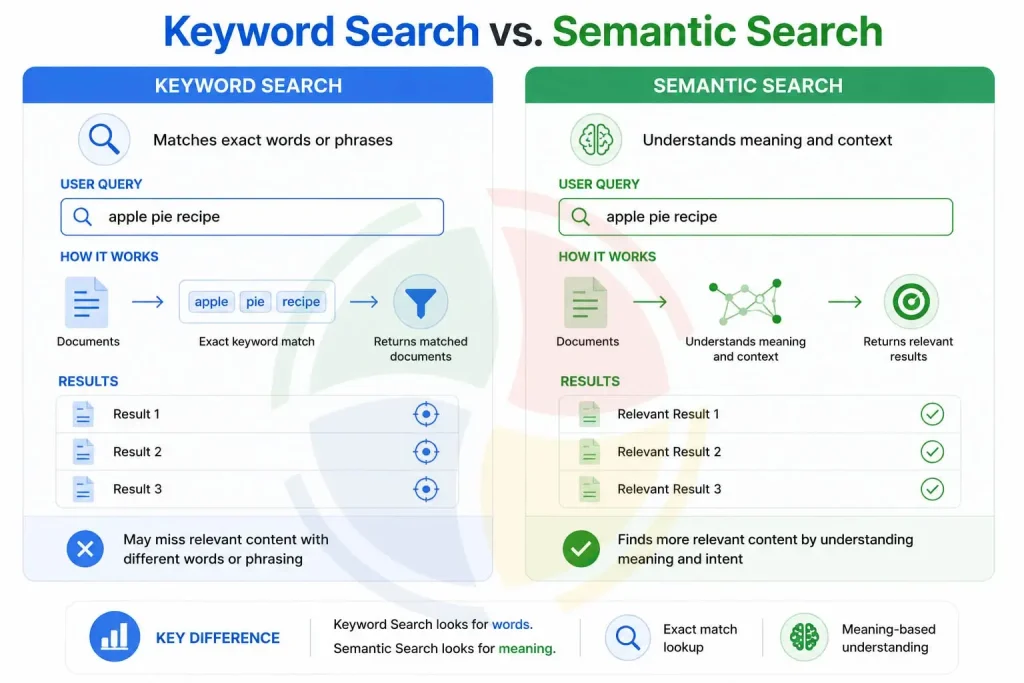
Keyword Search vs. Semantic Search: What’s the Difference?
Keyword search finds exact words, while semantic search understands the meaning and intent behind a query to deliver more relevant results.
Why Build Semantic Search Inside Snowflake?
Semantic search built into Snowflake maintains your data, embedding, compute, security, and governance on one platform without any external vector databases, pipeline overhead, duplicated controls, and operational challenges.
The primary reasons why organizations are choosing to build semantic search within Snowflake instead of a separate data layer are:
- Embeddings live alongside your existing data, making it easy to join with tables migrated from SQL Server or other enterprise databases without maintaining a separate vector store.
- Existing role-based access control applies automatically to vector tables. You don’t rebuild permissions in a second system.
- One bill, one platform, one team to train. That matters more than it sounds once you’ve lived through a multi-vendor data stack.
- Governance frameworks, such as masking, row-level policies, and audit logs, extend to embeddings without extra configuration.
While external vector databases may make sense for specific use cases, such as very large-scale deployments or applications requiring sub-50 ms latency, most enterprise search workloads can be handled within Snowflake. Enterprises that are already using Snowflake for analytics can additionally save on infrastructure complexity and data duplication.
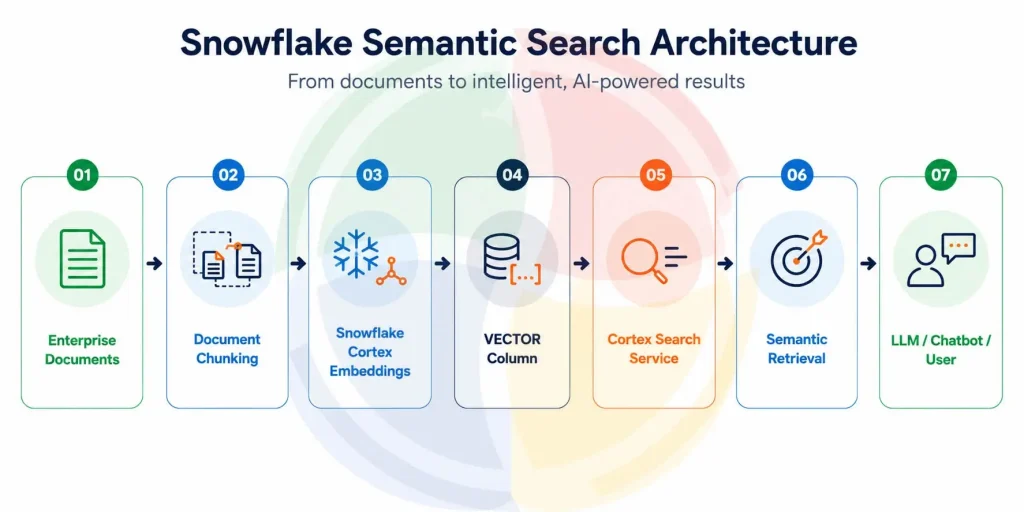
How Snowflake Semantic Search Architecture Works
The end-to-end semantic search workflow in Snowflake follows a straightforward pipeline, from document ingestion and chunking to embedding generation, vector storage, semantic retrieval, and ranked results. The diagram below illustrates how each stage fits together within a single governed platform.
Two Paths to Snowflake Vector Search Implementation
You can either write your own similar SQL against the VECTOR type, or let Snowflake Cortex Search manage chunking, indexing, and ranking for you.
Path 1: DIY Vector Search with the VECTOR Data Type
This is the manual route. You generate embeddings, store them, and write your own similarity queries.
CREATE TABLE documents (
    id STRING,
    content STRING,
    embedding VECTOR(FLOAT, 768)
);

SELECT id, content,
       VECTOR_COSINE_SIMILARITY(embedding, :query_vector) AS score
FROM documents
ORDER BY score DESC
LIMIT 10;
You control every step, including chunking logic, index strategy, and filtering. This flexibility is achieved at a price because the maintenance of that flexibility becomes your responsibility too. Such a solution would be ideal for companies who need customized ranking models, more complex filtering, or integration with their own AI processes.
Path 2: Snowflake Cortex Search (Managed Service)
Cortex Search is Snowflake’s managed layer for semantic search implementation. Point it at a table, tell it which column to index, and it handles embedding generation, indexing, and re-ranking behind the scenes.
CREATE CORTEX SEARCH SERVICE doc_search
  ON content
  ATTRIBUTES id, category
  WAREHOUSE = search_wh
  TARGET_LAG = '1 hour'
  AS SELECT id, content, category FROM documents;
You can access it via the SEARCH_PREVIEW function or REST endpoint, and it provides ranked relevant chunks without your having to write a single similarity formula.
The managed search service makes it possible to reduce the management burden because of automatic indexing, refreshes, and relevance ranking.
DIY Vector Search vs. Snowflake Cortex Search
In the choice between the two solutions, the tradeoff usually lies between flexibility and operational simplicity. Most businesses opt for Cortex Search first and then go for DIY vector search when there is a need for customization.
| Aspect | DIY VECTOR + SQL | Cortex Search |
| Setup effort | Higher: you design chunking, indexing, and ranking | Lower, mostly declarative |
| Control | Full control over every stage | Limited to configuration options |
| Maintenance | You own index refreshes and tuning | Snowflake manages refresh and scaling |
| Best for | Custom ranking logic, unusual data shapes | Most standard enterprise search use cases |
| Query interface | Raw SQL | SQL function or REST API |
How to Build Semantic Search in Snowflake: Step by Step
There are five phases to creating a semantic search system: chunk your data, create embeddings, store/index vectors, search them, and lock it all down using RBAC.
To begin with, make sure you enable the needed Cortex AI features in your Snowflake account, choose an appropriate embedding model for your use case, and plan which datasets you would like to index. By making all these decisions ahead of time, you can make it much easier to scale and maintain your semantic search system. This is where a structured Snowflake implementation becomes critical.
Step 1: Prepare and Chunk Your Data
Do not embed full documents as a single vector because you will lose precision. Snowflake recommends splitting text into chunks of no more than 512 tokens for Cortex Search to achieve better retrieval results. Smaller chunks can improve precision because the search system retrieves more relevant sections instead of processing large blocks of unrelated content.
During enterprise semantic search implementations, we have found that policy documents often perform better with smaller, focused chunks compared with larger chunks because users typically search for specific clauses, rules, or compliance requirements. In our experience, chunk sizes around 300–350 tokens can provide a good balance between preserving context and keeping retrieved results focused. However, we validate chunking strategies against actual search queries and retrieval metrics rather than applying a fixed size across every workload.
Step 2: Generate Snowflake Embeddings
Use Cortex’s native embedding function instead of routing calls to an external API:
SELECT id, content,
       AI_EMBED('snowflake-arctic-embed-m', content) AS embedding
FROM raw_documents;
Whatever model you pick, use it consistently. Mixing embedding models between documents and queries breaks similarity scoring entirely. This trips up more teams than any other step.
Snowflake Cortex supports multiple embedding models for generating Snowflake embeddings, but consistency is critical. Documents and search queries must use the same embedding model to generate comparable Snowflake embeddings. If you later migrate to a newer model, re-embed your existing content instead of mixing vectors generated from different models.
Step 3: Store Vectors and Build a Search Index
Match the VECTOR column dimension to your model’s output dimension. If you use a 768-dimension model, then you have to use a 768-dimension VECTOR column, not 1536 dimensions! This is a tiny detail, which can lead to huge pains.
Along with the embeddings, include useful metadata such as document type, department, language, source system, last updated, and embedding model version. Metadata improves filtering, governance, and hybrid search performance while making future maintenance significantly easier.
Step 4: Query with Managed Search or Similarity SQL
Convert the user’s query into a vector using the same model, then rank documents by distance. If you’re using Snowflake’s managed search service, this step is mostly handled for you; you just call the service.
For optimal search experience, include both vector similarity and metadata filters, such as department, product, region, or document category, into search queries. This combination of vectors and metadata reduces unnecessary comparisons, increases search relevance, and is widely recognized as best practice in enterprise semantic search.
Step 5: Secure Access with RBAC
Embeddings are just data, and they require governance as well. Enforce the same RBAC and row-level access control policies that you would enforce on any other sensitive table. A vector table containing HR documents should not be queryable by everyone in your Snowflake account.
Snowflake’s Role-Based Access Control (RBAC) works perfectly well with semantic search workloads, allowing users to retrieve only information that they are authorized to see. Applying existing governance controls to vector data allows companies to satisfy security and compliance requirements without extra access management infrastructure.
Snowflake vs. External Vector Databases
Snowflake wins on governance and simplicity for teams already on the platform; dedicated vector databases still edge ahead on raw indexing speed at massive scale.
| Factor | Snowflake Vector Search | Dedicated Vector DB (Pinecone, Weaviate, etc.) |
| Data movement | None, embeddings live with source data | Requires syncing data out of your warehouse |
| Governance | Inherits existing RBAC, masking, audit logs | Needs separate access controls |
| Latency at extreme scale | Good, not best-in-class | Purpose-built for ultra-low-latency ANN search |
| Cost model | Existing Snowflake credits | Separate vendor billing |
| Operational overhead | Lower, one platform | Higher, two systems to monitor |
For those already working with the Snowflake architecture, native vector search will simplify the architecture and ensure that there is no need to synchronize the data across multiple systems. For use cases that require billion-scale vector indexing or low-latency ANN search, vector databases might still work better.
Common Roadblocks in Enterprise Semantic Search
The same handful of mistakes show up across almost every enterprise semantic search implementation:
- Naive chunking. Splitting on fixed character counts instead of sentence boundaries breaks meaning mid-thought.
- Model mismatch. Using one embedding model for documents and a different one for queries. Similarity scores become meaningless.
- No metadata pre-filtering. Running similarity search across an entire table instead of scoping by department, document type, or tenant first. Slower and more expensive than it needs to be.
- Ignoring warehouse sizing. Embedding generation is compute-heavy; running it on an undersized warehouse just drags everything out.
- Treating embeddings as throwaway data. No versioning, no metadata, no way to trace which model generated which vector six months later.
Another common mistake is that organizations evaluate search quality using perfect queries instead of real user queries.
Best Practices Before You Go to Production
A short list, but each item here has burned a real team at some point:
- Filter first, embed-match second
Hybrid search, metadata filters plus vector similarity beats pure vector search almost every time. Scope by department or document type before comparing vectors, and cost drops with it. - Benchmark with realistic data volumes
A 500-row demo table proves nothing; small datasets feel instant regardless of design. Test against your real document count and warehouse size before trusting the numbers. - Version your embedding models
When you switch embedding models, re-embed everything; don’t let old and new vectors sit together. Different models don’t share a vector space, so comparisons between them look valid but aren’t. - Treat this as architecture, not a side project
Semantic search touches storage, warehouse sizing, and access control, so it belongs in your broader Snowflake architecture strategy. Bolt it on quickly and nobody ends up owning it. - Monitor warehouse credit consumption on embedding jobs
Embedding generation is compute-heavy, and costs hide easily inside a general warehouse bill. Tag the queries or give embedding jobs their own warehouse to keep spend visible.
Make sure you have role-based access control, metadata filtering, embedding versioning, monitoring dashboard, and search quality assessment before going into the production stage. These will not only make your search more maintainable but will also help in creating a secure and scalable AI search solution in your enterprise.
Production Readiness Checklist
- Choose a single embedding model and use it consistently
- Implement RBAC and row-level security
- Store metadata alongside Snowflake embeddings to improve governance, filtering, and lifecycle management.
- Adopt hybrid search where appropriate
- Version and monitor embedding models
- Benchmark retrieval quality using real-world queries
- Track warehouse credit consumption
- Review search relevance regularly as content evolves
Real-World Use Cases of Snowflake Semantic Search
Semantic search has been emerging as an important component for enterprise AI solutions because it lets users discover useful information by focusing on meaning instead of exact words. Snowflake semantic search is being utilized by companies in multiple industries for different use cases, such as:
- Enterprise knowledge management
- Customer support portals and help centers
- Legal and compliance document search
- Healthcare knowledge retrieval
- Financial document discovery
- Product documentation search
- Internal HR and policy search
- Retrieval-Augmented Generation (RAG) applications
- AI chatbots powered by managed semantic search
Key Takeaways
- Semantic search retrieves information based on meaning instead of exact keyword matches.
- Snowflake’s native VECTOR data type enables vector storage without external databases.
- Cortex Search simplifies semantic search implementation by managing embeddings, indexing, and ranking.
- Hybrid search (metadata + vector search) generally produces more relevant results than vector search alone.
- Applying RBAC and governance policies ensures enterprise-grade security for AI-powered search applications.
- Consistent embedding models and effective chunking significantly improve retrieval accuracy.
Ready to Build Semantic Search on Snowflake?
Semantic search is quickly becoming a standard capability for enterprise AI applications. As organizations build AI assistants, knowledge bases, and Retrieval-Augmented Generation (RAG) systems, searching by meaning rather than exact keywords delivers more accurate, context-aware results while keeping data securely within Snowflake.
For most enterprise workloads, Snowflake Cortex Search simplifies deployment by managing vector indexing, semantic retrieval, and search infrastructure without requiring a separate vector database. Combined with Snowflake’s native governance, RBAC, and AI capabilities, it provides a scalable foundation for production-ready semantic search.
Whether you’re building your first proof of concept or deploying semantic search across the enterprise, Aegis Softtech can help. Our SnowPro-certified engineers provide Snowflake consulting to design, implement, migration and optimize Snowflake solutions with secure architecture, embedding pipelines, governance, and cost optimization tailored to your business needs.
Talk to our Snowflake experts to discuss your semantic search project.
Frequently Asked Questions
How to build a semantic model in Snowflake?
A semantic model defines entities, dimensions, facts, and metrics independent of any single table. You create it in YAML or through Snowsight, mapping business terms to underlying columns so tools like Cortex Analyst can answer questions accurately.
How to build a semantic search?
Generate embeddings of your content with an embedding model and save these as vectors. Compare the embedding of the query with those of the vectors using either cosine similarity or a managed solution such as Cortex Search to retrieve the closest and most relevant matches.
Does Snowflake have a semantic layer?
Yes, Snowflake has a semantic layer which is made up of semantic models and semantic views. These are located between raw tables and the tools that will perform queries on them, providing both humans and AI applications with a way to consistently and governably understand business data.
What is semantics in Snowflake?
Semantics in Snowflake refers to the business meaning layered on top of raw data — dimensions, facts, and metrics. A column like o_totalprice becomes something a natural language query can understand and reason about.
Is Snowflake good for enterprise semantic search?
Governance, proximity of data and consumption pricing makes Snowflake a great choice for most enterprise requirements. High-throughput, sub-50ms latency applications will still benefit from a vector database.
What is the difference between keyword search and semantic search?
Keyword search involves looking for exact matches of words, while semantic search uses vector embeddings to understand what a user intends to ask and how the query should be interpreted based on its context.
Can semantic search in Snowflake be used in Retrieval-Augmented Generation (RAG)?
Yes. Semantic search is an integral part of RAG. Snowflake Cortex Search helps to find the most relevant documents or snippets of information that are then fed into the large language model (LLM) to generate a proper response.
How much does Snowflake semantic search cost?
Cortex Search charges two ways: serving compute (credits per GB/month of indexed data, continuous) plus embedding compute (credits per token when data is inserted or updated) — no flat fee, purely usage-based.