Data silos are silently killing the operational efficiency of your organization, and here’s how.
The biggest reason is the lack of communication between your marketing automation tools, customer service platforms, and ERP systems. This leads your teams to waste hundreds of hours in manual toil to reconcile data. Ultimately, it adds up to costly human errors and delays in making important decisions.
For smooth scaling of information across your entire tech stack, you need a unified data ecosystem. This is where a robust Dynamics CRM API integration is helpful, ensuring you achieve high agility.
It connects your external business applications directly to Microsoft Dynamics via its Web API, eliminating hours and money spent on manual data entry. It also automates cross-platform workflows while establishing a single source of truth for your customer data.
The benefits of Dynamics 365 integration do not end here. Our guide will walk you through the key concepts of this integration.
Key Takeaways
- REST APIs
- Web APIs
- Data Entities
- Integration Patterns
- Streamline Management
- Dynamic Web & Mobile Apps
- Increased Scalability
- Improved Customer Engagement
- Enhanced Security
- Improved Data Synchronization
- Build a Proactive Token Refresh Strategy
- Handle Complex Relationships Carefully
- Service Protection Throttling
- Optimize Database Performance Using Select & Filter Modifiers
- OData (Open Data Protocol)
- Batch Data API
- Custom Services
- Data Management Package REST API
- Excel Integration
- Power Platform Integration
- Step 1: Application Registration in Microsoft Entra ID
- Step 2: Define & Map the Target Data Schema
- Step 3: Establish the Authentication Exchange Flow
- Step 4: Prototype & Validate Core Data Requests
- Step 5: Incorporate Error Resilience & Rate Handling
What is Microsoft Dynamics CRM API Integration?
Dynamics API integration is an approach that connects your Microsoft Dynamics environment with external software systems. This integration process enables automatic data sharing and workflow triggers in real-time.
API, or Application Programming Interface, is like a digital translator that saves your employees’ time by eliminating the need for exporting CSV files or entering client data manually. Different systems, such as your custom website, a marketing automation tool, or an ERP, can work directly with Dynamics CRM.
Integration in modern Dynamics 365 environments centers around utilizing the Dataverse Web API, which is built on RESTful architecture and OData (Open Data Protocol) v4.0. You create a synchronized ecosystem when you implement a proper API integration.
The key points to know in Microsoft Dynamics CRM API integration are:
REST APIs
RESTful architecture is the basis of your Dynamics connectivity. It operates over standard HTTP/HTTPS protocols. Lightweight JSON transmits data quickly across any programming language to help manage your CRM data using standard HTTP methods
Web APIs
The Dataverse Web API is built on the OData v4.0 standard and acts as the entry point for modern Dynamics integrations. It is a highly structured method of applying complex filtering and sorting directly within your API requests.
Data Entities
The API interacts with data entities or tables to strategize complex database structures into recognizable business concepts. These include standard out-of-the-box (OOTB) objects such as Accounts and Leads, and custom entities built for your business logic.
Integration Patterns
Your system performance depends on the architectural pattern you choose. This generally falls into three categories, namely Synchronous for instant, immediate data exchange in real-time, Asynchronous, queueing and processing data independently, and Scheduled, synchronizing bulk data at specific intervals.
What are the Advantages Of Microsoft Dynamics 365 CRM API Integration?
Integration is a core growth strategy that bridges data divides for improved operational efficiency and bottom-line performance. The strategic business advantages of a Microsoft Dynamics 365 CRM REST API integration are plenty, driving security and cross-departmental alignment.
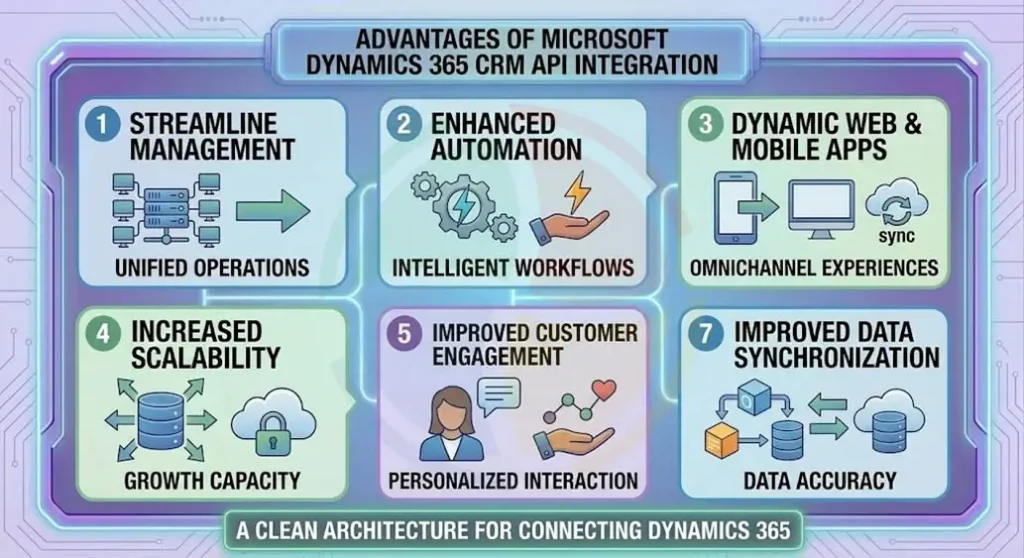
The key benefits of Dynamics CRM integration architecture are:
Streamline Management
Using this unified API gateway to connect external tools removes the need for extensive connections. Your IT department gets a collective view of all data flowing in and out of the company.
Enhanced Automation
Directly linking your internal platforms to this database automates cross-system processes, such as upgrading your customer account tiers and generating field invoices. Thus eliminating manual data entry mistakes.
Dynamic Web & Mobile Apps
A clean REST endpoint helps build custom internal mobile apps or web pages that securely pull and push live data to the CRM. It does so without buying expensive software licenses for every single employee.
Increased Scalability
The API framework runs inside Microsoft’s scalable cloud infrastructure, rendering your integration capable of handling massive data spikes smoothly.
Improved Customer Engagement
It connects your customer-facing applications, such as e-commerce sites or support portals, directly to your core database via APIs. This enables your teams to see real-time updates to swiftly answer client inquiries more accurately.
Enhanced Security
You can enforce strict role-based access rules when you route all data adjustments through verified endpoints. Through this, external applications get access to the specific data fields they need to do their job.
Improved Data Synchronization
A standard RESTful setup immediately syncs your CRM with the updates made in an external accounting system or field service tool. It eliminates data silos and keeps your records accurate across the business.
What are the Best Practices for Microsoft Dynamics CRM Integration API?
Integration is not problem-free. It often brings along issues, such as system slowdowns and data dropouts, which can be avoided by adhering to standard architectural patterns.
Practical experience with enterprise cloud patterns plays a major role in designing production-ready data bridges. Certified Dynamics 365 CRM consulting services help build secure data pipelines and implement reliable authentication workflows.
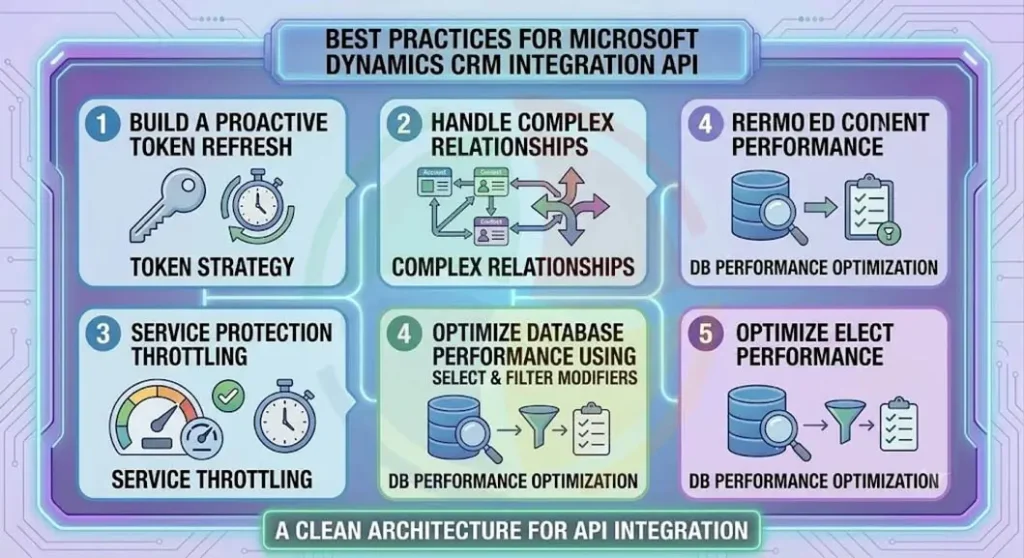
Here are four essential best practices to incorporate when building your data connection:
1. Build a Proactive Token Refresh Strategy
External applications must present a valid OAuth 2.0 access token issued by the OAuth 2.0 Microsoft Entra ID to connect securely. Refresh an expired token here instead of waiting for an API call to fail with a 401 Unauthorized error.
The best practice here is to use an internal tracking clock by your integration architecture to calculate token expiration windows automatically. This securely requests a fresh token from Entra ID before the active token expires.
2. Handle Complex Relationships Carefully
Dataverse is full of complex relational lookups since a single data field, such as the ‘Customer’ of a file, can link to entirely different tables, like a specific User or an entire Team.
Using POST or PATCH commands cannot simply pass a raw database identifier string. The best practice here is to structure the payload using OData navigation syntax, ensuring the exact entity type is targeted explicitly.
3. Service Protection Throttling
Microsoft protects multi-tenant cloud systems by enforcing strict rate limits on incoming traffic. In short, in case an external system floods the API, Dataverse will throttle the connection.
To prevent sync drops, it is important to have a smart handling pattern that reads the Retry-After values inside HTTP 429 Too Many Requests responses. It pauses and delays future requests until the system cools down
4. Optimize Database Performance Using Select & Filter Modifiers
Do not request the entire record payload blindly when pulling data from the CRM. Running wide queries results in unnecessary system notes and audit tracking fields, creating heavy network lag.
Precise $select strings target only the specific data columns they need, while clear $filter modifiers limit the number of records returned.
Types of API Integration by Microsoft Dynamics 365
Microsoft Dynamics 365 offers a suite of distinct integration types, rather than relying on a general approach. These are built-in connectivity protocols, each engineered to match a specific data volume, architectural needs, timing requirement, or development language.
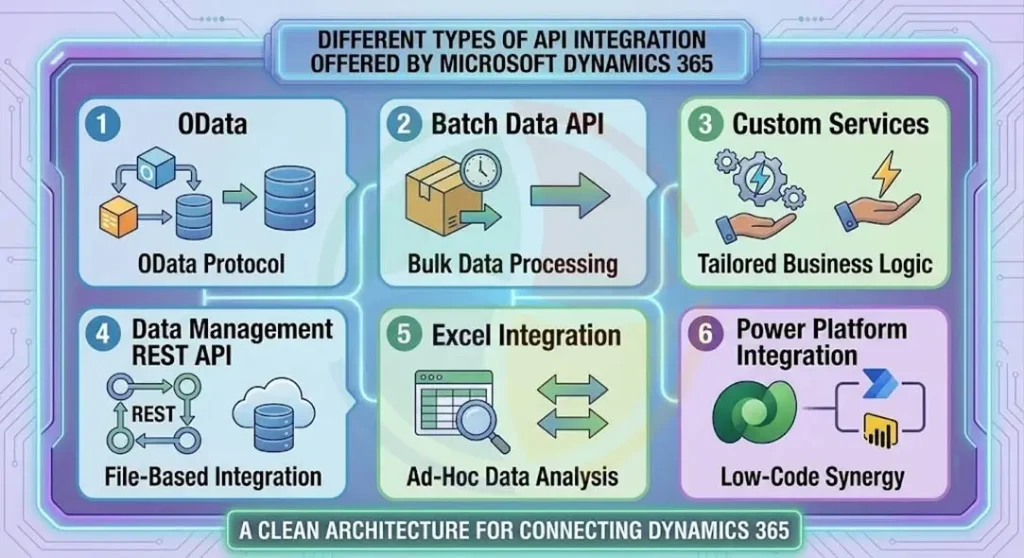
Here are the different types of API integration offered by Microsoft Dynamics 365:
1. OData (Open Data Protocol)
Most standard synchronous web apps choose the native RESTful framework built over OData v4 standards as the default. This makes it easier to execute standard CRUD (Create, Read, Update, Delete) operations using simple JSON payloads.
2. Batch Data API
If you are dealing with large bulk updates, such as shifting thousands of new customer records from an online portal into your CRM, sending individual HTTP requests quickly escalates system rate limits.
The Batch endpoint enables bundling up to 1,000 distinct data operations into a single HTTP payload container. This maximizes speed while keeping network overhead low.
3. Custom Services
Create Custom Services is ideal for business logics that require complex, multi-stage calculations that are unhandleable by standard OData calls in a single step. Writing specialized server-side extensions exposes a custom web address for handling complex parameters and processes them in a single transaction.
4. Data Management Package REST API
Standard web APIs are often too slow for deep warehouse extractions or massive data migration projects involving millions of rows. The Data Management framework moves raw data through background file attachments to seamlessly handle these high-volume requirements. Thus, processes huge datasets efficiently without locking active operational tables.
5. Excel Integration
The native Excel integration utilizes underlying API pipelines, which is great for working without code. Your staff can pull live data grids into spreadsheets and save changes back to the CRM securely, irrespective of their technical know-how.
6. Power Platform Integration
The cloud has a native connector layer that links Dataverse directly with other Microsoft tools, such as Power Apps and Power Automate. This enables swift workflow creation with minimal custom coding.
Steps to Implement Microsoft Dynamics CRM API Integration?
A structured and secure approach is essential to move from conceptual design to live deployment. This safeguards your data integrity and system performance.
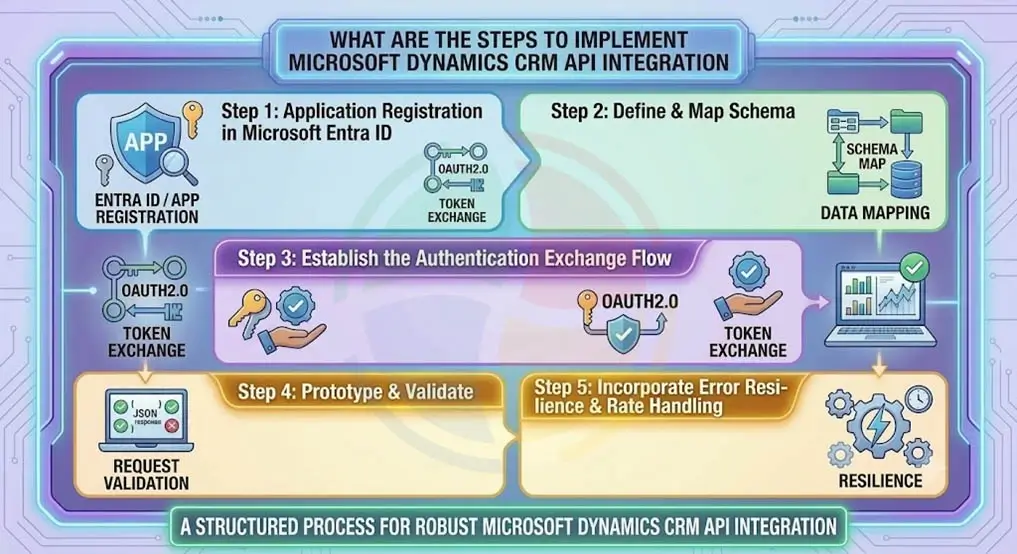
For a stable connection between your enterprise applications and your core database, follow these steps to implement a Microsoft Dynamics CRM API integration.
Step 1: Application Registration in Microsoft Entra ID
Begin by creating an application registration within your cloud portal. This establishes a secure client identifier and secret key for necessary platform access rights.
Step 2: Define & Map the Target Data Schema
The next step is to audit the custom fields inside your environment. Avoid payload errors by mapping internal variables against corresponding platform tables.
Step 3: Establish the Authentication Exchange Flow
The third step is writing the backend connection routines. This exchanges the credentials of your application for a secure access token using standard security protocols.
Step 4: Prototype & Validate Core Data Requests
Next, use API testing tools, such as Postman, to test your query configurations. This verifies authentication headers and payload shapes against a sandbox instance.
Step 5: Incorporate Error Resilience & Rate Handling
Finally, build exception handling and transaction logs into your application codebase. This ensures smooth operations during traffic spikes.
Scale Your Integration Infrastructure with Aegis Softtech
Connecting legacy systems and cloud platforms to Microsoft Dynamics 365 is dependent on architectural planning. Scaling database payloads and increasing concurrent transactions make it difficult to maintain simple point-to-point connections. This often results in sync errors and broken business processes.
Aegis Softtech eliminates these operational risks by focusing on building resilient data integration infrastructures. These protect system speed to maintain complete data accuracy across your business.
Our integration engineering team handles the complex development work, so your IT staff can focus on core tasks such as legacy ERP and accounting, high-throughput middleware architecture, and legacy code optimization.
FAQs
Q1. What is CRM API integration?
CRM API integration refers to the practice of linking external software systems (internal databases or billing tools) directly to your customer relationship management platform. This is done by using standard programming interfaces to build a secure connection.
Q2. How to call an external API in Dynamics 365?
You can either write custom C# plugins or workflow extensions to call an external web service from within Dynamics 365.
Q3. What is the difference between API and REST API?
An API is generally used for any code-level interface that enables two programs to communicate with each other. A more specific type of API is a REST API. It follows web-native architectural principles, uses lightweight JSON text formatting, and is considered better for fast cloud integrations.
Q4. What are web services in D365 CRM?
Web Services in D365 CRM refer to the secure programmatic access gateways. These are provided natively by Microsoft and allow external applications to read, write, and update data within the CRM environment.