Your CRM architecture determines how fast your organization scales, integrates systems, and adopts new technologies. Adopting legacy CRM systems often creates data silos and fragmented customer experiences.
This is why Microsoft Dynamics CRM architecture is considered a better fit, as it addresses these challenges with its cloud-native design built on Dataverse and Azure.
Our blog explores the core components of Dynamics CRM, functional layers, and why you should adopt it.
What is Microsoft Dynamics CRM Architecture?
Microsoft Dynamics CRM utilizes a multi-tier cloud architecture built on Microsoft Azure and the Power Platform. It scales and integrates through core layers: data, presentation, application logic, and security to support Dynamics 365 applications.
It provides a unified view of your customer interactions across sales, marketing, and service functions for business process automation and integration with enterprise systems.
Core Components of Dynamics 365 CRM Architecture
The Microsoft Dynamics CRM architecture is built upon the following core components:
| Data Layer | Business Logic Layer | Presentation Layer | Core Functional Modules |
| This layer controls how your data is stored, secured, and accessed. | It manages rules and integrations across the platform. | This layer dictates how interfaces and data are delivered to your end users. | These are specialized CRM applications that are built on top of the Dataverse architecture. |
| Encompasses Microsoft Dataverse, Security, and Storage | Encompasses workflows & Automation, customizability, and APIs | Encompasses a unified interface, power pages | Encompasses Dynamics 365 Sales, Dynamics 365 Customer Service, Dynamics 365 Marketing, and Dynamics 365 Field Service & Project Operations |
Dataverse: The Heart of Microsoft Dynamics CRM Architecture
Dataverse is a secure, cloud-based data service in the Microsoft Dynamics 365 ecosystem that provides a highly logical environment for all your applications. It is preferred over traditional architectures that force crm developers to spend hours managing database schema updates and security protocols.
The data integration market size is forecast to grow from $15.13 billion in 2025 to $17.18 billion in 2026 at a CAGR of 13.5%.
The Common Data Model (CDM) is a standardized language for your data that amplifies the power of Dataverse.
The top benefits of the Common Data Model are:
Semantic Consistency
CDM provides well-defined, extensible, and modular business entities, such as Contact, Lead, and Account. Thus, when your marketing team generates a lead, it is recognized as the same entity when it transitions to your sales team.
Operational Harmony
Sales and Marketing teams work from the same standardized metadata. CDM eliminates the common friction over conflicting numbers or fragmented customer profiles at the architectural level.
Simplified Integration
Since the data structure is standardized, connecting your CRM to other Microsoft services or third-party applications becomes easier. Your developers no longer have to invent a new schema from scratch.
Dynamics 365 Technical Architecture – Functional Layers
The Microsoft Dynamics CRM architecture follows a layered approach. Hence, changes in one area do not cause systemic failures in another. This separation allows high customization and remarkable stability.
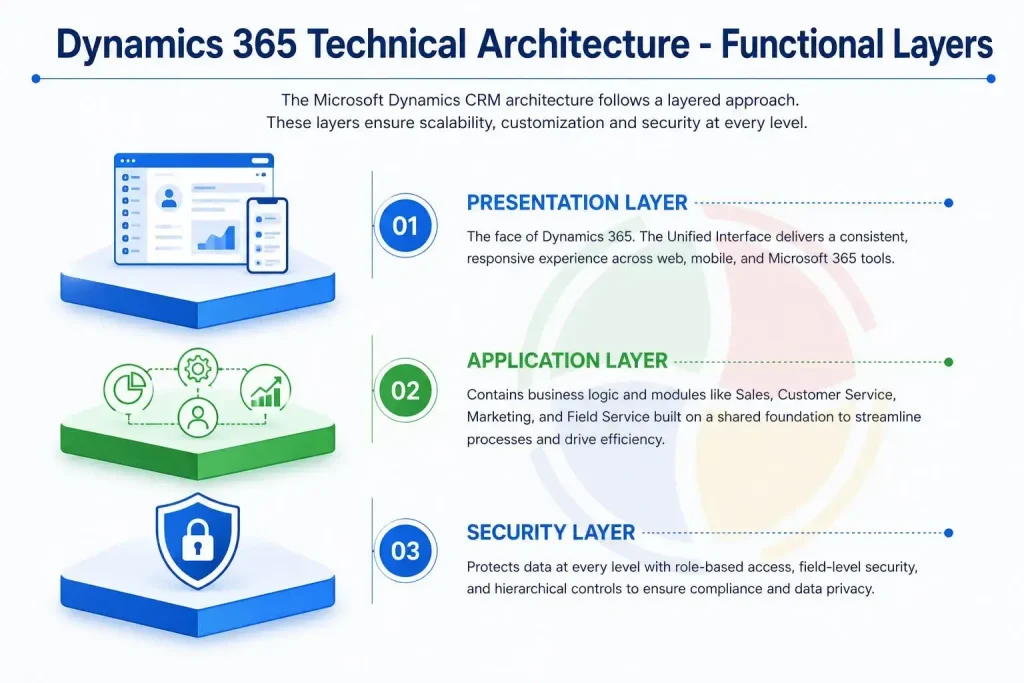
These layers dictate how data flows through your organization and how security is maintained at scale. The three functional layers are:
The Presentation Layer
The presentation layer is the face of the CRM. The Unified Interface (UI) ensures a superior desktop experience. It utilizes embedded AI assistance, such as Copilot, to implement responsive web design principles for a consistent experience across all platforms.
->Device Agnostic Mastery
Whether your team is at a desk using a browser or using the mobile app, the interface adapts dynamically. Controls and dashboards reflow to fit the screen size without losing functionality.
->Outlook & Teams Integration
The presentation layer extends directly into the tools your team uses most. Track emails and create new contacts with the Dynamics 365 App for Outlook without ever leaving the inbox.
->Accessible Insights
Dashboards and interactive charts are generated at the presentation layer so users can access raw data from any device. This enables the CRM to function as a real-time analytical tool.
The Application Layer
This layer includes business logic for specialized modules, such as Customer Service, Marketing, Field Service, and Sales. All these specialized apps sit atop a shared foundation.
->Integrated Workflows
The apps share the same logic layer. Hence, your marketing team immediately gets access to the leads converted by the sales team. This helps measure campaign ROI instantly.
->Business Process Flows
Operational discipline is enforced in this layer. You can design guided stages that ensure every team member follows the same standardized methodology, regardless of their department.
->Extensibility
It helps create custom entities and logic that interact smoothly with native Microsoft features. The software is customized to your unique business and industry requirements.
The Security Layer
MS Dynamics 365 uses AI to protect your customers’ sensitive data at every level of the architecture. Its unique strategy makes it fit for the fintech and healthcare industries.
->Role-Based Access Control (RBAC)
With RBAC, you define exactly what your users can read, write, or delete. For instance, you can permit a regional manager to see everything within their territory while allowing your junior sales representative to only view their own accounts.
->Field-Level Security
Apply security at the individual field level for highly sensitive data, such as a customer’s Social Security number. Even users with general access to a record cannot see restricted information.
->Hierarchical Security
This layer supports complex organizational structures. The security layer ensures data is shared only on a need-to-know basis in the case of both position-based and manager-based hierarchies.
Our specialized Dynamics 365 CRM consulting services ensure your specific business processes are mapped correctly onto this high-performance framework.
How Does Microsoft Dynamics CRM Architecture Support AI and Copilot?
The Dynamics 365 architecture embeds generative AI directly into its operational layers, linking Azure OpenAI LLMs with Microsoft Dataverse. Copilot retrieves contextual data from your tenant, summarizing information and automating tasks intelligently.
The core components that come together to support AI and Copilot are:
1. Dataverse
Dataverse is a secure grounding mechanism for generative AI. Copilot does not rely on generic web data. Rather, it draws real-time context directly from your relationship maps and transaction histories to deliver business-specific answers.
2. Security and Data Governance
Dynamics 365 prevents internal data leakage by running Copilot completely within its native security infrastructure. It implements RBAC and tenant isolation for the same.
3. Copilot Studio for Orchestration
Microsoft Copilot Studio helps manage AI workflows. It reads user prompts, determines intent, and routes tasks to the right data source.
4. Work IQ for Autonomous Workflows
Work IQ capabilities are a part of the modern releases, which allow the system to run autonomous AI agents for strict compliance. These agents have their own verified identities in the database and are held accountable for their actions.
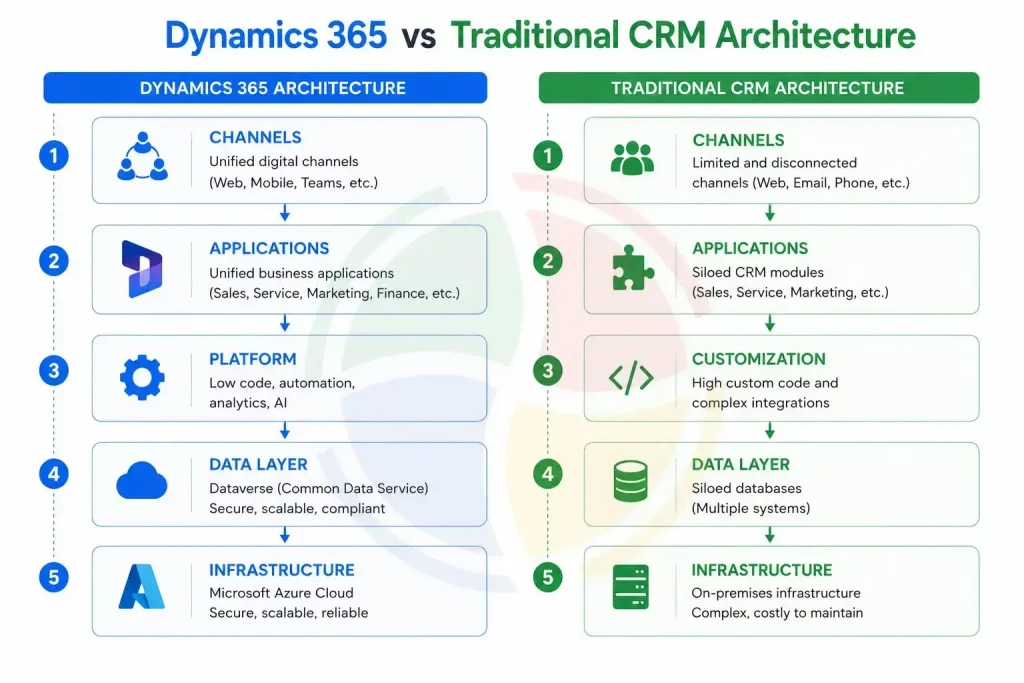
Dynamics 365 vs Traditional CRM Architecture
Dynamics 365 is a cloud-based, modular platform that integrates Dynamics 365 CRM front-office tasks and back-office ERPs. It is built on the Microsoft Dataverse and offers a single underlying database. Traditional CRMs are often monolithic, on-premises systems and require you to have a dedicated IT infrastructure.
While traditional CRMs rely heavily on rigid, rules-based automation, Dynamics offers AI-driven automation.
Why You Should Adopt Microsoft Dynamics CRM Architecture
Choosing the Microsoft Dynamics CRM architecture is a commitment to sustained scalability. With this, you move towards a purpose-built environment that handles the complexities relevant to your business.
Here is why adopting this scalable CRM design benefits you:
Integration and Extensibility
Its API-first architecture seamlessly communicates and connects to other systems. Web APIs and OData endpoints are used to make it the central hub of your business. It extracts data from a myriad of sources such as ERPs and legacy on-premise applications. Your CRM remains connected to your larger digital ecosystem.
Cloud-Native Integration Framework
It is cloud-native and channels the full power of Power Platforms. Power BI visualizes real-time trends while Power Automate triggers workflows based on CRM data. These low-code solutions solve complex business problems without extensive custom development.
Scalability
Its architecture resides on Azure, which makes it scalable and flexible. It is fit to work with a rapid increase in user count or the sudden influx of data without a complete re-architecting effort.
Gain Architectural Readiness for Your CRM with Aegis Softtech
Adopt the Microsoft Dynamics CRM architecture to walk away from a system that burdens your team, while bringing you closer to one that empowers them. However, you require a clear blueprint of this cloud tool to destroy the silos that burden your teams.
This is where our experts step in.
At Aegis Softtech, we help you achieve architectural readiness by moving beyond standard installation. We create a strategic blueprint that aligns with your specific industry workflows after understanding your requirements and goals.
Frequently Asked Questions
Q1. How does D365 architecture work with data from external systems?
Dynamics 365 uses a hybrid architecture using APIs and middleware to exchange data with external systems. It commonly utilizes Azure Integration Services instead of direct point-to-point connections for routing and security.
Q2. Is it possible to customize the CRM without compromising its security?
Yes, role-based access controls and sandbox testing environments help customize Dynamics 365 CRM without compromising its security. Creating custom fields and entities that automatically inherit Dynamics’ security protocols is also beneficial.
Q3. Are there any benefits of Dataverse over a traditional SQL database?
Traditional SQL databases offer fewer benefits than Dataverse, which includes built-in logic and integration layers. These inclusions help define business rules once at the data level, which are then automatically applied to every app built on top of it.
Q4. How does the Microsoft Dynamics 365 CRM architecture support AI features like Copilot?
The Microsoft Dynamics CRM architecture is built atop the Common Data Model. This makes the data fit for AI consumption. Copilot plugs directly into this standardized layer, ensuring automation and real-time insights without a separate data-cleansing project.