
The vast majority of Dynamics 365 CRM implementation challenges are because of a few common reasons, which include having unclear objectives, poor data quality, excessive customization, and inadequate support post-go-live. While none of these is fatal if identified early enough, it is necessary to spot them early to avoid cost overruns and implementation delays.
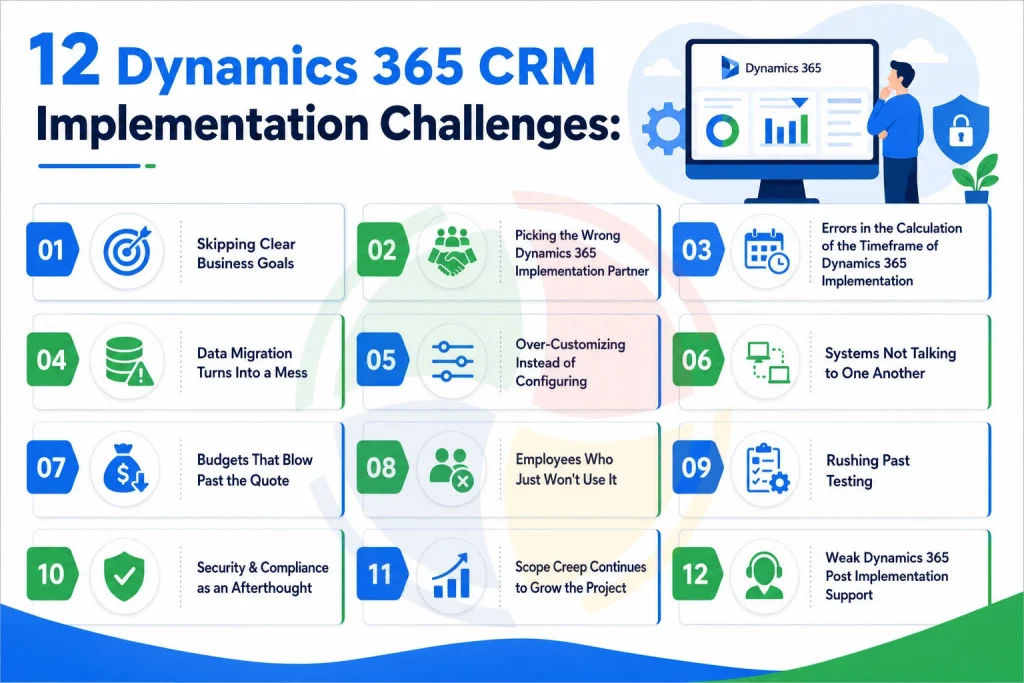
Here we will look at the 12 issues that most commonly occur with Dynamics 365 CRM implementations and their solutions.
Quick Summary
If you’re short on time, here are the biggest Dynamics 365 implementation challenges:- Unclear business goals
- Choosing the wrong implementation partner
- Unrealistic implementation timelines
- Poor data migration planning
- Too much customization
- Integration issues
- Budget overruns
- Low user adoption
- Inadequate testing
- Security and compliance gaps
- Scope Creep continues to grow
- Weak post-implementation support
Why Do Dynamics 365 Implementations Fail?
Dynamics 365 CRM implementation challenges mainly occur because of issues related to the solution itself. Most of the cases when Dynamics 365 implementations fail happen because of improper planning, underestimation of efforts, or ignorance of certain development stages like training and testing.
The most frequent causes are:
- Unclear project goals
- Poor communication between teams
- Unrealistic timelines
- Weak change management
- Incomplete data migration
- Choosing the wrong implementation partner
The good news is that these problems are preventable. The next sections explain each challenge and how to solve it before it affects your project.
12 Dynamics 365 CRM Implementation Challenges
1. Skipping Clear Business Goals
It’s common practice for developers to implement Dynamics 365 CRM solutions without establishing criteria for success, and this is where all Microsoft Dynamics 365 implementation issues start, not in the solution itself but in the lack of a brief.
To be precise, it’s worth spending some time before designing and configuring the first workflow and importing any data.
- Write down three to five measurable outcomes before scoping begins, not vague lines like “improve sales.”
- Get sales, service, and finance in the same room during discovery, not after configuration starts.
- Skip the fifty-page requirements document nobody reads. A one-page brief usually works better.
Our Dynamics 365 CRM implementation guide covers how to run that discovery phase stakeholder by stakeholder.
2. Picking the Wrong Dynamics 365 Implementation Partner
Partner companies that have never had experience working in your industry will definitely charge you for the time that they spend learning, and this can result in too much pressure and unsuitable configuration.
The right implementation partner can prevent months of rework later. Here’s what to evaluate before making your decision.
- Ask for references from your industry, not just a logo wall on their website.
- Check whether the consultant who scopes the project also builds it — handoffs between teams lose context fast.
- Confirm what support looks like after go-live before you sign anything.
See how Aegis Softtech structures Dynamics 365 CRM consulting services end to end, from discovery through support.
3. Errors in the Calculation of the Timeframe of Dynamics 365 Implementation
Organizations are always willing to implement their CRM in a couple of weeks. However, the timeframe of the Dynamics 365 implementation typically ranges from 6 to over 20 weeks.
The correct estimation of the timeframe is the way to ensure successful projects. The table below presents the Dynamics 365 implementation timeline depending on the level of project complexity.
| Project size | Discovery & design | Build & test | Rollout | Typical timeline |
| Small (single team) | 1-2 weeks | 2-4 weeks | 1-2 weeks | 6-8 weeks |
| Mid-size (multi-department) | 2-4 weeks | 4-8 weeks | 2-3 weeks | 10-16 weeks |
| Enterprise (ERP + CRM) | 4-8 weeks | 10-20 weeks | 4-6 weeks | 20-36 weeks |
The time required for implementing the Microsoft Dynamics 365 implementation becomes even longer in case of data migration or any custom coding. Padding your Dynamics 365 implementation timeline with a two-week buffer avoids the awkward email explaining why go-live slipped.
4. Data Migration Turns Into a Mess
Old CRM exports rarely match the Dynamics 365 data model, and duplicate contacts, blank fields, and broken mappings only surface after go-live, when fixing them costs far more.
Data problems rarely fix themselves after go-live. A little preparation before migration can save weeks of cleanup later.
- Audit legacy data before anyone touches a migration tool.
- Dedupe and standardize formats first; cleaning data after import takes roughly three times longer.
- Run a test migration on a slice of records before the real cutover, not the whole database at once.
If you’re moving off legacy or on-premise CRM entirely, explore our Dynamics 365 CRM migration services for a structured approach to data migration and cloud adoption.
5. Over-Customizing Instead of Configuring
Dynamics 365 offers extensive customization capabilities, but not every business requirement requires custom development. Many needs can be met through standard configuration, while more complex scenarios may require Dynamics 365 customization.
Following these recommendations will allow you to keep your Dynamics 365 environment manageable and up-to-date.
- Following Dynamics 365 implementation best practices here means configuring first and writing custom code only when you truly must.
- Reserve development work for the slice of requirements that configuration genuinely can’t cover. When custom development is required, our Dynamics 365 CRM developers can build and maintain business-specific CRM functionality.
- Document every customization so the next developer isn’t left guessing why it exists.
6. Systems Not Talking to One Another
Every company that uses Dynamics 365 also uses other systems like ERP, marketing, or e-commerce, and improper integration makes a mess of duplicate records and reports that no one trusts.
Proper integration is supposed to make things easier, not add manual steps. These recommendations help systems communicate reliably from the start. Our Dynamics 365 integration services help connect CRM with ERP, marketing, e-commerce, and other business systems while reducing duplicate data and manual processes.
- Map which systems need real-time sync versus a nightly batch. Not everything needs to be instant.
- Use Microsoft’s native connectors or Dataverse before reaching for custom middleware.
- Test integrations under real data volumes before go-live, not a sample of fifty records.
7. Budgets That Blow Past the Quote
Licensing is the visible cost. Customization, integration, data cleanup, and training are the quiet ones that double the invoice by the time you’re actually live.
Extra expenses come from unexpected places. The following budgeting tips will help keep those expenses low.
- Make sure that your initial budget includes a contingency line of fifteen to twenty percent.
- Ask your partner for a cost breakdown by phase, not one lump-sum figure.
- Track spend weekly during build. Surprises are easier to catch at two thousand dollars than twenty thousand.
Different engagement models spread that risk differently:
| Model | Best for | Trade-off |
| Fixed fee | Well-defined scope and timeline | Less flexibility if requirements shift mid-project |
| Time & material | Evolving requirements or phased builds | Costs need closer weekly tracking |
| Managed services | Post-go-live support and ongoing optimization | Recurring fee, but predictable and proactive |
For a fuller breakdown of what drives the number up or down, see our Microsoft Dynamics CRM implementation cost guide.
8. Employees Who Just Won’t Use It
A CRM only works if people actually log into it. Forget about training and change management, and you see employees reverting to spreadsheets a month after go-live.
If people stop using the CRM system, it doesn’t matter how good it is. This is why we recommend adopting such approaches.
- Train by role instead of running one generic session for the whole company.
- Bring a few skeptical users into testing early. Their objections usually point to real usability problems.
- Show teams what’s in it for them, not just what’s changing on their screen.
For sales teams, our Dynamics 365 Sales consulting services can help align CRM workflows, sales processes, and user adoption with business goals.
9. Rushing Past Testing
Deadline-bound teams will likely bypass QA, and bugs that could’ve been discovered in the sandbox environment cause problems in the production system where customer data is actually stored.
Testing provides your final chance to discover any issues before your customer does so. Ensure these quality gates become standard practice in each rollout.
- Perform functional, integration, and security tests as distinct rounds, rather than in one rush test pass of all things.
- Ensure you get actual end users to perform UAT and not only those from the project team who can get around the issues.
- Keep a defect log open and close it before go-live, not after.
10. Security & Compliance as an Afterthought
Customer data being stored in Dynamics 365 without proper access controls is an open invitation to a breach, particularly if GDPR or HIPAA is applicable.
Security must not be implemented as an afterthought once the deployment is complete. Implementation of these mechanisms during implementation will ensure data and compliance security.
- Implement role-based access prior to having any production records.
- Enable encryption and logging right away instead of waiting for an incident to demand this.
- Conduct an industry-specific compliance check, not just a general one.
11. Scope Creep Continues to Grow the Project
A Dynamics 365 implementation rarely goes according to plan. New feature requests and last-minute changes continue coming up, making the project more and more difficult to handle. Not long after that, budgets grow, timeframes stretch out, and the initial objectives take the back seat.
The main solution here is to keep the project on track. These solutions will be helpful in scope management without impeding progress.
- Firstly, prioritize necessary features and place all nice-to-have requests in future stages of the project.
- Secondly, carefully analyze each change request for the effect it has on the project budget and timeframe.
- Finally, always stick to the project scope documentation.
12. Weak Dynamics 365 Post-Implementation Support
Implementation isn’t the finish line. Poor Dynamics 365 support on post-implementation will cause minor problems to accumulate, leading to poor performance and ROI that never materializes.
Implementation is only the beginning of an optimization process. High-level post-implementation support will ensure that your system operates efficiently as your business evolves.
- Arrange the terms of your SLA before implementation.
- See whether the support team regularly monitors your system, or if you have to reach out to them first.
- Test the performance of your system every three months, and not only in case of any trouble.
Key Takeaways
- Define business goals before configuring the system.
- Keep customization to a minimum wherever possible.
- Clean and test your data before migration.
- Build realistic timelines with buffer time.
- Train employees before go-live, not after.
- Test everything thoroughly before launch.
- Choose a partner who offers ongoing post-implementation support.
Conclusion
Although each project implementation is unique, Dynamics 365 CRM implementation challenges occur for common reasons, which are easily avoidable with proper planning, knowledge, and support. The good news is that each of these risks can be eliminated in advance by proper planning and experienced help.
Aegis Softtech is a Microsoft Partner, ISO 27001-certified, and DUNS-registered organization. As an official Dynamics 365 implementation partner, our consultants provide discovery, build, migration, and training services to the client as a single responsible team.
Right from the start, we apply proven implementation best practices of Dynamics 365, ensuring that scope remains reasonable, customization is kept to a minimum, and testing is not neglected due to strict deadlines. After post go-live, we provide you with continuous Dynamics 365 post-implementation support, monitoring the client’s environment and not waiting for an issue to arise.
FAQs
What are the challenges faced during implementation?
The recurring ones are unclear goals, messy data migration, over-customization, weak integration planning, budget overruns, and low user adoption. Most trace back to rushing discovery instead of properly mapping business needs before configuration begins.
What are the cons of Dynamics 365?
Implementation of Dynamics 365 can be characterized by a difficult learning curve as well as high licensing fees that add up over different modules. Microsoft Dynamics 365 implementation challenges become less significant in the case of appropriate planning and phased introduction, backed up by an expert partner.
What are the challenges of CRM implementation?
CRM implementation challenges are associated with low data quality, reluctance to accept changes among end-users, lack of project ownership, and underestimation of the duration of training and adoption.
What is the implementation process of Dynamics 365?
It normally goes after discovery and requirements mapping, system design and configuration, data migration, integration with current software, testing, user training, the go-live phase, and further
How long does a Dynamics 365 CRM implementation take?
A Microsoft Dynamics 365 implementation timeline generally lasts for six to eight weeks for a single department, ten to sixteen weeks for multi-department deployment, and twenty or even more weeks for enterprise-level deployments, including ERP and CRM systems.
How much does Dynamics 365 CRM implementation cost?
Costs vary widely by user count, customization, and integrations, typically ranging from fifteen thousand dollars for smaller CRM-only deployments to two hundred fifty thousand or more for enterprise rollouts, so ask for a phased breakdown before signing.