
CRM reports should help teams make decisions faster and smarter. But when data is unreliable or reports are not relevant, people fall back on manual reports or assumptions. A good reporting system transforms CRM data into valuable business insights.
Below, we have explained 10 best practices to help you generate reports that will scale with your users, data size, and business needs.
Why Dynamics 365 CRM Reporting Matters
CRM Reporting helps to bring all scattered CRM records together, which makes decision-making faster.
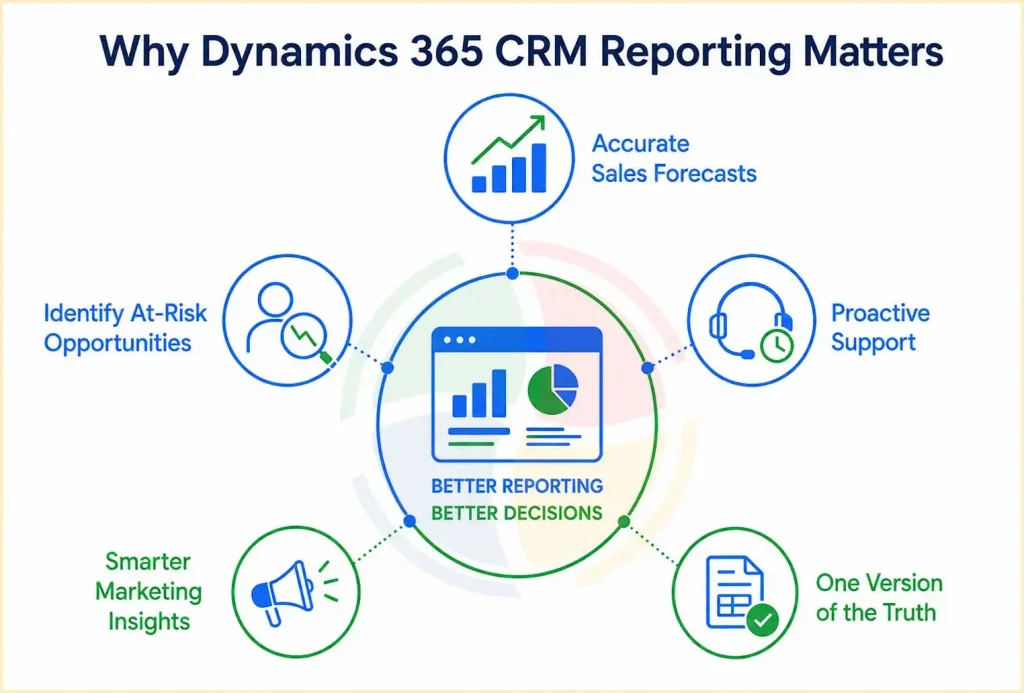
Here are a few things good reporting actually changes:
- Sales forecasts stop lagging reality by three weeks
- Managers catch a slipping rep before the quarter is already lost
- Support teams see resolution times drifting up before customers start complaining
- Marketing stops guessing which campaigns paid off and starts gaining insights from connected customer data through Dynamics 365 Customer Insights.
- Leadership gets one version of the truth instead of multiple conflicting spreadsheets
Top 10 Practices for Dynamics 365 CRM Reporting
Effective CRM reporting is built on clear goals, reliable data, and consistent processes. The following best practices will help you create reports that support faster, more informed decisions.
1. Define Clear Reporting Goals
Clear reporting is crucial; it should be built to answer a specific question instead of stating a general sense of activity. For example: rather than mentioning “how is the business performing,” a well-defined report should address “is our average sales cycle lengthening, and in which segment?”
2. Ensure High-Quality Data
Reporting helps to correct poor data quality by making it more visible. Duplicate leads, incomplete required fields, and inconsistent entry standards distort every metric calculated from them.
| Data quality issue | Impact on reporting | Recommended fix |
| Duplicate records | Inflates counts, skews conversion rates | Deduplication rules and a defined merge policy |
| Missing required fields | Breaks segmentation and filtering accuracy | Enforce mandatory fields at data entry |
| Inconsistent formats or naming | Filters fail to return expected results | Standardized picklists and entry guidelines |
| Stale or outdated records | Distorts trend accuracy in either direction | Scheduled data audits |
3. Build Role-Based Dashboards
A sales rep, a sales manager, and an executive don’t need to see the same information. Putting everything into one dashboard only creates clutter and makes it harder to take action.
- Sales representatives require visibility into their own pipeline, open activities, and near-term follow-ups, with Dynamics 365 Sales consulting services helping align CRM workflows and reporting with sales processes.
- Managers require team-level conversion rates, quota progress, and at-risk opportunities
- Executives require revenue trends, forecast accuracy, and performance across regions or business units
Build role-specific Dynamics 365 CRM dashboards from day one; retrofitting them later usually means someone’s been making decisions off the wrong numbers for months. These dashboards can be further tailored through Dynamics 365 customization services to match different roles, workflows, and reporting requirements.
4. Track Meaningful KPIs
Dynamics 365 can surface a wide range of metrics, but effective reporting comes down to the KPIs that directly support business goals. Too many numbers on a dashboard reduce trust and make insights harder to interpret. Prioritizing the metrics that matter keeps dashboards usable and enables faster, more informed decisions.
Here are some of the valuable KPI’s that can be analysed:
- Lead-to-opportunity conversion rate
- Average deal size and sales cycle length
- Case resolution time and customer satisfaction score
- Campaign response rate and return on investment
- Win/loss ratio by segment or region
5. Automate Reports and Scheduling
Manually generated reports lead to delays and risk. If a report depends on someone remembering to run it before a key meeting, it will eventually be missed. If reports are automated and scheduled for daily operational metrics or weekly and monthly for strategic summaries, it removes dependency and establishes a predictable reporting cadence.
6. Get Advanced Analytics using Power BI
For everyday reporting needs, the built-in reports in Dynamics 365 work well. But once you need to pull CRM data together with finance, marketing, or other outside sources, that’s where Power BI earns its keep. Dynamics 365 integration services can connect these systems so reporting and analytics work with consistent, connected data. It’s also the better bet if you’re after predictive analytics or want more advanced visualizations than the standard reports give you.
7. Standardize Report Formats
Differing color codes, naming conventions, or date ranges across reports slows down interpretation and reduces confidence in the available data. Standardizing the following areas resolves most of this friction:
- Naming conventions for reports and dashboards
- Consistent status color coding across the organization
- Default date ranges and filter settings
- Approved export formats for reports shared externally
This kind of consistency allows any user across the organization to interpret a report without additional explanation.
8. Protect Sensitive Data with Security Controls
CRM reports often include sensitive data such as financial figures, personally identifiable information, and contract terms. Field-level security, role-based access, and row-level filtering make sure users only see what’s relevant to their role.
9. Review and Optimize Reports Regularly
Reports that were relevant a year ago are not guaranteed to remain relevant today. Ongoing Dynamics 365 support services can help maintain and optimize the CRM environment as reporting requirements change. Business priorities evolve, and reporting infrastructure requires periodic review to keep pace with changing requirements and Dynamics 365 platform capabilities. When broader platform changes are needed, Dynamics 365 upgrade services can help manage the transition with minimal disruption. A quarterly review cycle is appropriate for most organizations:
- Retire reports that are no longer used.
- Update KPIs to reflect current priorities
- Gather feedback from the teams relying on this data.
10. Train Users on Reporting Best Practices
A well-designed dashboard is only as good as the person reading it. If users don’t know how to filter, drill down, or double-check a number before it ends up in a client email, the dashboard isn’t doing its job no matter how well it was built. Dynamics 365 training services can help users build the skills needed to work confidently with dashboards, reports, and CRM data.
Common Dynamics 365 CRM Reporting Mistakes to Avoid
Small reporting mistakes can lead to poor decisions. Here’s how to avoid the most common Dynamics 365 CRM reporting pitfalls.
| Mistake | Impact | Better approach |
| Building reports with no clear goal | Clutter nobody uses, wasted build time | Define the business question first |
| Ignoring data quality | Every downstream metric gets skewed | Regular data audits, validation rules |
| One dashboard for everyone | Buries what matters under what doesn’t | Build role-based views |
| Tracking too many KPIs | Dilutes focus, slows decisions | Keep only outcome-linked metrics |
| Manual, ad-hoc reporting | Delays and human error creep in | Automate scheduling and delivery |
| Weak access controls | Sensitive data reaches the wrong people | Field- and row-level security |
| Never revisiting old reports | Dashboards go stale and misleading | Scheduled review and retirement |
How Aegis Softtech Helps You Build Better Dynamics 365 CRM Reporting
Building effective CRM reports requires a clear reporting strategy, reliable data, well-defined KPIs, and role-based insights that support informed business decisions.
At Aegis Softtech, we help organizations build Dynamics 365 reporting solutions that deliver accurate insights, support informed decision-making, and scale with evolving business needs. A structured Dynamics 365 implementation service can establish the CRM environment, workflows, and reporting structure around these requirements.
Our Microsoft Dynamics 365 CRM services for reporting include:
- KPI and reporting strategy
- Role-based dashboards
- Power BI integration and reporting
- Cross-system data visualization
- Reporting optimization and governance
Looking for advanced reporting for your Dynamics 365 dashboards?
Our Dynamics 365 CRM experts help you build reporting solutions that deliver accurate insights, improve decision-making, and support long-term business growth.
FAQs
1. What’s the single most important Dynamics 365 CRM reporting best practice to start with?
Clean data and a clearly defined question for each report. Almost every downstream reporting problem traces back to one of those two being skipped.
2. How often should Dynamics 365 CRM reports actually be reviewed?
Quarterly works for most organizations. Fast-growing teams, or ones going through frequent process changes, may need a monthly check instead.
3. Do we really need Power BI, or is native Dynamics 365 reporting enough?
Depends on the need. Native reporting handles most operational use cases fine. Power BI earns its place once you need cross-system data blending or predictive analysis native tools weren’t designed for.
4. What makes role-based dashboards different from a standard dashboard?
They limit what each user sees to what’s relevant to their role, instead of surfacing everything to everyone. Less scrolling, faster decisions.
5. What’s the baseline security setup for protecting sensitive CRM report data?
Field-level security, role-based access, and row-level filtering together form the baseline — particularly important wherever financial data or PII appears in reports.