
Microsoft Fabric and Databricks both support data engineering, analytics, and AI, but take different approaches. Databricks focuses on lakehouse architecture and advanced data and AI workloads, while Microsoft Fabric unifies data integration, engineering, warehousing, and Power BI within the Microsoft ecosystem.
The right choice depends on your technology stack, workloads, BI needs, and data strategy. This Microsoft Fabric vs Databricks comparison highlights the key differences to help you evaluate both platforms.
Microsoft Fabric vs Databricks: Tabular Comparison
Microsoft Fabric and Databricks are both enterprise data and analytics platforms, but they differ in architecture, capabilities, integrations, and ideal use cases. The right choice depends on your existing technology stack, data workloads, analytics needs, AI requirements, and long-term data strategy.
The table below compares the key differences between Microsoft Fabric and Databricks across important factors.
| Aspect | Microsoft Fabric | Azure Databricks |
| Core Philosophy | Unified, all-in-one SaaS analytics platform; OneLake is the single data source. | Unified analytics platform built on the Lakehouse architecture; focuses on Apache Spark. |
| Deployment Model | SaaS (Software as a Service) | PaaS (Platform as a Service) on Azure |
| Data Storage | OneLake (built on ADLS Gen2, managed automatically) | Delta Lake on cloud object storage (ADLS Gen2, S3, GCS) |
| BI & Reporting | Native, deep integration with Power BI, Direct Lake mode for optimized performance. | Integrates with Power BI, Tableau, etc., typically via Direct Query or imported datasets. |
| Primary Cloud Focus | Microsoft Azure (deeply integrated) | Multi-cloud (Azure, AWS, GCP) with strong Azure integration |
| AI/ML Capabilities | Integrated Data Science experience, Copilot, and MLflow endpoints; leverages Azure ML. | Deep integration with MLflow, advanced ML libraries, and distributed training is generally stronger for complex custom ML. |
| CI/CD Maturity | Evolving, with deployment pipelines and Git integration improving. | Mature CI/CD support with robust integration with DevOps tools. |
| Data Governance | Leverages Microsoft Purview; evolving capabilities across all Fabric experiences. | Unity Catalog offers mature, granular data governance across the lakehouse. |
| Legacy Integration | Strong for existing Microsoft customers (Synapse, Power BI); T-SQL warehouse. | Requires more code-based migration for traditional data warehouses. |
What is Microsoft Fabric?
Microsoft Fabric is a unified data and analytics platform that brings data integration, engineering, warehousing, analytics, and business intelligence into a single SaaS environment. It combines capabilities from Power BI, Azure Data Factory, Azure Synapse Analytics, and other Microsoft data services.
At the core of Microsoft Fabric is OneLake, a unified data lake that provides a single data foundation across Fabric workloads. It helps reduce unnecessary data duplication and movement while making data access, management, and governance more consistent across the organization.
What is Azure Databricks?
Azure Databricks, co-engineered by Microsoft and Databricks, is a unified analytics platform optimized for the Microsoft Azure cloud. It optimally uses the power of Apache Spark to help you build, deploy, share, and maintain enterprise-grade analytics, AI solutions, and data at scale.
It is a collaborative workspace that simplifies machine learning tasks and big data processing. Its lakehouse architecture amalgamates the finest attributes of data lakes (flexibility for raw data and cost-effective storage) and data warehouses (data structure, governance, and performance for analytics).
Databricks brings data warehousing features, including ACID (Atomicity, Consistency, Isolation, and Durability) transactions and schema enforcement, to your data lake by building on open formats like Delta Lake.
Databricks vs Microsoft Fabric Comparison in Detail
Microsoft Fabric and Databricks differ in how they handle data architecture, engineering, analytics, AI, governance, and integrations. Understanding these differences is important when evaluating which platform better fits your existing technology environment and future data strategy.
Below is a detailed Databricks vs Microsoft Fabric comparison across the key areas that matter for enterprise data and analytics.
Architecture
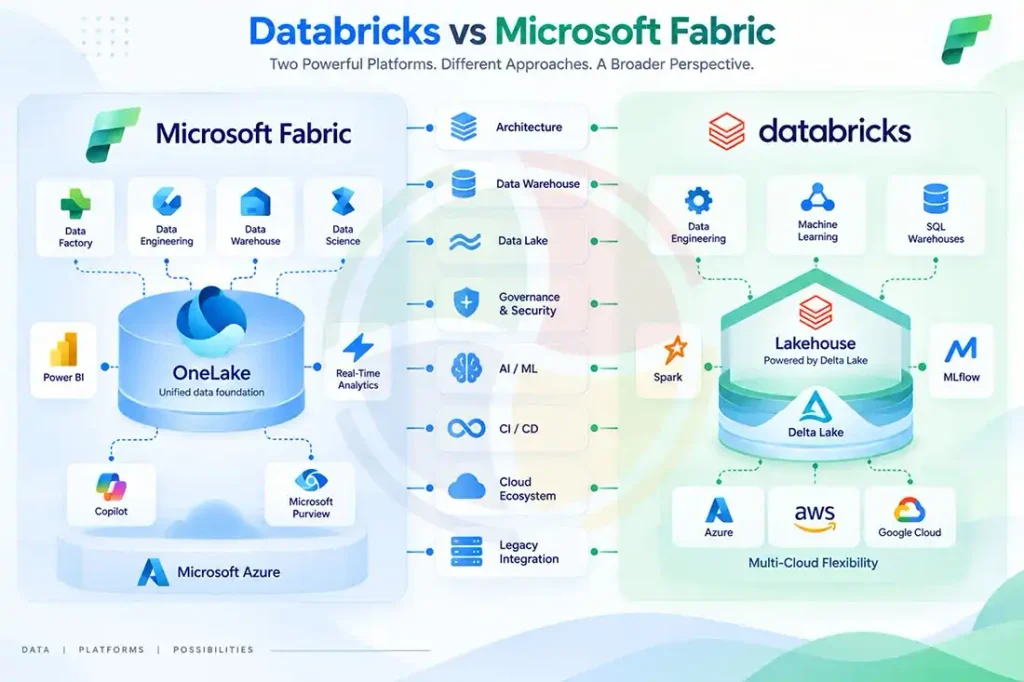
- Microsoft Fabric: The Microsoft Fabric architecture is built around the concept of OneLake, a single, logical data lake for your entire organization. Thus, when you use Fabric, Microsoft manages the underlying infrastructure, compute, and storage. It follows a single copy of the data principle where all Fabric workloads, including Data Engineering, Data Science, and Data Warehousing, directly access the same data without moving or duplicating it.
- Azure Databricks: Azure Databricks is a PaaS solution that offers you more control over your compute resources (Spark clusters). Built on the Lakehouse architecture, it combines the flexibility of a data lake with the reliability of a data warehouse. At its center is Delta Lake, offering schema enforcement and ACID transactions in addition to cloud object storage, including ADLS Gen2.
Data Warehousing Capabilities
- Microsoft Fabric: One of Fabric’s experiences is Data Warehouse, which offers robust T-SQL query capabilities directly over data in OneLake. Using its high-performance analytics on both structured and semi-structured data eliminates the need for data movement. Its deep integration with Power BI, particularly Direct Lake mode, allows for optimized real-time reporting.
- Azure Databricks: Databricks SQL Warehouses offer optimized Spark clusters for high-performance SQL queries on Delta Lake data. These warehouses integrate with various BI tools, support standard SQL, and offer advanced features (like predictive optimizations). You can thus perform fast, scalable analytics directly within the lakehouse.
Data Lake Functionality
- Microsoft Fabric: OneLake is a single, unified data lake for all your organizational data, eliminating silos. It is Fabric’s cornerstone for data lake functionality, supporting diverse data types for discoverability across all Fabric experiences. Features like OneLake shortcuts help virtualize data from external sources. It prevents data duplication while maintaining transactional capabilities with Delta Parquet.
- Azure Databricks: Delta Lake is an open-source storage layer that adds reliability to data lakes. It offers ACID transactions, time travel capabilities, and schema enforcement on cloud storage. You can use tools like Auto Loader to transform a raw data lake into a dependable lakehouse.
Data Governance & Security
- Microsoft Fabric: Fabric integrates seamlessly with Microsoft Purview for complete data governance, including lineage tracking, sensitivity labeling, and cataloging. Microsoft Entra ID manages security for RBAC (Role-Based Access Control) and authentication. Being a SaaS platform, Fabric benefits from Microsoft’s enterprise-grade security.
- Azure Databricks: Unity Catalog enables Databricks to excel in data governance. Its unified solution offers granular access control, lineage, and auditing across all your data and AI assets within the lakehouse. Unity Catalog ensures robust and scalable data security through its centralized metadata store, automated audit logs, and consistency in permissions.
AI/ML Capabilities
- Microsoft Fabric: The Data Science experience in Fabric offers a dedicated environment for ML model development while integrating with Azure Machine Learning for MLOps (Machine Learning Operations). Copilot is one of its standout features, offering AI-driven assistance across all experiences for data exploration, report creation, and code generation.
- Azure Databricks: Databricks AI/ML platform is centered on MLflow, an open-source standard for managing the ML lifecycle. It supports diverse ML frameworks and AutoML. Mosaic AI is another initiative that enhances Databricks’ capabilities with advanced tools, including AI Functions in SQL and an LLM gateway.
CI/CD and Development Workflows
- Microsoft Fabric: Fabric has Git integration and deployment pipelines, so teams can move work through dev, test, and production without much friction. Because it’s one platform, deploying across Fabric workloads is fairly straightforward, though some features are still catching up as the platform grows.
- Azure Databricks: Databricks has been doing CI/CD for a long time and works well with common dev and DevOps tools for automated testing, deployment, and infrastructure management. It’s built around code, which suits engineering teams running complex data and ML projects across several environments.
Cloud Ecosystem and Platform Flexibility
- Microsoft Fabric: Fabric is a SaaS analytics platform that runs on Azure and sits right inside Microsoft’s wider stack. If your team already works with Power BI, Azure, Microsoft Entra ID, or Microsoft Purview, it slots in easily — with very little to relearn.
- Azure Databricks: Azure Databricks is tuned for Azure, but it also runs on AWS and Google Cloud, which matters if your data lives in more than one place. That gives you far more room to maneuver.
Legacy System Integration
- Microsoft Fabric: Fabric works well with tools you may already have, including Power BI, Azure Data Factory, and Azure Synapse workloads. Its T-SQL-based Data Warehouse is also a handy stepping stone for teams with existing SQL data warehouses who want to move to a single analytics platform. The Legacy System Integration section has no Azure Databricks entry, so you may want to add one for balance.
- Azure Databricks: Databricks can integrate with traditional data warehouses and enterprise data sources, but moving existing warehouse workloads into a lakehouse architecture may require greater changes to data pipelines, SQL workloads, and data models. Its flexibility makes it suitable for organizations modernizing legacy data architectures around open lakehouse technologies.
Azure Databricks vs Microsoft Fabric: Use Case Scenarios
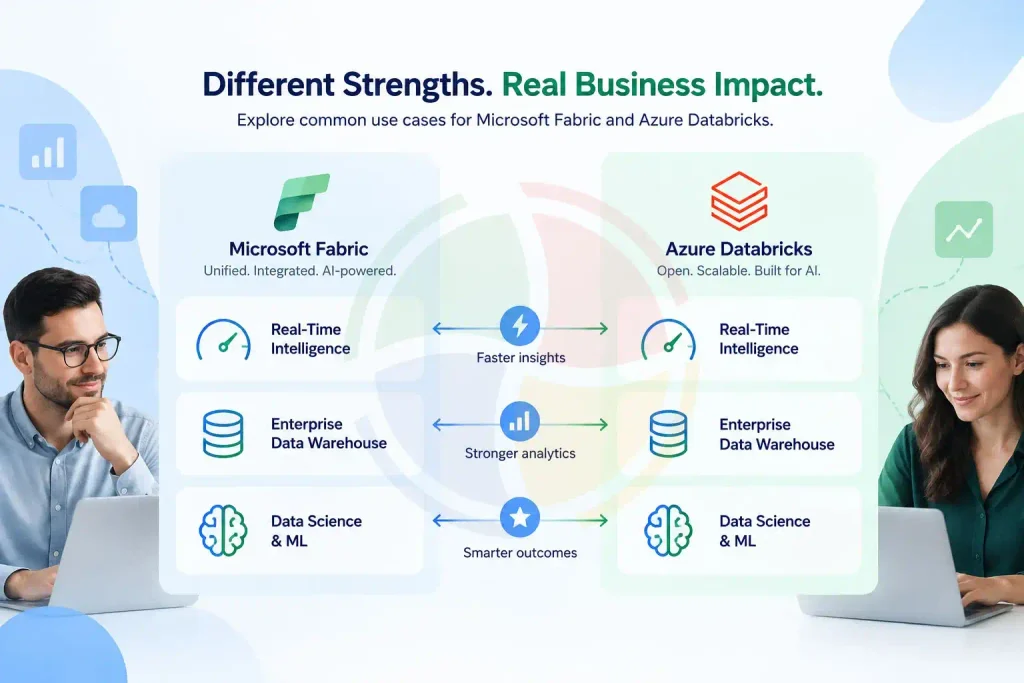
Here’s how Microsoft Fabric and Azure Databricks compare across common enterprise use cases:
| Use Case | Microsoft Fabric | Azure Databricks |
| Real-Time Intelligence | Best suited for real-time monitoring, IoT, fraud detection, and streaming analytics. | Handles complex, large-scale streaming with Spark and Delta Lake. |
| Enterprise Data Warehouse | Combines OneLake, T-SQL, and Power BI for integrated data warehousing. | Provides scalable SQL analytics on a lakehouse architecture. |
| Data Science & ML | Supports integrated ML workflows and AI-driven analytics within Fabric. | Supports advanced ML, MLOps, and large-scale AI workloads with MLflow. |
Transform Your Data Strategy with Microsoft Fabric Consulting
Both Microsoft Fabric and Azure Databricks offer strong capabilities for modern data and analytics.
- Choose Microsoft Fabric if you want a unified, managed platform with native Power BI integration and a strong Microsoft ecosystem.
- Choose Azure Databricks if you need greater flexibility and control for complex data engineering, analytics, or AI/ML workloads. Your existing technology stack, workload requirements, and data strategy should guide the decision.
Need help choosing or implementing the right platform? Aegis Softtech offers Microsoft Fabric consulting services to help you assess requirements, design the right architecture, and implement a scalable data and analytics environment.
Frequently Asked Questions
Q1. Is Microsoft Fabric better than Databricks?
Both Fabric and Databricks cater to different needs. Microsoft Fabric offers a unified SaaS platform ideal for Microsoft-centric organizations. Databricks, on the other hand, is a powerful, open-source lakehouse platform.
Q2. Should I use Microsoft Fabric or Azure?
Fabric is actually a unified analytics platform that sits within Azure, not a separate choice from it. The real question is fit: Fabric simplifies resource management; individual Azure services give more room to customize.
Q3. Is Microsoft Fabric replacing Azure?
No. Fabric is a new analytics offering built on Azure infrastructure, not a replacement for it. What it actually does is pull existing Azure data services — parts of Data Factory, Power BI, Synapse Analytics — into one SaaS experience instead of leaving them scattered.