

ServiceNow is used to manage and automate work across an organization — most commonly IT support tickets, but also HR requests, security incidents, customer service cases, and internal business processes.
ServiceNow puts everything into structured, trackable workflows on one shared system. It started as an IT service desk tool but has since expanded into departments like HR, security, and customer support.
The rest of this article breaks down each of these use cases in detail, along with who uses ServiceNow and why organizations adopt it.
ServiceNow Uses at a Glance
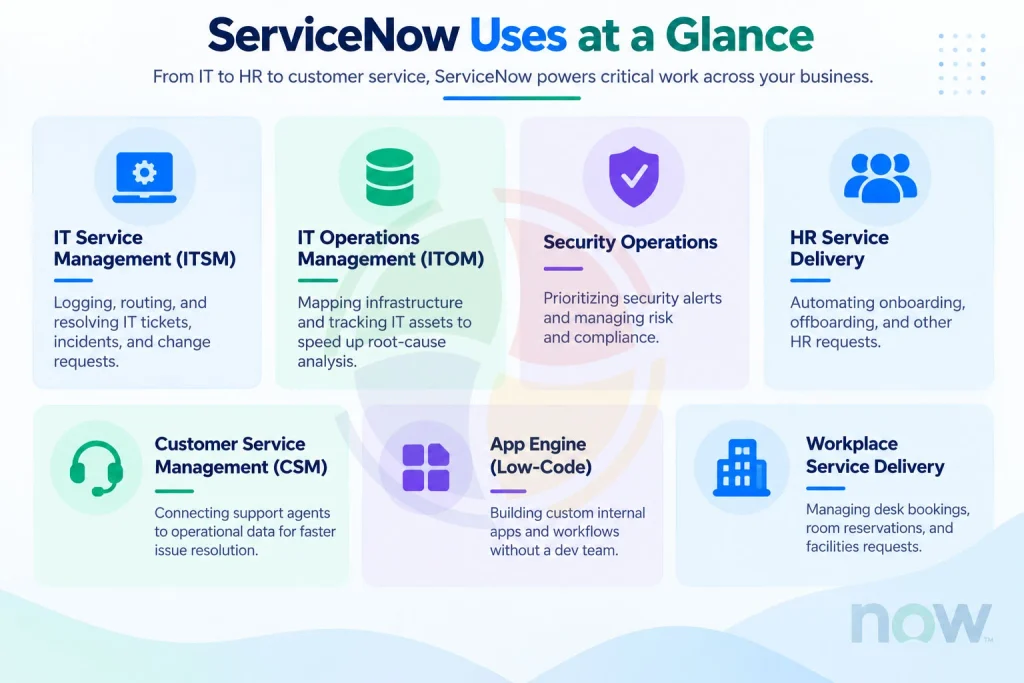
| Use Case | What It’s Used For |
| IT Service Management (ITSM) | Logging, routing, and resolving IT tickets, incidents, and change requests |
| IT Operations Management (ITOM) | Mapping infrastructure and tracking IT assets to speed up root-cause analysis |
| Security Operations | Prioritizing security alerts and managing risk and compliance |
| HR Service Delivery | Automating onboarding, offboarding, and other HR requests |
| Customer Service Management (CSM) | Connecting support agents to operational data for faster issue resolution |
| App Engine (Low-Code) | Building custom internal apps and workflows without a dev team |
| Workplace Service Delivery | Managing desk bookings, room reservations, and facilities requests |
The Core Uses of ServiceNow
1. IT Service Management
At its heart, ServiceNow is still an IT service desk tool. It lets employees log incidents like “my laptop won’t connect to the VPN”, submit service requests like “I need access to a new software license, and track change requests. ServiceNow logs, assigns, prioritizes, and tracks every request until it’s closed.
What sets ServiceNow apart from a basic ticketing tool is its ability to automate routing and prioritization through ServiceNow managed services. Based on rules the organization defines, a ticket about a company-wide outage gets flagged and escalated immediately, while a routine password reset gets handled through a self-service portal without ever touching a human agent.
2. IT Operations and Infrastructure Management
Requests from people are one side of ServiceNow. The other is the technology itself — IT Operations Management (ITOM) maps how servers, applications, networks, and cloud services connect. When something breaks, that map traces the root cause instead of leaving teams guessing which of a dozen interconnected systems actually failed.
This is paired with IT Asset Management, which tracks every piece of hardware and software a company owns — from the laptop assigned to a new hire to the cloud licenses renewing next quarter.
Instead of assets being tracked in scattered spreadsheets, ServiceNow keeps a running inventory that shows what exists, who’s using it, what it costs, and when it needs to be replaced or retired.
3. Security Operations and Risk Management
Security teams are often drowning in alerts, many of which turn out to be false alarms or duplicates. ServiceNow’s Security Operations module connects directly into an organization’s existing threat detection tools. For a team trying to cut through that noise, that translates into incidents getting automatically prioritized based on their potential impact, rather than someone having to sort through every alert by hand.
Rather than a security analyst manually cross-referencing an alert against which systems are affected and how critical they are, ServiceNow does that correlation automatically.
Combined with its Governance, Risk, and Compliance tools, it also helps organizations demonstrate to auditors that risks are being tracked and controls are actually being followed — not just documented on paper somewhere.
4. HR Service Delivery
HR departments deal with a constant stream of repetitive requests: onboarding paperwork, benefits questions, role changes, leave requests, and offboarding. ServiceNow’s HR Service Delivery module turns these into structured, trackable workflows instead of email threads and shared inboxes.
A new employee, for example, might get a single onboarding “case” that automatically triggers IT to provision their laptop, facilities to prepare a desk, and payroll to set up their bank details — all without an HR generalist manually chasing each department. For distributed and remote teams especially, that translates into a self-service portal where employees can get answers to common questions without waiting on a reply.
5. Customer Service Management
On the customer-facing side, ServiceNow’s Customer Service Management (CSM) product connects support agents to the same operational data that IT and engineering teams use. That matters because customer issues are often rooted in a technical problem happening elsewhere in the business: a billing glitch, a service outage, a broken integration.
For a support agent who’d otherwise see only the customer’s message with no context, that translates into service mapping that traces an issue back to its actual source — which speeds up resolution and cuts down on the back-and-forth that frustrates customers.
6. Building Custom Business Applications
One of the more underrated uses of ServiceNow is its low-code App Engine, which lets teams build their own internal applications without needing a dedicated software development team.
Think of tools like a custom expense approval workflow, a vendor onboarding tracker, or an internal equipment booking system — the kind of small, specific apps that would otherwise sit on a backlog waiting for developer time.
Because these apps are built on the same platform as everything else, they can pull in data from HR, IT, or finance without complicated integration work. For an operations team that needs something built quickly, that translates into skipping the months-long wait for a custom solution — which is a big part of why ServiceNow has caught on with that crowd.
7. Workplace and Facilities Management
As hybrid work has become the norm, ServiceNow is also used to manage physical and digital workspaces — things like desk booking, room reservations, and visitor management.
Facilities teams can track space utilization and maintenance requests the same way IT tracks a broken laptop, giving the organization a single place to manage both its digital and physical environments.
Why Organizations Choose ServiceNow
A few themes come up again and again when companies explain why they adopted ServiceNow:
Replaces scattered tools with one system
Instead of IT using one ticketing tool, HR using a different case management system, and customer service using a third platform, everything lives on shared infrastructure with a consistent data model.
Automates work that used to require a person
For a process that used to depend on someone manually pushing a request forward, that translates into routine approvals, ticket routing, and status updates happening automatically based on rules the business defines.
Gives leadership real visibility
Dashboards and reporting tools pull from live operational data, so decisions aren’t based on guesswork or outdated spreadsheets.
Plays well with existing systems
ServiceNow is built to integrate with legacy, on-premises software as well as newer cloud tools, making ServiceNow migration easier for organizations that aren’t starting from scratch. For an organization that isn’t starting from scratch, that translates into a lower barrier to adoption than ripping and replacing what’s already there.
The Bottom Line
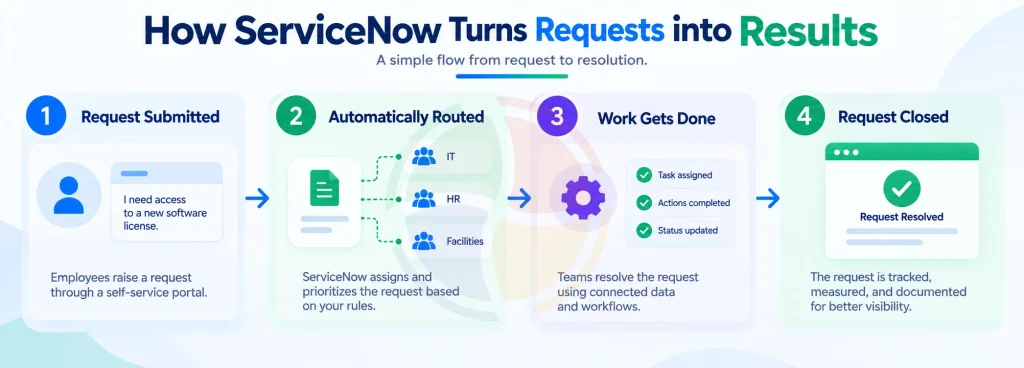
ServiceNow started as an IT ticketing tool, but today it helps organizations manage complete workflows across IT, HR, security, customer service, and facilities. A request comes in, ServiceNow sends it to the right team, connects the team with the required information, tracks the work, and records the resolution. This makes it more than a ticketing system. It helps organizations manage work from request to resolution in one connected process.
The challenge is setting up that process correctly. Routing rules, integrations, data, and access controls must work together for workflows to run smoothly. This is where Aegis Softtech helps. Its ServiceNow Consulting Services help organizations configure workflows correctly from the start, reducing manual work and avoiding costly fixes later.
Frequently Asked Questions
What is the primary purpose of ServiceNow?
The primary purpose of ServiceNow is managing and automating service requests — IT tickets originally, now HR, security, and customer service cases too — on one cloud platform instead of scattered tools and spreadsheets.
Who is ServiceNow’s biggest competitor?
In ITSM, Jira Service Management, BMC Helix, and Ivanti come closest. On the customer service side, Salesforce sometimes overlaps, though the two platforms are really solving different problems at their core.
Is ServiceNow a software or a tool?
ServiceNow is a cloud-based software platform, not a single-purpose tool. ITSM, HR, security, CSM — all separate applications, all running on the same underlying architecture.
What is ServiceNow and what does IT do with it?
ServiceNow is a cloud platform for managing digital workflows. IT specifically uses it to log, route, and resolve tickets, manage assets and infrastructure, and automate the routine requests that would otherwise eat someone’s day.
How long does it take to implement ServiceNow?
A basic ITSM rollout takes a few weeks. A full implementation across multiple departments takes several months, usually with a certified implementation partner involved.
Can ServiceNow be used without an IT background?
Yes. Most employees never see past the self-service portal, and HR and CSM modules are built for non-technical staff. Configuring workflows and integrations is where technical expertise actually starts to matter.