

Dynamics 365 lead management helps businesses capture, qualify, assign, nurture, and convert leads from a single CRM platform. With automation, AI insights, and standardized workflows, sales teams can reduce manual work, improve response times, and increase conversion rates.
This guide covers common lead management challenges, key Dynamics 365 features, and 10 best practices to help you build a more efficient sales process.
Common Lead Management Challenges
Below are the primary challenges associated with lead management in Dynamics 365.
| Challenge | Business Impact |
| Leads that are missed or delayed | Salespeople have no way to locate leads because they are scattered across several spreadsheets and emails, leading to missed follow-ups and sales. |
Limited visibility of Sales Pipeline | Owning real-time access to lead information becomes an enabler of forecasting and planning sales accurately; without it, a Salesperson will be working blindly and may not realize that their pipeline has been dried up for ages! |
| Unreliability in Lead qualification | Sales teams without lead scoring end up chasing the unconverted leads that waste their day, whereas they may be missing great revenue-generating opportunities. |
| Disconnect between Marketing and Sales | Sales and marketing teams that are not synced up and rely on paper or handoffs will lead to customer frustrations, delays, and inconsistent product/service delivery. |
Key Features of Microsoft Dynamics 365 Lead Management
One of the major benefits of lead management in Dynamics 365 is the fact that a complete lead lifecycle can be handled from a platform.
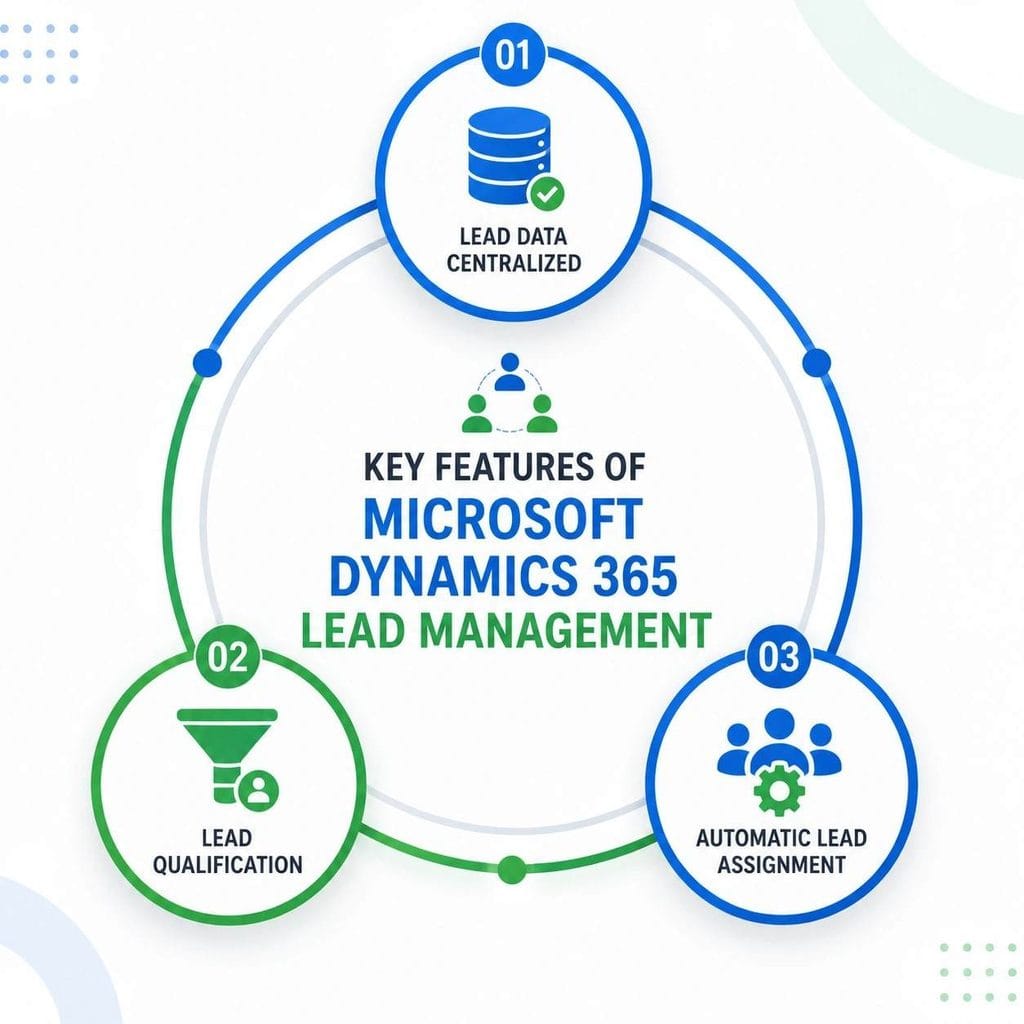
1. Lead data centralized
Leads can be gathered from various channels, such as websites, marketing campaigns, conventions, referrals, and manual inputs, through the lead management function. This provides sales teams with a comprehensive view of each prospect by centralizing all lead data in a single place.
2. Lead qualification
Use your standard lead qualification rules to decide whether a prospect should be sold. Salespeople can also find out whether this lead is ready to sell, and once qualified, they can easily turn it into an opportunity and still retain all the related history records.
3. Automatic Lead Assignment
There are several ways to distribute leads automatically depending on the territory, products, countries, product customer industry, and sales agent availability, which saves time on the distribution process and provides faster contact with the customer.
Routine tasks automation
With Power Automate, you can automate many of your daily activities like:
- Inviting a first-time buyer with a greeting message
- Setting a reminder activity after a call
- Alerting sales staff about a new lead
- Raising a ticket for an inactive lead
- Making the lead status updates automatically
AI-driven insights
With the use of Microsoft Copilot and Dynamics 365 Sales Insights, companies can:
- Determine what to work on next among several leads
- Understand the next course of action that will bring about the maximum benefit
- Compose a message draft
- Present the interactions of the buyers in brief
- Discover potential sales threats
Activity monitoring
Each contact made is recorded and tracked, such as emails, phone calls, meetings, and even the handwritten notes of the sales staff. This gives an end-to-end picture of the business contact of the customer.
Reporting and Dashboards
You can stay updated on the effectiveness of your team and identify any potential issues, for instance, slow conversions and delayed pipeline progress, through the real-time reporting and dashboard functions of Dynamics 365.
Top 10 Lead Management Best Practices in Dynamics 365
1. Capture Leads at Every Touchpoint
Customers interact with a business through various channels. By getting these channels in sync with Dynamics 365, you will not only reduce the amount of manual data entry but also will not miss any lead.
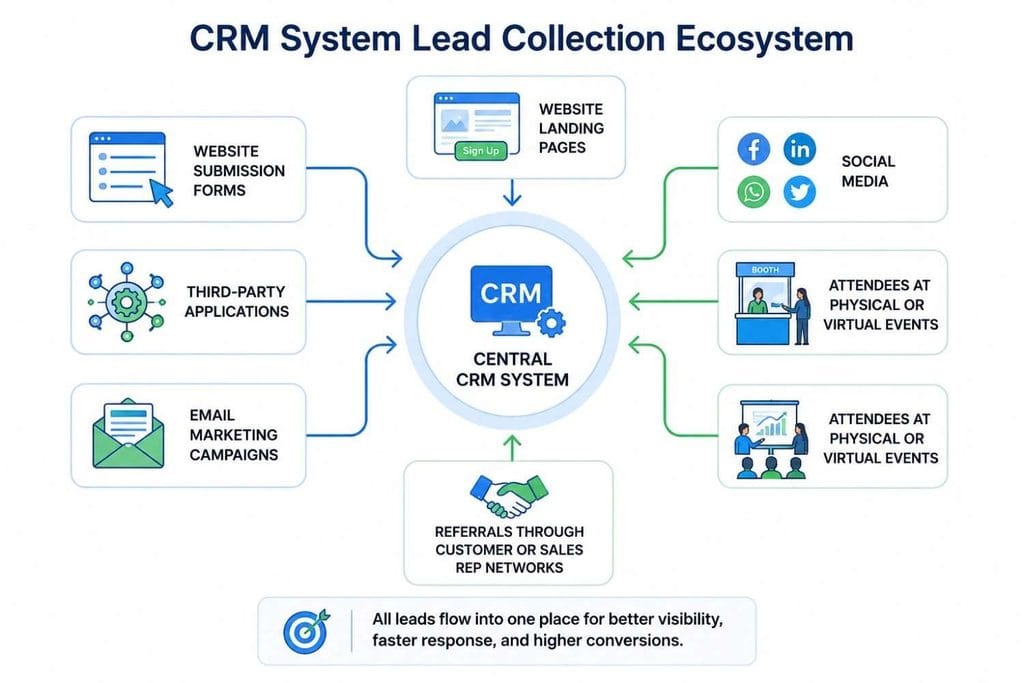
Dynamics 365 CRM system can and should be the one that collects leads from:
- Website submission forms
- Website landing pages
- Social media
- Attendees at physical events or virtual events
- Referrals through customer or sales representative networks
- Email marketing campaigns
- Third-party applications
2. Make Lead Qualification a Standard Part of the Sales Process
Inconsistent qualification is another of the primary reasons why sales teams miss their quota.
Inconsistency could be avoided if the qualification criteria were to be clearly defined and followed by everyone. If you cannot find any suitable framework for your business or the market, then you can create your own qualification fields.
To do this, use frameworks that define qualifications by means such as:
- Budget: The amount your prospect is willing to pay
- Authority: Who is the decision-maker
- Need: Is it a real need or a dream
- Timeline: When are they planning to make the purchase
3. Assign Leads Based on Lead Score
Everyone is important, but not everyone is the same. Sales teams can identify leads most likely to result in a sale (higher probability leads) and give them their time accordingly, thereby saving a lot of time and money and improving sales efficiency.
Lead scoring is one of these tools that helps prioritize who to focus on based on such parameters as:
- Company size
- Industry the company is in
- Job title of the lead
- Websites they access the most
- Openings of emails
- Previous conversations between sales team members and the lead
4. Assign Leads Automatically
Assigning leads is time-consuming. In fact, it is often one of the areas where lead loss occurs and a main bottleneck for sales teams due to its slow and manual nature.
Dynamics 365 offers multiple parameters for the automatic allocation of new leads:
- Geographic regions
- Product knowledge level: Salespersons should not only know what to sell, but also how to sell it.
- Industry-specific knowledge of products/services
- Degree of activity by the sales representatives; the ones who work most can handle more leads
- Business units in case a company has several lines of business
5. Keep Leads Warm Until Sales Can Take Over
Many of them just take a few steps until they can buy, but many others just can’t decide without someone else, maybe the husband, the CEO, or even themselves, who need some time. This method helps to keep the leads engaged until the Sales Department picks up the conversation.
A sales lead management system integrated with a Customer Journey functionality (which basically creates a path map of customers) gives a business the ability to engage leads via:
- Targeted e-mails
- Helpful information that a customer will find useful
- Regularly updated product information
- Webinar invitations as follow-ups
- Automated contact for follow-ups
6. CRM data cleanup as a business priority
Poor-quality CRM data leads to inaccurate reporting, unreliable forecasts, and missed sales opportunities. Regular data cleanup keeps your lead database accurate and actionable.
Data management best practices that you should adopt to keep a clean and updated sales database:
- Clean up the database to delete duplicate leads
- Standardization should begin with the fields and data themselves to make them easy to search and use;
- You must ensure completion of mandatory fields;
- Lead records which haven’t been touched for a long time need to be removed;
- Set up a regular process of reviewing the leads database;
- A clean CRM sales database is one of your most precious assets;
7. Use of AI and Copilot in Sales Work Improvement
The days are gone when CRM was used to keep customer data. AI-powered capabilities have made Advanced lead management in Dynamics 365 a powerful tool assisting sales teams in their day-to-day operations. Such features help to save the precious time of your staff by reducing their administrative tasks while at the same time keeping them on the frontline with customers.
Copilot can do all of the following:
- The system quickly summarizes the lead history.
- It drafts and sends emails following a sales meeting.
- Pick up what the next best actions could be for the user.
- Highlighting issues that the team is working on so that sales leaders can intervene at an early stage.
- Reveals deep insights that are relevant to the sales process by analysing data.
8. Monitor Lead Performance with Dashboards
When your team leaders are able to spot bottlenecks in the lead flow without even thinking about it, at the same time they will know when revenue will take a hit.
The main benefit of Power BI integration is that it provides managers with additional opportunities, enabling them to focus not only on general trends but also on specific details and make decisions faster and more efficiently.
You can keep track of the following metrics in your dashboards:
- Number of new leads (Lead Volume)
- Which channels or campaigns bring the most leads
- How many leads we could close in a month (Qualification Rate)
- Average time we took to reply to lead inquiries (Response Time)
- How many leads we turned around a month later and became an opportunity (Opportunity Conversion Rate)
- Average length of our sales cycles per product line (Sales Cycle Length)
9. Link Sales, Marketing, and Customer Service Activities
One major flaw in lead management is the siloing where one team works with one set of leads, another set of leads is with another team, and leads just end up forgotten or mishandled. This is one of the key problems why lead management fails in so many companies.
Integrate Dynamics 365 Sales with Dynamics 365 Customer Insights, Customer Service, Microsoft Teams, Outlook, and Power BI to create a unified customer view.
10. Keep on improving your leads and sales management
Making sales lead management work is a long-term investment. As we get to know our customers better and the external situation shifts, we need to constantly adjust our lead management process to better match customer needs and the company objectives.
So the idea is that the lead management system and its process stay relevant and support business development in the most efficient and profitable ways possible.
- Qualification criteria
- Workflow automation
- Assignment rules
- Lead scoring models
- Dashboard metrics
Conclusion
The best sales process with Dynamics 365 is characterized by having an excellent sales lead management strategy. By implementing Dynamics 365 lead management best practices such as automated lead qualification, AI insights, lead scoring, and automation of other processes, one can achieve increased sales productivity, rapid closure of leads, and a full sales pipeline.
Whether you are looking to implement Dynamics 365 Sales or simply want to optimize your current Dynamics CRM, Aegis Softtech can assist you. We facilitate best practices for capturing, qualifying, and routing leads to create a sales process that is highly scalable through implementation, customization, migration, and support services.
Are you interested in optimizing your Dynamics 365 sales solution? Explore our Microsoft Dynamics 365 Services or get in touch with our experts to develop a powerful lead management strategy that will drive your business growth.
Frequently Asked Questions
1. What is lead management in Dynamics 365?
Lead management in Dynamics 365 is the overall lead processing activity within a CRM system through generating leads, checking it with business standards, making it lead warmer by communication with the business, and finally handing leads over for conversion; it’s all inside the system.
Lead and CRM systems can help your sales teams streamline your business lead processes while they still have the opportunity to collaborate and convert.
2. What are the key Microsoft Dynamics 365 lead management features?
Lead capture, lead qualification, and workflow are some of the main lead management features within Dynamics 365.
- Lead capture
- Lead qualification
- Workflow
- Automation
- Data Analytics
Besides that, Microsoft Dynamics 365 provides tools for marketing lead management through lead nurturing with email, website, and social media campaigns.
In addition to standard sales lead management activities, sales reps will be able to use Microsoft tools such as Outlook, Teams, Power BI, and Power Automate to increase productivity in managing, qualifying, and tracking sales leads.
3. How does Dynamics 365 improve lead qualification?
Dynamics 365 allows you to set up and modify qualification criteria, lead scoring systems, and workflow qualification. These enable sales teams to better qualify which prospects are worth following and who is likely to result in the sale.
4. Can Dynamics 365 automate lead assignment?
Indeed. A variety of parameters such as location, line of business, sector, unit, or volume of sales activities of the salesperson are available as the basis for Dynamics 365 to make a decision and assign a lead to the sales reps manually as well as in a more automatic fashion. Lead assignment automation will lead to quick response from the sales rep and, at the same time, reduce manual workload.
5. How does Microsoft Copilot enhance Dynamics 365 lead management?
Microsoft Copilot enhances the productivity of sales teams by summarizing customer engagement, providing drafts of follow-up emails, suggesting the best next action, raising red flags on sales risks, and showing other related customer insights. These AI-powered features take away a lot of the manual effort and allow representatives to focus more effectively on prospect relationship building.