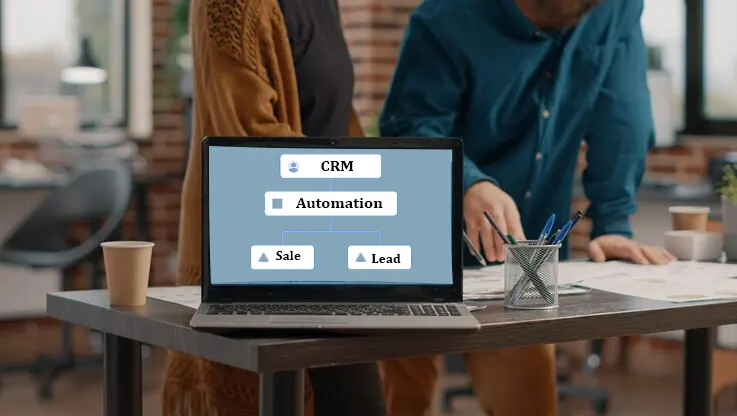
Customer relationship management (CRM) applications manage customers’ data, thereby doing away with spreadsheets to manage growth automatically.
The software automates repetitive tasks, like data entry, lead tracking, and customer records management, giving opportunity to your staff to work on more valuable activities.
In this guide, we will explain everything you need to know about CRM software: from the basics of what it is and how it works, to its types, features, benefits, and more
What is CRM?
CRM is an online system that helps sales and marketing teams in facilitating communication with current and potential clients. The software enables organizations to have a connection with their customers, increase efficiency, and be profitable. Moreover, CRM makes it possible for companies to monitor and control their lead generation and sales process using a customizable dashboard, with Dynamics 365 customization services helping adapt CRM functionality to specific business requirements. Popular solutions such as Microsoft Dynamics 365 CRM provide businesses with a centralized platform to manage customer interactions, sales activities, and marketing campaigns.
In the year 2026 and ahead, customer relationship management has and is likely to be improved further through the integration of artificial intelligence (AI).
How Does CRM Software Work?
The customer relationship management software gathers customer data through various platforms such as websites, email, telephone, social media sites, and the sales process into one central location. The system organizes real-time data, monitors customer behavior, and automates routine operations like follow-ups and lead generation, offering real-time analytics through dashboards and reports.
For example, the Microsoft Dynamics 365 CRM architecture combines a centralized data layer, automation tools, AI capabilities, and business applications to provide a unified view of customer interactions across departments.
Below is how the CRM software works in different aspects of business operations.
CRM in sales
Sales teams use CRM software to track leads, manage opportunities, monitor pipelines, and forecast revenue. Automated reminders and workflow tools help representatives follow up with prospects at the right time. Solutions like Dynamics 365 Sales are purpose-built for this, giving sales teams pipeline visibility, AI-guided selling, and productivity tools that reduce time spent on administrative work.
CRM in marketing
Marketing teams use CRM systems to segment audiences, track campaign performance, and understand customer engagement. This enables more personalized marketing efforts and improved lead generation. Dynamics 365 Marketing extends these capabilities with journey orchestration, real-time personalization, and lead nurturing automation that connects directly to sales workflows.
CRM in customer service
CRM software offers the customer care team a comprehensive view of all transactions made by the customer and their communication records. This helps the team resolve problems, resolve disputes, and offer customized services. For organizations with field operations, Dynamics 365 Field Service adds scheduling, resource dispatching, and on-site service management
What Are the Types of CRM Software?
There are four main types of CRM software: Strategic, Operational, Analytical, and Collaborative. Let us discuss each one of them individually.
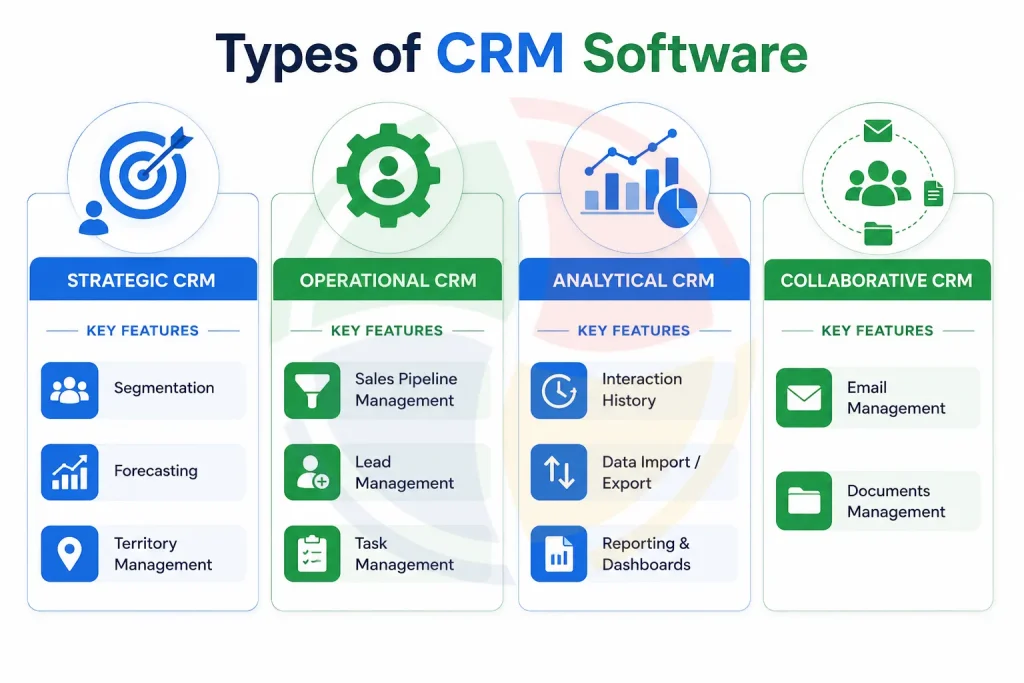
Key Features of CRM Software
Some of the important features of CRM software are the ability to manage contacts and leads, track the sales pipeline, automate marketing, manage customer support tickets, and generate reports. All of these features are intended to make team processes faster and improve customer service.
| Feature | Description |
| Contact & Lead Management | CRM stores every contact, lead, and account in one searchable place. You can log calls, attach notes, track deal stages, and view the full relationship history without digging through scattered emails or spreadsheets. |
| Sales Pipeline & Forecasting | CRM gives sales teams a real-time view of every active deal. You can track progress at each stage, identify stalled opportunities early, and forecast monthly revenue with clarity. |
| Marketing Automation | CRM automates repetitive marketing tasks like follow-up emails, lead assignments, and campaign triggers. You define the rules once, and the system executes them consistently. |
| Customer Support & Ticketing | CRM logs every support request, routes it to the right agent, and tracks resolution progress, while Dynamics 365 support services help maintain CRM performance and resolve issues after deployment. Software testing services can also help validate CRM functionality, integrations, and performance before and after deployment. Support teams access the customer’s full history upfront, reducing back-and-forth and helping agents resolve issues faster on the first interaction. |
| Reporting & Analytics | CRM consolidates performance data into dashboards your team can actually use. It helps you track conversion rates, campaign ROI, agent productivity, and customer churn, and updates these in real time so that the decisions are based on current numbers. |
Benefits of CRM Software
The most important benefits of CRM software include better customer relationships, increased sales efficiency, and cross-functional team transparency. The software provides businesses with an integrated system for managing all stages of the customer life cycle successfully. Let’s review the advantages of CRM software in detail.
- Unify customer data in sales, marketing, and support into a single platform, thus removing silos and providing all teams with the same and accurate data.
- Boost sales productivity by automating such routine tasks as data input, follow-up scheduling, and lead distribution so that your salespeople sell more and do not waste time on bureaucracy.
- Reduce churn rate by providing all teams with complete visibility into customers’ history and preferences, thus making each interaction relevant and personalized rather than mechanical.
- Use real-time analytics dashboards that monitor pipeline health, marketing campaigns, and customer service metrics for faster and data-driven decision-making.
- Align marketing and sales teams in terms of data, lead scoring, and campaign attribution, and make sure that the people whom your marketing attracts will close deals for your sales teams.
- Scale up your customer operations efficiently without additional staff as CRM automation manages an increasing amount of leads, tickets, and communication without lowering the service level.
AI in CRM Software
AI is revolutionizing the operation of CRM software systems, making them more proactive than the existing CRM systems that merely collect data. AI in CRM software can:
- Predict which prospects have the highest probability of conversion based on behavior and past data
- Schedule automatic reminders and task management without human intervention from the sales team
- Analyze the sentiment of customers through emails, phone calls, and help desk requests in real time
- Create personalized outreach, including emails, recommendations, and offers in bulk
- Make accurate sales revenue forecasts through pattern recognition that a human team would not be able to identify
CRM Integration: Connecting Your Business Stack
The idea behind CRM integration is to link your CRM with all of the other business tools you use now, such as marketing systems, accounting software, emails, and support programs, to ensure that customer information remains synchronized across all teams.
CRM integration is the integration of your CRM software with other business applications. This ensures data is automatically transferred among various tools and everyone in your company works with the same accurate customer information.
Some of the most common CRM integration types include:
- Native integrations: Ready-made plug-and-play integrations for the most popular business software, such as Gmail, Outlook, MailChimp, etc.
- API integrations: Integrations made to transfer data in real-time and meet unique business needs.
- Middleware platforms (iPaaS): Middleware platforms used to manage data transfers across several software applications at once.
- Custom integrations: Unique integration options designed specifically for legacy or uncommon software.
Use native integrations for common tasks. It is time to invite a professional CRM integration expert when you need to fix data inconsistencies or overlap of tools manually.
How to Choose the Right CRM Software?
There are four key considerations when choosing the right CRM. These include your pain points, the features that you actually need, your budget, and how easily it can be integrated with existing tools.
- Identify your main pain points before considering any particular platform. Identify your team’s needs, such as lack of follow-up, disorganized contacts, slow lead transfer, and make them your mandatory requirements throughout all the demos.
- Prioritize your features according to what your company really needs, making a map of features and tasks performed within the sales process, marketing, or customer support. Overbuying will cost money and increase the training period, while underbuying means extra efforts to get your job done.
- Consider the total cost of ownership rather than just the licensing fee. This will include the cost of Dynamics 365 implementation, migration, training, add-on services, and other hidden costs, which tend to outgrow the license fee itself.
- Ensure integration with your current technology infrastructure before making any commitments. Make sure that the CRM integrates seamlessly with your email systems, marketing software, ERP systems, and customer support infrastructure.
Conclusion
Today, CRM software goes far beyond basic contact management. It has become a core business function for managing sales and marketing relationships in modern-day enterprises. Whether you are installing your first-ever CRM solution or trying to switch from an old one to a new one, the correct CRM system will make your life simpler and give you better insights into everything.
Frequently Asked Questions
Is CRM Software Free?
Some CRM platforms offer free plans. For instance, HubSpot and Zoho offer free services, but these packages only provide a few options along with certain limitations for the users. The majority of businesses will eventually require paying for their services to access all features.
What Is the Most Used CRM Software?
The most commonly used CRM applications rely heavily on the size of your company as well as its current technological environment. Salesforce enjoys the greatest market share and is the most commonly used CRM application worldwide. If you are a small business, HubSpot can be sufficient for you. Microsoft Dynamics 365 is one of the dominant CRM platforms for Microsoft-based companies.
What Is the Most Popular CRM Software?
There are many options when it comes to picking which CRM system is the most popular one. This depends on the business and its needs. That being said, solutions like Salesforce, HubSpot, or Microsoft Dynamics 365 have proven their consistent work among various industrial ranking systems and customer reviews. The best solution for you will depend on your business and the tools you use daily.
Does CRM Scale With Business Growth?
All the contemporary CRM solutions are designed to be scalable, although the degree to which they can be is determined by the provider and the type of plan purchased. In essence, firms can start from basic customer and pipeline management and gradually go on to automation, artificial intelligence, and more complex analytics.
What Is the Cost of CRM Software?
There are wide variations in CRM pricing between different providers. While some vendors offer a free forever plan, others offer a trial period of up to 30 days, allowing you to test the features without cost. In general, the factors determining CRM cost include the number of users, features offered, deployment model, and integration requirements. Advanced functionalities such as AI-powered analytics, customer support, and priority support increase the cost of the software.