Snowflake Cortex Search is a built-in search tool inside Snowflake. It mixes keyword search with AI-based search. Additionally, it reranks results so the best ones show up first.
No extra database. No embedding pipeline. No separate infrastructure to manage.
What is Snowflake Cortex Search Used For?
Cortex Search helps you find the right information from your own data. It is mainly used to power AI chatbots that answer questions from your data and to add smart search to internal tools or customer-facing apps.
A simple example:
Say you build a support chatbot. A user types in a question. Cortex Search scans your data, picks out the most relevant content, and passes it to an AI model. The AI then writes a clear, grounded answer. This process is called (RAG) Retrieval-Augmented Generation. Cortex Search handles the finding. The AI handles the answering.
How does it find the right content?
It uses two methods running together:
- Keyword search catches exact matches like product names, order IDs, or specific terms
- Semantic search understands the meaning behind a question, even when the words do not match exactly
Once it finds the relevant results, it does one final thing — reranking. It scores and reorders everything so the most useful results rise to the top before anything reaches your AI model.
Common use cases of Snowflake Cortex Search at a glance:
Here’s a quick look at where people usually use Cortex Search:
| Use case | What it does |
| RAG chatbots | Pulls relevant text from your data, then feeds it to the AI |
| Enterprise search | Powers a search bar for internal apps or portals |
| Document search | Finds matching tickets, policies, or notes based on meaning |
| Product search | Matches user searches to products, even with different wording |
The key advantage: Your data never leaves Snowflake. No migration. No external vector database. It works on the data you already have.
It is also used alongside Cortex Analyst and Snowflake Cortex Agents when teams build full AI applications inside Snowflake. Unsure how these pieces fit together for your use case?
Our Snowflake experts review your use case and recommend the right setup — free, no obligation.
How does Snowflake Cortex Search work?
At a high level, Cortex Search takes your data, finds the most relevant information, and passes it to an AI model to generate a response.
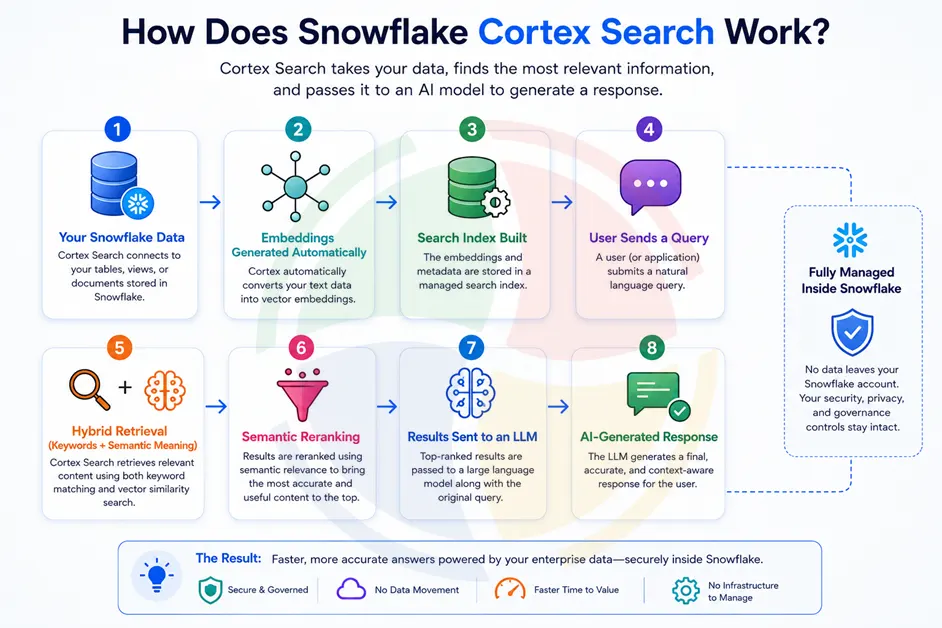
Here’s what happens behind the scenes:
Breaking Down Each Step
- Source data in Snowflake: Cortex Search connects to tables or views containing documents, tickets, policies, and other text-based content.
- Automatic embedding generation: Snowflake converts your text into vector embeddings automatically. No separate embedding pipeline required.
- Hybrid retrieval: Keyword search finds exact matches like product names and IDs, while semantic search understands meaning and intent.
- Semantic reranking: A final scoring pass reorders results, pushing the most relevant content to the top.
- Results sent to the LLM: The highest-ranked results are passed to a large language model, which uses them to generate an answer.
What’s New in Snowflake Cortex Search in 2026?
Snowflake has shipped several useful updates this year. Here is what matters if you are setting this up now:
1. Auto-suspend for serving
Previously, the search service ran 24/7 — even when nobody was using it. Now you can set it to pause after a period of inactivity (minimum 30 minutes). It wakes up instantly when a query comes in.
Best for: tools used only during business hours. Cuts idle serving costs significantly.
2. Primary keys for smarter refreshes
Mark certain columns as primary keys and Cortex Search only reprocesses rows that actually changed — not your entire table every time data updates.
Best for: large datasets where only a small percentage of rows change regularly.
3. Multi-index search
Index more than one column and mix index types within the same service. For example:
- Product names → exact keyword matching
- Product descriptions → semantic meaning-based search
- Both in one service, one query
Best for: product catalogs, knowledge bases with mixed content types.
4. Bring your own embeddings
Already have embeddings from another model? Plug them in directly. Snowflake skips its own embedding step — and that per-token cost — entirely.
Best for: teams already running an embedding model they trust.
5. Enhanced tools for Cortex Agents
The updated API now supports:
- Dynamic filters
- Metadata retrieval
- Result limits up to 500
- Index-specific queries
Best for: agentic AI applications that need precise, controllable retrieval.
If you’re planning to roll this out and want a hand figuring out which of these features actually fit your setup, finding good Snowflake Cortex consultants can help. Aegis Softtech’s Snowflake consulting services can walk through your data and help you set things up the right way from the start.
A Snowflake expert can review your current architecture and identify exactly which Cortex Search capabilities will deliver value without adding unnecessary cost.
How Much Does Snowflake Cortex Search Cost?
Snowflake Cortex Search pricing is based on five components: warehouse compute, embedding generation, serving, storage, and cloud services usage.
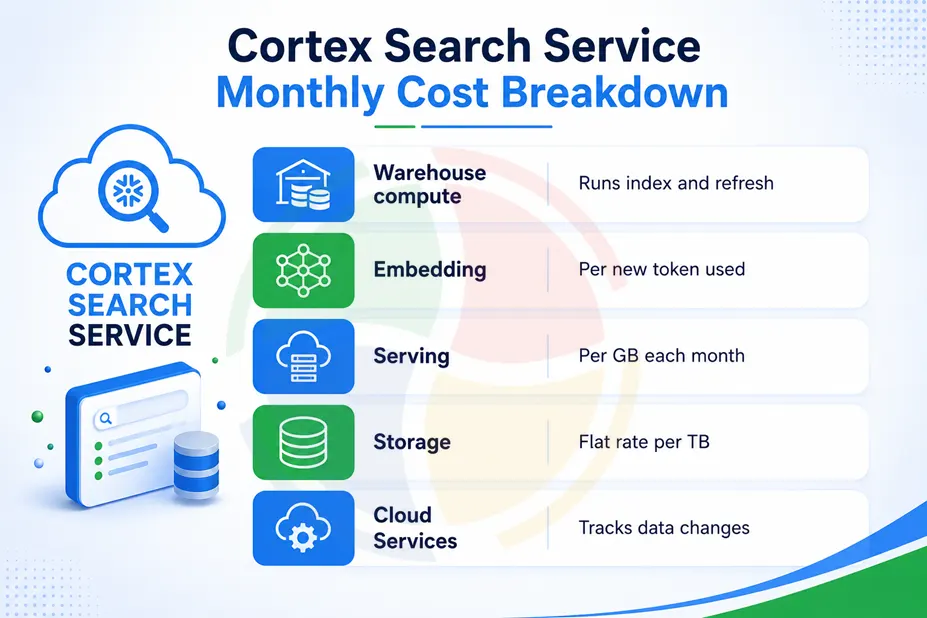
Here’s the breakdown to help you understand:
| What You’re Paying For | Why It Costs Money |
| Warehouse compute | Runs when the service is built or refreshed. No new data, no cost. |
| Embedding | Charged per token, only for new or changed text |
| Serving | A monthly fee based on how much data is indexed (per GB) |
| Storage | Flat rate based on how much space your data takes up |
| Cloud services | Small background cost for tracking changes |
Serving costs are charged per GB of indexed data per month, while embedding costs apply only to new or updated documents. Warehouse compute is consumed during service creation and refresh operations.
However, there are a couple of things to remember. The serving cost runs even when nobody’s searching, unless you’ve turned on auto-suspend. Embedding only costs money for new or edited rows, not your whole table every time. And the model you pick matters too. Bigger, multilingual models usually cost more per token than the basic English-only one.
If you need a good starting setup, use a small warehouse. Set a longer refresh time if your data doesn’t change much. And turn on auto-suspend if usage isn’t constant. Small choices like these can make a real difference over a month.
Where Cortex Search Might Not Be the Right Fit?
Cortex Search is great for a lot of things, but not everything. If your data is mostly structured- think rows, numbers, transactions- Cortex Analyst is probably the better tool here, not Search.
The same goes if your documents are huge and constantly changing. Refreshes can get pricey, especially if you haven’t set things like target lag or auto-suspend properly. And if your data doesn’t live in Snowflake yet, well, Cortex Search won’t help much until it does. That’s a Snowflake migration conversation first, then a search one.
None of this means don’t use it. Just means it’s worth checking if your use case actually fits before diving in. A quick chat with a Snowflake developer can save you from rebuilding things later.
How Do You Get Started with Snowflake Cortex Search?
The initial setup is one command:
sql
CREATE CORTEX SEARCH SERVICE my_search_service
  ON column_name
  WAREHOUSE = my_warehouse
  TARGET_LAG = '1 hour'
  AS (SELECT column_name FROM my_table);
However, there are a few things teams often overlook when setting it up for the first time. Like, which embedding model actually fits your language and document length? Or whether multi-index search even makes sense for your setup. Then there’s target lag; set it wrong, and your refresh costs creep up. And access to different teams querying the service requires the right roles set up.
None of these are dealbreakers. But they’re the kind of things that go a lot smoother when someone’s already been through it before.
For production environments, Cortex Search setup is often part of a broader Snowflake implementation strategy that covers architecture, warehouse configuration, security, access controls, cost management, and deployment.
Cortex Search vs Cortex Analyst: Which One Does Your Data Need?
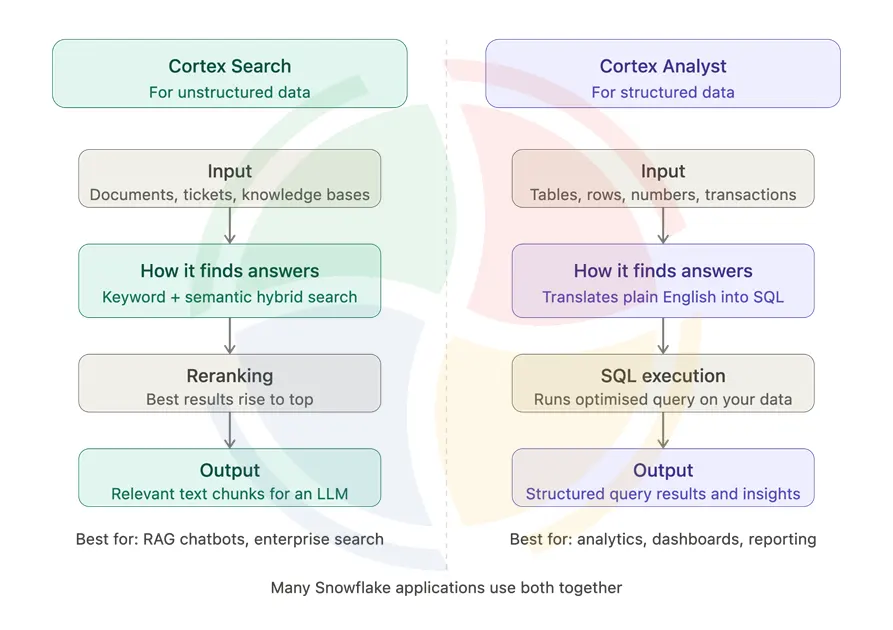
Cortex Search retrieves answers from documents, tickets, and knowledge bases using hybrid AI search. Cortex Analyst answers plain English questions over structured tables by generating SQL — same platform, different problems.
Conclusion
Snowflake Cortex Search does one thing really well. It gets the right information out of your data and into your AI application. This happens with great speed, accuracy, and without leaving Snowflake.
The 2026 updates also make Cortex Search easier to manage. Features like auto-suspend, smarter refreshes, multi-index search, and bring-your-own-embeddings give teams more control over performance and costs than before.
If search or RAG is on your roadmap, this is worth a serious look.
FAQs about Snowflake Cortex Search
What is Snowflake Cortex Search?
It’s a search tool built right into Snowflake. It mixes keyword matching with AI-based matching, then ranks the results so the most useful ones show up first. No extra setup.
What is Snowflake Cortex Search used for?
Cortex Search is mainly used for two things: Feeding relevant data to AI chatbots and powering search bars in apps. Either way, it helps you find the right information from your own data, fast.
Does Snowflake Cortex use retrieval-augmented generation?
Yes. Cortex Search is often the “retrieval” part of RAG. It finds the right bits of text, then passes them to an AI model, which uses that info to write its answer.
What is the difference between Snowflake and Snowflake Cortex?
Snowflake is the overall data platform where data is stored and managed. Snowflake Cortex is the AI layer within Snowflake that adds search, analytics, agents, and LLM-powered capabilities.
What is the difference between Snowflake Cortex Search and Cortex Analyst?
Cortex Search retrieves relevant text from unstructured data using hybrid search. Cortex Analyst answers natural language questions over structured data by generating SQL.
Which role lets me create a Cortex Search service?
You’ll need a role with the SNOWFLAKE.CORTEX_USER permission, plus the usual rights to create things in your schema and read from your table.
Can I clone or replicate a Cortex Search service?
No, cloning is not supported as of now. However, replication became generally available in April 2026, which means you can now replicate services to other accounts in the same organization using replication or failover groups.
How much does Cortex Search cost?
A mix of things: compute for refreshes, a per-token fee for embedding, a monthly fee based on data size, plus storage and a small background cost. It depends on your setup.
Does Cortex Search support structured and unstructured data?
Cortex Search mainly works with unstructured and semi-structured content like documents, tickets, and knowledge bases. For structured data analysis and SQL generation, Cortex Analyst is usually the better choice.
Is Cortex Search a vector database?
Not exactly. Cortex Search uses vector embeddings and semantic retrieval, but it’s a managed search service within Snowflake that combines keyword search, vector search, filtering, and reranking.