

A Snowflake Resource Monitor is a built-in object that tracks warehouse or account-level credit usage and automatically sends alerts or suspends warehouses when predefined credit limits are reached. It helps organizations control compute costs without third-party tools.
This guide explains how Resource Monitors work, how to configure them using Snowsight or SQL, their limitations, and best practices for Snowflake cost optimization.
What Is a Snowflake Resource Monitor?
A resource monitor is a Snowflake object that watches credit consumption for a warehouse or your whole account, then triggers an action once usage hits a limit you’ve defined.
Resource Monitors enforce spending limits but do not reduce credit consumption. For complete Snowflake cost optimization, combine them with warehouse rightsizing, query optimization, and FinOps practices.
How Do Snowflake Resource Monitors Work?
Every resource monitor runs on four settings: a credit quota, a monitoring frequency, one or more thresholds, and the actions triggered once those thresholds are crossed.
| Component | What It Does |
| Credit Quota | The number of credits allowed in one monitoring period. This is your spending cap. |
| Frequency | How often the quota resets, such as daily, weekly, monthly, yearly, or never. |
| Thresholds | Percentage points of the quota (like 75%, 90%, 100%) that trigger a response. |
| Actions | What happens at each threshold, such as notify, suspend, or suspend immediately. |
Snowflake evaluates credit usage approximately every minute rather than continuously. To avoid unexpected suspensions, configure notification thresholds (for example, 75% and 90%) before suspending warehouses at 100%.
If you want the fuller picture of how Snowflake’s credit-based pricing and billing works underneath all this, our guide on Snowflake Database breaks down the pricing model resource monitors are built on top of.
Where Resource Monitors Sit in Snowflake’s Architecture
Resource Monitors govern only the compute layer by tracking virtual warehouse credit consumption. They do not monitor storage costs or most serverless cloud services, so they cannot cap your total Snowflake bill.
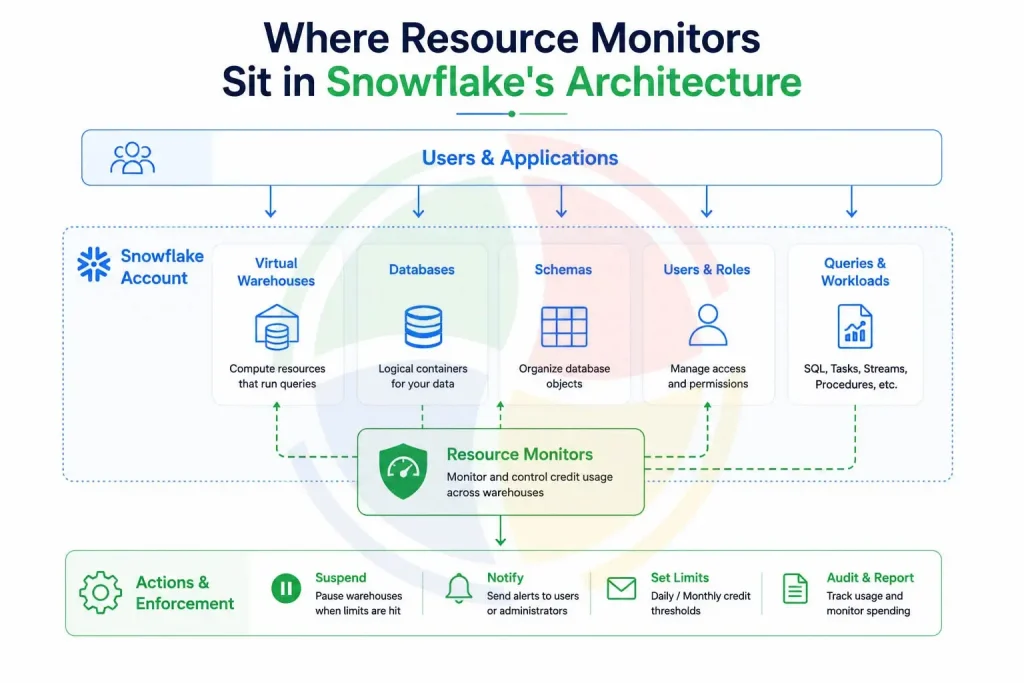
Learn more in our guide to Snowflake Architecture, which explains how the storage, compute, and cloud services layers work together.
Resource Monitors vs. Budgets: What’s the Difference?
Resource monitors only track virtual warehouse credits and can suspend them. Budgets track broader spend, including serverless features, but can only send alerts. They can’t stop anything.
| Aspect | Resource Monitor | Budget |
| Scope | Warehouse or account-level compute credits | Broader spend, including serverless and AI features |
| Can it stop usage? | Yes, can suspend warehouses | No, notification only |
| Setup | SQL or Snowsight UI | Snowsight UI (Cost Management) |
| Best for | Hard caps on warehouse spend | Visibility across account-wide spend |
How to Set Up a Resource Monitor in Snowsight?
You can create a resource monitor in Snowsight under Admin, then Cost Management, in a few clicks. No SQL required, though SQL gives you finer control.
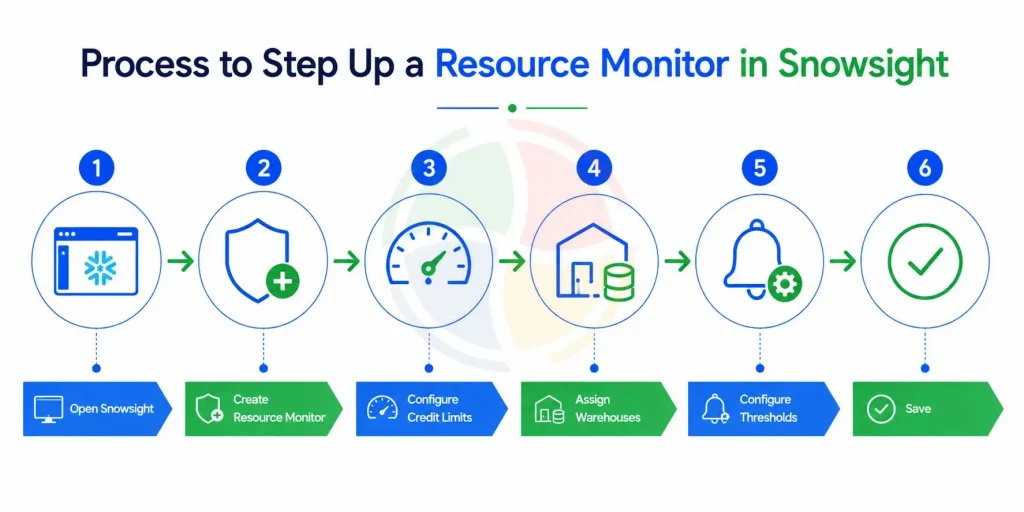
- Go to Admin > Cost Management > Resource Monitors in Snowsight.
- Click ‘Create Resource Monitor’ and give it a name.
- Set the credit quota and choose a frequency (daily, weekly, monthly, etc.).
- Add one or more warehouses, or leave it unassigned to apply at the account level.
- Set thresholds and pick an action for each: notify, suspend, or suspend immediately.
- Save. It’s active immediately; no restart needed.
Snowsight is ideal for basic configurations. For enterprise environments with multiple warehouses, SQL offers greater flexibility and automation.
How to Create a Resource Monitor With SQL
Use the CREATE RESOURCE MONITOR command to set a credit quota, frequency, and trigger actions, then assign it to a warehouse or your entire account.
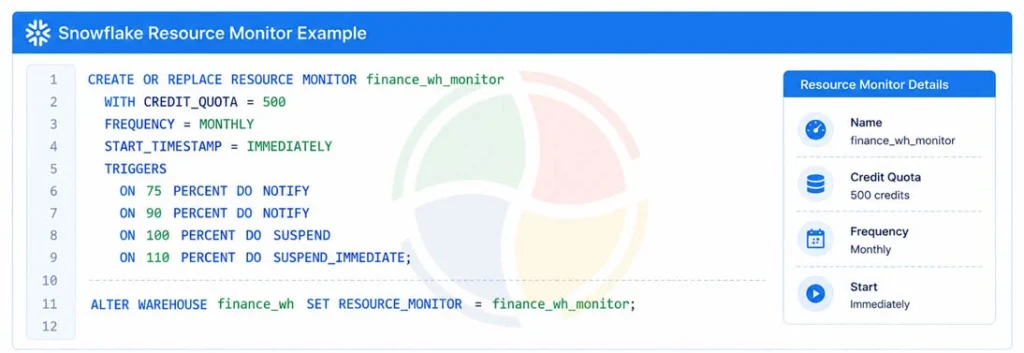
Creating a Resource Monitor requires the ACCOUNTADMIN role (or equivalent privileges). After creating it, assign it to a warehouse using ALTER WAREHOUSE.
As part of our Snowflake Implementation Services, Aegis Softtech helps organizations configure Resource Monitors, cost governance policies, and warehouse management best practices.
Account-Level vs. Warehouse-Level Monitors
Account-level monitors cap total credit spend across Snowflake. Warehouse-level monitors control individual warehouses, which gives tighter, team-by-team cost control. Here is the Pros and Cons of each one:
| Type | Pros | Cons |
| Account-level | One safety net for the whole account; simple to set up | Can’t tell you which team or warehouse caused the spike |
| Warehouse-level | Granular ties spend to specific teams or workloads | Needs more monitors, more upkeep as warehouses grow |
In practice, most enterprises use both approaches together. An account-level monitor acts as the final safety net for overall spending, while warehouse-level monitors help individual teams stay within their allocated budgets. Resource Monitor quotas should also be reviewed during Snowflake migration services, as newly migrated workloads may have different compute requirements than legacy environments. Setting warehouse-level limits early helps teams identify unexpected credit consumption after migration.
Explore: Planning to modernize a legacy Teradata environment? See how our Teradata to Snowflake Migration Services help enterprises migrate data, workloads, and analytics while optimizing the target Snowflake environment for performance and cost.
What Happens When a Threshold Is Hit?
Snowflake gives three actions: notify only, suspend after running queries finish, or suspend immediately, which cancels everything running, even mid-query.
Snowflake supports three actions when a threshold is reached.
| Action | What It Does | When to Use It |
| Notify | Sends an email/alert. The warehouse keeps running. | Early thresholds, like 75% or 90%. |
| Suspend | Lets running queries finish, then suspends the warehouse. | Hitting 100% of quota. |
| Suspend Immediately | Cancels all running queries and suspends right away. | Hard limits you never want breached. |
Limitations of Snowflake Resource Monitors
Monitors do not tune queries, rightsize warehouses, or tell you why your costs are rising.
- They don’t tell you why a warehouse is burning credits.
- They can’t automatically resize or right-size a warehouse for you.
- They react at fixed thresholds, not in real time as credits accumulate mid-query.
- Suspend Immediately can kill legitimate long-running jobs, not just runaway ones.
- They don’t cover storage costs or most cloud services usage.
Because of these limitations, Snowflake Resource Monitors are generally considered a cost governance feature rather than a complete cost optimization solution. They prevent overspending, but they don’t improve warehouse efficiency or query performance.
Best Practices for Snowflake Cost Optimization With Resource Monitors
- Apply monitors to every warehouse, including Snowflake development and testing.
- Teams working with Snowflake developers should establish warehouse-specific quotas early so development workloads don’t create uncontrolled compute spend.
- Configure multiple thresholds (75%, 90%, 100%).
- Prefer Suspend over Suspend Immediately for production workloads.
- Review quotas monthly.
- Pair Resource Monitors with Budgets.
- Review warehouse utilization regularly.
Common Mistakes Teams Make
The most common mistake is having only one monitor at an account level, thinking that this is enough, then being shocked when a single warehouse eats up the entire allocation.
- Only having an account-level monitor, with no warehouse-level backup.
- Setting Suspend Immediately as the default action everywhere, breaking long-running jobs.
- Never revisiting quotas after the initial setup, even as usage grows.
- Assuming a resource monitor equals full Snowflake FinOps coverage, when it’s really just one piece of it.
- Using the same credit limits for every warehouse, despite different workloads and usage patterns.
Conclusion
Resource Monitors help prevent unexpected compute costs by enforcing credit limits and automating alerts or warehouse suspension. However, they are only one part of an effective Snowflake cost optimization strategy.
Aegis Softtech’s Snowflake Consulting services help organizations implement Resource Monitors, optimize warehouse usage, establish FinOps practices, and reduce long-term Snowflake costs through governance and performance optimization.
Frequently Asked Questions
What is a resource monitor in Snowflake?
A resource monitor in Snowflake is an object that keeps track of credit consumption of a particular warehouse or an account and sends alerts to your team or suspends the warehouse in case it uses more than a certain amount.
How do I create a resource monitor in Snowflake?
Resource monitors can be created in Snowsight by clicking on Admin, then Cost Management, or through the SQL command CREATE RESOURCE MONITOR, then assigning it to a particular warehouse using ALTER WAREHOUSE.
Can resource monitors stop running queries in Snowflake?
Yes. The Suspend Immediately action suspends the warehouse immediately and stops all queries from running, while regular Suspension does not stop any queries until they finish.
What is the difference between resource monitors and budgets in Snowflake?
Resource monitors track and can suspend warehouse credits, while budgets track broader account spend, including serverless features, but can only send notifications, not stop usage.
Can I set a resource monitor for my entire Snowflake account?
Yes. Leaving a resource monitor unassigned to any specific warehouse makes it apply at the account level, capping total credit usage across every warehouse combined.
Does a Resource Monitor reduce Snowflake costs?
No. A Resource Monitor doesn’t reduce credit usage. It controls spending by sending alerts or suspending warehouses when credit limits are reached.