
A successful Dynamics 365 implementation timeline is not a fixed calendar date. The actual deployment time depends heavily on the complexity of your operational system, customization requirements, and data architecture. Based on these factors and more, your deployment can span anywhere from 3 months to over a year.
Tracking deployment goals, customization requirements, and data migrations is difficult in growing businesses. Information that’s spread across spreadsheets and different tools makes it hard for your teams to stay aligned on project expectations. A structured implementation cycle helps manage dependencies, set realistic expectations, and keep different stakeholders up-to-date.
How long does Dynamics 365 implementation take?
The Dynamics 365 implementation timeline varies by product, customization requirements, business needs, and module complexity. For instance, a standalone Dynamics 365 Sales deployment differs from a comprehensive rollout of Dynamics 365 Finance & Supply Chain Management.
Since these modules work independently, you can start with what you need and add more modules as required, depending on your business size and demand.
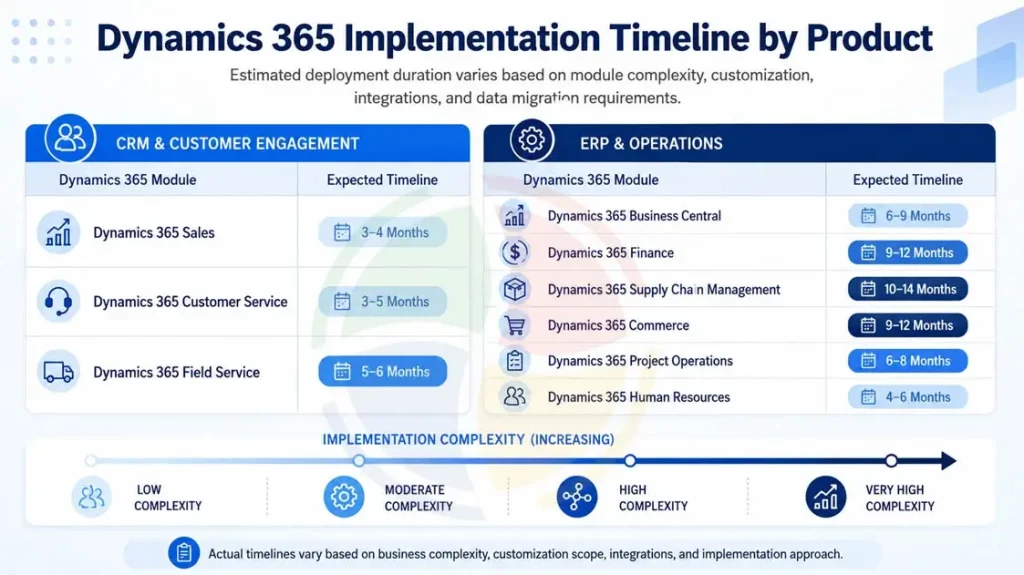
The expected timeline for different Dynamics 365 products and modules is shown below:
| Product Category | Dynamics 365 Module | Expected Timeline |
| CRM & Customer Engagement | Dynamics 365 Sales | 3 – 4 Months |
| Dynamics 365 Customer Service | 3 – 5 Months | |
| Dynamics 365 Field Service | 5 – 6 Months | |
| ERP & Operations | Dynamics 365 Business Central | 6 – 9 Months |
| Dynamics 365 Finance | 9 – 12 Months | |
| Dynamics 365 Supply Chain Management | 10 – 14 Months | |
| Dynamics 365 Commerce | 9 – 12 Months | |
| Dynamics 365 Project Operations | 6 – 8 Months | |
| Dynamics 365 Human Resources | 4 – 6 Months |
Disclaimer: Actual timelines vary based on organization size, customization requirements, implementation scope, partner methodology, and data complexity.
Phases of the Dynamics 365 Implementation Timeline
Dynamics 365 effectively manages all your existing workflows. A high-performance implementation of this intelligent platform requires an iterative methodology and Agile execution principles.
The different phases of the Dynamics 365 implementation timeline systematically validate your data and code before moving forward.
Phase 1: Diagnostic & Discovery (Weeks 1 – 4)
The first month revolves around analytics. Before jumping into writing code or configuring staging tables, business analysts must map out existing workflows, ensuring they identify process blockages. Technical architects conduct a formal fit-gap analysis to evaluate the distance between standard features and unique business logic.
Phase 2: Architecture & Detailed Design (Weeks 5 – 10)
Technical consultants turn abstract business specifications into formal technical system schemas. This includes mapping the RESTful API boundaries and data schema modeling needed for integration.
Phase 3: Development, Customization & Configuration (Weeks 11 – 22)
This phase is usually the longest part of the Dynamics 365 implementation timeline. It requires intensive technical development, utilizing specialized X++ or AL programmers to configure core environments, prepare data pipelines, or execute custom coding tracks.
- Core Configuration: Setting up core applications, localized financial parameters, default workflow structures, and permissions models.
- Custom Code Development: Writing backend plugin extensions to override standard functional constraints.
- Integration Engineering: Configuring webhooks and asynchronous queues to secure rapid bidirectional data sync.
- Data Staging: Extraction scripts help extract, scrub, and format historical databases from legacy systems into clean target staging formats.
Phase 4: Validation & Testing Cycles (Weeks 23 – 26)
Not taking validation seriously may initially save time, but it ultimately results in post-go-live performance issues. Rigorous System Integration Testing (SIT) is beneficial for verifying API data precision; User Acceptance Testing (UAT) validates real-world functional paths; while extensive load and performance testing prevent database locking under peak operational stress.
Phase 5: Deployment & Final Go-Live Sequence (Weeks 27 – 30)
This is the final month leading up to go-live and requires a precise execution sequence. Legacy applications are turned off, and live operations are fully migrated to the cloud environment. Data engineers execute delta data migrations to sync live active balances that accumulated during testing cycles.
Phase 6: Post-Go-Live Support and Optimization (After Go-Live)
Once your system goes live, we transition you towards a support model lasting 4 to 6 weeks. Dedicated Dynamics 365 support engineers uncover minor user navigation errors, continuously optimize database query performance, and resolve edge-case custom script failures.
Top Variables That Affect Implementation Timeline
Your enterprise operations are structurally different from those of the next company. This means specific baseline complexities can rapidly expand or compress your deployment calendar.
Here are the variables that can extend or compress your timeline expectations:
What Extends a Dynamics 365 Implementation Timeline?
1. Data Quality and Migration Effort
Migration is a hidden cost that companies fail to account for at the beginning of their implementation efforts. Legacy systems with years of undocumented custom fields or missing records require extensive cleansing. Large transaction volumes compound the problem, as does fragmented master data across business units that has never been reconciled.
If you’re migrating from an existing ERP or CRM system, our Dynamics 365 migration services team handles data profiling and cleansing as a dedicated workstream, separate from configuration, precisely because it’s the phase most likely to run long.
2. Customization and Custom Development
Every custom workflow or custom table is time not spent on testing or user training. In Finance & Operations specifically, custom X++ development typically adds 2–4 weeks per module, and each custom report family can add another 1–3 weeks.
3. Integration Scope
Connecting Dynamics 365 to legacy systems, e-commerce platforms, warehouse management systems, or third-party financial tools typically adds 2–6 months, depending on API maturity and the number of systems involved.
4. Regulatory and Localization Needs
Multi-currency accounting, region-specific tax compliance (VAT/GST), and direct integrations to government or banking systems all add scope — particularly for organizations operating across multiple countries.
5. Organizational Readiness
This is the factor most companies underestimate. If key stakeholders can’t commit time to workshops and testing, review cycles stretch by 4–8 weeks. Undocumented business processes have a longer discovery phase, while projects without a clear executive sponsor tend to struggle with scope control throughout.
6. Decision-Making and Approval Cycles
Long approval cycles or delayed feedback during testing extend the Dynamics 365 implementation timeline quietly, delaying development and testing activities. Establishing clear decision-makers and response timelines is important to keep the implementation moving forward.
What Compresses a Dynamics 365 Implementation Timeline?
1. Adopting an Out-of-the-Box First Mindset
Choosing native platform features over heavy custom X++ or AL development significantly reduces the timeline. Relying on built-in workflows means your team does not have to get into weeks of custom coding, rigid code reviews, or debugging. This keeps the core system clean and upgrade-ready.
2. Early Data Profiling and Pre-Cleansing
Staging and deduplicating historical customer and financial records before the development phase keeps ERP deployments smooth. When data engineers work with clean legacy files from day one, migration scripts run smoothly without breaking.
3. Phased Rollouts and MVP Deployment
A massive big bang release across all your global entities and modules simultaneously is often not the best approach. Successful projects launch a Minimum Viable Product (MVP), where core sales or financial modules deploy first. This allows your teams to go live fast, while complex integrations and secondary modules roll out in controlled later phases.
How Aegis Softech Helps You Hit Your Go-Live Date
A realistic implementation timeline depends on early planning, clean data, clear decision-making, and effective project governance. Our team helps organizations build practical deployment roadmaps by assessing these factors before development begins.
Our team can map out a month-by-month plan for your organization if you are planning a Dynamics 365 rollout and want a realistic timeline. Our Dynamics CRM implementation cost guide comprises a complete breakdown of implementation, licensing, and ongoing support costs, along with the timelines.
Frequently Asked Questions
Can Dynamics 365 be implemented in under 3 months?
It is possible to complete a production deployment within three months in some limited scenarios. This is particularly true when requirements are straightforward and dynamics 365 customization is minimal.
What happens if we miss our go-live date?
Expect an extended parallel-run period, higher costs from extended team allocation, and delayed benefit realization. A phased go-live is often the fastest way to recover momentum, where core functionality first rolls out first and is followed by remaining modules.
Is it better to push for a faster timeline or accept a longer one?
Neither of these extremes is ideal for your business. Rushed timelines risk weak training and poor data quality at go-live. On the contrary, overly long ones raise costs and delay ROI. Most organizations target a 10–20% schedule float above baseline to absorb discovery surprises.
How much does scope creep add to a project?
As a rule of thumb, each 10% increase in scope — a new business unit, module, or product — adds 15–25% to the timeline. Strong change control and an engaged executive sponsor are the best defenses.
Should we go live on schedule even if some features are deferred?
Generally, yes. Going live as scheduled, even with a handful of deferred features, builds stakeholder confidence. Your organization also starts realizing benefits sooner than waiting for a perfect version.
What’s the fastest realistic path to production?
Pair an experienced partner and proven accelerators with a minimally customized configuration, a phased rollout starting with core financials, firm executive commitment, and business processes documented before the project starts.