Snowflake sells well on the whiteboard. Elastic compute, consumption-based pricing, zero infrastructure management, native multi-cloud support. The architecture makes sense, the value proposition is clear, and the initial proof of concept almost always goes smoothly.
Then you go to production, and that’s when Snowflake implementation challenges start showing up.
This guide covers 17 real-world challenges across architecture, migration, performance, cost, governance, and organizational readiness, along with the specific actions that resolve them.
Key Takeaways
- Architecture: Improper warehouse sizing, poor data modeling, and missing workload isolation are the most common sources of performance problems and cost overruns in early deployments.
- Migration: Legacy SQL conversion from Teradata, SQL Server, and Oracle requires manual review. ETL-to-ELT pipeline rebuilds are consistently underestimated in scope and effort.
- Performance: Most Snowflake performance optimization issues trace back to unclustered tables, under-sized warehouses, and queries written for row-based systems. Query Profile surfaces the root cause in almost every case.
- Cost: Warehouses running without auto-suspend and unmonitored background tasks are responsible for the majority of unexpected credit consumption. It is a configuration problem, not a platform one.
- Governance: RBAC misconfiguration, missing masking policies, and cross-region compliance gaps are significantly harder to fix after data has landed and access has been granted.
- People: Teams that replicate on-premise architecture patterns in Snowflake are one of the leading causes of underperforming deployments. Cloud-native upskilling isn’t optional.
Why Snowflake Implementations Become Complex at Scale
Early-stage Snowflake deployments are deceptively straightforward. You spin up a single warehouse, load a handful of tables, and a few analysts start running queries. The platform performs well, and the operational overhead is minimal.
Then adoption grows, and complexity compounds. Here’s what drives it at scale:
- Multiple teams sharing compute resources with no workload isolation
- Legacy pipelines rebuilt inadequately for cloud-native ELT architecture
- Governance policies applied inconsistently across Snowflake schemas and business units
- Warehouse sizing decisions made once and never revisited as workloads evolve
- Integration sprawl across BI tools, CRMs, ERPs, and custom data pipelines
- Cross-region data residency requirements introducing compliance constraints
- Cost attribution becoming impossible without resource monitoring in place from the start
These are Snowflake deployment issues that come from applying on-premise thinking to a cloud-native platform.
Architecture and Design Challenges
Poor architectural decisions made at the start of an implementation are the hardest to unwind later. These three challenges appear consistently across enterprise Snowflake deployments. They typically require re-architecture to resolve if left unaddressed.
Challenge 1: Improper Warehouse Sizing
Snowflake warehouse sizing strategy is one of the most consistently misjudged decisions in early implementations. Under-provision, and your queries slow to a crawl under peak load. Over-provision, and you’re burning credits on idle compute.
The root cause is almost always static sizing: you configure a data warehouse once during setup and never touch it again. That’s not how Snowflake warehouses are meant to work. Size them dynamically based on workload type.
How to fix it:
- Size warehouses per workload type – separate compute for ETL, BI, and ad hoc analytics
- Use Query Profile to identify queries that consistently spill to disk, a reliable signal of under-provisioning
- Enable auto-scaling on multi-cluster warehouses to handle concurrency spikes without manual intervention
- Review warehouse utilization weekly in the early post-deployment period and adjust based on actual consumption data
Challenge 2: Poor Data Modeling Decisions
Legacy star schemas designed for on-premise OLAP engines don’t automatically translate into efficient Snowflake models. Snowflake’s columnar storage, micro-partition architecture, and separation of compute and storage reward different modeling patterns. So, if you ignore that, you’ll pay for it in query performance.
Common modeling mistakes that create Snowflake architecture challenges:
- Over-normalizing schemas in ways that force expensive multi-table joins at query time
- Carrying over surrogate key strategies that add unnecessary join overhead in columnar systems
- Ignoring Snowflake’s native support for semi-structured data and flattening JSON unnecessarily
- Replicating slowly changing dimension logic from legacy systems without evaluating simpler alternatives
The fix is a deliberate schema review before data migration. Model for how Snowflake stores and scans data, not for how your previous warehouse did.
Challenge 3: Ignoring Workload Isolation
Running ETL pipelines, BI dashboard queries, and data science workloads on a single warehouse is one of the most common Snowflake architecture challenges we see.
When a heavy ETL job consumes all available compute, your dashboard queries queue and your analysts wait. That’s a solved problem if you use Snowflake’s multi-warehouse architecture the way it was designed.
Snowflake’s multi-warehouse architecture exists precisely to solve this. The fix:
- Assign dedicated warehouses to each workload category—ETL, BI, ad hoc, and data science
- Apply resource monitors at the warehouse level so each team operates within defined credit budgets
- Use warehouse-level query tagging to track which workloads consume what, enabling accurate cost attribution
Data Migration and Integration Challenges
Migration is where the gap between a successful proof of concept and a production-ready implementation becomes most visible. These three challenges are the most common sources of Snowflake migration risks during and after cutover.
Challenge 4: Legacy SQL Compatibility Issues
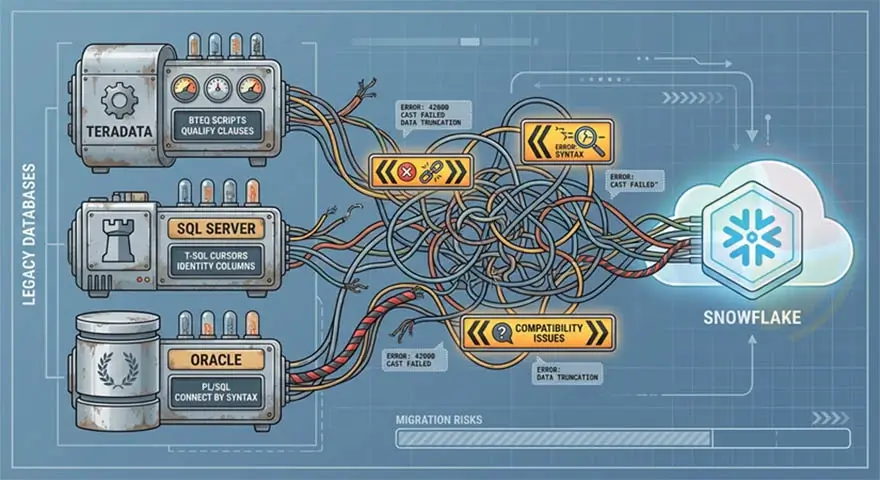
The riskiest part of any Snowflake migration is the code conversion. Every legacy platform carries SQL dialects, proprietary functions, and procedural constructs that don’t map cleanly to Snowflake’s ANSI SQL implementation.
Source-specific conversion challenges:
- Teradata: BTEQ scripts, QUALIFY clauses, macro logic, and Teradata-specific aggregation functions require rewriting. Multi-value compression and row-level security configurations need Snowflake equivalents.
- SQL Server: T-SQL cursors, identity columns, and implicit type coercions need explicit handling. Date arithmetic and collation behavior differences are a frequent source of post-migration data inconsistencies.
- Oracle: PL/SQL stored procedures, Oracle-specific date functions, and hierarchical query syntax (CONNECT BY) need manual conversion. No automated tool handles this reliably end-to-end.
Automated schema conversion tools will accelerate the straightforward DDL work. But procedural logic and embedded business rules in stored procedures? Those require manual review, every time, no exceptions.
Challenge 5: ETL to ELT Transition Complexity
Most teams underestimate Snowflake ELT implementation risks when transitioning from traditional ETL architectures. Rebuilding those pipelines for an ELT-first model requires more than moving SQL around.
What creates friction:
- Transformation logic embedded in ETL tools like Informatica or SSIS that needs to be extracted, documented, and rebuilt in dbt or Snowpark
- Dependencies between pipeline steps that were implicit in ETL tool workflows need to be made explicit in a new orchestration layer
- Data quality checks that ran inside the ETL tool with no equivalent in the new pipeline, without deliberate re-implementation
- Teams unfamiliar with dbt’s testing and documentation model, leading to transformation logic that is migrated but not validated
Before you move a single line of code: run a pipeline audit.
Challenge 6: Third-Party Integration Gaps
Snowflake integration challenges surface across BI tools, CRM platforms, ERP systems, and custom data pipelines. Snowflake’s connector ecosystem is broad, but it’s not universal, and integration behavior varies significantly by tool.
Common integration friction points:
- BI tools pushing down queries that perform well on row-based systems but scan excessively in Snowflake’s columnar architecture
- CRM and ERP systems without native Snowflake connectors requiring custom extraction logic or middleware
- Real-time data feed requirements that conflict with Snowflake’s micro-batch ingestion model via Snowpipe
- Schema drift in source systems breaking downstream Snowflake pipelines not built to handle it
Test every integration against real workloads before go-live. Don’t assume connector compatibility means production readiness.
Performance Optimization Challenges
Snowflake performance optimization issues accumulate across query design, clustering decisions, and warehouse configuration. These challenges account for most of the performance regressions we see in production Snowflake environments.
Challenge 7: Query Performance Bottlenecks
The most common performance problems trace back to a small set of root causes:
- Large joins on unclustered tables forcing full micro-partition scans
- Queries written for row-based systems that do not leverage Snowflake’s columnar pruning
- Excessive use of SELECT * pulling unnecessary columns into memory
- Transformation queries running on under-sized warehouses that spill intermediate results to disk
- Missing or stale statistics causing the query optimizer to make poor execution plan decisions
Start every performance investigation with Query Profile. It surfaces partition pruning ratios, bytes scanned, spill volumes, and execution time breakdowns at the operator level—everything you need to pinpoint the problem.
Challenge 8: Ineffective Clustering Strategies
Clustering keys improve query performance by co-locating related micro-partitions and reducing the data scanned per query. Misapply them, and you’re paying more in compute costs and maintenance overhead for no benefit. That’s one of the most expensive Snowflake performance optimization issues we encounter.
Common clustering mistakes:
- Applying clustering keys to small tables where the overhead outweighs the benefit
- Choosing high-cardinality columns as clustering keys, which fragments rather than consolidates micro-partitions
- Clustering on columns that do not match actual query filter patterns, providing no pruning benefit
- Over-clustering tables by applying multiple clustering keys without validating that query patterns justify the cost
Let query pattern analysis drive your clustering decisions. Use the SYSTEM$CLUSTERING_INFORMATION function to evaluate clustering depth before and after any changes.
Challenge 9: Concurrent Workload Management
Snowflake scalability concerns become acute when concurrent workload demand spikes and queuing behavior degrades query response times. A single warehouse handling simultaneous BI dashboard refreshes, scheduled pipeline runs, and ad hoc analyst queries will queue requests the moment compute is saturated.
The fix requires both architectural and configuration changes:
- Enable multi-cluster warehouses for BI workloads with unpredictable concurrency patterns
- Set maximum cluster counts based on realistic peak concurrency requirements
- Use workload-specific warehouses to prevent pipeline jobs from competing with analyst queries
- Monitor queue times through Snowflake’s QUERY_HISTORY view to identify warehouses that consistently show queuing behavior
Cost Management Challenges
Snowflake’s consumption-based pricing is powerful when you manage it well, and expensive when you don’t. These three Snowflake cost management challenges are responsible for the majority of budget overruns in enterprise deployments.
Challenge 10: Unexpected Credit Consumption
Unexpected credit spend is the most frequently cited Snowflake cost management challenge in production. Plus, the root cause is almost always the same: warehouses running without auto-suspend, or workloads consuming far more compute than anyone anticipated.
Specific cost leaks to watch for:
- Warehouses with auto-suspend disabled running overnight or through weekends with no active queries
- Snowflake development and testing warehouses provisioned at the same size as production
- Materialized views and dynamic tables refreshing on schedules more frequent than query patterns require
- Snowpipe continuously processing files at a rate that generates more serverless compute charges than a scheduled bulk load would
Challenge 11: Inefficient Compute Scaling
Multi-cluster warehouses solve concurrency problems, but introduce cost exposure if you don’t configure them carefully. Scaling out to additional clusters for workloads that query optimization could handle is unnecessary spend.
Snowflake cost management challenges around scaling typically involve:
- Setting minimum cluster counts above one, meaning additional clusters run continuously rather than scaling on demand
- Failing to distinguish between queuing caused by concurrency (which scaling out resolves) and queuing caused by individual long-running queries (which it doesn’t)
- Not setting maximum cluster counts, allowing unbounded scale-out during unexpected demand spikes
Set your scaling policy to Economy for cost-sensitive environments, Standard for latency-sensitive ones. That distinction shows up on your invoice.
Challenge 12: Lack of Resource Monitoring
Without Resource Monitors in place, you have no way to catch runaway spend before it accumulates. Snowflake cost management challenges are significantly harder and more expensive to resolve after the fact than to prevent with upfront configuration.
Resource Monitor configuration should cover:
- Credit quotas at both the account and individual warehouse level
- Alert thresholds at 75% and 90% of quota to provide warning before limits are hit
- Suspend actions triggered automatically at quota limits to prevent overspend
- Weekly credit consumption reports distributed to team leads and finance stakeholders
Data Governance and Security Challenges
Snowflake data governance issues and security configuration problems come from treating governance as a post-deployment task instead of a deployment prerequisite. These three challenges reflect the patterns we see most consistently.
Challenge 13: Role-Based Access Misconfiguration
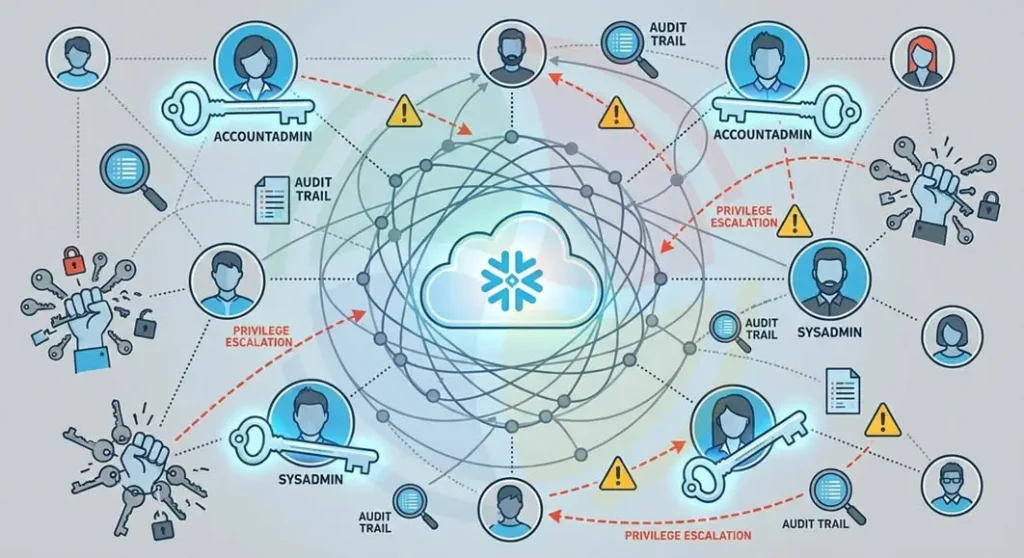
Snowflake data governance issues frequently originate in RBAC configurations set up quickly during initial deployment and never formally reviewed. Overly permissive roles grant broader access than users need. Poorly structured role hierarchies make access auditing difficult and privilege escalation easy.
Common RBAC mistakes:
- Granting ACCOUNTADMIN or SYSADMIN roles to end users for convenience
- Creating flat role structures rather than hierarchical ones aligned to organizational data ownership
- Not applying object-level privileges at the schema and table level, leaving access controls too broad
- Failing to implement a role review process as teams grow and personnel changes occur
Challenge 14: Data Masking and Privacy Gaps
Snowflake security configuration problems around sensitive data most commonly show up when analytics layers expose PII or regulated fields. And by the time you notice, unauthorized users have already run queries against data they shouldn’t have seen.
Dynamic data masking resolves this. It applies column-level masking policies that return masked values to unauthorized users while preserving full access for those with the appropriate role. But it only works if you implement it with discipline:
- Masking policies need to be applied at ingestion, not retrofitted after data has been queried by unauthorized roles
- External tokenization systems integrated with Snowflake need schema-level coordination to avoid masking gaps
- Row access policies should be applied to tables containing multi-tenant or regionally restricted data
Challenge 15: Cross-Region Data Compliance
For enterprises operating across multiple geographies, Snowflake data governance issues get significantly more complex. Data residency regulations in the EU, APAC, and other regions impose hard constraints on where data can be stored, processed, and replicated, and those constraints don’t bend.
Key compliance considerations:
- Provision your Snowflake accounts in the correct cloud region before you load any data. Data residency requirements must be satisfied upfront.
- Review replication policies against regulatory requirements before enabling cross-region Snowflake data sharing.
- Business Critical or VPS edition may be required for organizations subject to HIPAA, PCI-DSS, or other regulated workload requirements.
- Governance policies applied in one regional account need to be consistently replicated to secondary accounts.
Organizational and Skill Gaps
Technology alone doesn’t determine implementation outcomes. These two challenges are people and process problems, and they’re responsible for more failed or underperforming Snowflake deployments than any purely technical issue.
Challenge 16: Lack of Cloud-Native Expertise
The most persistent cloud data warehouse implementation challenge isn’t technical. Teams with deep on-premise warehouse experience consistently approach Snowflake implementations the same way they approached their last warehouse. This involves:
- Building ETL-heavy pipelines when ELT would be more efficient and easier to maintain
- Applying index-like clustering to every large table regardless of query patterns
- Sizing warehouses based on physical server specs from previous environments
- Writing procedural SQL when set-based transformations would perform better
Challenge 17: Change Management Resistance
On-premise data warehouse teams carry ingrained assumptions about performance tuning, pipeline design, and data access. Most of those assumptions don’t apply in Snowflake, and shifting that mindset is as much a change management challenge as a technical one.
Resistance typically surfaces as:
- Teams rebuilding familiar ETL patterns in Snowflake rather than adopting ELT
- Reluctance to trust Snowflake’s auto-scaling in place of manually managed compute clusters
- Over-engineering governance configurations that replicate on-premise controls Snowflake handles natively
- Underinvesting in dbt adoption because the team is more comfortable with SQL scripts in shared drives
Successful implementations pair technical onboarding with structured change management. This includes clear ownership of platform decisions, defined standards for pipeline design, and leadership alignment on the architectural direction. Without all three, technical progress stalls.
Best Practices to Mitigate Snowflake Implementation Challenges
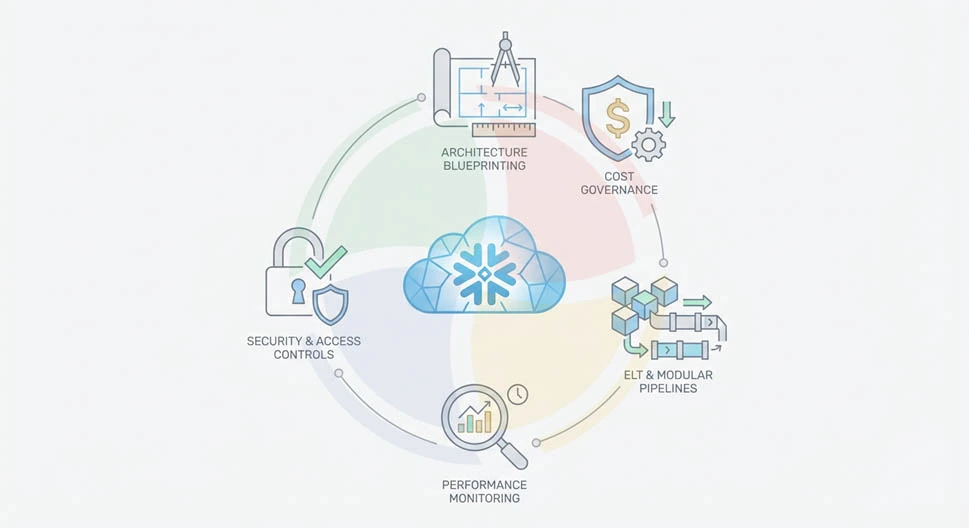
The Snowflake implementation challenges above share a common thread: almost all of them are significantly easier to prevent than to fix. Here are the best practices that directly address the failure patterns we see most consistently across deployments.
Start with Architecture Blueprinting
Define warehouse topology, data modeling standards, role hierarchy, and cost governance structure before any production workloads go live. Decisions made under deadline pressure during deployment are the ones that generate the most expensive rework.
Implement Cost Governance from Day One
Configure Resource Monitors, auto-suspend policies, and credit attribution frameworks during environment setup. Cost governance retrofitted after go-live is always harder, slower, and less effective than governance built in from the start.
Adopt ELT and Modular Data Pipelines
Build transformation logic in dbt with version control, automated testing, and lineage documentation. Load raw data into Snowflake unmodified and transform inside the platform. Retire your external ETL infrastructure as you rebuild pipelines; don’t run both in parallel indefinitely.
Establish Performance Monitoring Frameworks
Instrument Query Profile analysis, warehouse utilization reviews, and clustering health checks are recurring operational processes. Performance issues caught early are configuration adjustments. At the same time, performance issues caught late are re-architecture projects. That gap is measured in weeks and budget.
Enforce Strong Security and Access Controls
Apply RBAC, dynamic data masking, and audit logging at deployment, not after the first compliance review. Treat governance configuration as a deployment prerequisite, full stop.
How Aegis Softtech Helps Overcome Snowflake Implementation Challenges
Snowflake implementation challenges compound fast when your team is navigating them without prior enterprise-scale experience on the platform. At Aegis Softtech, we’ve worked across the full spectrum of these challenges, and we know exactly where implementations go wrong.
Our Snowflake consulting services help enterprises assess their current architecture, identify risk areas before deployment, and build implementation roadmaps that account for workload complexity, governance requirements, and organizational constraints. Furthermore, our Snowflake developers directly work alongside your engineers on the challenges that matter most.
FAQs
1. What are the most common Snowflake implementation challenges?
The most frequent issues are improper warehouse sizing, unexpected credit consumption, legacy SQL compatibility problems during migration, RBAC misconfiguration, and workload isolation failures. Most stem from applying on-premise architecture patterns to a cloud-native platform.
2. Why do Snowflake costs increase unexpectedly?
The most common causes are warehouses running without auto-suspend, development environments sized the same as production, and materialized views or scheduled tasks consuming credits in the background without visibility. Resource Monitors with hard credit caps prevent this from accumulating undetected.
3. How do you optimize warehouse sizing in Snowflake?
Start by separating warehouses by workload type: ETL, BI, and ad hoc. Use Query Profile to identify queries spilling to disk as a signal of under-provisioning. Then, review warehouse utilization weekly post-deployment and right-size based on actual consumption data.
4. What are the risks in migrating legacy data warehouses to Snowflake?
The highest-risk areas are legacy SQL conversion, ETL-to-ELT pipeline rebuilds, and data validation gaps at cutover. Teradata BTEQ logic, SQL Server T-SQL procedural code, and Oracle PL/SQL all require manual review that automated conversion tools cannot fully replace.
5. How do you handle data governance in Snowflake?
Implement RBAC with a hierarchical role structure aligned to data ownership. Apply dynamic data masking to PII and sensitive columns at ingestion. Additionally, we enable audit logging across all warehouses. Our team also prefers using Snowflake Horizon for lineage tracking and classification policy enforcement.
6. What causes performance issues in Snowflake?
The most common causes are large joins on unclustered tables, queries written for row-based systems that do not leverage columnar pruning, under-sized warehouses spilling to disk, and misapplied clustering keys that increase data scanned per query.