
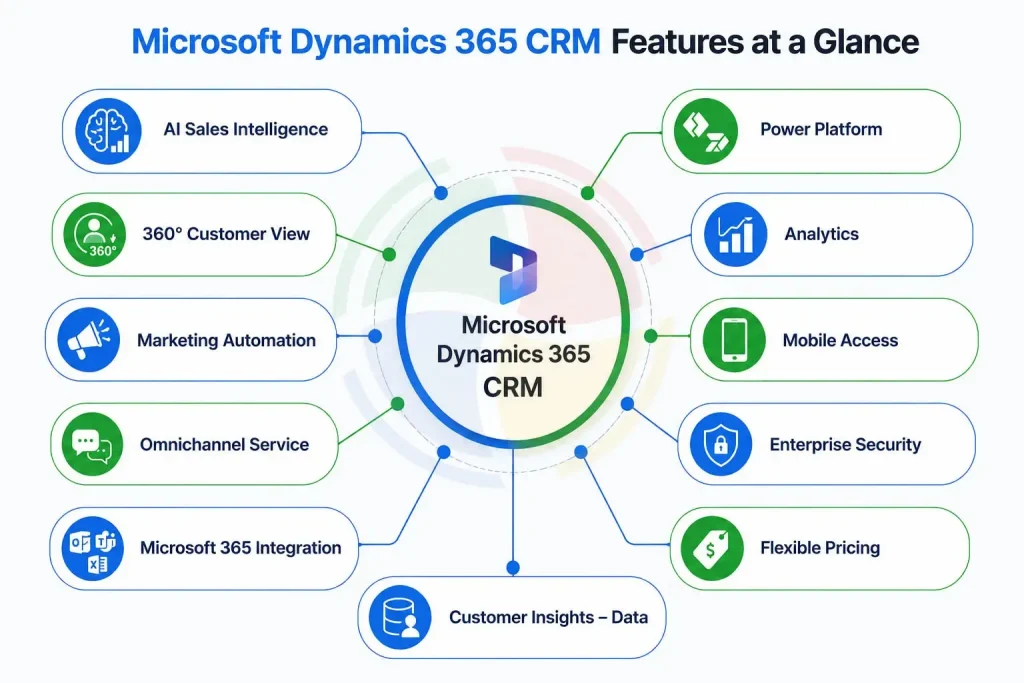
Microsoft Dynamics 365 CRM combines AI-powered sales, marketing, customer service, and analytics capabilities to help organizations manage customer relationships, improve productivity, and accelerate growth. These include AI-powered sales intelligence, a 360-degree customer view, omnichannel customer service, marketing automation, analytics, and seamless Microsoft 365 integration. Understanding these features is important so that you can close more deals and deliver better business outcomes.
If you are new to Microsoft Dynamics 365 CRM, this article will help you understand its key features in 2026.
What Is Microsoft Dynamics 365 CRM?
Microsoft Dynamics 365 CRM is Microsoft’s cloud customer relationship management (CRM) tool for sales, customer service, marketing, and field service teams. It stops your teams from working off separate copies of the same customer.
What Are The Key Features of Microsoft Dynamics 365 CRM?
The key features of Microsoft Dynamics 365 CRM include AI-powered sales intelligence, a 360-degree customer view, marketing automation, omnichannel customer service, analytics, security, mobile access, and seamless Microsoft 365 integration. Let’s understand these in detail.
1. AI-Powered Sales Intelligence
Leveraging artificial intelligence in CRM is a major factor for 2026. CRM ranks your leads, predicts which opportunities are most likely to close, and suggests how the reps can move forward. Therefore, people don’t chase random leads anymore just because that’s how it has always been done.
- It scores leads and deals, so reps know who to call first thing based on priority.
- Microsoft Copilot for Dynamics 365 helps sales teams prioritize opportunities, summarize meetings, generate emails, and forecast revenue using generative AI.
- It picks up on relationship signals from Outlook and Teams, not just what’s typed into a form
- Forecasts update on their own as the pipeline moves, not once a month in a spreadsheet
2. 360-Degree Customer View
Every email, call, order, and support ticket for a customer sits on one screen. So whoever picks up the phone, sales or support, already knows what happened last time. No more asking the customer to repeat their story.
- Contact info and every past conversation, in one place
- Orders and open support cases sitting next to each other
- Internal notes the whole team can see, not just the account owner
- Updates in real time, so you’re never working off something three weeks old
This is basically the whole idea behind good CRM design. We go into more detail in Microsoft Dynamics CRM Architecture: Components, Layers & Benefits, if you’re curious how it’s built.
3. Dynamics 365 Marketing Automation That Nurtures Leads
Microsoft renamed Dynamics 365 Marketing to Dynamics 365 Customer Insights–Journeys, so if you see either name, it’s the same app. It watches what people do, not just what list they’re on, and builds the follow-up journey by itself. Sales only get handed the leads worth their time.
- Segments built off behaviour, not a static list someone forgot to update
- Campaigns that run across email, SMS, and events at once
- Journeys that shift depending on what the lead clicks or ignores
- Analytics you can check today, not a report that lands next month
4. Omnichannel Customer Service
Whether customers communicate through chat, email, telephone, or even Instagram, all these are put in one single queue. The conversation is first handled by a chatbot before it reaches a person.
- One case queue, so nothing gets lost between channels
- Chatbots handle the repetitive questions first
- Cases route to the right agent on their own, with SLA timers running
- Suggested knowledge base answers pop up right inside the ticket
5. Deep Integration With Microsoft 365 and Power Platform
Microsoft apps such as Outlook, Teams, Excel, and Power BI– all of it works with the CRM already. In this manner, there is no need for the representatives to switch tabs while making updates on the record and viewing the report, which may not sound important, but actually helps in saving a lot of time.
The following table shows how the apps of Microsoft 365 and Power Platform are incorporated in Microsoft Dynamics 365 CRM along with the reason for using them for your team.
| Microsoft App | What It Does With CRM Data |
| Outlook | Logs emails and calls, adds new leads, no need to open the CRM |
| Teams | Representatives can talk through a deal or a case right there in the chat |
| Excel | Pulls live CRM numbers into a sheet that keeps itself updated |
| Power BI | Turns CRM records into dashboards people look at |
| Power Automate | Handles the boring stuff, like assigning leads or sending reminders |
6. Low-Code Customization With Power Platform
The availability of Power Apps and Power Automate ensures that you can develop custom forms and new workflows yourself without filing tickets and waiting for two weeks until a developer gets back to it.
You can automate approvals, notifications, and repetitive business processes without any or little coding. That way, your business will have the ability to modify the CRM according to changing business needs without the dependency on the IT team.
7. Analytics, Reporting and Predictive Insights
The dashboards and Power BI hookup turn plain CRM data into forecasts and numbers your team can use today. Not something you find out about next quarter.
Sales performance, customer behavior, and service KPIs can be analyzed with real-time dashboards. Predictive insights further enable the business teams to recognize opportunities and risks.
8. Mobility and Offline Access
There’s a mobile app for iOS and Android, and it still works with no internet connection. Once you’re back online, it just syncs, so field representatives aren’t stuck waiting on wifi to get anything done.
It is especially useful for sales and service personnel who constantly travel since they can key in customer information, extract data, and track their movements regardless of where they are.
9. Enterprise-Grade Security and Compliance
Microsoft provides enterprise-grade security features, role-based access controls, encryption, and compliance capabilities that help organizations meet regulatory requirements such as GDPR and HIPAA when properly configured. You’re not bolting on some separate security tool just to feel safe.
Administrators can manage who will view and edit the customer data based on their role. Security patches and cloud platforms from Microsoft make sure that customer data is protected by compliance standards.
10. Scalable Pricing and Deployment Options
Microsoft Dynamics 365 CRM pricing is flexible, with licensing available per user or per application. Most organizations choose Microsoft’s cloud deployment because it requires minimal infrastructure and scales easily as business needs grow.
The table below explains the available deployment and licensing options, along with the type of business each one is best suited for.
| Option | Best Fit |
| Cloud (SaaS) | Teams that want quick setup and access from anywhere |
| Multi-app licensing | Teams that need several modules working together |
| Per-user licensing | Stable team sizes with predictable seat counts |
| App-based licensing | Teams that only need one or two modules, not the full suite |
11. Customer Insights – Data (Customer Data Platform)
This is Microsoft’s own customer data platform. It pulls in data from everywhere and builds one live customer profile that updates as things happen, not overnight.
- Merges data from your CRM, ecommerce store, POS system, and other third-party apps into one profile
- Updates in real time, not through some batch job that runs at 2 am
- Builds AI segments on its own, no SQL or data team needed
- Feeds straight into Customer Insights–Journeys, so campaigns react to fresh data automatically
Most CRMs make you bolt on a separate CDP tool and pay extra for it. Here it’s already part of the package, which is a big deal if your customer data is scattered across five different systems right now.
Microsoft Dynamics 365 CRM vs Salesforce vs HubSpot
Dynamics 365 triumphs if you’re already working in the Microsoft ecosystem and you need adaptable pricing plans.
Salesforce has the bigger app marketplace if you need something niche. HubSpot is the easiest to just pick up and use if you’re small.
| Aspect | Dynamics 365 CRM | Salesforce | HubSpot |
| Best for | Microsoft-heavy businesses | Complex, custom sales organizations | Small to mid-size teams |
| Microsoft 365 integration | Native | Needs connectors | Needs connectors |
| Pricing model | Per user or per app | Per user, add-ons stack up fast | Free to start, then per seat |
| Learning curve | Moderate | Steep, honestly | Low |
Conclusion
Understanding Microsoft Dynamics 365 CRM features is the first step toward choosing the right customer engagement platform. Whether your goal is improving sales productivity, automating marketing, delivering better customer service, or gaining deeper customer insights, Dynamics 365 provides a scalable platform that grows with your business.
Aegis Softtech acts as a Dynamics 365 CRM consulting partner, providing planning, customization, and optimization of Microsoft Dynamics 365 CRM according to your specific business processes. We help you pick the right modules, move your old data over cleanly, build out Power Platform pieces, and roll out Copilot without it becoming a mess.
Whether you’re evaluating Dynamics 365 CRM or optimizing an existing deployment, our Microsoft consultants can help you select the right applications, streamline implementation, and maximize user adoption.
Frequently Asked Questions
What is Microsoft Dynamics 365 CRM used for?
Microsoft Dynamics 365 CRM can be used for sales pipeline management, marketing campaign management, and customer service management.
Is Dynamics 365 CRM & Dynamics 365 ERP the same?
ERP and CRM are not the same. Whereas the former is for customer interaction, the latter deals with back-office processes.
Does Dynamics 365 CRM integrate with other software products other than Microsoft?
Yes, Dynamics 365 CRM integrates with other software products also. It integrates with other software products like Salesforce, HubSpot, MailChimp, etc., using the tools of Power Automate. Nevertheless, it performs well with other software products of Microsoft.
How much does Dynamics 365 CRM cost?
The cost of Dynamics 365 CRM is estimated depending on various criteria such as the module that you want to use, its functionality, and the number of users.
What are the capabilities of CRM in Microsoft Dynamics 365?
Microsoft Dynamics 365 CRM gives the ability to manage the processes of selling, marketing, and customer service. With the help of Dynamics 365 CRM, CRM professionals can trace leads, automate their actions, store data about clients, and generate reports.
What are the main features of CRM?
The main CRM features include contact management, lead tracking, sales automation, customer support, reporting, workflow automation, and communication history. These features help teams stay organized and deliver better customer experiences.
Does Microsoft Dynamics 365 CRM include AI?
Yes, AI is built right in. It scores leads, predicts which deals might close, and Copilot helps write emails and summarize notes. You don’t need to buy or set up anything extra.
Can Microsoft Dynamics 365 CRM integrate with ERP?
Yes, easily. Since Microsoft sells CRM and ERP apps under the same Dynamics 365 umbrella, they share the same data layer already. So sales, finance, and operations teams can all see the same information.