A data breach doesn’t announce itself. Neither does a compliance violation.
They surface quietly, through an audit finding, a regulator’s letter, or a misconfigured role that gave the wrong person access to the wrong table for six months before anyone noticed.
Snowflake governance prevents such breaches.
The problem is that most teams configure governance as an afterthought. Data lands, users get access, pipelines go live, and governance gets added later, if at all.
By then, privilege sprawl has set in, sensitive data has been queried by roles that shouldn’t have touched it, and the audit trail has gaps you can’t explain to a regulator. Let’s understand how Snowflake data governance capabilities work, what compliance and security tips matter most, and how to operationalize governance at scale.
Key Takeaways
- Configure governance early: Privilege sprawl, ungoverned PII, and audit gaps compound with every week they go unaddressed. RBAC, masking, and logging belong at deployment, not after.
- RBAC needs hierarchy: Role templates, least-privilege principles, and documented ownership scale. Ad-hoc grant management doesn’t.
- Automate masking: Tag-based masking policies that propagate through object hierarchies are the only approach that scales as schemas grow. Manual policy assignment misses new tables the moment they land.
- Compliance needs evidence: ACCESS_HISTORY, LOGIN_HISTORY, and QUERY_HISTORY need to feed structured, scheduled audit reports. Regulators require proof, not assurances.
- GDPR and HIPAA differ: Data residency, BAA eligibility, PII de-identification, and access traceability each map to specific Snowflake configurations. General governance setup is not the same as regulatory compliance readiness.
- Lineage closes the loop: Knowing who accessed what is necessary but not sufficient. Knowing how raw data is transformed into downstream reports, and which fields are carried through, is what complete governance traceability looks like.
What Snowflake Governance Means in a Cloud Data Platform
Snowflake governance is a layered set of controls that determine who can access what data, how sensitive data is protected, what gets logged, and how compliance obligations are met.
These five pillars define what it means for your cloud data warehouse:
1. Access Control
Snowflake’s RBAC framework governs who can query, modify, or administer every object in the platform, from databases and schemas down to individual columns. Access is granted through roles, not directly to users.
2. Data Protection
Dynamic data masking, column-level Snowflake security, and row access policies protect your sensitive data at the platform level.
Masking applies at query time based on the querying role, so unauthorized users see masked values without any change to the underlying data.
3. Monitoring and Auditing
Snowflake Access History logs every object accessed by every query, including the specific columns read and the role that executed the query.
Account Usage views surface this data for compliance reporting and anomaly detection.
4. Compliance Alignment
Snowflake’s Business Critical and Virtual Private Snowflake (VPS) editions provide you with the technical controls required for HIPAA, PCI-DSS, and SOC 2 compliance. This includes dedicated infrastructure, encryption at rest and in transit, and private connectivity options.
5. Secure Collaboration
Secure Data Sharing in Snowflake and its Data Clean Room capabilities allow you to share governed data with external partners without copying datasets or creating ungoverned data extracts.
Snowflake Governance and Compliance Tips for Regulated Industries
Regulated industries face governance requirements that go beyond good practice. GDPR, HIPAA, PCI-DSS, and sector-specific standards impose enforceable obligations on data access, residency, protection, and traceability.
Here’s how Snowflake governance and compliance tips translate into implementation decisions for your industry:
Tip 1: Align Governance with GDPR, HIPAA, and Industry Standards
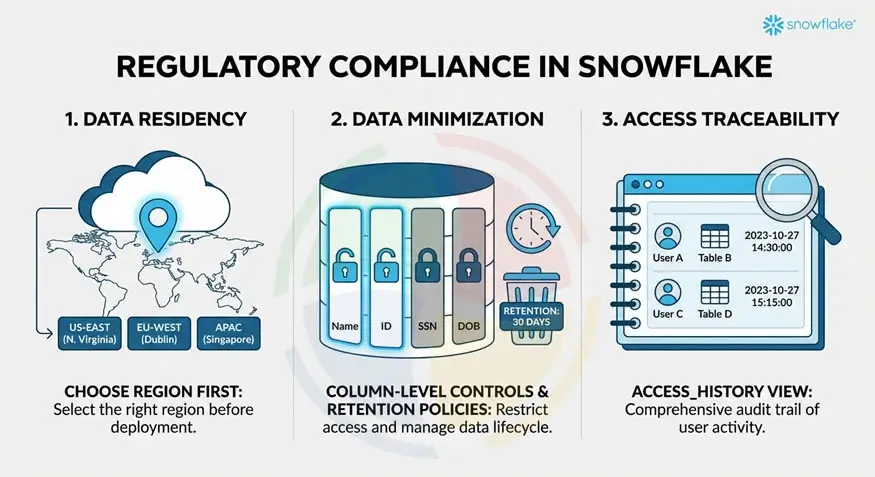
Regulatory compliance in Snowflake requires deliberate configuration aligned to specific obligations.
Three areas that need your explicit attention include:
- Data residency: Provision Snowflake accounts in the correct cloud region before any data is loaded. Changing an account’s region after the fact requires a full data migration, so decide this with your Snowflake developers before deployment.
- Data minimization: Column-level access controls should limit which fields are queryable by each role. Retention policies using Snowflake’s Time Travel settings should enforce defined data lifecycles rather than retaining everything indefinitely.
- Access traceability: Snowflake’s ACCESS_HISTORY view in the ACCOUNT_USAGE schema provides a complete record of which users accessed which tables and columns, through which roles, and when. This is the your primary evidence source for access audits.
Tip 2: Implement Policy-Based Access Controls Early
Snowflake role-based access control, built on ad-hoc privilege grants, creates governance debt that compounds with every new user, dataset, and workload added to the platform.
Policy-based access control scales in ways ad-hoc grant management cannot. Here’s how you can have it implemented:
- Assign Proper Roles: Define role templates for standard personas before onboarding any users: data consumer, analyst, engineer, steward, and admin. Each of these roles carries a defined privilege set applied consistently.
- Apply least-privilege at every layer: Snowflake database, schema, table, and column access each require explicit grants.
- Restrict access: Avoid granting ACCOUNTADMIN or SYSADMIN to operational users. These roles carry unrestricted platform access and should be restricted to named administrators with MFA enforced.
- Audit access regularly: Use SYSTEM$SHOW_GRANTS_TO_ROLE and ACCESS_HISTORY regularly to audit privilege assignments and identify roles with broader access than their scope requires.
Tip 3: Enforce Data Masking for PII and Sensitive Data
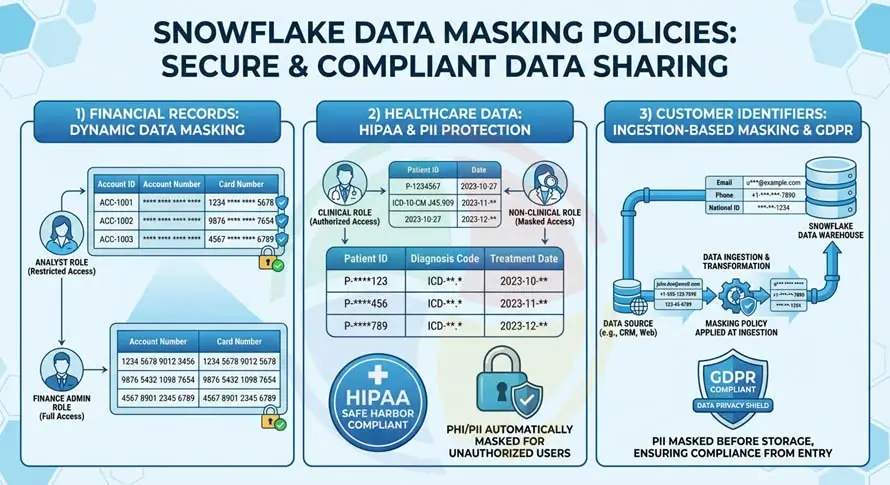
Data masking policies in Snowflake apply at query time through dynamic data masking. They return masked values to unauthorized roles without modifying underlying data:
- Financial records: Account and card numbers should be fully masked for roles needing aggregate access, with partial masking for roles that need to identify records without seeing full values.
- Healthcare data: Mask patient identifiers and diagnosis codes subject to HIPAA for all roles without clinical access. HIPAA’s Safe Harbor standard specifies 18 data element types requiring masking.
- Customer identifiers: Email addresses, phone numbers, and national ID numbers under GDPR scope need masking policies applied at ingestion.
A data steward role should manage masking policies. Policy assignments are auditable through POLICY_REFERENCES.
Tip 4: Monitor Data Usage Continuously
Governance without monitoring is a policy document. Snowflake audit logging and access monitoring need to run continuously, and here’s how:
- Review ACCESS_HISTORY weekly to identify users querying tables outside their defined scope, high-volume data extracts, and access from unusual IP addresses
- Monitor LOGIN_HISTORY for failed login attempts, logins from unexpected IP ranges, and access outside normal business hours
- Build scheduled queries against ACCOUNT_USAGE views that produce structured access reports weekly for anomaly detection and monthly for compliance reporting
- Join QUERY_HISTORY to ACCESS_HISTORY to identify specific queries that accessed sensitive tables or columns and ensure each is attributable to a legitimate business purpose
Snowflake Data Governance Best Practices
Compliance requirements define the floor. Snowflake data governance best practices define what a well-governed platform looks like beyond the minimum.
These practices/tips separate organizations managing governance proactively from those responding to it reactively.
Tip 5: Separate Administrative and Analytical Roles
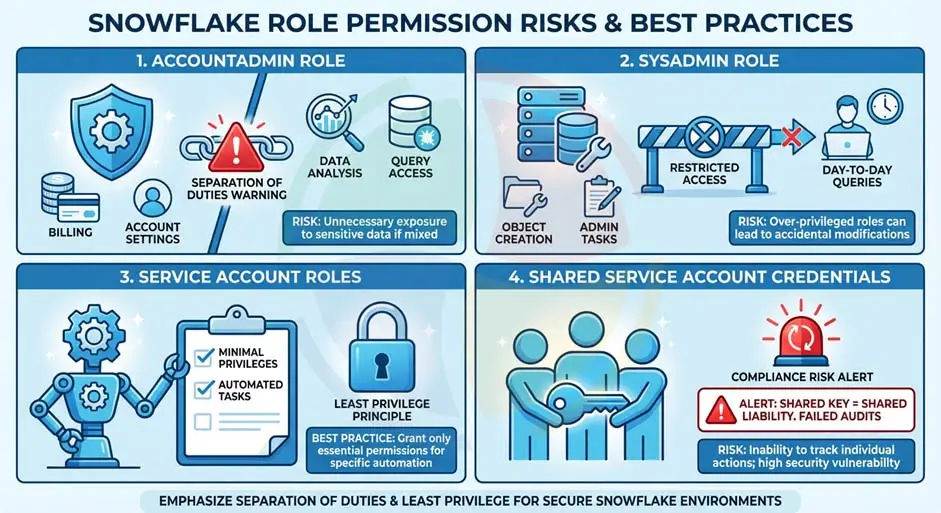
Combining administrative and analytical permissions in the same role creates internal risk that’s difficult to detect and harder to explain during an audit.
Let’s look at how these are separated:
- ACCOUNTADMIN handles billing and account-level settings only. No analytical access should run through this role.
- SYSADMIN handles object creation and database administration. It should not be used for day-to-day queries.
- Service account roles for automated pipelines should carry only the minimum privileges to execute their defined tasks.
- Shared service account credentials with broad access are a common source of compliance findings and should be avoided entirely.
Tip 6: Automate Governance with Tags and Policies
Snowflake object tagging and Snowflake data classification allow governance policies to follow data automatically rather than being applied manually:
- Define account-level tags (PII, PHI, CONFIDENTIAL, INTERNAL) that attach to databases, Snowflake schemas, tables, or columns and propagate through the object hierarchy
- Link tag-based masking policies to tag values so columns tagged PII automatically inherit the appropriate masking rule without a separate policy assignment
- Use Snowflake’s system classification functions to scan column names and sample values and suggest data classifications across large schemas
- Track tag lineage to ensure sensitivity classifications applied to raw data carry through to derived tables and views
Tip 7: Establish Data Lineage and Documentation
Snowflake data lineage tracking provides the traceability essential for compliance audits, incident investigations, and data quality reviews.
Understand how it works:
- ACCESS_HISTORY provides object-level lineage: which queries read which tables and columns, in what sequence, through which roles
- dbt’s lineage graph documents how raw data transforms through each modeling layer into analytical outputs
- Data Catalog integrations with tools like Alation, Atlan, and Collibra extend native lineage with business context, including data owners, definitions, and quality scores
- Column-level lineage is increasingly required by GDPR’s right-to-erasure obligations, where organizations must show which derived datasets contain personal data from a specific source record
Our Snowflake implementation services configure object tagging, masking policies, and lineage tracking frameworks as part of every governance engagement.
How Aegis Softtech Strengthens Snowflake Governance
Snowflake governance problems are significantly cheaper to prevent than to remediate. Privilege sprawl, ungoverned sensitive data, and audit trail gaps that accumulate over months take considerably more effort to clean up than they would have taken to configure correctly from the start.
Upon partnering with us for Snowflake development, we design and embed governance frameworks into your cloud data platform before deployment.
We assess current access control structures, identify compliance gaps against GDPR, HIPAA, and PCI-DSS requirements. Our experts also define role hierarchies, masking policies, and audit configurations that hold up under regulatory scrutiny.
If you need ongoing governance expertise embedded within your teams, we’ve got your back.
FAQs
1. What are the 5 pillars of data governance?
The five pillars are availability, usability, integrity, security, and compliance. They cover ensuring data is accessible to authorized users, fit for its intended use, accurate and consistent, protected from unauthorized access, and handled in line with regulatory obligations.
Snowflake’s native governance capabilities address all five within a single platform.
2. Is Snowflake a warehouse or lakehouse?
Snowflake is primarily a cloud data warehouse. Its support for semi-structured data, external tables, and unstructured data gives it lakehouse characteristics, and Snowflake positions the platform more broadly as the AI Data Cloud.
For most enterprise use cases, it functions as a cloud data warehouse.
3. What are Snowflake’s data governance capabilities?
Snowflake’s core governance capabilities include RBAC, dynamic data masking, column-level security, row access policies, object tagging, and data classification. Access History logging, Snowflake Horizon for unified governance, and Secure Data Sharing are also unavoidable governance and compliance parameters.
Business Critical edition adds compliance controls for HIPAA, PCI-DSS, and SOC 2 regulated workloads.
4. How do you implement row-level security in Snowflake?
Through row access policies. A policy is defined as an SQL expression that returns a Boolean, determining which rows a given role can see when querying a table.
Snowflake applies it automatically at query time, filtering results to only the rows the querying role is permitted to access. Policies typically reference mapping tables that define which data segments each role can see.
5. Does Snowflake support GDPR and HIPAA compliance?
Yes, with important caveats. Business Critical edition provides HIPAA-required technical controls, including encryption, private connectivity, and Snowflake’s willingness to sign Business Associate Agreements.
For GDPR, Snowflake provides regional account provisioning for data residency, masking for PII protection, and Access History for traceability. Compliance is a shared responsibility: Snowflake provides the controls, and customers are responsible for configuring them correctly.