Last week, a client called frantically about a customer who’d just defaulted on a $50K payment. “If only we’d seen this coming,” she said.
The irony? Her Business Central system had been flagging that exact customer as high-risk for months; she just didn’t know the feature existed.
This happens more often than you’d think.
Companies upgrade their ERP, focus on the basics, and never discover the AI tools in Business Central that could save them time, money, and stress.
In this blog post, we’ll explore the built-in AI capabilities you already have and show you how to put them to work.
Key Takeaways
- AI is already built-in: Business Central includes AI features (Copilot, forecasting, predictions) in existing subscriptions—often unused.
- Automates key workflows: Tasks like bank reconciliation, reporting, and product content creation are handled faster with minimal manual effort.
- Predicts risks early: AI flags late payments, cash flow gaps, and demand changes so teams can act before issues escalate.
- Improves decisions across teams: Finance, supply chain, sales, and leadership get real-time insights and smarter recommendations.
- Requires proper setup: Success depends on clean data, user adoption, phased rollout, and the right licensing strategy.
AI Tools in Business Central: Why They Matter
Microsoft Dynamics 365 Business Central looked completely different five years ago.
Most users spent their mornings manually keying invoices and afternoons guessing which products to reorder. Now, companies across every industry are discovering that AI adoption in ERP platforms can eliminate these time-draining tasks.
Microsoft took an unconventional approach here. Rather than building separate AI tools that cost extra, they embedded intelligence directly into Business Central.
Your existing subscription already includes predictive Business Central features that other ERP vendors charge thousands for as premium add-ons.
Benefits of AI in Business Central
So what changes when you turn these features on? The impact hits every corner of your business:
- Spot customers who’ll default on payments weeks before it happens
- Generate compelling product descriptions that sound like a human wrote them
- Get precise inventory suggestions that factor in your unique sales patterns
- Complete bank reconciliation in under 10 minutes most days
- Catch potential cash crunches early enough to do something about them
Business Central Copilot AI Tools
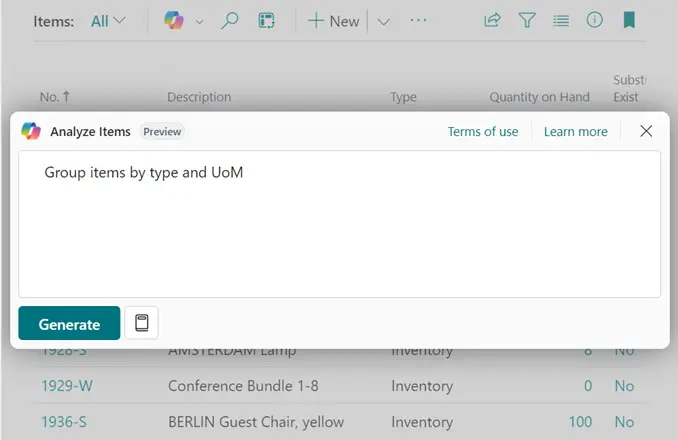
Business Central Copilot AI’s natural language interface removes the technical barriers that typically limit AI adoption across organizations.
via Microsoft Learn
You can request complex analysis through conversational commands:
- Purchase order creation: Tell Copilot, “I need office supplies for Q3 based on our usual consumption,” and watch it analyze your spending patterns, identify vendors, and generate complete orders.
- Financial reporting: Ask “Show me our cash position trends for the last six months,” and receive formatted reports with charts.
- Content generation: Request “Write product descriptions for our new inventory items that highlight sustainability,” and get on-point marketing copy.
When you ask Copilot for “overdue invoices,” it knows you don’t want to see internal transfers or partial payments cluttering your results. This contextual intelligence separates it from basic search functions that dump everything onto your screen.
Late Payment Prediction
The benefits of AI in Business Central hit home when you can prevent cash flow disasters before they happen.

via Microsoft Learn
The Late Payment Prediction extension applies machine learning in Business Central to help you anticipate risk before it damages cash flow.
What it does in practice:
- Analyzes past customer behavior, invoice amounts, due dates, and patterns of delay
- Tags invoices with confidence levels (high, medium, low) for the likelihood of late payment
- Surfaces alerts directly on invoice pages and role dashboards so finance teams can take preventive action
For example, if a customer consistently delays payments on large invoices, the AI model will flag new invoices from them as “high risk.” That gives you a chance to renegotiate payment terms, request deposits, or plan reserves accordingly.
Inventory Forecasting
Traditional inventory management often resembles educated guesswork, but AI-driven automation in Business Central eliminates costly speculation through mathematical precision. The forecasting engine processes your complete sales history, seasonal variations, and external demand drivers to generate accurate replenishment recommendations.
The system identifies non-obvious correlations that impact your specific market segment.
A sporting goods retailer discovered that tennis equipment sales consistently spiked whenever the local high school team advanced in regional tournaments. Meanwhile, a food service distributor found that ice cream orders correlated with weather forecasts two weeks in advance, allowing them to optimize inventory before competitors.
These advanced forecasting capabilities address:
- Supplier lead time optimization: Calculate safety stock requirements based on vendor delivery performance, reducing carrying costs while maintaining service levels.
- Seasonal demand evolution: Recognize shifts in customer behavior patterns year-over-year to prevent obsolescence and stockout situations.
- Product lifecycle management: Detect declining demand trends early enough to implement inventory reduction strategies before write-offs become unavoidable.
This approach converts working capital from inventory carrying costs into available resources for strategic investments.
Cash Flow Forecasting
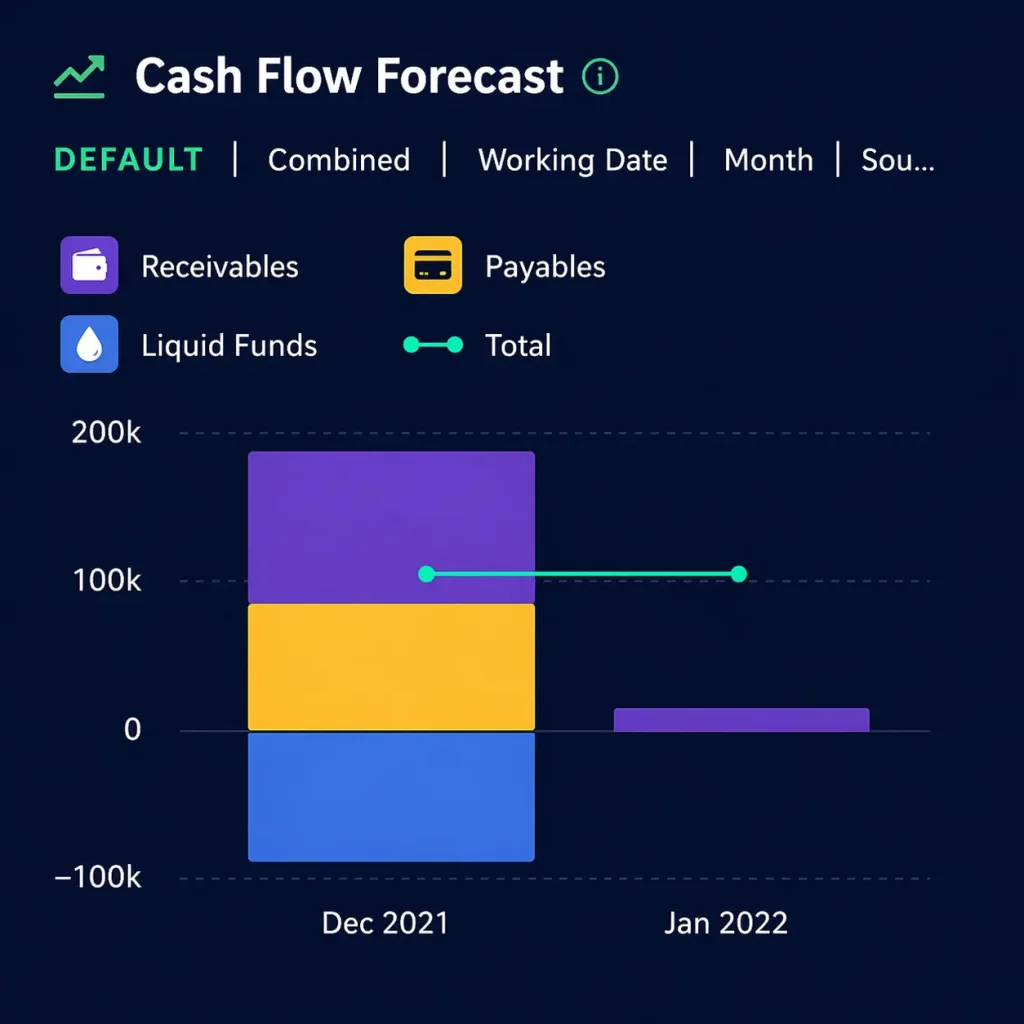
Beyond basic budgeting, predictive insights with Business Central produce:
- Detailed liquidity projections that incorporate payment timing probabilities
- Seasonal cash flow patterns
- Operational funding requirements specific to your business model
These projections update automatically as new transactions are processed and customer payment behaviors evolve.
How you can use it:
- Plan ahead: Identify potential shortfalls weeks or months in advance, giving you time to secure financing.
- Scenario analysis: Model different “what-if” cases (e.g., what if a major customer delays payment by 30 days?) to stress-test your plans.
- Real-time updates: Refresh forecasts automatically as new invoices, payments, or transactions are entered.
This tool shifts cash flow management from reactive firefighting to proactive planning. Finance teams no longer need to scramble at the last minute to cover shortfalls.
AI-Powered Reporting and Insights
via Microsoft
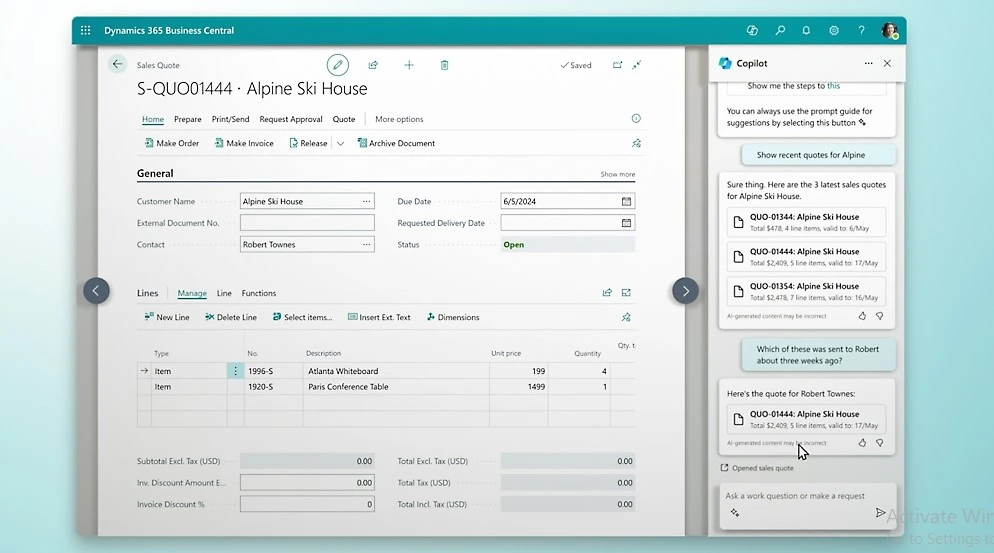
Machine learning in Business Central delivers forward-looking business intelligence that supports strategic decision-making. The system adapts to individual user roles, surfacing relevant insights while filtering out information that does not contribute to their specific responsibilities.
Further, role-based dashboard customization in Business Central ensures each user receives actionable information.
Power BI integration lets you:
- Detect emerging patterns in customer behavior, operational performance, or market conditions
- Receive automated alerts for unusual transactions, performance deviations, or developing risks that require immediate attention
- Access plain English explanations for complex data patterns, such as “Customer acquisition costs decreased 12% due to improved referral program effectiveness”
Real-World Use Cases of AI in Business Central
AI features only matter when they solve practical problems. Here are real-world applications of AI in Dynamics 365 Business Central for different teams.
Finance Teams
Finance teams must keep operations accurate, compliant, and progressive. AI helps them move from reactive reporting to proactive financial management. Here’s what that looks like:
- Automated reconciliations: Bank transactions are matched with ledger entries, eliminating hours of manual review.
- Payment predictions: Machine learning in Business Central identifies invoices at risk of delay, giving teams time to follow up or adjust credit terms.
- Cash flow planning: Insights from overdue invoice predictions feed into cash flow forecasting, helping CFOs plan liquidity with greater confidence.
Supply Chain Teams
Inventory and supplier management demand accuracy, and small miscalculations can disrupt the entire flow.
AI tools in Business Central provide visibility to help managers stay one step ahead. Let’s see how that plays out:
- Smarter replenishment: Stock levels are adjusted with AI-driven reorder suggestions to reduce both shortages and excess inventory.
- Vendor performance monitoring: Predictive analytics highlight suppliers likely to miss deadlines, helping procurement teams prepare alternatives.
- Demand forecasting: Seasonal and historical sales trends are analyzed to keep the right products available without tying up unnecessary capital.
Sales Teams
Sales teams thrive when they can focus on customers instead of admin work. AI reduces manual effort and brings clarity to pipeline priorities. Here’s how it supports them:
- Customer targeting: High-value prospects are identified using purchase behavior and engagement patterns.
- Quote generation: Business Central Copilot AI drafts proposals with accurate product and pricing details, shortening approval cycles.
- Cycle visibility: The full quote-to-cash process is tracked with AI, highlighting bottlenecks and showing managers where improvements are needed.
Executives and Decision-Makers
Executives need foresight to guide growth and risk planning. Predictive insights with Business Central help leadership teams gain that edge.
Here’s how it helps at the top level:
- AI-driven models support planning for expansion, mergers, and new market entry
- Real-time, role-based dashboards powered by AI-powered reporting and insights keep leaders updated on critical KPIs
- Executives simulate events such as demand surges or supply chain disruptions, using AI projections to evaluate outcomes before committing resources
Challenges and Considerations with AI Tools in Business Central
Data quality, user adoption, compliance, over-reliance on automation, and licensing are some of the challenges organizations face with Business Central AI tools.
You must address these considerations to get the best results from Microsoft Dynamics 365 Business Central AI features.
Let’s take a closer look.
Data Quality and Integration
For predictive analytics and machine learning models to work effectively, the underlying data must be clean and reliable. Duplicate records, outdated entries, or disconnected systems can reduce accuracy.
Companies often need to:
- Standardize data entry practices across teams
- Consolidate information from disconnected ERP, CRM, and legacy systems
- Perform ongoing data governance to maintain model accuracy
If you want expert help, Aegis Softtech provides end-to-end integration support and ensures your data foundation is strong enough for reliable AI-driven automation in Business Central.
User Adoption and Training
Even advanced Microsoft Dynamics 365 Business Central AI features may fail if employees don’t trust or understand them. Building user confidence requires:
- Hands-on training to show how AI recommendations align with historical outcomes
- Clear explanation of how models work, reducing skepticism from finance and operations professionals
- Change management programs to embed AI into daily workflows rather than treating it as an optional add-on
Adoption grows when employees see transparency and personal benefit.
Licensing and Cost Implications
AI in Business Central is not included in every license tier. Some features, like Business Central Copilot AI, require higher-tier subscriptions or add-on modules.
Before investing, companies should:
- Assess the total cost of ownership, including licensing and implementation
- Calculate expected ROI from efficiencies such as reduced manual reconciliation or optimized stock management
- Plan budgets for ongoing AI model updates and system improvements
Compliance and Security Risks
With AI for finance and supply chain management, sensitive information is constantly analyzed, making compliance and security non-negotiable. Weak governance can trigger penalties or erode client trust.
You should be prepared for:
- AI processing personal data that falls under GDPR or HIPAA rules
- Predictive models creating new categories of data that require monitoring
- Poor access controls could expose financial forecasts or supplier contracts
Over-Reliance on Automation
AI-driven automation in Business Central accelerates tasks, but relying on it blindly risks missing nuances that only human expertise can catch.
Additionally:
- Predictive models don’t always account for sudden market shocks
- Automated payment recommendations might miss unique customer arrangements
- Blind acceptance of AI forecasts reduces critical thinking
Create review checkpoints where humans confirm high-impact outputs to strike a balance between speed and judgment.
How Aegis Softtech Supports Your Business Central AI Journey
The real strength of AI tools in Business Central comes from how it’s applied.
Tools like Copilot, forecasting models, and predictive insights can transform finance, supply chain, and sales operations when backed with the right foundation and adoption plan.
Partnering with experts ensures you make Microsoft Dynamics 365 Business Central AI features work for your business. Aegis Softtech offers support across every stage of the AI journey.
First, our Business Central consultants conduct an AI readiness assessment to identify gaps in your current Business Central environment. They evaluate whether your data, workflows, and integrations are suitable for deploying AI-driven automation in Business Central.
Next, our Business Central Services help with tailored implementation:
- Setting up Copilot, inventory forecasting, and predictive insights so they align with your operations
- Embedding AI into existing processes for finance, supply chain, and sales without disrupting day-to-day operations
- Equipping staff with the skills and confidence to rely on AI-driven insights
- Continuously tuning models and dashboards to reflect changing business conditions
Plus, our Business Central Implementation Services ensure you unlock the full potential of AI tools in Business Central without running into adoption roadblocks.
Working with Aegis on our Microsoft Dynamics 365 Business Central implementation has been a great experience. Their deep industry knowledge and dedication to delivering results on time gave us confidence in their work.
Take the next step with Aegis Softtech. Schedule a consultation with our expert team today!
FAQs
1. What is AI in Business Central?
AI in Business Central refers to intelligent features built directly into Microsoft Dynamics 365 Business Central that automate tasks and provide predictive insights.
These include Copilot for natural language assistance, payment prediction to identify late-paying customers, inventory forecasting for optimal stock levels, and cash flow projections. The AI analyzes your business data to make recommendations and automate routine processes.
2. How to enable Copilot chat in Business Central?
To enable Copilot in Business Central:
- Go to the Feature Management page in your admin center
- Find Copilot and AI capabilities in the feature list
- Turn on the toggle to enable the feature
- Assign appropriate user permissions through the User Groups or Permission Sets
- Users will then see the Copilot icon in their Business Central interface
3. Can Copilot do bank reconciliation?
Yes, Copilot can assist with bank reconciliation in Business Central. It can automatically match bank statement lines with existing ledger entries, suggest matches for unrecognized transactions, and help resolve discrepancies.
However, it works as an assistant tool. You still need to review and approve the matches Copilot suggests. The AI learns from your approval patterns to improve future matching accuracy.
4. Can SMBs benefit from AI features in Business Central?
Absolutely. AI features in Business Central are specifically designed for small and medium businesses. SMBs benefit from:
- Automated invoice matching and bank reconciliation that saves hours weekly
- Payment risk alerts that prevent cash flow surprises
- Inventory recommendations that reduce carrying costs
- Financial forecasting that supports better planning decisions
- Natural language queries that eliminate complex reporting setup
The AI works with your existing data, so even smaller businesses with limited transaction history can see improvements.
5. Do you need Premium licensing to use AI tools in Business Central?
It depends on the specific AI feature:
- Basic Copilot features: Included with standard Business Central licenses
- Advanced AI capabilities (like detailed predictive analytics): May require premium licenses or additional capacity units
- Power Platform integration: Might need separate Power BI or Power Automate licenses
Some AI features consume “AI Builder credits” which have usage limits. Contact your Microsoft partner to review your specific licensing needs based on which AI features you want to use and your expected usage volume.