Most IT departments treat their Configuration Management Database (CMDB) like that gym membership they bought in January: full of good intentions, rarely used, and quietly draining resources.
But here’s the thing: a properly implemented CMDB becomes the single source of truth that determines whether your incident response is proactive firefighting or reactive compliance.
Without accurate CMDB data, that “simple” server patch takes down three applications nobody knew were connected.
This guide helps you build a CMDB that actually works. It is a step-by-step implementation roadmap covering planning, Discovery, CSDM alignment, governance, and scaling.
Key Takeaways
ServiceNow CMDB implementation is the structured deployment of a configuration management database to centralize CI data, relationships, and lifecycle management
Core Steps:Scope & plan → Configure CI classes & CSDM alignment → Set up Discovery & data sources → Define IRE rules → Establish governance → Monitor CMDB Health
Key Components:CI classes, Discovery, Service Graph Connectors, Identification & Reconciliation Engine (IRE), CSDM 4.0 framework, CMDB Health Dashboard
Best Fit:Organizations with 500+ CIs needing a single source of truth for ITSM, change management, incident response, and compliance
What to Do Before Starting Your ServiceNow CMDB Implementation?
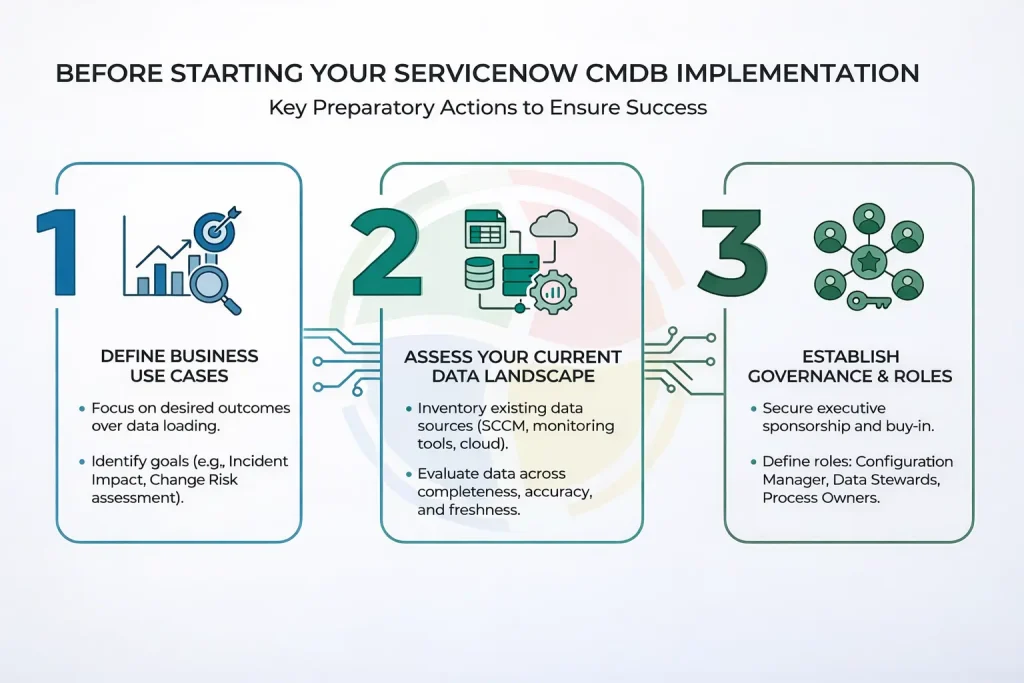
Before you touch a single configuration item, you need to answer one question: “What will this CMDB actually help us do?”
Not “what data should we load?”; that’s putting the cart before the horse. And trust us, that cart is heavy.
So, here are the prerequisites of implementing ServiceNow CMDB:
Define Business Use Cases First
Start with outcomes, not inputs. Common use cases include:
- Incident impact analysis: When a server goes down, what services break?
- Change risk assessment: What could this patch actually break?
- Service dependency mapping: Which CIs support critical business services?
- Compliance auditing: Can we prove what’s in our environment?
- Asset lifecycle management: When does hardware need replacement?
Assess Your Current Data Landscape
Inventory your existing data sources before importing anything:
- Spreadsheets (yes, we know they exist)
- Monitoring tools
- SCCM/Intune
- Cloud consoles (AWS, Azure, GCP)
- Legacy CMDBs
Evaluate data quality across four dimensions: completeness, accuracy, freshness, and format consistency.
Also, identify authoritative sources for each CI type. Discovery should be your primary source, supplemented by Service Graph Connectors and IntegrationHub ETL.
Secure Stakeholder Buy-In and Governance Structure
CMDB implementation is an organizational initiative that requires executive sponsorship and clear accountability. Remember, it’s not your other technical project.
Define these roles upfront:
| Role | Responsibility |
| Configuration Manager | Overall CMDB strategy and health |
| Data Stewards | Per-CI-class ownership and validation |
| Process Owners | Define how CMDB data supports ITSM processes |
| CMDB Analyst | Day-to-day maintenance and troubleshooting |
We’ve seen million-dollar CMDB projects stall because nobody assigned CI ownership. Without data stewards, your CMDB becomes a data graveyard within six months.
— ServiceNow Practice Lead, Aegis Softtech
Step-by-Step Tutorial for ServiceNow CMDB Implementation
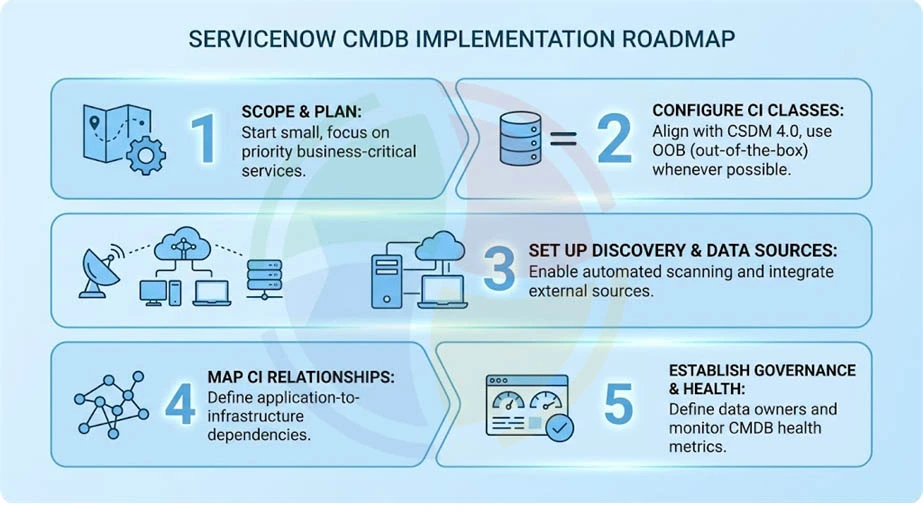
Now that the foundation is set, let’s walk through the implementation phases. And no, “copy everything from the old CMDB” is not a valid strategy.
Step 1: Scope CI Classes and Align with CSDM 4.0
Start small. Focus on business-critical CI classes tied to your priority use cases:
- Servers
- Applications
- Databases
- Network devices
Next, align with CSDM 4.0 domains: Business Applications, Application Services, Technical Services, and their CI relationships.
Use OOB (out-of-the-box) CI classes whenever possible—do not extend directly off the cmdb_ci base class.
And, place custom attributes at the correct inheritance level (e.g., BIOS Date on Server class, not on Windows/Linux/UNIX individually). Custom tables must follow the naming convention: u_cmdb_ci_*.
Step 2: Configure Identification & Reconciliation Engine (IRE)
IRE prevents duplicate CIs and reconciles data from multiple sources. It’s the backbone of CMDB data quality, and skipping this step is like building a house without a foundation.
Technically possible, but you’ll regret it.
Configure identification rules by defining unique identifiers for each CI class.
For hardware, use serial number + hostname.
Next, set reconciliation rules to prioritize authoritative data sources when conflicts arise.
And, do not alter OOB relationship types in cmdb_rel_type – modifications break Discovery and cause cascading errors.
Step 3: Set Up ServiceNow Discovery and Data Ingestion
ServiceNow Discovery setup uses agentless, credential-based scanning of infrastructure. This should be your primary CMDB population method, handling 70-80% of your data.
Start by configuring Discovery schedules, IP ranges, and credential sets for your environment.
Deploy Agent Client Collector (ACC) for endpoints outside network reach—laptops, remote devices, and that one developer who insists on working from a coffee shop.
Enable Service Graph Connectors for the cloud environments (AWS, Azure, GCP) to sync cloud CIs automatically. Use IntegrationHub ETL for non-standard sources that Discovery can’t reach.
Finally, set automated validation rules at ingestion to catch malformed or incomplete data on entry. Garbage in, garbage out still applies in the cloud era.
Step 4: Map CI Relationships and Service Dependencies
Relationship mapping is what separates a useful CMDB from a glorified inventory list.
Use Service Mapping to auto-discover application-to-infrastructure dependencies.
Follow CSDM relationship patterns:
Also, validate upstream/downstream dependencies for critical services; this enables accurate change impact analysis.
Use the Dependency View map in ServiceNow to visualize and verify relationship chains.
Step 5: Establish Data Quality Controls and CMDB Health Monitoring
Enable the CMDB Health Dashboard and configure health metrics across three dimensions:
- Correctness: Are attribute values accurate?
- Completeness: Are required fields populated?
- Compliance: Do CIs follow governance policies?
Set up duplicate CI detection rules and schedule automated remediation jobs. Implement stale CI policies to flag CIs not updated within 30-60 days for review or retirement.
Configure CMDB Data Manager (available since Rome release) for lifecycle and policy-based CI management.
Target these CMDB health KPIs:
| Metric | Target |
| Duplicate rate | < 2% |
| Data completeness | > 95% |
| Stale CIs | < 5% |
ServiceNow CMDB Implementation Example: Mid-Size Enterprise Walkthrough
A focused, phased ServiceNow CMDB implementation can quickly deliver measurable operational improvements.
Let’s walk through a real-world style scenario.
Say, a 2,000-employee financial services firm needed better visibility into infrastructure dependencies. Their goal was simple: reduce change failures and speed up incident resolution by implementing a reliable CMDB aligned with CSDM 4.0.
Here’s how they’d go about it:
Phase 1: Scope and Data Ownership (Weeks 1–2)
Instead of trying to model the entire environment, the team started with three high-value CI classes:
- Servers
- Business Applications
- Network Devices
They aligned the structure with CSDM 4.0 and assigned Data Stewards for each CI class to maintain ownership and data quality.
The implementation included initial ServiceNow development work to configure CI relationships, lifecycle states, and governance rules.
Phase 2: Discovery and Data Population (Weeks 3–5)
Next came automated data ingestion.
Key configurations included:
- ServiceNow Discovery for on-prem servers
- Azure Service Graph Connector for cloud infrastructure
- Identification and Reconciliation Engine (IRE) rules to prevent duplicate CIs
The company also completed a small ServiceNow migration of legacy asset records into the new CMDB structure to maintain historical accuracy.
Phase 3: Service Mapping and Health Monitoring (Weeks 6–8)
With the data foundation ready, the team mapped service dependencies using Service Mapping.
They also configured the CMDB Health Dashboard to track:
- Completeness
- Compliance
- Correctness
At launch, the CMDB contained 1,200 configuration items with 94% completeness.
Results
Within the first quarter, the impact was immediate:
- 40% reduction in change-related incidents
- MTTR dropped from 4.2 hours to 2.5 hours
Key lesson: Start small, prove value with clear KPIs, and expand. After demonstrating success, the firm added additional CI classes and expanded service mapping in the following quarter.
ServiceNow CMDB Implementation Best Practices
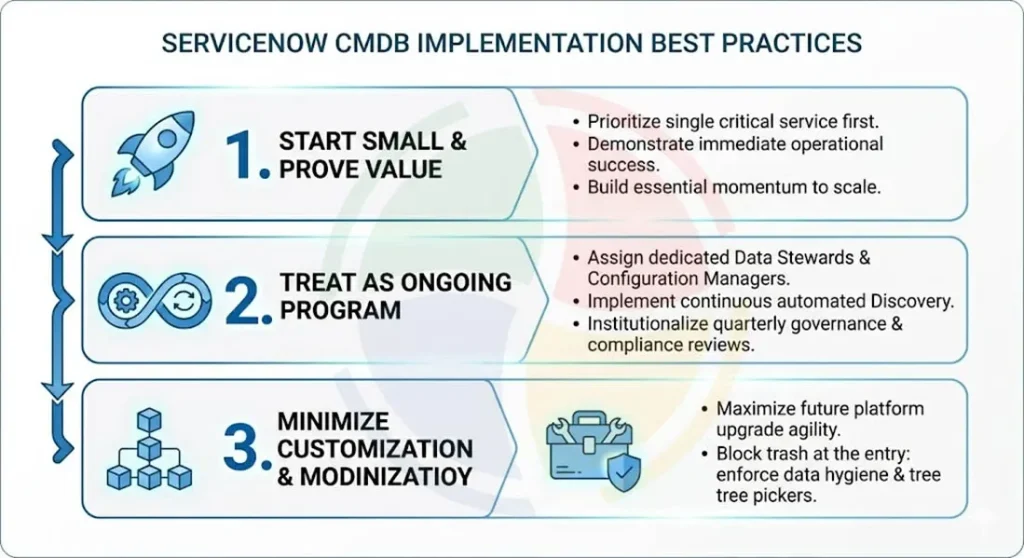
While the technical ServiceNow implementation of CMDB provides the foundation, your execution strategy determines the ROI. To move from a ‘data repository’ to a ‘strategic asset,’ adopt these industry-proven best practices:
#1: Start Small, Prove Value, Then Scale
The most effective strategy is to start small by focusing on a single business-critical service and its supporting CIs, rather than attempting to address all 800+ OOB classes at once.
By proving the CMDB’s value through measurable outcomes, you can build the necessary momentum to scale the implementation across the rest of the organization.
#2: Treat CMDB as an Ongoing Program, Not a One-Time Project
Stop treating your CMDB as a one-off project and start managing it as a living program. First, assign dedicated Configuration Managers and Data Stewards to ensure accountability.
Next, move beyond static imports by implementing continuous Discovery schedules that reflect your real-time environment. Finally, institutionalize quality through quarterly governance reviews and annual CSDM audits.
This shift from “done” to “evolving” prevents data decay and transforms your CMDB into a reliable, strategic asset for the long haul.
#3: Minimize Customization and Maximize OOB
Ensure your ServiceNow developers maximize upgrade agility by leveraging baseline CI classes and attributes first; your future self will thank you.
Crucially, enforce data hygiene: mandate tree pickers for fields, such as Location, to block typo-induced duplicates.
Ultimately, hold someone accountable: every Business Application needs an assigned Business Owner.
#4: Enforce Tagging and Access Controls from Day One
Lock the gates with role-based access: if they aren’t a Configuration Manager or CI owner, they shouldn’t be touching your data.
Next, weaponize your validation rules. Force mandatory fields so “TBD” doesn’t become your most common CI name. Garbage in leads to chaos out; so, stop the trash at the doorstep.
The teams that succeed with CMDB are the ones with the cleanest data and the clearest ownership. Quality over quantity, every single time.
— VP of IT Operations & Compliance, Aegis Softtech
Common CMDB Implementation Pitfalls and How to Avoid Them
Even the most well-planned projects encounter obstacles. Knowing the common missteps can save you months of rework.
Here are the most frequent implementation pitfalls we see and how to fix them:
| Pitfall | Why It Happens | How to Fix It |
| Loading all CIs at once | Trying to boil the ocean from day one; leads to poor data quality and overwhelmed teams | Scope to business-critical services first; expand incrementally |
| Skipping relationship mapping | Focus on CI attributes only; impact analysis becomes impossible | Use Service Mapping + CSDM relationship patterns from the start |
| No governance plan | Unclear ownership; data decays within months | Assign Data Stewards per CI class; schedule quarterly reviews |
| Over-customizing CI classes | Custom classes and attributes create upgrade debt and break Discovery | Use OOB classes/attributes; customize only with clear justification |
| Ignoring CSDM alignment | Data ends up in wrong tables; inconsistent service views across ITSM | Align all CI classes to CSDM 4.0 domains before population |
| One-time data load mindset | CMDB accuracy degrades without continuous refresh | Automate with Discovery schedules + Service Graph Connectors |
Build a Trusted CMDB Foundation with Aegis Softtech
A successful ServiceNow CMDB implementation starts with clear use cases, CSDM alignment, automated Discovery, and relentless governance, not a massive data dump. Aegis Softtech partners with organizations implementing or optimizing CMDB within ServiceNow. Our ServiceNow consulting team brings 80+ successful implementations, 40+ certified consultants, and 12+ years of delivery experience.
FAQs
1. What is ServiceNow CMDB implementation?
ServiceNow CMDB implementation is deploying the Configuration Management Database to store, manage, and track configuration items and their relationships. It enables accurate impact analysis, change risk assessment, and IT infrastructure visibility.
2. How long does a typical CMDB implementation in ServiceNow take?
A focused CMDB implementation takes 6-12 weeks for initial deployment, depending on scope and data readiness. Starting with 3-5 CI classes aligned to business-critical services accelerates time-to-value significantly.
3. What are the best practices for ServiceNow CMDB implementation?
Start small with high-value use cases, align with CSDM 4.0, automate population via Discovery, assign Data Stewards per CI class, and monitor CMDB Health Dashboard weekly. Avoid over-customization and one-time data imports.
4. What is the role of CSDM in CMDB implementation?
The Common Service Data Model provides a standardized framework for organizing CIs and their relationships. CSDM alignment ensures data lands in the correct tables and maintains consistency across ITSM processes.
5. How does ServiceNow Discovery populate the CMDB?
ServiceNow Discovery uses agentless, credential-based scans to detect infrastructure CIs and auto-populate the CMDB. It supports IP-based and cloud-based Discovery, supplemented by Agent Client Collector for remote endpoints.