Tableau Server isn’t the same platform it was two years ago. Between the 2025.1, 2025.2, 2025.3, and 2026.1 releases, the platform has seen a significant expansion in AI capabilities, governance tooling, security controls, and visualization options.
If you’re running Tableau Server on-premises or in hybrid environments, keeping up with what’s changed and what it means for your analytics operations is genuinely useful.
This guide covers the most significant Tableau Server new features across the recent release cycle. We also cover what each one does and how it changes the way your teams build, manage, and consume analytics across modern Tableau development solutions.
Key Takeaways
- Tableau Agent: Natural language analytics, dashboard narratives, and AI-powered insights are now generally available in Tableau Server 2025.3. Requires linking your own OpenAI API key.
- Semantic Modeling: Tableau Semantics models can be shared across workbooks, auto-generated from workspaces in natural language, and used as the source of truth for business logic across teams
- Security Upgrade: IP filtering, SAML REST API configuration, User Attribute Functions for dynamic RLS, and OIDC SCIM support are all live in recent releases
- New Chart Types: Donut and sunburst charts via the Radial Viz Extension, rounded corners for dashboard objects, and improved Sankey and Table viz extensions
- Proactive Administration: Admin Insights, Dashboard Summaries, and the Platform Data API give administrators visibility into usage, adoption, and activity logs without manual investigation
- Connector Landscape: The Starburst connector is generally available, Prep can write directly to Databricks, and Marketo and Oracle Eloqua connectors are deprecated and removed in 2026.1
Tableau Server 2026.1 and Recent Releases: What’s New

via Tableau
The recent Tableau release cycle has pushed hard in three directions: AI-powered analytics embedded directly into the server environment, stronger governance and semantic layer tooling, and security enhancements that give administrators more control without adding management overhead.
The headline categories across Tableau Server 2026.1 and recent releases:
- AI and agent capabilities: Tableau Agent is now generally available in Tableau Server, bringing natural language analytics directly into the server environment.
- Semantic modeling: New tools for building, sharing, and auto-generating semantic models that define consistent business logic across all workbooks.
- Security and access control: SAML REST API configuration, User Attribute Functions for row-level security, and IP filtering controls.
- Visualization enhancements: Radial charts, rounded corners, improved viz extensions, and custom color palette support.
- Governance and administration: Dashboard summaries, Admin Insights, and the Platform Data API for programmatic activity monitoring.
- Connector updates: Starburst connector now generally available, Prep write-to-Databricks, and deprecation of Marketo and Oracle Eloqua connectors in 2026.1.
Performance Improvements in Tableau Server
Performance in enterprise Tableau Server environments comes down to how efficiently queries run, how reliably connections initialize, and how well the server handles concurrent workloads. The 2026.1 release addresses all three.
Starburst Connector with JWT Authentication
As established above, the Starburst connector is now generally available in Tableau Server, Tableau Desktop, and Tableau Prep. The modern JWT auth method accelerates connection initialization by eliminating validation queries. It also supports flexible server addressing through IP input and enables workload attribution through client tags.
For teams connecting Tableau Server to Starburst Galaxy, this matters in three specific ways:
- Removing validation queries on every connection startup reduces the latency users experience when opening dashboards that hit Starburst data sources
- IP-based server addressing removes DNS resolution delays that were adding overhead to every session
- Client tags let administrators track which dashboards are generating the heaviest load on the Starburst cluster, making capacity planning significantly more accurate
Semantic Model Reuse Reduces Redundant Query Load
via Tableau
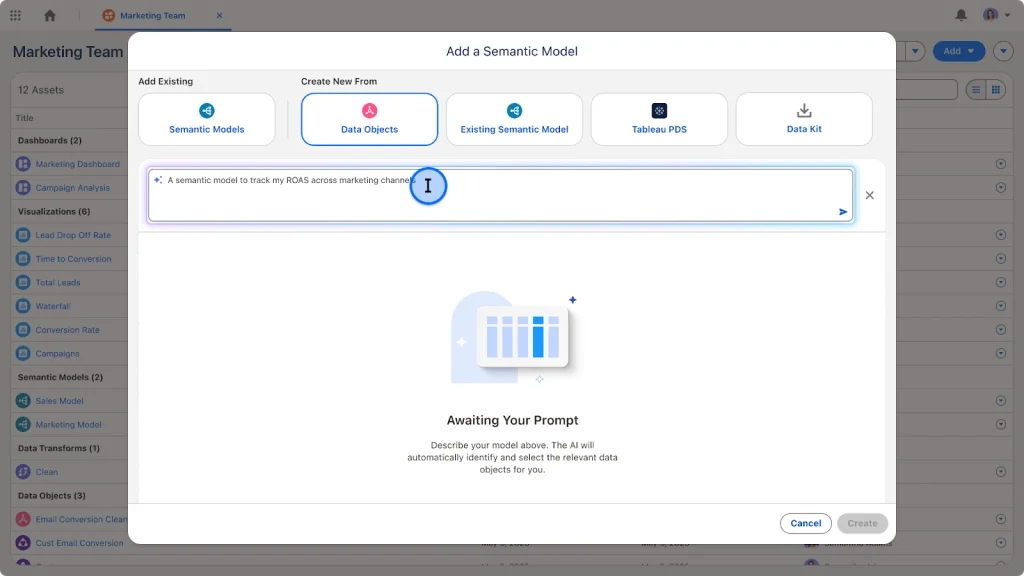
Tableau 2026.1 introduces Auto-Generate Semantic Models from Workspaces, allowing users to create semantic models with natural language directly from Tableau Next Workspaces. It automatically maps objects and relationships to move from raw data to a structured semantic layer in seconds.
Beyond the authoring convenience, shared semantic models have a direct performance implication. When every workbook defines its own version of the same metric, the server runs redundant variations of the same query. Centralizing business logic through a shared semantic model means:
- One optimized query runs at the model level, reused across all workbooks referencing it
- Downstream workbooks no longer duplicate calculation logic, reducing total query volume on the server
- Cross-domain analysis runs from a single multi-fact model rather than joining redundant data source copies
Connector Deprecations: Action Required Before Upgrading
The Marketo and Oracle Eloqua connectors are officially deprecated and will be removed in version 2026.1.
Organizations must begin content migration immediately to avoid service disruptions. JDBC-based replacement connectors are available for download via Tableau Exchange.
If your environment uses either connector, here’s what to do before upgrading to 2026.1:
- Audit all workbooks and data sources using Marketo or Oracle Eloqua connections across every project and site
- Download the JDBC replacement connectors from Tableau Exchange and configure them in your environment
- Test migrated data sources in a staging environment before cutting over production workbooks
- Notify workbook owners of the migration timeline well ahead of the 2026.1 upgrade window
Aegis Softtech handles server upgrades, connector migrations, and performance configuration end-to-end.
Collaboration Features in Tableau Server
Collaboration in Tableau Server has historically been passive: you share a workbook and leave the interpretation to the recipient. The 2026.1 release pushes toward a model where analytical context is built into the content itself, and where analysts have governed spaces to develop new work without disrupting production.
Personal Orgs for Governed Self-Service Development
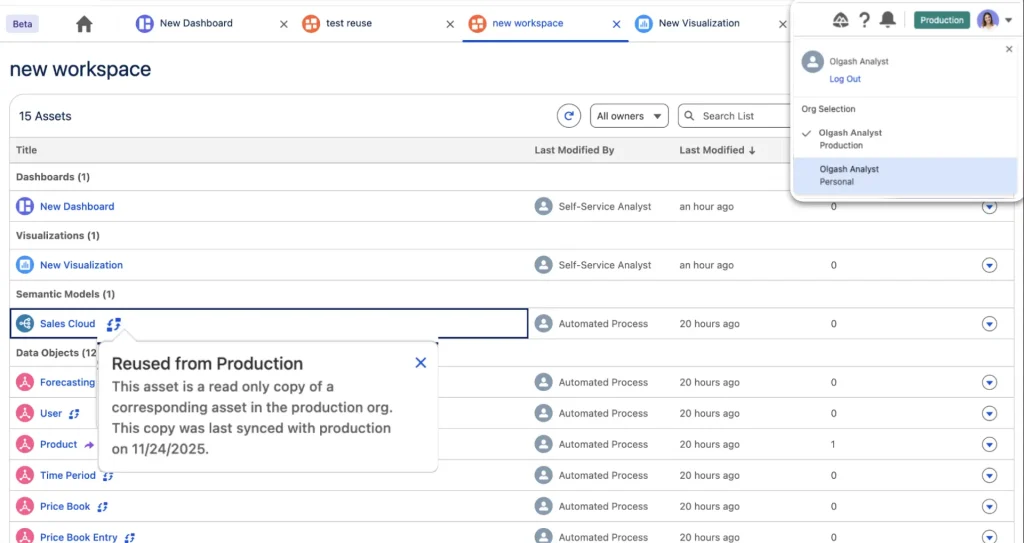
Personal Orgs provide analysts with a secure and flexible environment to build new analytics. This empowers teams to self-service by extending governed assets with new data before approved assets go into production.
via Tableau
This solves a persistent tension in enterprise Tableau deployments. Without dedicated development spaces, analysts either work directly in production workspaces (cluttering certified content with work-in-progress) or build in ungoverned shadow environments outside the server entirely.
Personal Orgs gives them a third option:
- A sandboxed space to develop and test new analytics against governed data sources
- The ability to extend certified assets with new fields or calculations without modifying the source directly
- A clear promotion path from Personal Org to production, with administrator oversight at every step
- No disruption to certified content during the development cycle
Dashboard Summaries for Metric Context
via Tableau
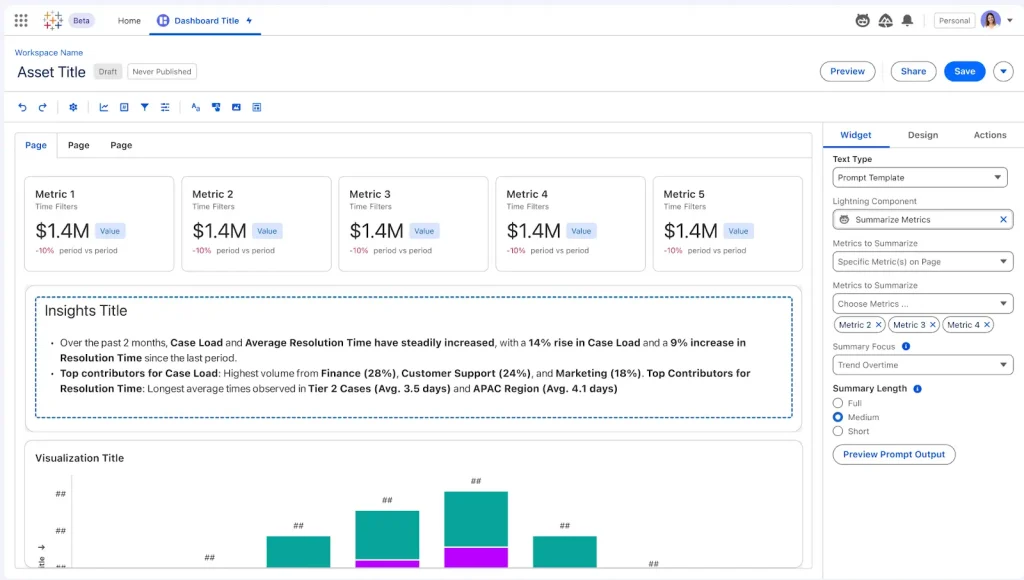
Dashboard Summaries let users quickly understand what is happening and why by configuring a dynamic text component that shows a text-based summary across metrics.
For organizations where dashboard consumers aren’t data analysts, this changes how they interact with reports:
- Stakeholders get a written summary of what the dashboard is showing before they start interpreting charts
- The text component is dynamic, updating with the underlying data rather than being a static description written at publish time
- Report authors can configure which metrics drive the summary, keeping the narrative focused on what matters
- Reduces the need for separate briefing documents or explanation emails alongside every published Tableau dashboard
Tableau Pulse Enhanced Q&A
Enhanced Q&A surfaces meaningful correlation insights between metrics, reporting the relationship strength, direction, and significance with a supporting visualization.
Custom queries on the Tableau Pulse homepage allow business users to ask their own questions first, without needing to start from a suggested question.
What this enables in practice:
- Business users can start their own analytical queries from the Pulse homepage
- Correlation insights automatically surface relationships between metrics from different data sources, connecting dots that would otherwise require a data analyst to identify
- Relationship strength, direction, and statistical significance are reported alongside the visualization, giving users confidence in the insight
- Generally available in the Tableau+ edition of Tableau Cloud
Aegis Softtech can design your workspace architecture, Personal Orgs governance, and content promotion workflows from the ground up.
Data Governance and Security Enhancements in 2026.1
Security and governance are where the 2026.1 release delivers the most for enterprise administrators. These updates close specific gaps that were forcing manual workarounds in large, multi-site deployments.
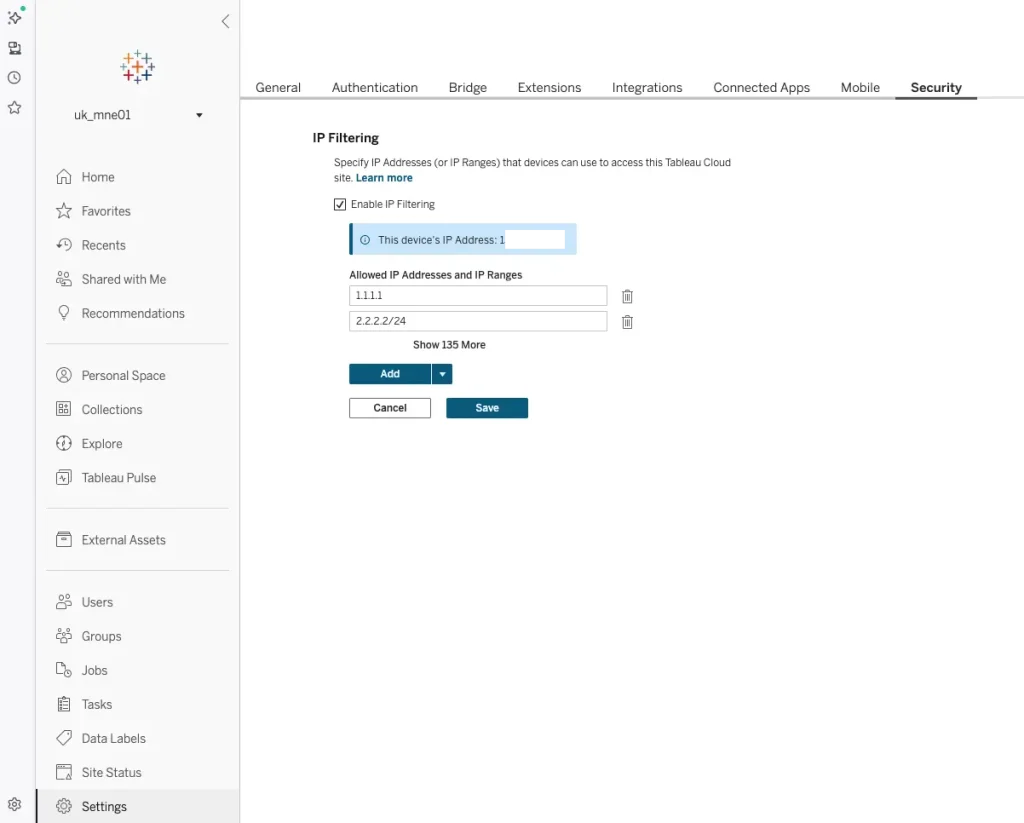
IP Filtering Self-Service
Administrators can now directly manage approved IP addresses or ranges within site settings. It ensures only authorized locations can access data and protects inbound traffic under strict governance controls.
via Tableau
Previously, IP-based access restrictions required intervention at the infrastructure level, outside Tableau’s own admin interface. Bringing this into site settings means:
- Administrators define and update approved IP ranges without needing infrastructure team involvement
- Access restrictions are managed alongside other site security settings, keeping governance consolidated
- Changes take effect immediately without requiring a server restart or external configuration update
- Organizations with regulatory requirements around data access location can enforce those requirements directly in Tableau
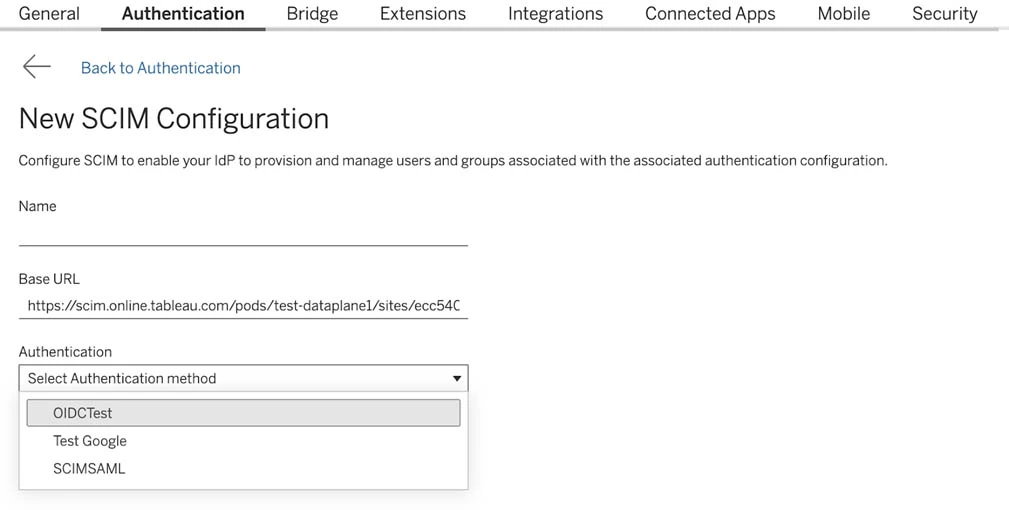
SCIM Support Extended to OIDC
Tableau 2026.1 extends SCIM support beyond SAML to include the modern OpenID Connect (OIDC) protocol. It allows Cloud Administrators to seamlessly select OIDC as an authentication method in the SCIM configuration.
via Tableau
For organizations that have moved their identity infrastructure to OIDC-based authentication, this removes a significant overhead:
- User provisioning and deprovisioning via SCIM now works with OIDC without maintaining a parallel SAML configuration
- Administrator workflows for managing Tableau access align with the rest of the organization’s identity management setup
- Onboarding and offboarding automation that was previously SAML-only now applies consistently regardless of authentication protocol
- Reduces the risk of access lingering after offboarding in environments where SAML and OIDC were configured separately
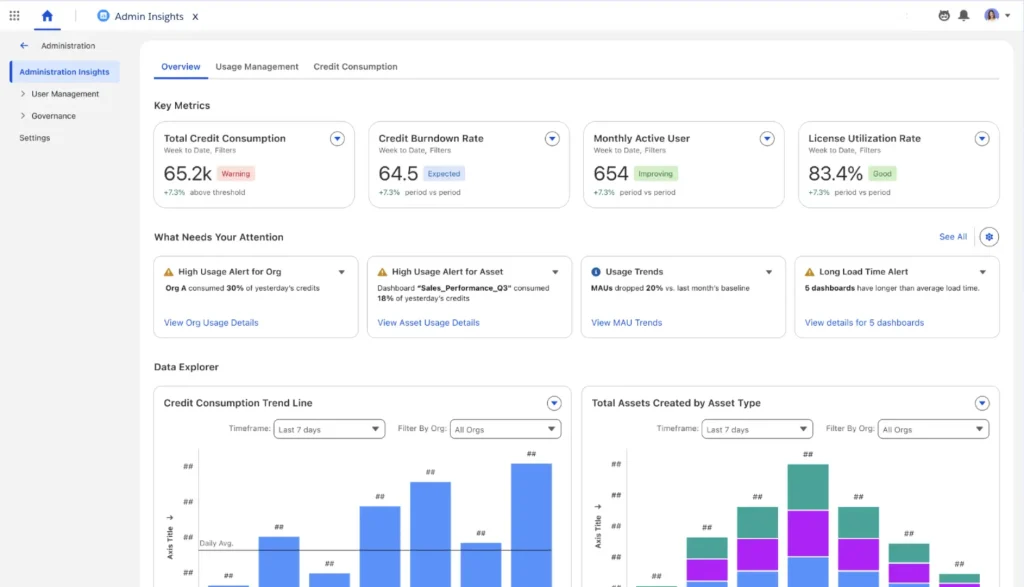
Admin Insights for Proactive Governance
Admin Insights gives administrators a unified dashboard that consolidates content usage, user engagement, and consumption insights. Admins can quickly identify underutilized assets or inefficiencies to optimize performance with cost-saving recommendations for enhanced administration.
via Tableau
The shift this enables for server administrators:
- Move from reactive support (responding to complaints) to proactive governance (identifying issues before users report them)
- Identify which workbooks, data sources, and dashboards are unused and can be deprecated, reducing server overhead
- Track user engagement trends to understand where adoption is strong and where training or content improvements are needed
- Cost-saving recommendations surface specific actions rather than requiring administrators to interpret raw usage data themselves
Integration Enhancements in Tableau Server 2026.1
The 2026.1 release tightens Tableau Server’s integration with enterprise data infrastructure, authentication systems, and monitoring pipelines. These updates reduce the custom engineering that previously filled the gaps between Tableau and the surrounding stack.
Data Platform Connectivity
The connector updates in 2026.1 directly affect how reliably Tableau Server connects to modern data platforms:
- Starburst connector is now generally available with JWT authentication, cross-region connectivity, and client tag support for workload attribution
- The Marketo, Oracle Eloqua, and generic Web Data (WDC) connectors are officially deprecated in 2026.1. JDBC-based replacements for Marketo and Oracle Eloqua are available on Tableau Exchange. The REST API Connector is the designated replacement for WDC.
- Organizations still relying on WDC connectors need to begin migration to the REST API Connector as part of their 2026.1 upgrade planning, not just Marketo and Eloqua users
Authentication and Identity Integration
The identity and authentication integration improvements in 2026.1 are specifically designed for organizations running multi-site or enterprise-scale Tableau deployments:
- SCIM provisioning now supports OIDC in addition to SAML, aligning Tableau’s user lifecycle management with modern identity infrastructure
- IP Filtering Self-Service brings access restriction management into Tableau’s own admin interface, removing the infrastructure dependency that made it cumbersome to maintain
- Starburst JWT authentication integrates with existing enterprise identity setups without requiring separate credential management for the Starburst connection
- SAML configuration via REST API, carried over from 2025.3, continues to support automated certificate rotation and multi-site configuration scripting
Monitoring and Analytics Integration
Tableau 2026.1 introduces Bridge Monitoring and Management Enhancements, including improved Bridge job monitoring that indicates which jobs run on local Bridge clients.
The Jobs page now reports the ‘sent to Bridge’ status, while administrative views report the client ID and pool name related to the extract. A new Tableau Bridge client status type in the Activity Log provides a continuous audit trail of when a Bridge client disconnects or reconnects.
For administrators managing Tableau Bridge deployments, this changes the troubleshooting experience significantly:
- The Activity Log now records Bridge client disconnect and reconnect events, creating a complete audit trail for connectivity issues
- Job monitoring shows which Bridge client handled each extract, making it straightforward to identify which client is causing failures in multi-client deployments
- Pool name reporting in administrative views enables capacity planning for Bridge infrastructure based on actual workload distribution
- Faster troubleshooting translates directly to fewer extract failures reaching end users
Analytics and Visualization Improvements in 2026.1
The 2026.1 visualization updates focus on two things: giving authors more design control without workarounds, and making AI-assisted creation faster for common design tasks.
If you are evaluating Tableau alongside other BI platforms, our Power BI vs Tableau comparison covers the key differences in visualization, AI capabilities, integrations, and enterprise use cases.
New Design Capabilities
The design additions across the release include:
- Rounded corners for dashboard objects, directly configurable without using annotation or image workarounds
- AI-assisted Color Palette generation: describe the palette you want in a few words, and Tableau generates contrast-optimized, accessible color swatches automatically
Both features are available in Tableau Desktop when signed into a Tableau Agent-enabled site for the AI palette feature.
These newer design capabilities can be applied across many types of BI dashboards. See our Tableau dashboard examples for practical examples across different business functions and analytical needs.
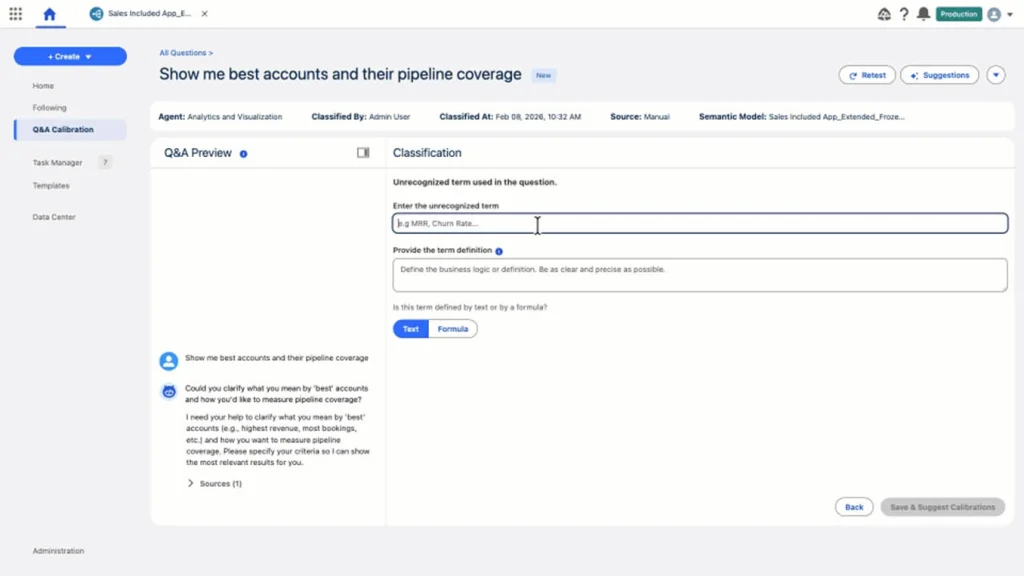
Q&A Calibration for AI Accuracy
via Tableau
Q&A Calibration allows data experts to test agent responses against curated questions, classify accuracy, use guided suggestions to fine-tune logic, and verify questions to ensure every answer is accurate and reliable.
For organizations that have deployed Tableau Agent across large user bases, calibration is the mechanism that keeps answer quality high over time:
- Data experts test the AI agent against a set of known questions and classify each response as accurate or inaccurate
- Guided suggestions help fine-tune the underlying logic when responses miss the mark
- Verified questions build a library of trusted answers that the agent prioritizes in future responses
- The calibration workflow is designed for data stewards and model owners, not administrators, keeping it in the hands of the people who understand the business logic
Accessible Visualization Authoring
Accessible Visualization Authoring increases accessibility by empowering all users to become creators of Tableau data visualizations.
Within Web Authoring, users can navigate to a pill and use their keyboard and assistive technology. Use it to select the context menu option to drop that pill into a drop zone, including Columns and Rows shelves, Show Me, Pages, Filters, or Marks cards.
This change expands who can author visualizations in Tableau:
- Users who rely on keyboards and screen readers can now build visualizations in Web Authoring without mouse-dependent interactions
- All core authoring drop zones are accessible via keyboard navigation, not just viewing and filtering
- Organizations with accessibility compliance requirements now have a Tableau-native path to compliant visualization authoring
- Generally available in Tableau Cloud and Tableau Public
Benefits of Upgrading to the Latest Tableau Server Version
If your organization is running an older Tableau Server release, here’s what you’re leaving on the table by not upgrading:
- Tableau Agent access: Natural language analytics, dashboard narratives, and AI-assisted insights are only available in 2025.3 and later. Earlier versions have none of this.
- Stronger security posture: IP filtering, SAML REST API configuration, User Attribute Functions for dynamic RLS, and OIDC SCIM support are all recent additions. Older releases rely on manual security management that doesn’t scale.
- Better governance tooling: Semantic model sharing, Data Monitoring, and centralized MCP hosting require current releases to function. Organizations running older versions are managing data consistency manually.
- New connector support: The Starburst connector, Prep-to-Databricks write, and Platform Data API are all unavailable in older releases. Teams connecting to modern data platforms are working around these gaps with custom solutions.
- Improved collaboration: Project Tree navigation, Dashboard Summaries, Personal Orgs, and export improvements are QoL features that reduce friction for every user, every day.
How Aegis Softtech Supports Tableau Server Implementations
Our Tableau consulting services cover deployment and upgrades, governance framework design, and security configuration. We also manage connector migration, dashboard development, and performance optimization across healthcare, fintech, and enterprise operations.
For teams that need Tableau expertise embedded directly within their own team, you can hire expert Tableau developers with us. They handle server administration, dashboard builds, and analytics consulting on your timeline.
FAQs
1. How do Tableau Server updates improve analytics performance?
Recent Tableau Server updates improve performance at the data model level. The Tableau Semantics Connector lets shared data sources be reused across workbooks, reducing redundant query execution. You can add Related Tables to cut the manual work involved in building accurate data models. Faster authoring with Instant Viz in Show Me also reduces ad hoc query load across the day.
2. What collaboration features are available in Tableau Server?
Tableau Server now includes reliable image exports for dashboards using extensions, which fixes a long-standing issue with subscriptions and Slack sharing. Tableau Agent’s Dashboard Narratives generates AI-powered summaries directly alongside visualizations. The Recycle Bin gives users and admins a 30-day window to recover accidentally deleted content.
3. How does Tableau Server support data governance?
The 2026.1 release adds:
- IP Filtering Self-Service for access restriction management within site settings
- SCIM support extended to OIDC for automated user provisioning
- Admin Insights for proactive environment monitoring with cost-saving recommendations
- Bridge Activity Log events for a continuous audit trail of client connectivity
- Auto-Generate Semantic Models to support governance by centralizing business logic