Data modeling decisions made in the first weeks of a Snowflake project determine query performance, compute costs, and pipeline maintainability for years afterward.
Get them right, and the platform delivers on its promise. Get them wrong, and your teams spend months tracing performance issues back to schema choices no one questioned at the start.
Most teams bring instincts built on traditional warehouses to Snowflake, and that’s where problems start. Snowflake’s architecture changes the rules: no indexes, automatic micro-partitioning, consumption-based compute, and ELT-first pipeline design. Each of these realities directly shapes how you should structure schemas, when to denormalize, where to apply clustering, and how to organize transformation layers.
In this blog, we will talk about data models in Snowflake, the tradeoffs between them, and how ELT reshapes schema design.
You will also get a peek into the performance and cost implications of the decisions that matter most.
Key Takeaways
- Modeling approach matters: Star schema works best for BI workloads. Data vault fits enterprise-scale auditability requirements. Wide tables serve high-frequency reporting layers. The right choice depends on workload type.
- ELT changes schema design: Raw data lands first, transformation happens inside Snowflake across layered models. dbt manages the logic. External ETL infrastructure adds complexity without benefit.
- Clustering is selective: Apply clustering keys only on large tables with predictable filter patterns. Clustering everything adds maintenance cost without performance return.
- Over-normalization is expensive: Storage is cheap in Snowflake. Compute is not. Excessive joins cost more in credits than the storage savings justify.
- Legacy schemas need redesigning: Schemas built for row-based, index-driven systems carry over poorly. A deliberate schema review before snowflake migration prevents rework that compounds after go-live.
- Model for read patterns: Query behavior should drive schema decisions. Validate pruning efficiency and join costs against real query patterns before committing to a design in production.
What Are Data Models in Snowflake?
A data model in Snowflake defines how you structure, organize, and relate data across tables within the platform. It determines how fact tables and dimension tables are designed, how normalized or denormalized the schema is, and how historical data is tracked. Additionally, it focuses on how transformation layers are organized between raw ingestion and business-ready consumption.
Unlike traditional warehouse modeling, Snowflake data models are built around a few platform-specific realities:
- Snowflake stores data in compressed columnar micro-partitions, not row-based pages. Query performance depends on how well partition pruning can eliminate irrelevant data before scanning.
- Compute and storage scale independently. Heavy transformation work runs on elastic warehouses without affecting storage costs, which changes the math around where and when to denormalize.
- Snowflake has no indexes. Clustering keys serve a related but distinct purpose, and applying them incorrectly creates cost overhead without a performance benefit.
- ELT (Extract, Load, Transform) is the dominant pipeline pattern. Raw data lands in Snowflake first and transforms within the platform. That shapes how modeling layers are structured.
Together, these realities make Snowflake schemadesign a distinct discipline, one that requires a deliberate rethink of patterns you may have relied on for years.
Traditional vs. Cloud-Native Data Modeling
The differences between on-premise and cloud-native data modeling affect every layer of your schema design. Here’s what changes:
| Dimension | Traditional On-Premise | Snowflake Cloud-Native |
| Storage model | Row-based pages | Columnar micro-partitions |
| Indexing | Required for query performance | No indexes; clustering keys used selectively |
| Normalization preference | High normalization to reduce storage costs | Moderate denormalization to reduce join overhead |
| Compute scaling | Fixed; over-provision for peak | Elastic; scale per workload type |
| Pipeline approach | ETL: transform before load | ELT: load raw, transform inside Snowflake |
| Schema rigidity | Schema-on-write enforced | Schema-on-read supported via VARIANT type |
| Historical tracking | Custom SCD implementations | Native Time Travel and Fail-safe |
| Cost driver | Hardware and licensing | Compute credits and storage consumption |
Modeling techniques developed for fixed-resource, row-based systems need a deliberate re-evaluation before you apply them to Snowflake. Some patterns carry over well. Others actively work against the platform.
Aegis Softtech can assess your current architecture and identify what needs to change before migration begins.
Types of Data Models in Snowflake
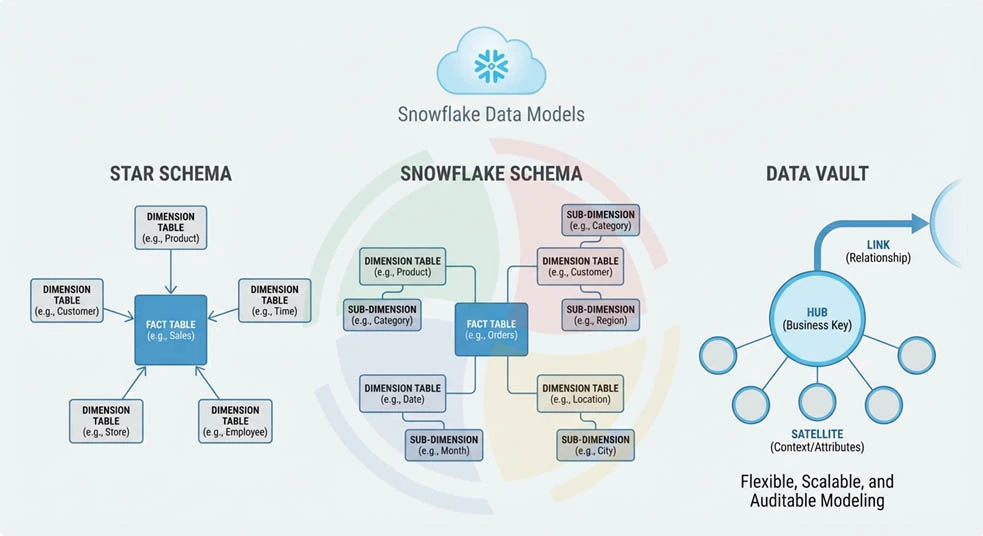
Snowflake supports multiple modeling approaches. The right choice depends on your workload type, query patterns, team capability, and how data is consumed downstream. Each approach carries distinct tradeoffs.
Star Schema
The star schema is the most widely used dimensional modeling approach in Snowflake for BI and reporting workloads. A central fact table holds measurable business events, surrounded by denormalized dimension tables that provide descriptive context.
Fact and dimension tables in a star schema are optimized for read performance. Dimensions are intentionally denormalized, collapsing hierarchies into flat tables to minimize joins at query time. A single join between a fact table and a dimension returns all the attributes you need.
Why star schema works well in Snowflake:
- Fewer joins reduce query execution complexity and improve columnar pruning efficiency
- Denormalized dimensions align with Snowflake’s storage model, where repeating string values compress efficiently in columnar format
- BI tools like Tableau, Looker, and Power BI generate optimal SQL against star schemas
- Simpler join paths reduce the risk of accidental cartesian products on large fact tables
The tradeoff is storage redundancy and update complexity. When a dimension attribute changes, the update propagates across denormalized records. For slowly changing dimensions, you need a deliberate SCD strategy decided at design time.
Snowflake Schema
The star schema vs. snowflake schema decision comes down to one core tradeoff: join complexity against storage efficiency and update flexibility.
A Snowflake schema normalizes dimension tables into sub-dimensions, breaking hierarchies into separate tables. A geography dimension, for example, splits into city, region, and country tables linked by foreign keys. Storage footprint shrinks and update operations become simpler because changes apply to a single normalized record.
The cost is query complexity. Every hierarchy traversal requires an additional join, and in a columnar system optimized for pruning, those joins carry measurable compute overhead at scale.
Snowflake schema is the right choice when:
- Your dimension tables are large, frequently updated, and contain deep hierarchies
- Storage cost at the dimension layer is a meaningful concern
- Your analytics layer runs on tools that handle multi-join queries efficiently
- Your data governance requirements favor normalized structures for auditability
For most BI-heavy Snowflake implementations, the star schema wins on query speed. The Snowflake schema makes more sense when update frequency and dimension complexity justify the join overhead.
Data Vault Modeling
Data vault modeling in Snowflake is the right approach when scalability, auditability, and incremental loading requirements outweigh the simplicity of dimensional models. It works particularly well for enterprise data warehouses that consolidate data from multiple sources.
Data vault structures are built around three components:
- Hubs: Tables that store unique business keys, one row per entity. A customer hub holds one record per customer, identified by the natural business key, with no descriptive attributes.
- Links: Tables that capture relationships between hubs, recording associations between entities without embedding that logic into either hub.
- Satellites: Tables that store descriptive attributes and historical changes for hubs and links. All history lives in satellites, making point-in-time reconstruction straightforward.
Why data vault works well with Snowflake’s ELT architecture:
- You can load hubs, links, and satellites independently and in parallel — keeping incremental loading efficient and pipeline failures isolated
- New source systems attach to existing hubs without restructuring your existing tables
- Full load history is preserved by design, aligning with Snowflake’s Time Travel capabilities
- The separation of raw vault from business vault layers maps cleanly to Snowflake’s layered modeling approach
The tradeoff is query complexity. Consuming data from a data vault requires joining hubs, links, and satellites, which typically means building a presentation layer of dimensional views or wide tables on top of the vault for BI consumption.
Designing Snowflake Data Models for ELT
An ELT-based modeling approach changes how you structure schemas from the ground up. The pipeline does not transform data before it enters Snowflake. Raw data lands first, and you build modeling layers on top of it inside the platform. This requires a deliberate layered architecture.
Loading Raw Data First
The raw layer is an exact replica of your source system data as it arrives. Tables in the raw layer preserve source column names, data types, and structure, including NULL values and formatting inconsistencies.
This layer serves two purposes. First, it gives you a reliable audit trail from source to consumption. Second, it decouples ingestion from transformation. That means pipeline failures at the transformation layer do not require re-extraction from source systems.
For the raw layer, use one schema per source system with table names matching source object names. VARIANT columns handle semi-structured data from APIs and event streams without requiring upfront schema definition.
Transforming Inside Snowflake
Once raw data lands, transformation logic runs inside Snowflake using SQL, dbt, or Snowpark. This is where your data models in Snowflake take shape from raw ingestion into structured analytical layers.
dbt is the dominant tool for this work. It manages transformation logic as version-controlled SQL models with built-in testing, documentation, and dependency management. If your team has more complex transformation requirements, or existing Python, Java, or Scala assets you want to preserve, Snowpark extends that capability seamlessly.
The key discipline is keeping transformation logic inside Snowflake. External transformation adds pipeline complexity, creates unnecessary data movement costs, and gives up the performance advantage of running compute close to storage.
Layered Modeling Approach
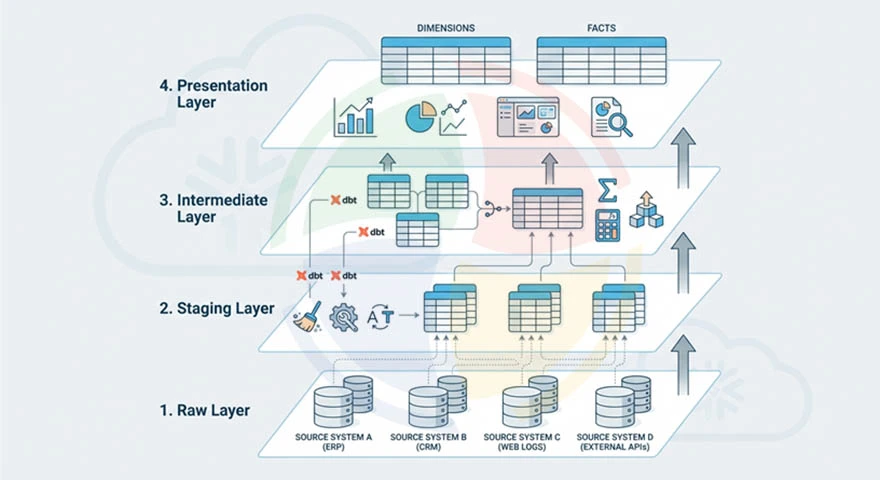
A well-designed modern data stack architecture on Snowflake organizes transformation into four layers, each serving a distinct purpose:
- Raw layer: Source data as ingested, unmodified. One schema per source system.
- Staging layer: Lightly cleaned and typed data. Column renames, type casting, NULL handling, and deduplication. No business logic applied.
- Intermediate layer: Business logic applied. Joins across source systems, calculated fields, and aggregations that represent business concepts.
- Presentation layer: Dimensional models, wide tables, or data vault consumption views optimized for downstream BI tools and analytical queries.
dbt rebuilds or incrementally updates each layer, automatically tracking data lineage across the full transformation chain.
Performance Considerations in Snowflake Data Models
Your modeling decisions directly impact query performance and compute costs. These areas account for the majority of performance variation across Snowflake deployments:
Micro-Partitioning and Clustering Keys
Snowflake automatically organizes data into micro-partitions of 50 to 500 MB of uncompressed data during ingestion. Your query performance depends on how effectively partition pruning eliminates irrelevant micro-partitions before scanning begins.
Clustering keys and partitioning reorganize micro-partitions so that rows with similar key values are co-located. When your queries consistently filter on the clustering key column, Snowflake prunes the majority of micro-partitions and scans only the relevant data.
When clustering is necessary:
- Your tables exceed several hundred gigabytes and queries consistently filter on specific columns such as date ranges or region codes
- Natural ingestion order does not align with your query filter patterns, resulting in poor partition pruning ratios
- Query Profile shows high bytes scanned relative to bytes returned, indicating minimal pruning
When clustering is not necessary:
- Your tables are small enough that full scans are fast regardless of partition organization
- Your query patterns are too varied to benefit from a single clustering key
- The table is primarily write-heavy with infrequent analytical queries
Applying clustering indiscriminately is a common and expensive mistake. Clustering maintenance consumes credits continuously. Use SYSTEM$CLUSTERING_INFORMATION to evaluate whether clustering depth justifies the cost before enabling it.
Query Optimization Techniques
Snowflake performance optimization strategies at the query layer address the specific ways that poorly written SQL creates unnecessary compute overhead. Apply these practices:
- Avoid SELECT * on large fact tables. Pull only the columns required for the query to minimize bytes scanned per execution.
- Filter early in queries to reduce the data volume that downstream joins and aggregations process.
- Avoid joining large fact tables to each other directly. Route through dimension tables or pre-aggregated intermediate models.
- Use CTEs to break complex queries into readable, optimizable steps rather than deeply nested subqueries.
- Validate join cardinality before running queries against large tables. Unexpected fan-outs on fact-to-fact joins create result set explosions that consume significant compute.
Managing Concurrent Workloads
Normalized vs. denormalized models carry different compute profiles under concurrent load. Normalized models generate more joins and more intermediate result sets, which increases memory pressure when multiple concurrent queries run simultaneously.
Warehouse isolation is your primary tool for managing concurrent workload performance:
- Assign separate warehouses to ETL pipelines, BI tools, and ad hoc analytical queries
- Enable multi-cluster warehouses for BI workloads with unpredictable concurrency spikes
- Use query tags to attribute compute consumption to specific workloads and identify warehouses that consistently queue
Common Mistakes in Snowflake Data Modeling
Schema design mistakes in Snowflake surface gradually as query costs climb, pipeline complexity grows, and performance degrades. The patterns below account for the majority of modeling problems seen in production Snowflake environments.
Replicating Legacy On-Prem Schemas
On-premise schemas were optimized for row-based storage, fixed compute, and index-driven query execution. None of those constraints exist in Snowflake. Schemas built around them perform poorly on a columnar, elastic platform.
These are the specific patterns that carry over badly:
- Highly normalized schemas with many small tables that generate excessive join chains at query time
- Surrogate key strategies built to minimize storage on row-based systems — they add unnecessary join overhead in columnar architecture
- Aggregate tables pre-computed outside Snowflake to work around fixed compute constraints that no longer exist
- Index-dependent query patterns that assume fast lookups Snowflake does not support natively
The fix is a deliberate schema review before data migration, not after go-live when rework is expensive.
Over-Normalization
Storage is cheap in Snowflake. Compute is consumption-based. When you over-normalize schemas to minimize storage redundancy, you generate join chains that consume more compute credits per query than the storage savings justify.
A reporting query traversing six normalized tables in a snowflake schema can cost 2-3x more in compute credits than the equivalent query against a star schema with denormalized dimensions, while returning identical results. Watch for these cost patterns that signal over-normalization:
- High bytes scanned per query relative to the size of your result set
- Repeated joins to the same dimension tables across multiple query patterns
- Your BI tool generating deeply nested SQL with four or more joins on common reports
- Query Profile showing significant time spent on join processing relative to aggregation
Ignoring Cost Implications of Schema Design
Every schema decision carries a compute cost. Models that generate large intermediate result sets, require full table scans, or force repeated joins translate directly into higher credit consumption per query.
Cost-aware modeling practices to apply from the start:
- Evaluate compute cost of common query patterns against a candidate schema before committing to it in production
- Use materialized views or pre-aggregated tables for high-frequency queries running the same expensive logic repeatedly
- Monitor bytes scanned per query through QUERY_HISTORY to identify schema patterns generating disproportionate scan volumes
- Reassess schema design when credit consumption trends upward without a corresponding increase in data volume or query complexity
Best Practices for Snowflake Data Models
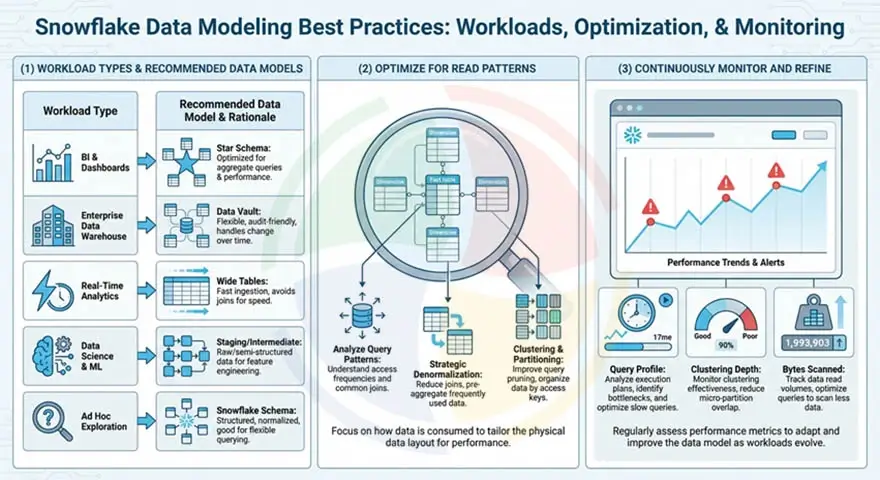
Apply these best practices to get the most out of your data models in Snowflake:
Choose the Model Based on Workload Type
Different workloads place different demands on your data model. Applying a single modeling approach across all use cases will create performance problems in at least one of them.
| Workload Type | Recommended Model | Reason |
| BI and dashboards | Star schema | Minimal joins, fast aggregation, BI tool compatibility |
| Enterprise data warehouse | Data vault | Scalable, auditable, supports multiple source systems |
| Real-time analytics | Wide tables or flattened models | Low query latency, no join overhead |
| Data science and ML | Staging or intermediate layer | Raw or lightly transformed data with full feature history |
| Ad hoc exploration | Snowflake schema or intermediate layer | Flexibility over optimization |
Optimize for Read Patterns
One principle holds true across every cloud data warehouse: model for how your data is read, not for how it is written. Let your query patterns drive schema design decisions.
In practice:
- Identify the 10-20 most frequent query patterns before finalizing the dimensional model
- Validate that your candidate schema prunes effectively against those patterns using EXPLAIN and Query Profile
- Denormalize dimensions that are consistently joined in the same way to eliminate redundant join paths
- Partition or cluster on the columns that appear most frequently in your WHERE clause filters
Continuously Monitor and Refine
Query patterns evolve as new use cases emerge, data volumes grow, and your team’s consumption behavior changes. Models that perform well at launch will degrade as they age without active monitoring.
Keep your models sharp with these ongoing refinement practices:
- Review Query Profile weekly for your highest-cost queries and identify schema-level root causes
- Monitor clustering depth on large tables using SYSTEM$CLUSTERING_INFORMATION and reconfigure when depth degrades
- Track bytes scanned trends over time to catch schema patterns generating increasing scan volumes as your data grows
- Reassess wide table materialization schedules as refresh costs accumulate against actual query frequency
How Aegis Softtech Helps Design Snowflake Data Models
Designing data models in Snowflake that perform well at scale requires experience. Specifically, experience with how Snowflake’s micro-partition architecture, ELT pipeline patterns, and consumption-based cost model interact with schema design decisions under real production workloads.
Our Snowflake Consulting Services cover assessing your existing schemas, identifying modeling patterns that create problems, and designing warehouse architectures built for how the platform works.
If your team needs embedded Snowflake expertise alongside your own engineers, our Snowflake developers bring deep modeling and optimization experience without the overhead of a full-time hire.
FAQs
1. What are the different types of data models in Snowflake?
The main approaches are star schema for BI and reporting, snowflake schema for normalized dimensional models, data vault for enterprise-scale auditable warehouses, and wide tables for high-frequency reporting layers. Most production environments use a combination of these across different layers.
2. Should you use star schema in Snowflake?
Yes, for most BI and reporting workloads. Denormalized dimensions reduce join complexity, align well with columnar pruning, and generate clean SQL from BI tools like Tableau, Looker, and Power BI.
3. How does data vault modeling work in Snowflake?
Data vault separates your data into hubs (business keys), links (relationships), and satellites (descriptive history). Each component loads independently, making incremental ingestion from multiple source systems straightforward. It maps well to Snowflake’s ELT architecture and Time Travel capabilities.
4. Does Snowflake require denormalized tables?
No, Snowflake supports both normalized and denormalized schemas. That said, denormalization at the dimension layer reduces your join overhead and lowers compute costs per query. Over-normalizing generates more joins than necessary and increases credit consumption without meaningful storage savings.
5. How do clustering keys affect data models in Snowflake?
Clustering keys reorganize micro-partitions so that rows with similar values are co-located, improving partition pruning on queries that filter on that column. They are only beneficial on large tables with predictable filter patterns. On small tables or varied query patterns, clustering adds maintenance cost without any performance benefit.
6. What is the best data modeling approach for ELT in Snowflake?
A layered approach works best. Raw data lands unmodified, moves through a staging and cleaning layer, then an intermediate layer where your business logic is applied, and finally a presentation layer optimized for your downstream consumption. dbt manages transformation logic across all layers.