Your best candidate from last quarter just accepted a role at your competitor. Not because they were actively job hunting when you called them three months ago, but because the other recruiter stayed in touch. Sent relevant content. Remembered their career goals. Built a relationship while you moved on to the next requisition.
Most recruitment teams lose placements not because they can’t source talent, but because they can’t maintain relationships at scale. Recruitment CRM software solves this exact problem. In this guide, we’ll show you how to evaluate, select, and use recruitment CRM systems that turn one-time outreach into a long-term pipeline advantage.
Key Takeaways
Recruitment CRMs help recruiters maintain long-term candidate relationships, automate outreach, manage pipelines, and surface high-fit talent faster. They complement an ATS by focusing on engagement before someone applies, making talent pipelines warmer, more organized, and easier to convert into hires.
Our top picks:- Microsoft Dynamics CRM (Best for large, multi-team hiring workflows)
- Salesforce (Best for deeply customized recruitment operations)
- Recruit CRM (Best for staffing and agency workflows)
- Zoho Recruit (Best for in-house HR teams)
- Bullhorn (Best for high-volume and contract placements)
What is a Recruitment CRM?
A recruitment CRM is software that manages candidate relationships before they apply to jobs.
It’s your system for tracking every interaction with potential hires: the software engineer you met at a conference, the passive candidate who responded to your LinkedIn message, the finalist who declined your offer but might be perfect for the next role, and the hundreds of prospects you’re nurturing for future opportunities.
What is an ATS vs. CRM?
An Applicant Tracking System (ATS) and a Customer Relationship Management (CRM) system are both essential in recruitment, but serve different purposes.
Here’s a simple comparison:
| Feature | ATS (Applicant Tracking System) | CRM (Customer Relationship Management) |
| Main purpose | Tracks applicants through the hiring process | Manages and nurtures candidate and client relationships |
| Primary users | Recruiters and hiring managers | Recruitment teams, sales, and client relationship managers |
| Core function | Job posting, resume screening, interview tracking | Candidate engagement, lead tracking, and client management |
| Focus area | Recruitment operations and workflow | Relationship management and communication |
| Data handled | Candidate applications and hiring stages | Candidate profiles, client details, and communication history |
| Example tools | Greenhouse, Lever, Workable | Microsoft Dynamics CRM, Recruit CRM, Salesforce |
5 Best Recruitment CRMs
Several platforms have figured out how to make recruitment less chaotic and more strategic. This list covers the five top recruitment CRMs that stand out for different reasons. Let’s dive in.
1. Microsoft Dynamics CRM
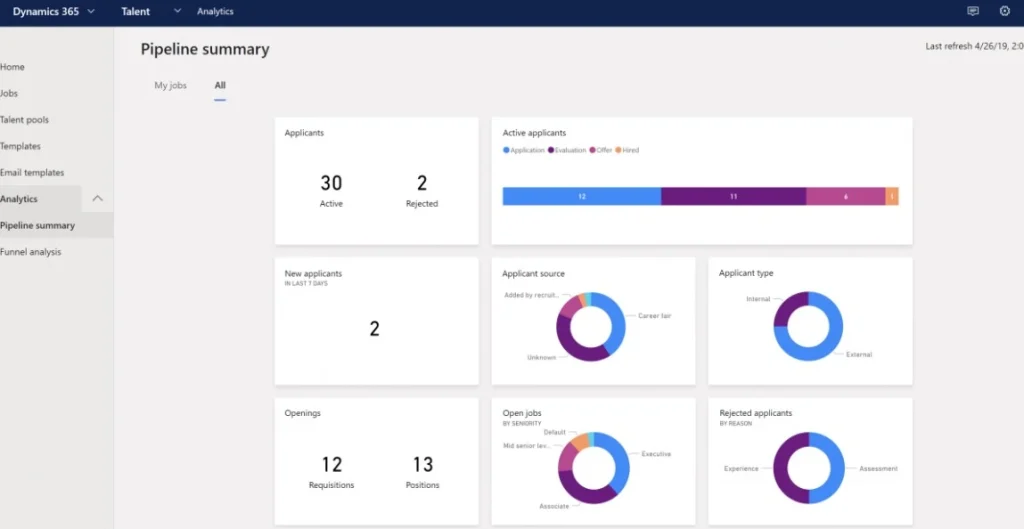
via Microsoft
Microsoft Dynamics CRM lives inside the Microsoft universe, which matters if your company already runs on Outlook, Teams, and the rest of that ecosystem.
The real draw here is how the platform handles data—you can slice recruitment metrics however you want through Power BI, and the AI components learn from your hiring patterns over time. Everything from candidate scoring to interview scheduling runs through customisable workflows that you design around your actual process, not some generic template.
The recruitment CRM software also handles multiple hiring pipelines simultaneously, so you can manage executive searches differently from high-volume hiring without creating separate systems.
Microsoft Dynamics CRM Best Features
- Build custom approval chains in Power Automate that route candidates through different managers based on department, salary level, or role seniority
- Connect your recruitment database to Power BI and create live dashboards that update as candidates move through stages
- Train Copilot AI with your past hiring decisions to score incoming applications against criteria that actually matter to your organisation
- Assign different permission levels to recruiters, hiring managers, and executives so each person only accesses the candidate information they need
- Link candidate records to your existing Microsoft 365 calendar and email, so interview schedules and correspondence live in one place
Microsoft Dynamics CRM Limitations
- Costs add up quickly when you factor in user licenses and necessary add-ons
Microsoft Dynamics CRM Pricing
- Dynamics 365 Human Resources: $135/month (billed annually)
- Dynamics 365 Human Resources Self-Service: $4/month per user
We automate interview reminders, follow-ups, and onboarding tasks so teams can focus on building stronger relationships instead of repetitive admin work.
2. Salesforce
via Salesforce
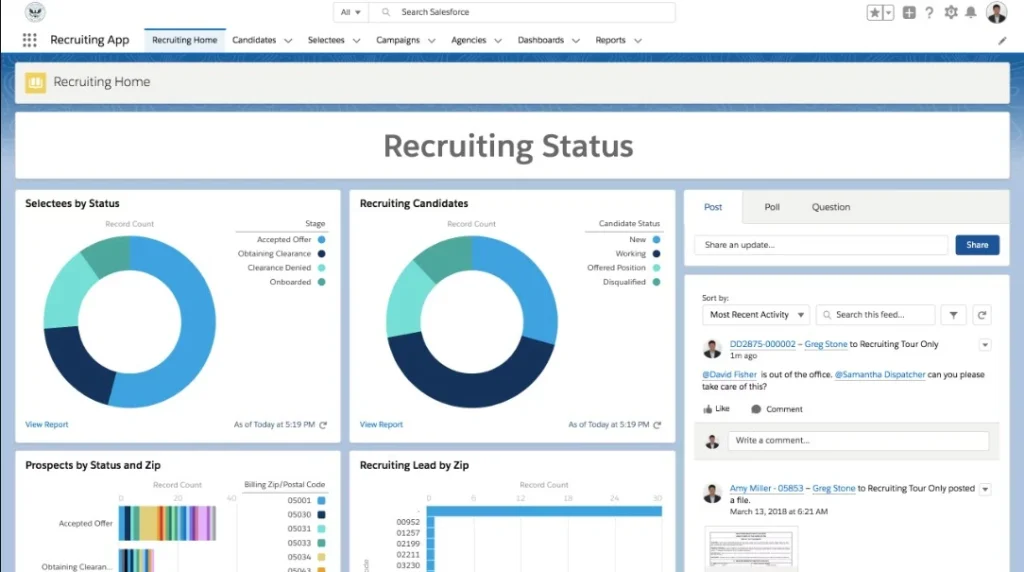
Salesforce wasn’t built specifically for recruitment, and that becomes its advantage in certain situations. The recruitment CRM system treats candidates like any other relationship you’re managing, which means you can apply the same sophisticated automation and tracking you’d use for sales leads. This approach works particularly well if you’re running recruitment as part of a larger talent strategy, such as employer branding campaigns, alumni networks, or long-term candidate nurturing.
The AppExchange marketplace has hundreds of recruitment-specific tools you can layer on top, from video interviewing to skills assessments. Just know that making Salesforce work for recruitment takes effort upfront. You’re essentially building your own system using their tools.
Salesforce Best Features
- Create drip campaigns in Marketing Cloud that send personalized content to candidates based on how they interact with your emails
- Use Einstein Analytics to analyze which recruitment channels bring in candidates who get hired vs. those who drop off early
- Build custom objects in Salesforce that track recruitment-specific data points like technical assessments, reference checks, or visa status
- Design multi-step approval processes in Flow that automatically notify stakeholders when candidates reach certain stages or meet specific criteria
Salesforce Limitations
- The pricing structure gets complicated fast, especially when you start adding features
- Recruiters often find the interface overwhelming for basic tasks like updating candidate status
Salesforce Pricing
- Free trial
- Starter Suite: $25/month per user
- Pro Suite: $100/month per user
3. Recruit CRM
via Recruit CRM
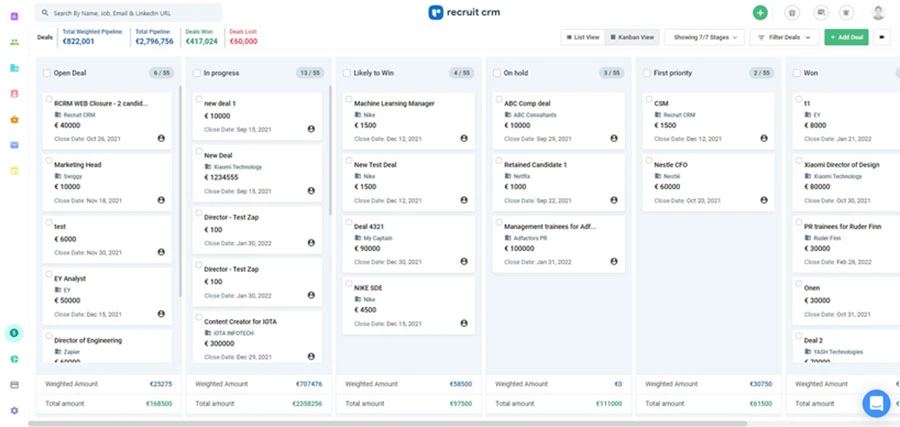
Recruit CRM speaks the language of recruitment agencies. The platform assumes you’re juggling multiple clients, tracking placements for commission, and sourcing candidates who might fit several different roles. Resume parsing happens in bulk, so you can upload 50 CVs at once and have them structured into searchable profiles automatically.
The Chrome extension pulls candidate information directly from LinkedIn, job boards, or company websites into your database while you browse. What makes this an efficient CRM for recruitment agencies different is how it handles the business side. You can track which clients owe payment, manage contractor timesheets, and calculate recruiter commissions all in the same place you’re managing candidates.
Recruit CRM Best Features
- Set up email drip sequences that pull in candidate details like name, current company, or job title to personalise each message automatically
- Track which jobs you’ve submitted each candidate to across all your clients and see their status in a single view
- Generate invoices from completed placements and monitor payment status alongside your recruitment pipeline
Recruit CRM Limitations
- The mobile CRM app doesn’t give you access to all the features available on desktop
- Email sync sometimes lags, which means recent conversations don’t always show up immediately
Recruit CRM Pricing
- Free trial
- Pro: $85/month per user
- Business: $125/month per user
- Enterprise: $209/month per user
4. Zoho Recruit
via Zoho Recruit
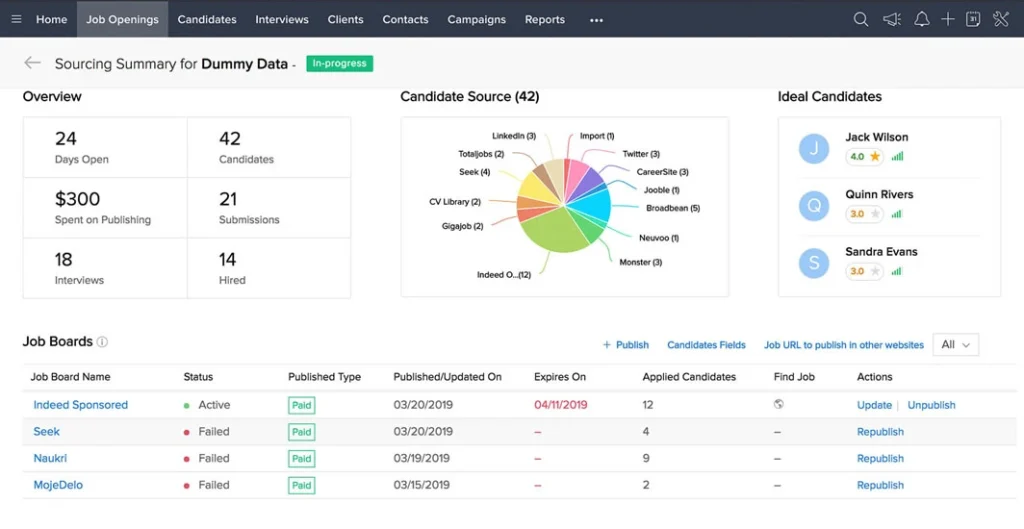
Zoho Recruit feels lighter than the enterprise options, but still packs enough features for serious recruitment operations. Zia, their AI assistant, scans resumes against job requirements and automatically ranks candidates. The career site builder lets you create branded hiring pages without touching code, which matters if you’re trying to make your company look more professional than your budget suggests.
You can post to multiple job boards from a common interface and track which sources actually deliver candidates who make it past phone screens. The AI-powered CRM also works well with other Zoho products, so your candidate data can even flow into Books for invoicing.
Zoho Recruit Best Features
- Ask Zia to scan resumes against your job description and rank applicants so you can focus on reviewing candidates who actually match the requirements
- Drag and drop elements in the career site builder to design application pages that match your brand without writing any code
- Create custom hiring stages that reflect your actual interview process instead of forcing your team to use preset templates
- Share candidate shortlists through client portals, where hiring managers can review profiles and leave feedback without accessing your full system
Zoho Recruit Limitations
- Integrations with non-Zoho software sometimes feel clunky compared to how smoothly Zoho products connect with each other
- Reporting tools work fine for basic metrics but struggle when you need complex analytics
Zoho Recruit Pricing
For corporate HRs
- Free
- Standard: $30/month per recruiter
- Enterprise: $60/month per recruiter
For staffing agencies
- Free
- Standard: $30/month per user
- Professional: $60/month per user
- Enterprise: $90/month per user
5. Bullhorn
via Bullhorn
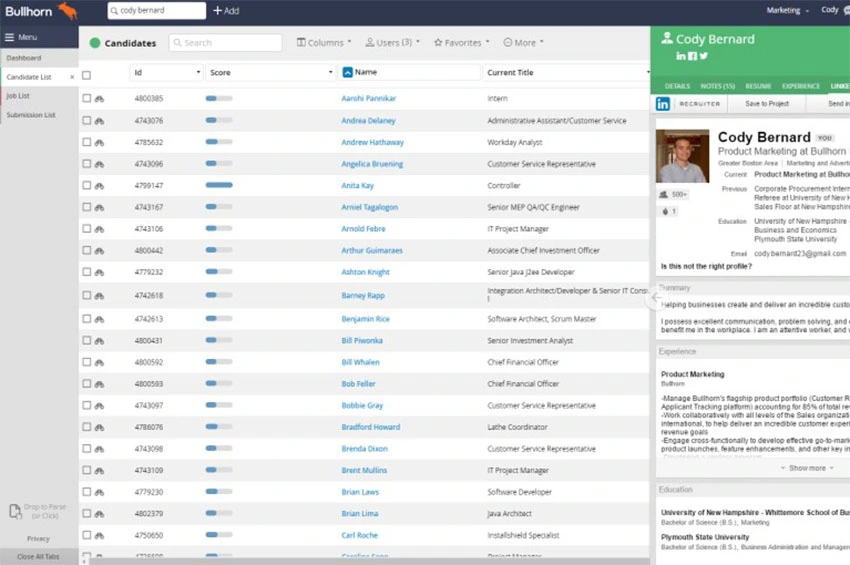
Bullhorn runs on volume. The AI CRM solution assumes you’re managing hundreds of active candidates and dozens of open roles simultaneously, which changes how everything works. Candidate relationship tools keep passive prospects warm through automated check-ins that feel personal because they’re triggered by actual milestones like work anniversaries or certification renewals.
The mobile app provides you with proper functionality to submit candidates, update notes, and manage communications from your phone as easily as from your desk. Back-office features handle the complexities of staffing, such as timesheet approvals and payroll data, which matters when you’re placing temporary workers.
Bullhorn Best Features
- Run reports that predict which candidates are likely to accept offers based on historical data about compensation, location, and role type
- Approve timesheets and process payroll for contract placements within the same platform where you manage their candidate profiles
- Connect tools from the Bullhorn Marketplace, like reference checking services or compliance software, built specifically for staffing workflows
Bullhorn Limitations
- The platform requires a significant financial commitment that puts it out of reach for smaller staffing agencies
- The interface hasn’t been redesigned in years and feels clunky compared to newer platforms
Bullhorn Pricing
- Custom pricing
Annual savings = (average hires per month x cost per hire reduction) x 12
How to use- Write your average hires per month
- Estimate cost per hire reduction (what you save on sourcing, agency fees, time, etc.)
- Plug into the formula above
- Average hires per month = 10
- Cost per hire reduction = $1,500
- Multiply month savings: 10 x 1,500 = 15,000 (this is saved each month)
- Annual savings: 15,000 x 12 = 180,000
Key Features to Look for in a Recruitment CRM
Most recruitment CRM software demos showcase identical feature lists. The real question: which capabilities actually improve sourcing outcomes vs. which collect dust after implementation?
Here’s a breakdown.
Candidate Profile and Enrichment
Profile completeness determines search quality. Search for “product managers in fintech with Series B experience” and get three results from weak platforms compared to 47 from strong ones.
What strong recruitment CRM systems deliver:
- Auto-populated profiles: LinkedIn data, employment history, skills, and contact information flow in automatically without manual entry
- Intelligent deduplication: The system detects “John Smith at Google” and “J. Smith, Software Engineer” are the same person and merges records while preserving interaction history
- Third-party enrichment: Phone numbers, email addresses, and employment updates append to profiles without sourcer intervention
Multi-Channel Outreach and Email Automation
Manual outreach to 200 candidates takes 12-15 hours weekly. Proper automation reduces that to 2-3 hours while improving response rates.
These are the automation capabilities that matter:
- Dynamic personalization: Insert the candidate’s current company, specific skills, or mutual connections (“I saw you worked on the Kubernetes migration at Stripe”) outperforms generic greetings
- Smart sequencing: A/B test subject lines automatically, send follow-ups when emails go unopened after five days, pause sequences when candidates reply
- Engagement tracking: Measure reply rates by template, time-to-response by channel, and which candidates opened multiple emails or clicked links
CRM software for recruiters should make this level of personalization scalable without drowning recruiters in manual work.
Pipeline Visualization and Stage Management
Most sourcing problems stem from conversion breakdowns. When 400 candidates sit in “contacted” status but only 12 move to “interested” in a month, that 3% conversion rate indicates messaging problems.
The best recruitment CRM platforms expose bottlenecks through:
- Conversion rate analytics: See exactly what percentage of candidates move between each pipeline stage
- Time-in-stage tracking: Identify where candidates stall and how long relationships sit dormant
- Bulk stage updates: Automatically move all backend engineers contacted 45+ days ago who never responded into nurture sequences using conditional logic
Manual, one-by-one pipeline management breaks down as databases grow. Strong platforms automate hygiene.
Nurture Campaigns and Engagement Triggers
Candidate relationships die from neglect. Someone wasn’t looking when you first reached out, and six months later, when they’re ready, you’ve disappeared.
Campaign automation maintains relationships at scale:
- Value-first sequences: Deliver salary benchmarks, career resources, and market insights before introducing opportunities
- Behavior-based triggers: Escalate candidates from automation to personal outreach when they update LinkedIn profiles, open emails three times in a week, or click job links
- Progression metrics: Track “moved 23 candidates from cold to engaged, producing seven applications” instead of vanity metrics like “sent 400 emails”
Integration Architecture
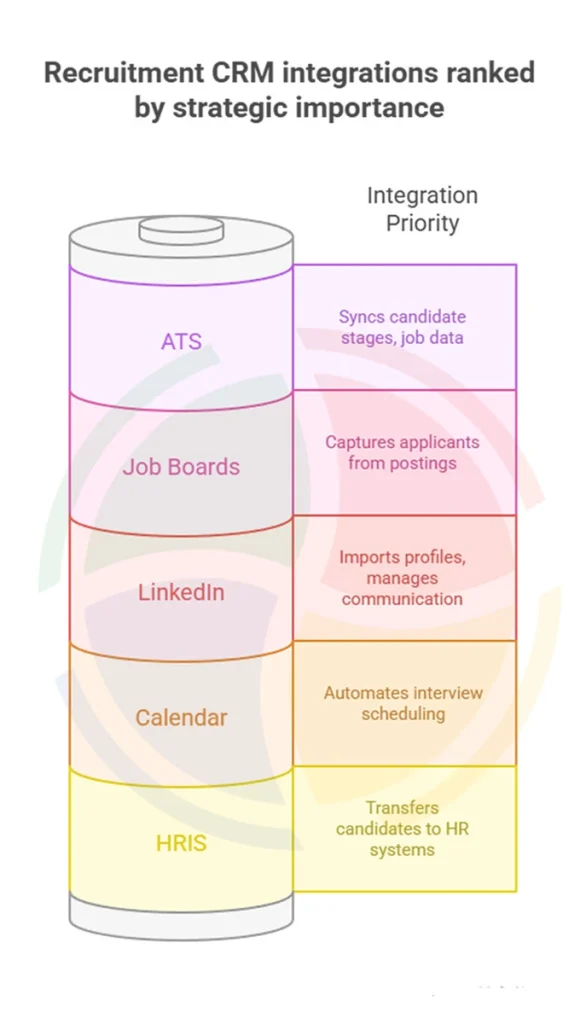
Integration quality determines whether your recruitment CRM system becomes your source of truth or creates duplicate data entry across platforms.
Critical integrations for most teams:
- ATS connection: Bidirectional sync so applicant data populates both systems automatically without manual exports
- Calendar integration: Meeting logging happens automatically without recruiters remembering to update records
- LinkedIn Recruiter: Profile imports and message tracking sync directly into candidate timelines
- Email platform: Track sends, opens, replies, and clicks without switching tools
Analytics That Drive Decisions
Activity metrics measure effort, while outcome metrics predict hiring success. Most platforms excel at the former and fail at the latter.
The questions strong analytics answer:
- Source effectiveness: Which sourcing channels produce candidates who get hired and not just apply?
- Recruiter performance: Which team members build the strongest talent pools that convert to placements?
- Predictive indicators: How does month-one engagement predict month-six application likelihood?
- Pipeline coverage: What’s the realistic pipeline health for next quarter’s hiring needs based on our conversion patterns?
Recruitment CRM software with custom report builders lets you ask new questions as strategy evolves. Furthermore, multi-touch attribution showing which sequence of touchpoints influenced decisions reveals what works in your candidate journey.
Compliance and Security Infrastructure
Weak security destroys the trust that makes candidates share information. Non-negotiable security requirements to keep in mind:
- Role-based access control: Sourcers see profiles but not salary data; recruiters access assigned requisitions only; administrators control exports
- GDPR compliance tools: Consent tracking, automated deletion within mandated timeframes, processing records for audits, data portability for candidate requests
- Infrastructure verification: SOC 2 reports, encryption methods in transit and at rest, backup processes, breach response protocols
Verify the CRM platform’s claims through documentation. Vague or defensive answers about security should end your evaluation immediately.
AI-Powered Search and Candidate Matching
Useful AI scores candidates based on profile-to-requirement matching, predicts response likelihood based on engagement patterns, and surfaces overlooked candidates in large databases.
What works in AI functionality:
- Semantic search: Finds candidates whose experience matches role requirements, even when they use different terminology
- Response prediction: Surfaces prospects most likely to engage based on profile completeness, past interaction patterns, and similarity to successful placements
- Intelligent recommendations: Identifies candidates your recruiters might overlook in manual searches
This becomes essential past 10,000 candidate records when manual review becomes impossible. Skip vendor claims about predicting cultural fit or assessing quality from LinkedIn profiles alone.
- 1. Import your top 1,000 candidates: Build a clean, searchable talent base ready for re-engagement.
- 2. Set two nurture sequences: One for active candidates, one for passive talent to keep your pipeline warm.
- 3. Enable interview scheduling: Let candidates book slots directly and watch admin time disappear.
Mobile Functionality for Field Work
Recruiters work outside their desks: conferences, phone screens during commutes, coffee shop meetings. Mobile-responsive web interfaces create friction that delays logging until recruiters return to laptops.
Native mobile apps should support:
- Full search capability: Find candidates using the same Boolean and filtered searches available on desktop
- Profile updates: Edit candidate information, add notes, log interactions immediately at the point of contact
- Message sending: Launch outreach sequences or send personalized messages without switching to desktop
- Offline functionality: Capture information even without connectivity; sync when connection returns
Data quality improves dramatically when recruiters capture information immediately. Details fade, and context gets lost when logging happens hours later.
Use Cases of a Recruitment CRM
Here’s how recruitment CRM software adds value at every stage of your hiring process.
Building and Nurturing a Talent Pool
Most agencies lose valuable candidates because they vanish into spreadsheets or old inbox threads. With an efficient CRM for recruitment agencies, that never happens.
Recruiters can build long-term relationships with passive talent through tags, automated follow-ups, and engagement tracking.
Example: A tech recruitment agency uses Recruit CRM to tag candidates based on programming languages and seniority. When a FinTech client suddenly needs five Python developers, the recruiter filters their database and re-engages pre-screened talent via automated emails. Within a day, three interviews are scheduled, all with existing candidates.
Recruitment Marketing and Employer Branding
Recruitment today looks a lot like marketing, and CRM systems for recruitment agencies make it possible to measure what’s working. Recruiters can create campaigns, track candidate engagement, and analyze which messages or channels bring the best response.
Example: A healthcare staffing agency uses HubSpot CRM tailored for recruitment to run automated outreach. It tracks open rates for job alerts and social content across different demographics.
When data shows higher engagement from nurses on Facebook vs. LinkedIn, the agency reallocates ad spend accordingly and sees a 35% increase in qualified applicants.
That means every candidate touchpoint feels personal, and the employer brand stays consistent across platforms.
Internal Mobility Programs
Many companies already have the talent they need, just not visibility. A recruitment CRM system helps HR teams identify internal candidates for open roles by mapping skills, past roles, and training progress.
Example: A large IT services company uses Microsoft Dynamics CRM linked to its HR database. When a project manager role opens up, the CRM flags three analysts who’ve completed leadership certifications. The internal team fills the role within a week, saving hiring costs and improving retention.
Recruiters get to fill positions faster while employees see real career growth opportunities.
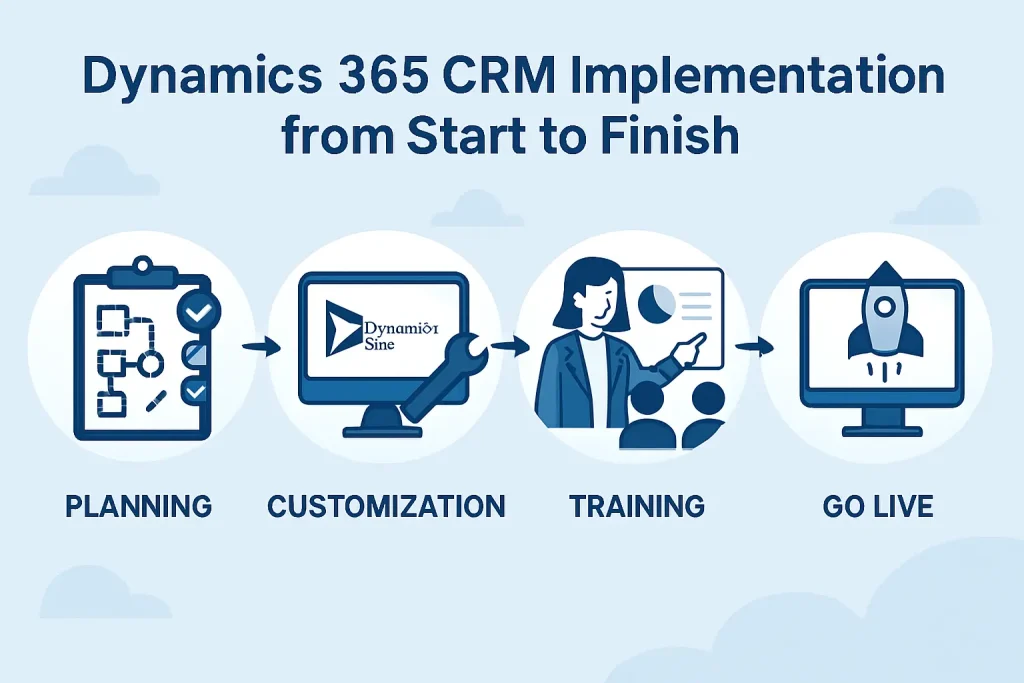
We help recruitment teams use Dynamics 365 CRM as a complete talent management system through expert Dynamics 365 CRM consulting. It tracks candidate progress, matches skills with job requirements, and provides real-time visibility into hiring performance.
With Aegis Softtech, agencies and HR teams can manage placements faster, improve collaboration, and keep every opportunity moving without losing valuable time or information.
Diversity and Inclusion Reporting
The best recruitment CRM offers recruiters dashboards that track diversity metrics throughout the pipeline, revealing where bias might creep in.
Example: A staffing agency uses Salesforce CRM analytics to monitor diversity at every hiring stage. They notice that diverse candidates tend to drop out after technical screenings.
Then, they adjust their assessment methods and introduce inclusive interview training, which improves representation in final rounds by 20%.
Campus and Early Talent Hiring
Managing college recruitment manually is chaotic. CRM software for recruiters simplifies everything: capturing leads from events, tracking communication, and automating follow-ups.
Example: A consulting firm uses Microsoft Dynamics CRM features to manage relationships with universities. Students who attend career fairs are automatically added to segmented lists based on their interests.
After the event, they receive a personalized follow-up email with links to open internships and webinars. Within weeks, the firm builds a database of over 1,000 engaged students.
How to Choose a Recruitment CRM for Staffing Agencies (Step By Step)
Selecting a recruitment CRM without a structured approach leads to costly mistakes. The process below helps you make an informed decision.
Step #1: Define Hiring Goals and Metrics
Start with specific problems the CRM needs to solve. A staffing agency focused on reducing time-to-fill needs different capabilities than one trying to improve candidate engagement or scale operations across multiple verticals.
Identify your priority challenges with measurable targets.
Are you trying to decrease average time-to-fill from 28 days to 18 days through better pipeline management? Looking to increase successful placements from 15% to 22% with better candidate-job matching? Want to enable each recruiter to manage 30% more requisitions by automating administrative tasks?
Other common goals include:
- Client retention: Improve repeat business rate from 60% to 75% through better relationship tracking
- Candidate redeployment: Increase candidate reuse rate from 20% to 35% by maintaining engaged talent pools
- Recruiter efficiency: Reduce time spent on administrative work by 40% to focus on relationship building
Each goal shapes what you need from recruitment CRM software. An agency targeting speed needs automated sourcing and communication tools.
One focused on quality needs robust assessment tracking and detailed candidate profiling. Write these objectives down with specific metrics; they become your evaluation criteria and later prove ROI.
Step #2: Decide Your Deployment Model and Budget Constraints
Platform deployment and pricing structures vary dramatically. Your decision impacts initial costs, long-term scalability, and the total cost of ownership.
Cloud-based SaaS platforms are hosted by the vendor with automatic updates and minimal IT overhead. This works best for agencies without dedicated technical resources. Conversely, on-premise installations give you complete data control and customization flexibility, but require IT staff for maintenance, updates, and security.
Some vendors also offer hybrid models where certain components run in the cloud while sensitive data stays on-premise.
Pricing structures to evaluate:
- Per-user licensing: Monthly fees multiplied by every recruiter and admin who needs access
- Tiered pricing: Different feature sets at different price points, where starter tiers might lack essential reporting or automation
- Usage-based pricing: Costs tied to candidates managed, emails sent, or job postings created
- One-time license: Large upfront payment followed by annual maintenance fees
Calculate the three-year total cost of ownership, including software licensing, CRM implementation services, data migration, training, ongoing support, and potential customization.
Ask vendors specifically: “What triggers price increases as we grow?” Hidden scalability costs often emerge after contracts are signed.
We take the time to understand how your teams operate and configure Dynamics CRM to align with your goals, whether that means improving sales tracking, customer service, or partner management.
Step #3: Create Role-Based User Stories
Recruitment CRM software serves different users with different needs.
Develop user stories that capture real daily scenarios. A recruiter might say: “I need to quickly find candidates with Java and AWS skills who are open to contract roles in Chicago, so I can fill urgent client requisitions without starting searches from scratch.” This requires robust search, filtering, and talent pool segmentation.
Account managers need different capabilities:
- Visibility into all open requisitions, submitted candidates, and communication history with each client
- Ability to generate client reports and updates without digging through emails
- Alerts when clients haven’t been contacted recently or when follow-up is due
Operations managers need dashboards to see each recruiter’s activity levels, pipeline health, and placement rates to identify coaching opportunities and forecast revenue. Similarly, compliance officers need complete documentation with audit trails that highlight who accessed what data and when.
Bring these user stories into vendor demos. Ask vendors to demonstrate how their recruitment CRM handles each scenario. If they can’t walk through your actual workflows convincingly, the platform won’t meet your needs, regardless of impressive feature lists.
Step #4: Shortlist Vendors and Request Demos
Generic product demonstrations waste time. Provide vendors with your specific use cases, user stories, and integration requirements before meetings so they can demonstrate relevant functionality.
Create a scored evaluation matrix with weighted criteria. Must-have features, such as candidate database search, client management, email integration, pipeline tracking, and placement tracking, might carry 40% of the total weight.
Integration capabilities with your existing ATS, job boards, and email systems might represent 25%. Usability factors like interface intuitiveness and mobile accessibility could be 20%. Vendor stability and pricing round out the evaluation.
Here’s an example:
| Evaluation Criteria | Description | Weightage | Vendor A | Vendor B | Vendor C |
| Core functional features | Candidate database search, client/contact management, email integration, pipeline tracking, placement tracking | 40% | 4/5 | 3/5 | 5/5 |
| Integration capabilities | Ability to connect with your existing ATS, job boards, email systems, calendar tools, and other recruiting tech stack components | 25% | 5/5 | 4/5 | 3/5 |
| Usability and experience | Interface intuitiveness, workflow navigation, mobile functionality, learning curve, and overall ease of daily use | 20% | 3/5 | 5/5 | 4/5 |
| Vendor stability and pricing | Pricing transparency, scalability of pricing tiers, financial stability of the vendor, customer support quality, references/customer reviews | 15% | 4/5 | 3/5 | 4/5 |
Take detailed notes and score each vendor against your matrix. This structured approach prevents decisions based on subjective impressions or on which salesperson was most persuasive.
Your weighted score calculation might look like this:
| Vendor | Raw Score (out of 5) | Weighted Score |
| Vendor A | (4×0.40) + (5×0.25) + (3×0.20) + (4×0.15) | 4.05/5 |
| Vendor B | (3×0.40) + (4×0.25) + (5×0.20) + (3×0.15) | 3.70/5 |
| Vendor C | (5×0.40) + (3×0.25) + (4×0.20) + (4×0.15) | 4.20/5 |
Vendor C ranks highest overall, despite Vendor A having stronger integrations. Vendor B has the best usability but weaker core features.
Step #5: Run a Pilot With Real Workflows and Data
Even after a thorough evaluation, real-world use reveals issues that demos miss. A pilot program reduces risk before a company-wide investment.
Choose 3-5 recruiters with varying experience levels and specializations for the pilot. Include at least one account manager and one operations person who needs reporting access.
Plus, use real data. Migrate a subset of actual candidate and client records rather than sanitized demo data. This reveals data quality issues, mapping problems, and workflow gaps that won’t appear with clean test data.
Collect structured feedback through weekly check-ins.
Ask specific questions: What tasks are faster now? What takes longer? What’s confusing? What information do you need that isn’t available?
Step #6: Negotiate Contract Terms and SLAs
Once pilot results validate your choice, contract negotiation determines long-term success and cost management.
Everything is negotiable, especially if you represent significant recurring revenue.
Lock in pricing for 2-3 years with defined maximum annual increases. Without this, vendors can raise prices significantly at renewal. Clarify whether “users” means concurrent users, named users, or active users, and negotiate flexibility to shift licenses between employees without penalties.
Critical terms to address:
- Data ownership and portability: Ensure complete ownership of all data entered and exportability in standard formats if you switch vendors
- Implementation timeline: Define specific milestones with penalties if the vendor misses deadlines
- Service level agreements: Specify uptime guarantees (typically 99.5% or higher), response times for support tickets by priority level
- Integration support: Clarify which integrations are included, which cost extra, and who’s responsible if integrations break after platform updates
- Exit terms: Negotiate reasonable termination clauses and data export provisions
Step #7: Plan Go-Live and Adoption
Change management and training determine whether the recruitment CRM software delivers value or becomes shelfware.
Clean data before migration: duplicate records, incomplete profiles, and outdated information cause ongoing problems if they transfer into the new system. Test all integrations with real workflows before go-live.
Send actual emails through the CRM, import candidates from your job boards, sync calendars, and verify interview scheduling works under a realistic load.
Customize training by role rather than one-size-fits-all sessions:
- Recruiters need hands-on training with candidate sourcing, pipeline management, and communication tools
- Account managers need client relationship features and reporting capabilities
- Operations staff need analytics and performance tracking dashboards
Create cheat sheets for common tasks like searching candidates, adding new clients, tracking placements, and generating reports. Make these accessible within the platform if possible.
If time-to-fill isn't decreasing or placement rates aren't improving within the expected timeframe, investigate why. The platform might need configuration adjustments, additional training might be necessary, or workflows might need refinement.
Continuous optimization ensures you know how to use CRM in recruitment with the ROI you projected during vendor selection.
Why Partner With Aegis Softtech For Recruitment CRM Projects
Your last CRM implementation probably went like this: the vendor promised everything would work seamlessly, your team received a generic two-hour training session, and six months later, everyone went back to their spreadsheets.
We do things differently. At Aegis Softtech, we start our Microsoft Dynamics 365 CRM Services by understanding how your recruiters work: how they source candidates, manage client relationships, and track placements. We configure it to match those workflows and connect your job boards, ATS, and background check providers so data flows without manual entry. And if issues arise three months post-launch, our Microsoft Dynamics CRM developers are still there to optimize and troubleshoot.
FAQs
1. What is the best CRM for recruitment?
Microsoft Dynamics CRM is one of the best options for recruitment. It helps manage candidate data, automate communication, and track the entire hiring process efficiently.
2. Which platform is best for recruitment?
Recruit CRM is a great platform designed specifically for recruiters. It combines an applicant tracking system (ATS) with CRM features, making it easy to handle candidates and clients in one place.
3. What are the top recruitment CRM platforms with AI features?
The top recruitment CRMs with AI features are Microsoft Dynamics CRM, Salesforce, and Bullhorn. They use artificial intelligence for tasks like candidate matching, resume parsing, and communication automation.