Most finance leaders approach ERP selection with a simple question: “What will this cost us?” But when it comes to Microsoft Dynamics 365 Business Central (BC), that question rarely gets a straightforward answer.
While many organizations focus on licensing fees, Business Central implementation costs extend beyond the monthly subscription. Smart finance leaders know that deployment methods, customization needs, data migration complexity, and ongoing support all significantly impact your total investment. Getting these costs wrong can derail budgets and timelines.
In this blog post, we’ll examine cost components that affect your total investment to build a realistic budget and timeline for BC implementation.
Key Takeaways
- Total Cost Range: Business Central implementation typically costs $15,000-$150,000+, depending on scale and complexity.
- Business Size Impact: Essentials (SMBs) average $15,000-$50,000, while Premium (mid-market) projects run $50,000-$100,000+.
- Deployment Model: Cloud deployment is 30-40% more cost-effective upfront than on-premise because it eliminates server and infrastructure expenses.
- Customization and Integrations: Add-ons, workflow changes, and third-party system connections can influence final pricing significantly.
- Ongoing Support: Expect 15-20% of implementation cost annually for updates, training, and partner support.
How Much Does Business Central Implementation Cost?
When you’re looking at Microsoft Dynamics 365 Business Central implementation, costs typically range from $15,000 to $150,000+, depending on your business size and needs.
Let’s break this down.
Small to medium businesses using Business Central Essentials:
- Implementation costs: $15,000-$50,000
- Perfect for basic financial management and supply chain needs
- Includes standard reporting and workflow automation
Mid-market companies needing Business Central Premium:
- Implementation costs: $50,000-$100,000+
- Advanced manufacturing and warehouse management features
- Complex integrations and custom reporting capabilities
The biggest cost difference when choosing BC as your ERP solution comes down to cloud vs. on-premise deployment. Cloud implementations usually cost 30-40% less upfront since you don’t need server infrastructure or an extensive IT setup.
Real-world cost comparison:
- Cloud implementation (20 users): $35,000-$60,000
- On-premise setup (same company): $60,000-$90,000
- Difference: $25,000+ in upfront savings with cloud
Core Cost Components of Business Central Implementation
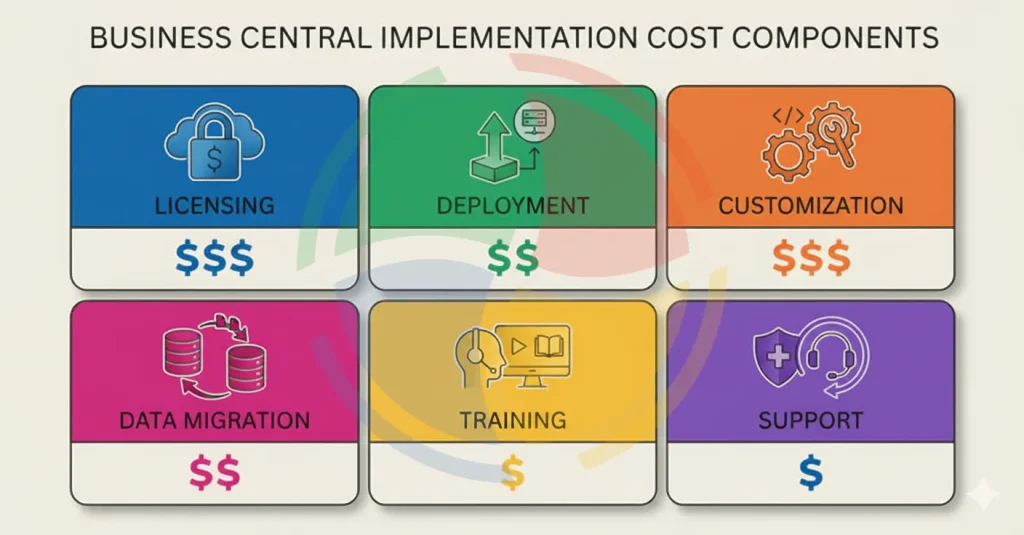
Let’s break down the main cost components you’ll encounter with BC implementation.
1. Licensing and Subscription Fees
Business Central licensing follows a user-based model with two main tiers.
Essentials starts at $70/month per user and covers basic financials, supply chain, and sales features.
Premium runs $100/month per user and adds manufacturing, service management, and advanced warehouse capabilities.
Your licensing costs directly impact implementation expenses. More users mean higher monthly fees, but also more complex setup requirements. A 10-user Essentials deployment is straightforward, while a 50-user Premium implementation needs extensive user role configuration and security setup.
Don’t forget about device licenses either, at $40 per month. These work well for warehouse workers using mobile devices, part-time users who only need limited access, or seasonal employees who don’t require full system access. This can save significant money compared to full user licenses for occasional users.
2. Deployment Model Costs
Choosing between cloud and on-premise is probably your biggest cost decision.
Cloud deployment typically costs less upfront and gets you running faster. You’ll pay Microsoft for hosting, automatic updates, and infrastructure management. Most cloud implementations take 2-4 months and run $20,000-$80,000, depending on the level of customization required.
On-premise is different. You’re looking at a significant upfront investment: $30,000-$150,000+ for hardware and software alone, plus 4-8 months to get everything running. The upside is that you get more control over customizations and data location, which some industries need for compliance reasons.
3. Customization and Development
Standard Business Central covers most business processes, but you’ll likely need some customization. Simple workflow modifications might cost $5,000-$15,000, while complex custom modules can run $25,000-$75,000.
The key factors driving customization costs include:
- How different your processes are from standard functionality
- Industry-specific requirements that need custom development
- Integration complexity with existing systems
- Custom reporting and dashboard requirements
Custom reporting and dashboard development add another $10,000-$30,000 to typical projects. Power BI integration to BC for advanced analytics usually costs $5,000-$15,000 but provides significant value for data-driven companies.
4. Data Migration and Integration Costs
Moving from your old system to Business Central is often more complex than people expect.
Migrating from legacy ERP systems like QuickBooks, Sage, or older Dynamics versions typically costs $15,000-$40,000. The complexity depends on how clean your data is, what customizations exist in your current system, and how much historical data you want to bring over.
Then there are third-party integrations. Connecting Business Central to your CRM, e-commerce platform, or specialized industry software usually runs $5,000-$20,000 per integration. If you need custom API development for older systems, costs can climb much higher.
5. Training and Change Management
Don’t underestimate this part of your budget. User training typically costs $3,000-$8,000, depending on the number of people involved and the complexity of your setup. This covers everything from daily tasks for end users to advanced features for power users and system management for administrators.
Change management support helps ensure adoption success and typically runs $10,000-$25,000. This includes:
- Creating user documentation
- Establishing new business processes
- Providing go-live support
- Monitoring post-implementation adoption
Companies that skimp on change management often see poor user adoption, which undermines the entire ERP investment.
6. Ongoing Maintenance and Support
Annual maintenance costs typically run 15-20% of your initial implementation investment. This covers Microsoft updates, partner support, and minor customization adjustments. For a $60,000 implementation, budget $9,000-$12,000 annually for maintenance.
Microsoft provides basic support with your subscription, but most companies need partner support for business-specific questions and customizations. Partner support packages range from $2,000-$10,000 annually, depending on response time requirements and complexity.
The three main support levels include:
- Basic support for general questions and minor issues
- Premium support with faster response times and dedicated resources
- Comprehensive managed services, including proactive system monitoring
Hidden Costs of Business Central Implementation
Every Business Central project has potential hidden costs that can blow your budget. Delayed project timelines are the most common culprit—what starts as a 12-week implementation can stretch to 20+ weeks when scope creep, data issues, or resource constraints arise.
Additionally, over-customization creates both immediate and long-term costs that many companies don’t anticipate:
- Every custom modification needs testing, documentation, and ongoing maintenance
- Heavy customization complicates future updates and can create performance issues
- The temptation to recreate your old system exactly leads to expensive implementations
- You miss out on Business Central’s standard benefits and best practices
How Aegis Softtech Helps Optimize Business Central Implementation Cost
Aegis Softtech’s Business Central consultants bring deep expertise in Essentials and Premium licensing to help you choose the right tier for your needs. We’ve guided hundreds of companies through the licensing decision process, ensuring you don’t overpay for features you won’t use or underbuy and need expensive upgrades later.
Our Microsoft Dynamics 365 Business Central Services help avoid common cost overruns during rollout. We use standardized project methodologies, realistic timeline planning, and proactive risk management to keep your project on budget and schedule.
Plus, our ongoing support and training programs make sure you get the most from your BC investment long after go-live.
FAQs
1. How does Dynamics 365 Business Central implementation cost compare to other ERPs?
Business Central typically costs 20-40% less than comparable solutions like NetSuite or SAP Business One. Most companies also find that the Microsoft ecosystem integration and familiar interface reduce training costs compared to other platforms. However, total cost still depends heavily on customization requirements and implementation complexity.
2. What’s the difference in cost between cloud and on-premise Business Central?
Cloud implementations cost 30-40% less upfront since you skip server hardware, SQL licensing, and infrastructure setup. Cloud also includes automatic updates, Microsoft-managed hosting, and faster deployment timelines.
On-premise requires a higher initial investment but gives you more control over customizations and data location. Monthly subscription costs are similar between both models, but ongoing infrastructure maintenance expenses can add up over time.
3. What ongoing costs should I expect after implementation?
Plan for annual maintenance costs of 15-20% of your initial implementation investment. This covers Microsoft updates, partner support, user training, and minor system adjustments. For a $60,000 implementation, budget $9,000-$12,000 annually.
Additional costs include new user licenses, periodic system optimization reviews, and occasional consulting for new integrations or business process changes.