Your data warehouse was built for a world that no longer exists. It was sized for yesterday’s volumes, priced for yesterday’s budgets, and architected before cloud-native compute was even a concept.
Meanwhile, your teams are querying against bottlenecks, aging scripts hold back your pipelines, and your data costs scale with hardware.
That’s the real driver behind the rapid shift to Snowflake.
Data migration to Snowflakeis not a lift-and-drop exercise. Moving from Teradata, SQL Server, or Salesforce to Snowflake requires deliberate planning across schema conversion, ETL redesign, governance configuration, and performance tuning. Get it wrong, and you carry your old problems into a new platform (with a new cost structure on top).
This guide walks through every critical phase: from pre-migration assessment and environment setup to source-system-specific considerations, tool selection, and post-migration optimization.
Key Takeaways
- Source systems carry distinct complexity: Teradata needs BTEQ rewrites, SQL Server requires T-SQL cleanup, and Salesforce needs dedicated extraction tools like Fivetran or Airbyte.
- Match tooling to your ingestion pattern: Snowpipe for continuous feeds, COPY INTO for bulk loads, Striim for real-time CDC, ADF for Azure-native environments.
- ELT over ETL: Load raw data first, transform inside Snowflake using dbt or Snowpark, retire external transformation infrastructure.
- Validation is a quality gate: Run hash comparisons and parallel validation before cutover. Row counts alone do not catch silent data corruption.
- Cost governance starts before go-live: Resource Monitors, auto-suspend, and warehouse right-sizing are not post-migration tasks.
- Govern data as it lands: RBAC, masking policies, and audit logging applied during migration are far easier than retrofitting them afterward.
- Design for the AI Data Cloud early: Accounting for Cortex, Horizon, and Snowpark during migration avoids a second re-architecture cycle later.
Why Enterprises Are Moving to Snowflake
Legacy data warehouses were engineered around physical constraints, like fixed compute tiers, monolithic storage, and rigid scaling models. Snowflake eliminates those constraints by design. Here’s what’s driving migration decisions at the enterprise level:
- Separation of compute and storage: Scale warehouses up or down independently, paying for what each workload consumes.
- Performance elasticity: Run multiple virtual warehouses simultaneously on the same data, eliminating resource contention between analytics, ETL, and ad hoc queries.
- Multi-cloud architecture: Operate natively across AWS, Azure, and GCP. Data teams are no longer locked to a single cloud provider’s ecosystem.
- Zero-copy data sharing: Share live, governed data across business units or external partners without duplication, exports, or data movement overhead.
- AI and ML readiness: Allow teams to run ML workloads directly on warehouse data without external infrastructure using native integrations with Snowpark and the AI Data Cloud.
Key Steps for Successful Data Migration to Snowflake
A successful migration is built on process discipline. The eight steps below represent a proven data migration lifecycle.
Step #1: Assess and Define Your Migration Strategy
Before a single byte moves, you need a complete inventory of what you are working with. A structured assessment should cover:
- Total data volumes, table sizes, and projected growth rates
- Schema complexity, legacy-specific constructs, and proprietary functions
- ETL pipeline dependencies and job scheduling logic
- Downstream integrations: BI tools, reporting layers, and operational systems
- PII, regulated data, and compliance requirements that affect data transit
With that inventory complete, define the migration model that fits your timeline and risk tolerance:
- Lift and Shift: Minimal redesign, faster execution. Risk of carrying over legacy inefficiencies.
- Full Redesign: Re-architect pipelines and data models for Snowflake’s cloud-native architecture. Higher upfront effort, stronger long-term returns.
The deliverables at this stage are a phased migration roadmap, a timeline estimate, and a risk assessment that flags dependencies and cutover complexity.
Step #2: Prepare and Configure the Snowflake Environment
Before data moves, the environment needs to be production-ready. Rushing this step creates Snowflake security gaps and performance bottlenecks that are difficult to fix later. The configuration work covers:
- Databases, schemas, and naming conventions aligned to governance standards
- Virtual warehouses sized and separated by workload type: ETL, analytics, ad hoc
- Role-based access controls (RBAC) applied at the database, schema, and table level
- Column-level encryption, dynamic data masking, and row-level security policies
- Resource Monitors to enforce credit thresholds before workloads go live
- Network policies and private connectivity for organizations with strict traffic requirements
Step #3: Stage Data for Migration
Source data needs a structured landing zone before it enters Snowflake. The right option depends on data volumes and how much intermediate processing is required:
- Internal Snowflake stages: Lower overhead, suited for straightforward bulk loads in compatible formats
- External cloud storage (S3, Azure Blob, GCS): Better for large-scale or multi-source migrations requiring parallel uploads and intermediate format conversion
If your team is conducting data migration from Teradata to Snowflake, external staging is typically the more practical path given the volumes involved.
Step #4: Load Data into Snowflake
With staging in place, Snowflake’s native COPY INTO command handles structured bulk ingestion for initial loads. The key decisions at this stage are:
- File format selection: Parquet and ORC for large-scale loads, CSV for simpler Snowflake schemas
- File chunking to enable parallel loading and maximize throughput
- Snowpipe for automated, near-real-time ingestion on event-driven pipelines
- Error handling policies: abort on bad rows or skip and log for review
- Load monitoring via LOAD_HISTORY and COPY_HISTORY views
Step #5: Transform Data Using ELT
Snowflake’s architecture is built for ELT, not traditional ETL.
Load raw data first, then run transformations inside the platform using native compute. This eliminates external transformation infrastructure and keeps processing costs tied directly to Snowflake’s elastic warehouses.
The two tools that anchor most ELT workflows are:
- dbt: SQL-based transformation with version control, automated testing, and lineage documentation. Strong fit for analytics engineering teams moving off legacy transformation layers.
- Snowpark: Python, Java, or Scala transformations running natively inside Snowflake. The preferred path for teams migrating Spark or PySpark workloads.
Step 6#: Convert and Modernize Legacy Code
This is where source-system-specific complexity surfaces most sharply. Each legacy platform carries proprietary logic that does not translate directly into Snowflake-compatible SQL:
- Teradata: BTEQ scripts, SQL extensions, and macro logic require ANSI SQL rewrites. Data migration from Teradata to Snowflake projects consistently underestimate this phase, particularly when procedural logic is embedded across large batch job libraries.
- SQL Server: T-SQL cursors, identity columns, and implicit type conversions need careful conversion. Date handling and collation differences are frequent sources of post-migration data inconsistencies in SQL Server to Snowflake data migration projects.
- Salesforce: Salesforce to Snowflake data migration tools like Fivetran, Airbyte, and Informatica handle extraction and schema mapping, converting Salesforce objects into relational tables. Change data capture for incremental post-cutover syncs needs to be configured and tested before go-live.
Automated schema conversion tools handle standard DDL and DML well. Complex procedural logic and embedded business rules almost always need manual review.
Aegis Softtech’s implementation team has done it before.
Step #7: Validate Data Integrity Before Cutover
Validation is the step most frequently compressed under deadline pressure, and the one that generates the most post-migration incidents. The validation process should include:
- Record count reconciliation by table, partition, and load batch
- Column-level hash comparisons to catch silent corruption and type conversion errors
- Parallel run validation: source and Snowflake running simultaneously on live data
- BI and report output validation against expected values, not approximations
- Referential integrity checks for data originating in relational systems like SQL Server
A single undetected mismatch in a core dimension table propagates errors across every downstream report. Treat this as a quality gate.
Step #8: Optimize Performance and Costs Post-Migration
Going live is not the finish line. Snowflake’s consumption-based pricing means poorly tuned workloads directly increase your bill. The first 30 to 60 days post-migration are the most critical window for getting this right:
- Right-size virtual data warehouses to actual workload utilization, not theoretical peaks
- Configure clustering keys on large tables with predictable filter patterns
- Enable auto-suspend on all warehouses to eliminate idle credit spend
- Use Query Profile to surface expensive operations, cartesian joins, and full table scans
- Set Resource Monitor alerts at the warehouse and account level
- Apply materialized views and result caching for high-frequency aggregation queries
Leveraging Snowflake’s AI Data Cloud During Migration
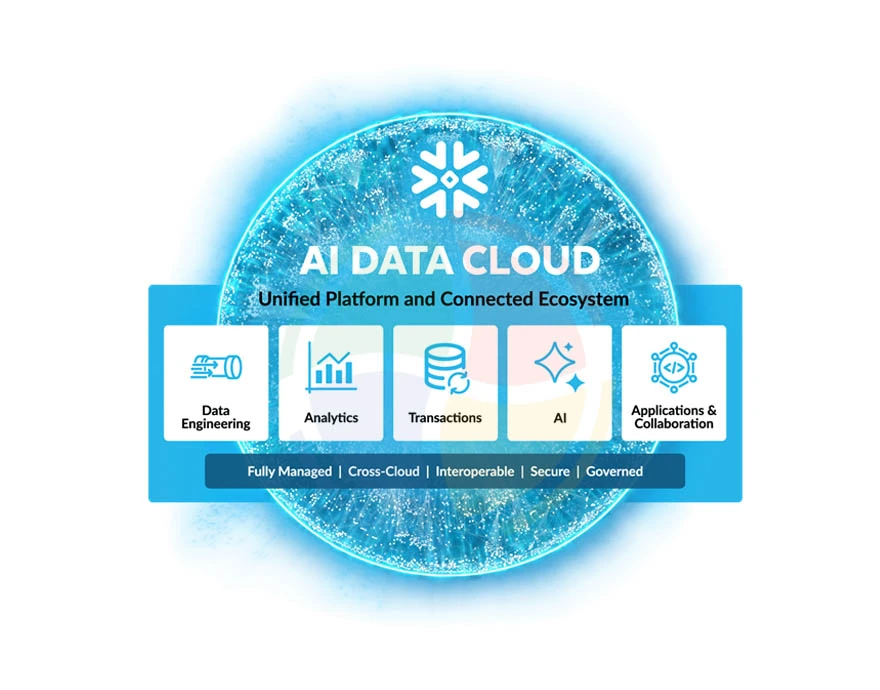
Most teams treat the AI Data Cloud as a post-migration consideration. That’s a missed opportunity. AI Data Cloud is an architectural foundation that shapes how you design schemas, govern access, and structure pipelines during migration itself.
Snowflake developers who account for it early build a platform ready for AI and ML workloads, rather than facing a second re-architecture cycle 12 to 18 months later.
Here’s what it enables and why it matters at the migration stage:
- Unified data access: Structured, semi-structured, and unstructured data coexist in a single platform. Snowflake’s VARIANT type lets you query JSON, Avro, and Parquet natively without flattening everything upfront.
- Cross-cloud data sharing: Secure Data Sharing enables you to share live datasets across business units or cloud environments without copying data or building separate pipelines per consumer.
- AI and ML-ready pipelines: Snowpark’s native Python, Java, and Scala support means data scientists can build and run models inside Snowflake without extracting data to external compute.
- Cortex AI: LLM-powered capabilities including classification, summarization, and vector search run directly in the warehouse. Designing ingestion pipelines with Cortex AI in mind means data lands ready for AI-driven analytics.
- Unified governance via Snowflake Horizon: Access controls, lineage tracking, classification policies, and compliance tagging apply across all data in a single governance plane. Critical for enterprises consolidating from multiple legacy systems as part of Snowflake data migration.
- Data clean rooms: Native clean room functionality supports joint analysis on sensitive datasets without exposing raw records. It’s far easier to design for during migration than to retrofit afterward.
Common Tools and Techniques for Snowflake Migration
Tooling decisions made early in a data migration to Snowflake project directly impact pipeline reliability, ongoing maintenance overhead, and total cost of ownership.
The right stack depends on your source systems, team skillset, and whether you need batch, real-time, or hybrid ingestion patterns.
Here’s a breakdown of the core tools and where each one fits.
Snowpipe
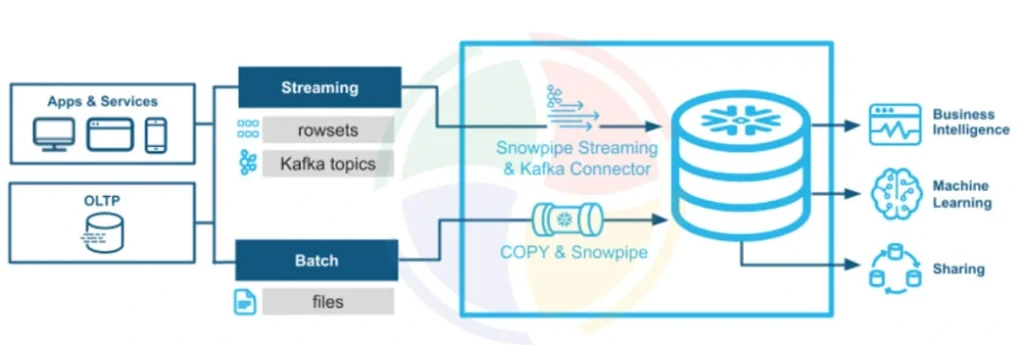
Snowpipe is Snowflake’s native continuous ingestion service. Rather than waiting for scheduled batch loads, Snowpipe triggers automatically when new files land in a designated stage, processing data within seconds of arrival.
You should choose it when:
- Source systems generate files continuously rather than in scheduled batches
- Latency between data creation and availability in Snowflake needs to stay under a few minutes
- You want ingestion managed and scaled by Snowflake rather than an external orchestrator
Snowpipe integrates directly with cloud event notifications from S3, Azure Blob, and GCS, meaning no polling logic to maintain. For teams running SQL Server to Snowflake data migration with ongoing CDC requirements post-cutover, Snowpipe handles the continuous file ingestion side of that pipeline efficiently.
Snowpark
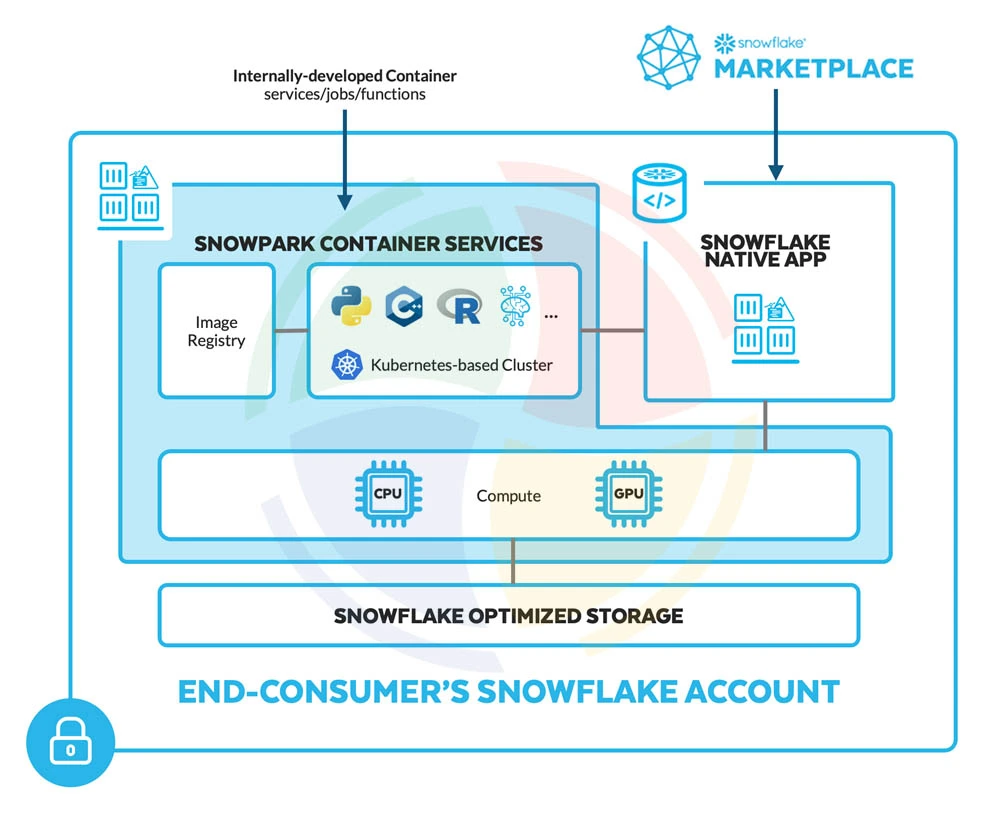
Snowpark is Snowflake’s developer framework for running non-SQL workloads natively inside the platform. It supports Python, Java, and Scala, allowing data engineers to write transformation logic, ML preprocessing, and custom functions without pushing data to an external compute environment.
It is particularly relevant for:
- Teams migrating Spark or PySpark transformation pipelines that want to preserve their existing code patterns
- Data science workflows that need to run feature engineering or model inference directly on warehouse data
- Organizations moving away from external Hadoop or Databricks clusters as part of broader platform consolidation
For data migration from Teradata to Snowflake projects, where significant procedural transformation logic exists, Snowpark provides a path to modernize that logic inside Snowflake.
Striim
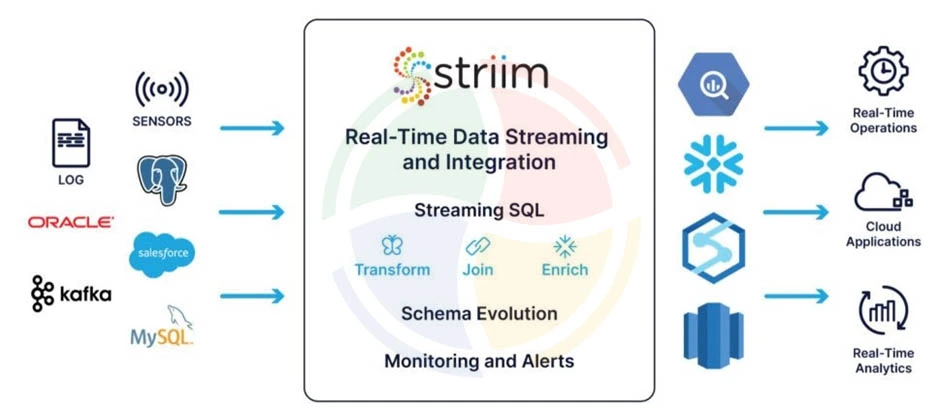
Striim is a real-time data integration and streaming platform built for enterprise migration scenarios. It connects to legacy sources at the database log level, capturing change data without impacting source system performance.
Key capabilities relevant to Snowflake migration include:
- Log-based CDC from Oracle, SQL Server, MySQL, and other relational sources
- Real-time pipeline monitoring with data quality validation in-stream
- Pre-built Snowflake targets with automatic schema mapping and type conversion
- Support for continuous replication during parallel run validation, keeping source and target in sync until cutover
Striim is particularly well-suited to SQL Server to Snowflake data migration projects where downtime windows are constrained, and data should remain synchronized.
Azure Data Factory
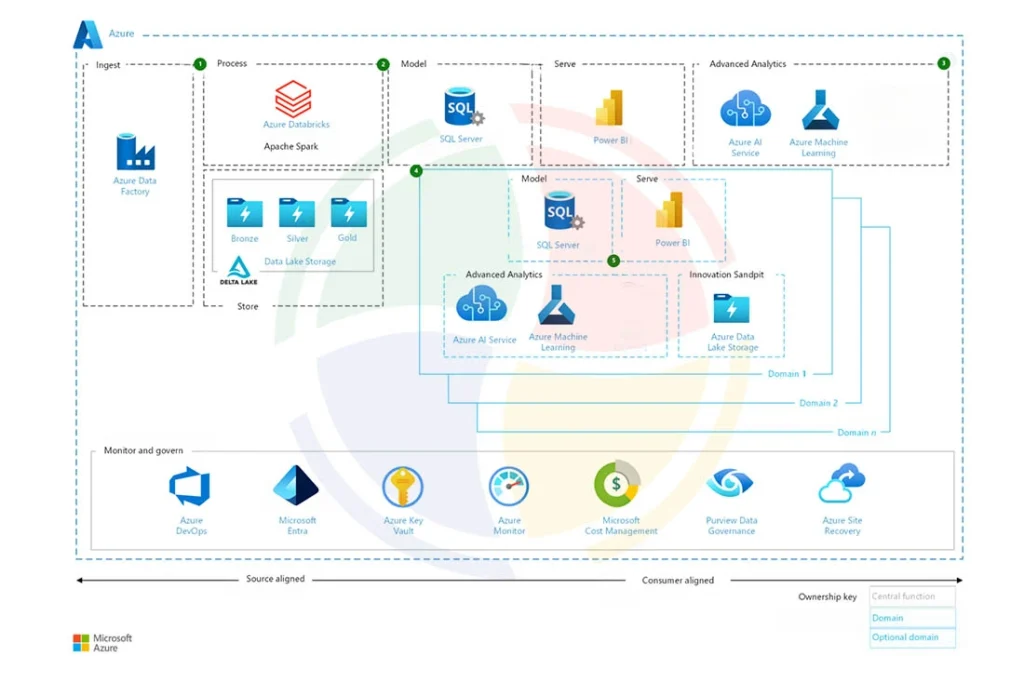
Azure Data Factory (ADF) is Microsoft’s cloud-based data integration service and a natural fit for organizations already running workloads in the Azure ecosystem.
For Snowflake migration, it provides:
- Pre-built Snowflake connectors for both bulk load and incremental ingestion patterns
- Visual pipeline authoring with support for complex branching, looping, and dependency management
- Native integration with Azure Blob Storage, making it a strong fit for the staging layer in Azure-based migrations
- Scheduling, monitoring, and alerting built into the Azure ecosystem without additional tooling
To shorten this curve further, some teams partner with external experts like STX Next rather than assembling the stack themselves. Their data engineering depth helps navigate schema conversion, pipeline redesign, and post-migration tuning much faster.
Achieve Long-Term Success with Snowflake as Your Data Warehouse
Migration is the starting line, not the destination. The enterprises that extract the most value from Snowflake treat go-live as the beginning of an operational discipline, not the end of a project. Three practices make the difference.
Adopt ELT Architecture
Traditional ETL pipelines were designed around the limitations of on-premise warehouses, where compute was expensive and transformations happened outside the database to reduce load. Snowflake removes that constraint. Transform inside the platform using its elastic compute, and retire the external transformation infrastructure entirely.
In practice, this means:
- Raw data lands in Snowflake unmodified, preserving a reliable source of truth
- Transformation logic lives in version-controlled dbt models, not scattered pipeline scripts
- Testing, documentation, and lineage tracking are built into the transformation layer
- Compute scales automatically, eliminating capacity planning overhead
For teams completing data migration to Snowflake, the ELT shift is also an opportunity to audit and retire legacy transformation logic.
Monitor and Manage Costs Proactively
Snowflake’s consumption-based pricing is one of its strongest advantages and one of its most common operational pitfalls. Without active cost management, warehouse spend grows in ways that are difficult to attribute or control after the fact.
The core controls to put in place are:
- Resource Monitors with hard credit caps at the warehouse and account level
- Auto-suspend policies tuned to actual usage patterns, not default settings
- Regular warehouse utilization reviews to identify and right-size over-provisioned compute
- Query cost attribution by team or pipeline, so spend is visible and accountable
- Periodic audits of materialized views and scheduled tasks consuming credits in the background
Strengthen Data Governance
Governance gaps that existed in legacy systems surface quickly in Snowflake, where data is more accessible and shared more broadly. The governance foundation should cover:
- RBAC enforced at every layer: Snowflake database, schema, table, and column
- Dynamic data masking on PII and sensitive fields so downstream users see appropriately restricted values
- Object tagging and classification applied during data migration to Snowflake so sensitive data is governed from the moment it lands
- Audit logging across all warehouses for compliance and incident response
- Data lineage tracking through Snowflake Access History and Horizon
Modernize Your Data Warehouse on Snowflake With Aegis Softtech
Data migration to Snowflake is a multi-layered undertaking. Teams that treat it as a straightforward data movement exercise consistently run into the same problems. For example, performance regressions, runaway costs, and governance gaps that take months to untangle post-go-live.
At Aegis Softtech, we work with enterprises across the full Snowflake journey. Our Snowflake cloud consulting services help technical decision-makers assess migration complexity, define the right approach, and build a roadmap before work begins.
Our engineers handle end-to-end Snowflake implementation, from environment setup and pipeline buildout to code conversion and validation.
Across all engagements, we bring:
- Deep experience across Teradata, SQL Server, and Salesforce source systems
- Proven ELT architecture and dbt-based transformation frameworks
- Cost governance and performance optimization built into delivery, not added after
FAQs
1. Is Snowflake a data migration ETL tool?
No. Snowflake is a cloud data warehouse platform. It is the migration target, not the migration tool. ETL and ELT tools like Fivetran, Airbyte, dbt, and Azure Data Factory handle data movement and transformation work that feeds into Snowflake.
2. Which ETL tool is best for Snowflake?
It depends on your source system and ingestion pattern. Fivetran works well for SaaS sources like Salesforce. Azure Data Factory suits SQL Server and Azure-native environments. dbt handles transformation logic inside Snowflake. Most enterprise migrations use a combination rather than a single tool.
3. How do you move 100 GB of data into Snowflake?
Stage the data in S3, Azure Blob, or GCS, then use Snowflake’s COPY INTO command to bulk load it. Split large files into smaller chunks beforehand to enable parallel loading and improve throughput.
4. How do you bring data into Snowflake?
The three main approaches are bulk loading via COPY INTO for large initial loads, Snowpipe for automated continuous ingestion, and third-party connectors like Fivetran or Airbyte for SaaS and database sources.
5. Is Snowflake an OLAP or OLTP system?
Snowflake is an OLAP system, optimized for analytical workloads, complex queries, and large-scale data processing. It’s not designed for high-frequency transactional operations that require row-level inserts and updates at speed.