If you think that moving your data to the cloud will automatically guarantee better performance and lower costs, you’re in for a surprise.
Yes, Snowflake implementation will solve many of your problems, but only with a well-defined strategy. Even though it is a promising investment, agility is uncompromisable.
You must look out for and adopt Snowflake implementation best practices to dodge unexpected operational challenges and expenses.
Consider your Snowflake environment as a space that requires intentional design, rather than a pre-built solution. You need to carefully plan and create a strategic blueprint to ensure it functions as you intend.
While there is no one-size-fits-all plan, our blog covers some of the most common and useful best practices for Snowflake implementation.
Let’s explore them.
Key Takeaways
Snowflake implementation best practices to achieve a scalable and cost-effective environment include:
- Data Governance: Establish integrity via data cataloging and protect PII with dynamic masking.
- Data Security: Enforce the principle of least privilege using MFA, Role-Based Access Controls (RBAC), and end-to-end encryption.
- Query Optimization: Use clustering, caching, and profiling to maintain performance and reduce credit burn.
- Query Threshold Alerts: Set automated notifications for high usage or unusual security activity to prevent overspending and breaches.
- Data Sharing: Implement secure views and zero-copy sharing features to prevent data malpractice.
- Warehouse Management: Use Auto-Suspend to eliminate costs during inactivity and Right-Sizing to match compute power to specific workloads (ETL vs. BI).
- Data Strategy: Leverage Zero-Copy Sharing for secure data exchange without duplication and optimize Data Loading using staging areas and Parquet/Avro formats.
Snowflake Implementation Best Practices
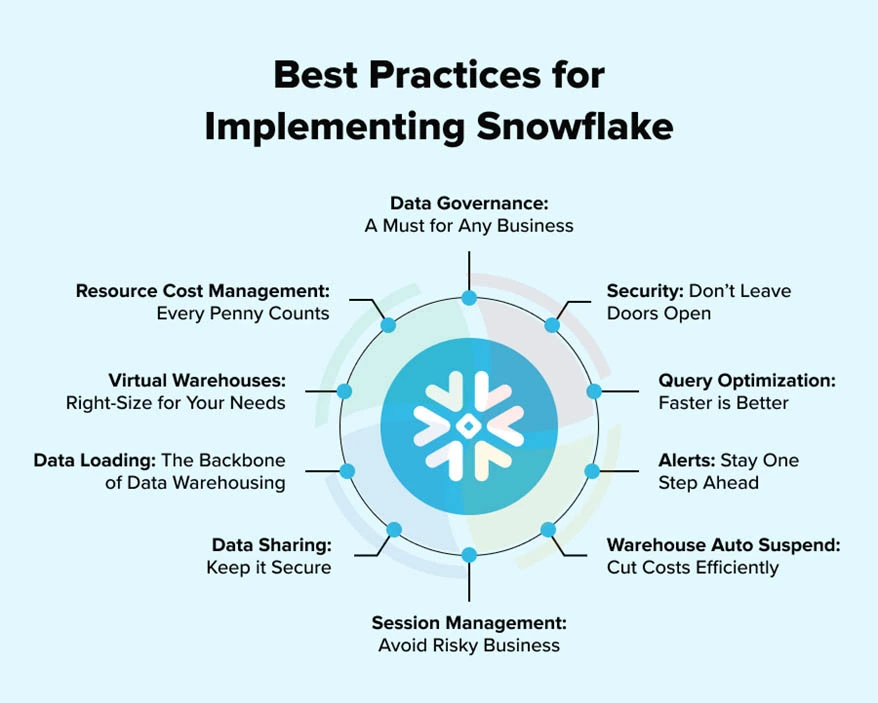
Investing in Snowflake can change the future of your data. The unparalleled power and flexibility this platform offers are reflected in smarter decisions and the centralization of information. Numerous exceptional Snowflake features only yield desired outcomes when the platform is effectively deployed.
Following Snowflake implementation best practices will solidify the foundation of this platform, ensuring long-term success.
Here are the critical considerations for building a scalable and robust data environment:
1. Embed a Data Governance Framework
Data governance helps manage the integrity and quality of your data while safeguarding it. It helps assign clear data ownership, outlining who is responsible for maintaining the consistency and accuracy of each dataset.
A strong governance framework ensures your data complies with all regulations and is accessible only to direct stakeholders.
Data Cataloging
Track available metadata, data lineage, and datasets with data cataloging. Users can better understand the data’s context and accuracy when it becomes more discoverable.
Data Masking
Dynamic data masking protects sensitive data, such as personally identifiable information (PII). These policies also help you meet compliance regulations, including HIPAA and GDPR.
2. Make Security Your Focal Point
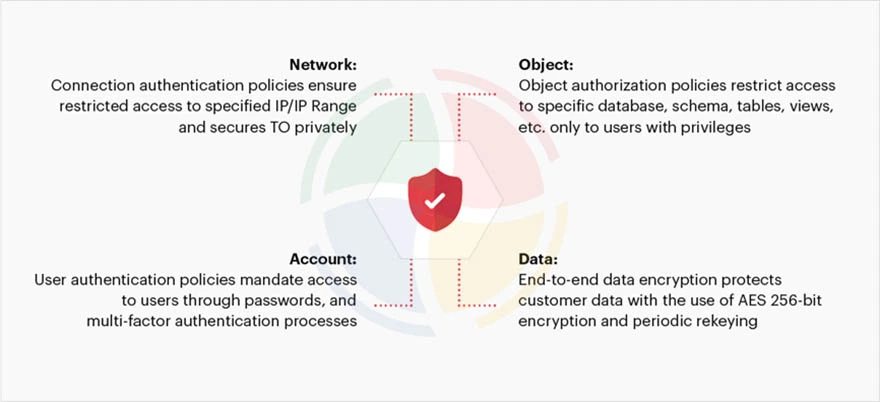
Security should be your focal point from day one, which also helps instill confidence in your customers. Consider the principle of least privilege as your guiding light, ensuring no role or user has more permissions than necessary.
Multi-Factor Authentication (MFA)
Multi-factor authentication, especially for admin roles, is a must when accessing Snowflake. It’s an additional layer of security, ensuring zero unauthorized access.
User Access Controls
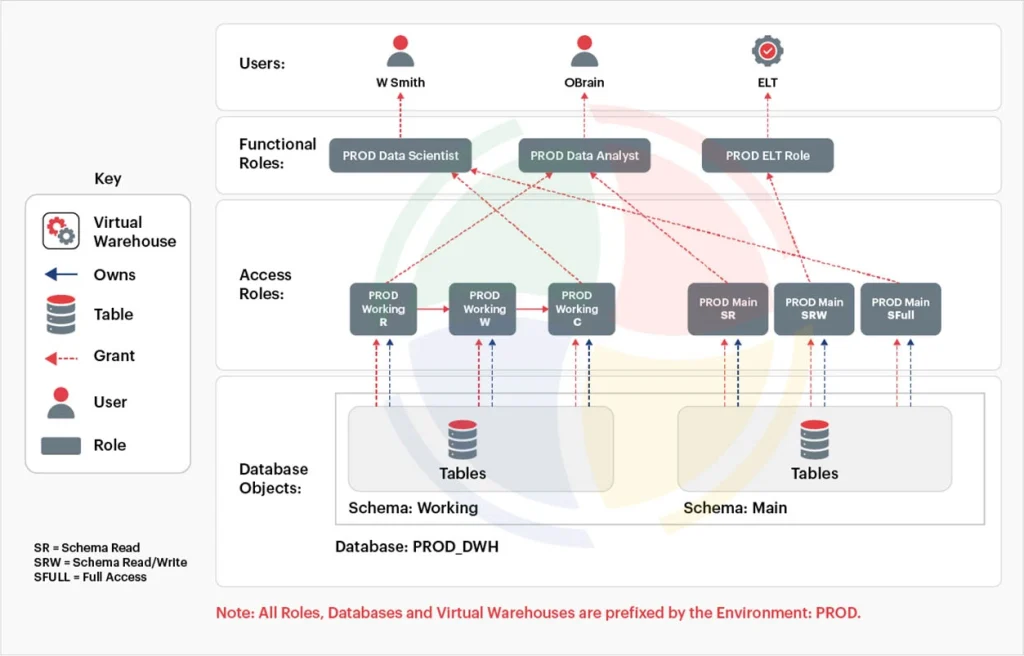
Snowflake’s Role-Based Access Controls (RBAC) limit user access based on the roles and responsibilities of your employees. The hierarchical system assigns privileges to users at various levels, including the database and the data warehouse.
Data Encryption
Enable end-to-end encryption and implement VPC peering and private links for better security.
3. Establish Regular Query Optimization
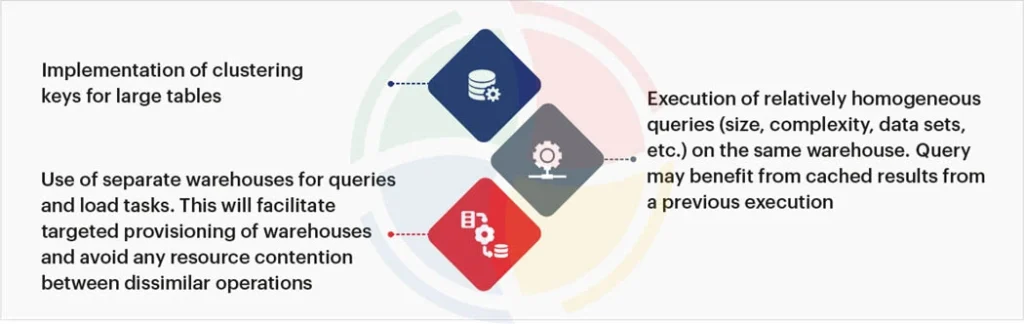
Efficient queries control spending and facilitate performance tuning in Snowflake. There are a few common mistakes, like using SELECT * in production queries, which should be avoided at all times. Use materialized views for queries run on large datasets. It will reduce credit usage and query execution time.
Clustering
Clustering large tables helps optimize data retrieval, improving query performance. The amount of data scanned for queries is reduced, too.
Result Caching
Result caching speeds up recurring queries, saving resources and time.
Query Profiling
Query profiler helps analyze and optimize query performance by identifying issues and adjusting the data model accordingly.
4. Set Query Threshold Alerts
With Snowflake, you can set up alerts to notify you when specific thresholds are met, be it failing queries or high usage. You can thus control problems before they grow out of bounds.
Security Alerts
Set up security alerts to monitor the system for unusual activities, such as access from a blacklisted location or multiple failed login attempts from a single IP address.
Warehouse Alerts
Administrators are notified when a Snowflake data warehouse is suspended or resumed, offering clear visibility.
5. Control Costs with Warehouse Auto Suspend
Warehouse auto-suspend is a great feature for controlling costs. It automatically pauses a virtual warehouse (VWH) if it has been inactive for a set time.
Utilize professional Snowflake implementation services to ensure these configurations are optimized for your specific scale. It will further prevent costly configuration errors during the initial rollout.
Cost Control
A warehouse in a suspended state does not consume any credits. It is useful for ad-hoc workloads, ensuring you pay only for compute resources when queries are running.
Optimal Duration
Set the auto-suspend time according to your workload needs. For instance, scheduled batch jobs will benefit from longer suspension time. However, BI tools that have brief, frequent bursts benefit from a short time.
6. Implement Secure Data Sharing
Snowflake offers secure data sharing for you to share data with other accounts, both internally and externally, without creating a copy. There is no need to export or send files manually.
Secure Views
Secure views hide the underlying raw data when you share a subset of data with internal or external teams. It offers extensive control over your sensitive information and intellectual property.
Zero-Copy Sharing
It eliminates the need to create or manage duplicate copies of data, ensuring you only work with the latest information.
7. Instill Data Loading Features
Data loading is a multi-stage process that begins in the cloud storage to load data to a landing table, where it is then transformed.
Bulk Loading
Snowflake’s bulk loading features efficiently load huge volumes of data. The Snowflake Snowpipe is suitable for smaller data loads
Use Staging Areas
Improve load efficiency by temporarily storing data either in Snowflake’s internal staging area or an external one (such as Google Storage or Amazon S3).
File Formats
Choose optimal file formats, such as Avro or Parquet, for lower storage costs and faster load times.
8. Develop Virtual Warehouses
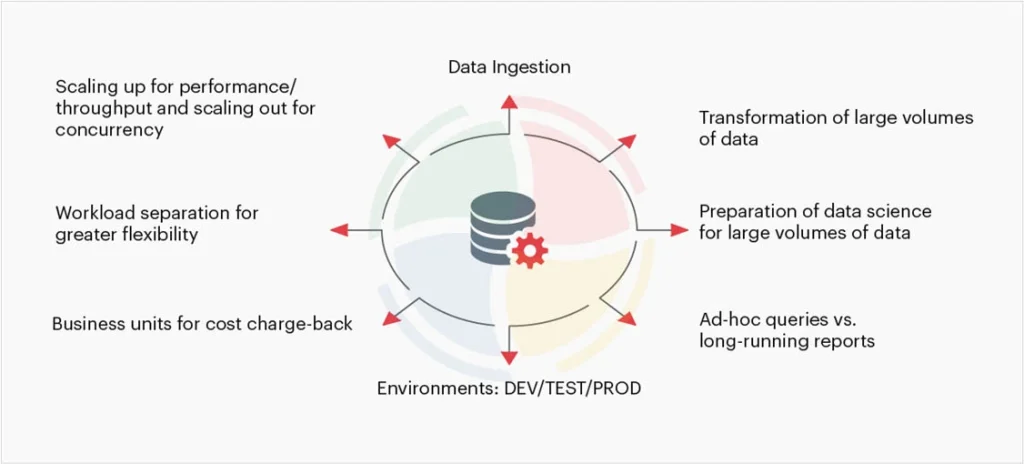
Virtual warehouses (VWHs) in Snowflake are a collection of compute resources. These offer the necessary resources to perform DML operations and execute SWL SELECT statements.
Dedicated Workloads
Create dedicated data warehouses for distinct teams or workloads for more accurate cost optimization. The separation also ensures that a heavy ETL (Extract, Transform, Load) job does not slow down an ad-hoc query.
Right-Sizing
The size of the warehouse should match your specific workload. A smaller warehouse, for instance XS or S, is more cost-effective for ad-hoc queries. However, heavy data transformations require a larger warehouse of size M or L.
What’s at Stake when Snowflake Implementation Goes Wrong?
Undoubtedly, the consequences of a failed or poorly planned Snowflake implementation can go beyond a technical hiccup. Financial loss is still something an organization can manage, but exposure to security risks cannot be accounted for.
So, what’s really at stake if your implementation goes wrong? Let’s find out!
1. Financial Loss
Financial loss usually happens due to unused resources and over-provisioning during the transition phase. Many organizations struggle when moving legacy data without a clear plan.
Skip this obstacle by engaging expert Snowflake migration services, which ensure that your data moves securely without incurring ‘cloud shock’ costs.
2. Security Vulnerabilities
A flawed implementation opens doorways to security gaps, possibly exposing sensitive data. The stakes are quite high and thus must be carefully addressed by adopting best practices for Snowflake implementation.
Turn Snowflake Best Practices into Measurable Wins with Aegis Softtech
Implementing Snowflake effectively focuses on delivering consistent performance and governance based on your business needs. While your business and data requirements may differ, there are certain established Snowflake implementation best practices that you should adopt.
The execution of these best practices, however, requires both expertise and foresight. That’s where we make a difference.
At Aegis Softtech, our Snowflake consulting services align the platform’s capabilities with your organization’s data goals. With years of experience, our team builds resilient data environments to avoid common pitfalls and maximize efficiency.
Upon partnering with us, you gain a data partner who helps you turn Snowflake into a long-term growth enabler.
FAQs
Q1. What are the top Snowflake data governance best practices tools needed for implementation?
Top Snowflake data governance best practices and tools involve using Snowflake’s built-in features, including row-access policies, Role-Based Access Controls (RBAC), dynamic data masking, and data classification.
Q2. How to handle concurrency in Snowflake?
The unique Snowflake architecture and an extensive list of features ensure it handles concurrency. It does so by isolating workloads, automatically scaling compute resources, managing query queues, and ensuring transactional integrity.
Q3. What is pruning in Snowflake?
Pruning in Snowflake is an automatic process where the query optimizer does not scan micro-partitions containing data irrelevant to the query.
Q4. What are the best practices for Snowflake monitoring?
Best practices for Snowflake monitoring encompass continuously monitoring dashboards, optimizing performance and costs, identifying anomalies, securing user access with MFA/SSO, and analyzing query history to optimize execution.
Q5. What are the best practices for Snowflake naming?
The key best practices for Snowflake naming include:
- Using uppercase letters with underscores.
- Creating short but descriptive names.
- Avoid mixed-case or special characters.
- Using prefixes like RAW_, STG_, DM_ to denote schema layers and object types.
- Adopting a shared naming convention within the team.