ML pipelines fail quietly at the infrastructure level. Your data lives in Snowflake. Feature engineering runs somewhere else. Training happens on a separate cluster. Inference results get written back through a custom API that no one fully understands anymore. Every handoff between systems is a failure point, a latency tax, and a governance blind spot.
Snowflake for machine learning changes the architecture at its core.
Feature engineering, model training, and batch inference run inside the platform, directly against your warehouse data, with no extraction required. That equals fewer moving parts, less synchronization complexity, and uniform governance across the entire ML lifecycle
Let’s understand how Snowflake ML workflows are structured, what the platform supports, where external tools still belong, and what performance and cost decisions matter in production.
Key Takeaways
- Snowpark eliminates the extraction step: Python-based feature engineering and model training run inside Snowflake’s compute engine directly against warehouse data. No separate cluster required for most workloads.
- Feature consistency is structural: Features generated inside Snowflake for training and inference come from the same tables and the same logic. Training-serving skew is reduced by design.
- The Model Registry centralizes governance: Model artifacts, training metadata, dataset versions, and evaluation metrics live in Snowflake alongside the data the models were trained on. Lineage is tracked end-to-end.
- Real-time ML is viable: Snowpipe Streaming, Dynamic Tables, and model UDFs support event-driven inference pipelines with near-real-time feature freshness.
- External platforms still have a role: GPU-accelerated deep learning training, millisecond-latency inference, and MLflow experiment tracking integrate with Snowflake.
- Drift monitoring requires custom work: Snowflake does not provide native model monitoring. Production ML pipelines need custom drift detection logic built as a first-class pipeline component.
Why Snowflake for Machine Learning Changes Traditional ML Architecture
Traditional ML pipelines move data constantly, and every hop adds latency and creates a new place for things to break. Snowflake AI and ML capabilities address this by bringing the compute to your data.
Here’s what this changes in practice:
- Reduced data movement: Feature engineering and model training run inside Snowflake against data already in the platform. Extraction to external environments is no longer a prerequisite for ML work.
- Unified storage and compute: A single platform manages data storage, transformation, and ML execution. Teams no longer maintain separate infrastructure for each stage of the pipeline.
- Simplified data governance: Snowflake’s RBAC, dynamic data masking, and audit logging apply to ML workloads automatically. Models train on governed data without requiring custom access control implementations in external systems.
- Elastic compute for training workloads: Snowflake warehouses scale on demand. Training jobs that require more compute get it without infrastructure provisioning, and credits stop accumulating the moment the job completes.
- Consistent feature data: Features used during training and features used during inference come from the same Snowflake tables. Training-serving skew, one of the most common sources of model degradation in production, is structurally reduced.
Core Machine Learning Capabilities in Snowflake
Machine learning in Snowflake covers every stage of your ML lifecycle in layers. Understanding what each capability does and where it fits determines how effectively your team builds on the platform.
Snowpark for Python and ML Development
Snowpark for Python is Snowflake’s developer framework for running non-SQL code natively inside the platform. It lets your data scientists write Python directly against Snowflake data using a DataFrame API, pushing execution down to Snowflake’s compute engine without moving data out.
Here’s what it supports for Snowflake ML development:
- Python DataFrames that execute as Snowflake SQL under the hood, keeping your data inside the platform during exploration and preparation
- User-defined functions (UDFs) and vectorized UDFs written in Python that run at scale across large datasets without data extraction
- User-defined table functions (UDTFs) for generating multiple output rows per input row, useful for feature generation and data augmentation tasks
- Integration with Python ML libraries, including scikit-learn, XGBoost, LightGBM, and PyTorch through Snowpark’s Anaconda package repository
- The Snowpark ML Modeling API, which gives you a scikit-learn-compatible interface for training models directly inside Snowflake
The practical consequence is that Snowflake developers can write familiar Python code and run it at scale without managing a separate compute cluster.
Feature Engineering Inside Snowflake
Feature engineering in Snowflake runs directly against your warehouse data using SQL, Python via Snowpark, or a combination of both. Your team doesn’t need to extract raw data to an external environment for transformation before feeding it into a training pipeline.
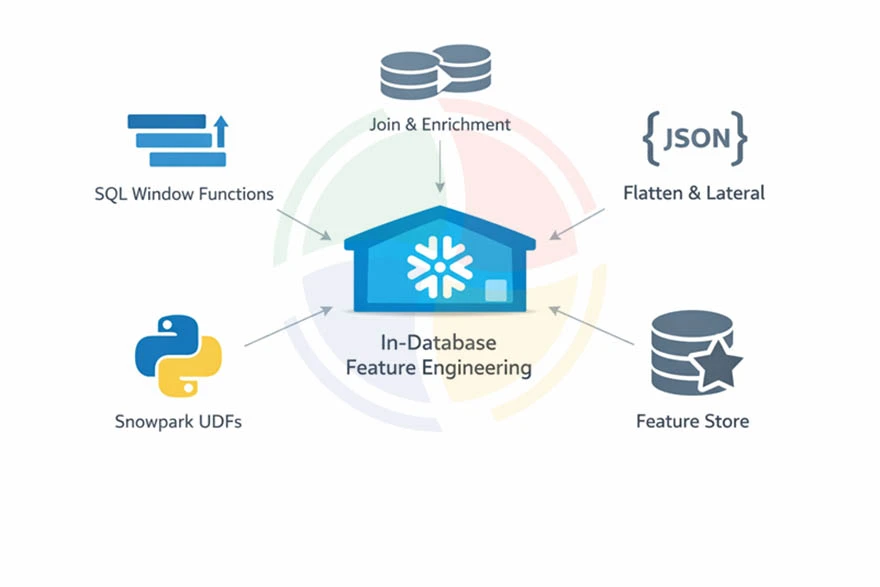
Feature engineering operations that run natively in Snowflake:
- Window functions for lag features, rolling averages, cumulative sums, and time-based aggregations across event streams
- JOIN-based feature enrichment pulling attributes from dimension tables into your training datasets
- Semi-structured data parsing using FLATTEN and LATERAL to extract features from JSON, Avro, and Parquet fields stored as VARIANT
- Python-based feature transformations using Snowpark UDFs for logic that SQL expresses poorly
- The Snowflake Feature Store, available as part of Snowflake ML, which registers, versions, and serves features consistently
Keeping feature engineering within Snowflake implies that training and serving features are generated by the same logic against the same data.
Point-in-time correctness for time-series features is handled through Snowflake’s Time Travel capabilities. These enable feature computation at any historical timestamp without maintaining a separate feature history table.
Secure and Governed Data Access for ML Workloads
Snowflake’s native governance layer extends automatically to your ML workloads. Your models train on data that respects the same RBAC policies, masking rules, and audit requirements that apply to every other query on the platform.
Governance capabilities relevant to ML workflows:
- Role-based access controls determine which datasets a given ML pipeline can read
- Dynamic data masking allows models to train on datasets containing sensitive fields without exposing raw values
- Snowflake Access History logs every table and column accessed by a training job, providing full lineage
- Data sharing via Snowflake allows ML teams to train on governed datasets shared from other business units without copying or replicating data
Step-by-Step Machine Learning Workflow in Snowflake
A complete Snowflake data science workflow takes you from raw data ingestion through to model inference without leaving the platform. Each step maps to a specific set of Snowflake capabilities.
Here’s a process breakdown:
Step #1: Ingest and Prepare Your Data
Begin by bringing raw data into Snowflake through bulk load via COPY INTO, continuous ingestion via Snowpipe, or connector-based replication from source systems. Once ingested, Snowflake handles structured data in standard relational tables and semi-structured data natively through the VARIANT column type.
From there, work through the following preparation tasks in order:
- Deduplicate records and handle NULLs using SQL or Snowpark DataFrames.
- Cast types and standardize formats across source systems with inconsistent Snowflake schemas.
- Parse semi-structured data to extract relevant fields from JSON event streams into typed columns.
- Validate data quality using dbt tests or Snowpark-based assertion logic before data enters the feature pipeline.
Step #2: Apply Feature Engineering
With clean data in place, transform raw records into ML-ready datasets. The feature logic you register here must be reproducible at inference time, so follow these steps in sequence:
Some key considerations at this stage:
- Use explicit time boundaries for window aggregations on time-series features to ensure reproducibility
- Materialize features derived from multiple sources as Snowflake tables or register them in the Snowflake Feature Store; avoid recomputing expensive joins on every run
- Apply categorical encoding and numerical scaling using Snowpark ML’s preprocessing transformers
- Establish feature versioning before your first model training run
Step #3: Train Your Model
ML model training in Snowflake runs through Snowpark ML, which provides scikit-learn-compatible estimators that execute within Snowflake’s compute environment. Supported algorithms include linear models, tree-based models like XGBoost and LightGBM, and neural network models.
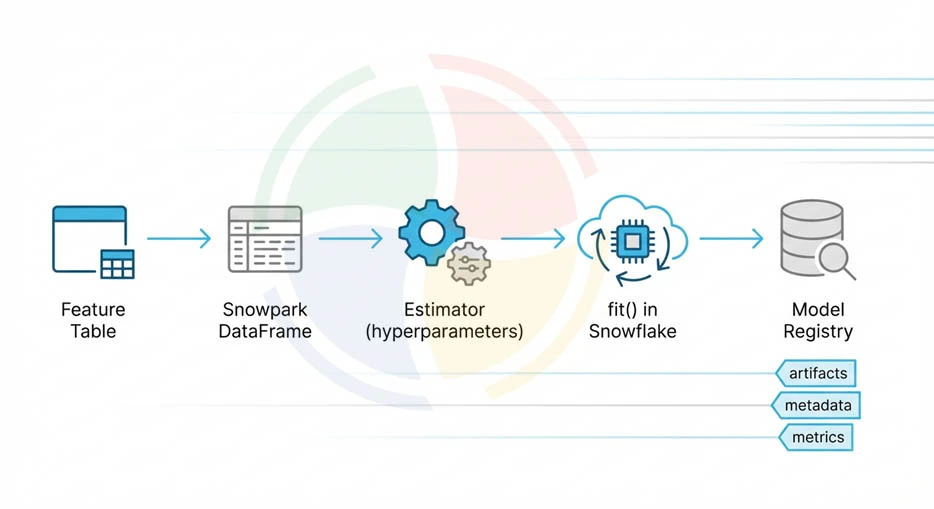
Follow this sequence to train using Snowpark ML:
- Load your training dataset as a Snowpark DataFrame directly from the feature table
- Instantiate a Snowpark ML estimator with hyperparameters defined in your training script
- Call fit() on the Snowpark DataFrame; this executes the training job inside Snowflake’s compute engine
- Register the trained model in the Snowflake Model Registry, which stores model artifacts, metadata, training parameters, performance metrics, and the warehouse data your model was trained on
For large-scale training workloads that exceed Snowpark ML’s native support, Snowflake integrates with external training frameworks.
Export data to S3 or Azure Blob to feed external GPU-based training clusters, then return trained model artifacts to the Snowflake Model Registry for governed storage and deployment.
Step #4: Evaluate and Validate the Model
Model evaluation runs against a held-out test dataset using the same Snowpark DataFrame infrastructure you used during training. Apply these evaluation practices for production-grade ML in Snowflake:
- Compute standard classification or regression metrics using Snowpark ML’s metrics module, which runs evaluation inside Snowflake without data extraction
- Compare your candidate model performance against the current production model stored in the Model Registry before promoting a new version
- Run evaluation across data slices representing different population segments to identify performance disparities before deployment
- Log evaluation results, training parameters, and dataset versions to the Model Registry to maintain a complete audit trail for each model version
Step #5: Deploy and Infer
ML model deployment with Snowflake supports two inference patterns: batch scoring and real-time inference.
Batch scoring runs on a schedule or triggers on pipeline completion:
- Call the registered model as a function within a SQL query or Snowpark script
- Score new records in a Snowflake table
- Write predictions back to a results table
This pattern suits use cases like daily churn scoring, weekly demand forecasting, and periodic risk classification.
Real-time inference runs through model UDFs registered in Snowflake:
- Register your model as a UDF in Snowflake
- Call the UDF from SQL queries or application layers via Snowflake’s API
- Review latency against your requirements. UDF-based inference depends on warehouse size and model complexity. It’s suitable for near-real-time use cases where sub-second response is not a hard requirement.
For applications requiring true millisecond-level latency, export your models from Snowflake to external serving infrastructure via ONNX or native framework formats.
Real-Time Machine Learning with Snowflake
Real-time ML pipelines in Snowflake rely on continuous data ingestion feeding inference workflows that score your data as it arrives rather than in scheduled batches. The Snowflake architecture works well for event-driven use cases where prediction value degrades rapidly with latency.
The real-time ML stack on Snowflake consists of three components:
1. Streaming Ingestion via Snowpipe
Snowpipe triggers automatically when new files land in a cloud storage stage, loading your data into Snowflake within seconds of arrival.
For higher-throughput event streams, Snowpipe Streaming accepts direct API calls and loads rows continuously without the file staging step.
2. Dynamic Tables for Near-Real-Time Feature Computation
Dynamic Tables automatically refresh when upstream data changes, recomputing features on fresh data without manual pipeline orchestration. They replace scheduled tasks for feature computation in pipelines where feature freshness directly affects prediction quality.
3. Model UDF Inference on Arriving Data
You can apply registered model UDFs directly to newly ingested records via Streams and Tasks. As new rows arrive in a source table, inference triggers automatically and write predictions to a results table without external orchestration.
Event-driven ML use cases well-suited to this architecture include:
- Fraud detection on transaction streams
- Real-time personalization scoring on user activity events
- Anomaly detection on sensor or log data
Integration with External ML Platforms
When Snowflake ML’s native capabilities do not meet the requirements completely, Snowflake ML integration with external platforms becomes crucial. It’s particularly valuable for large-scale deep learning training, experiment tracking, and production model serving at low latency.
MLflow
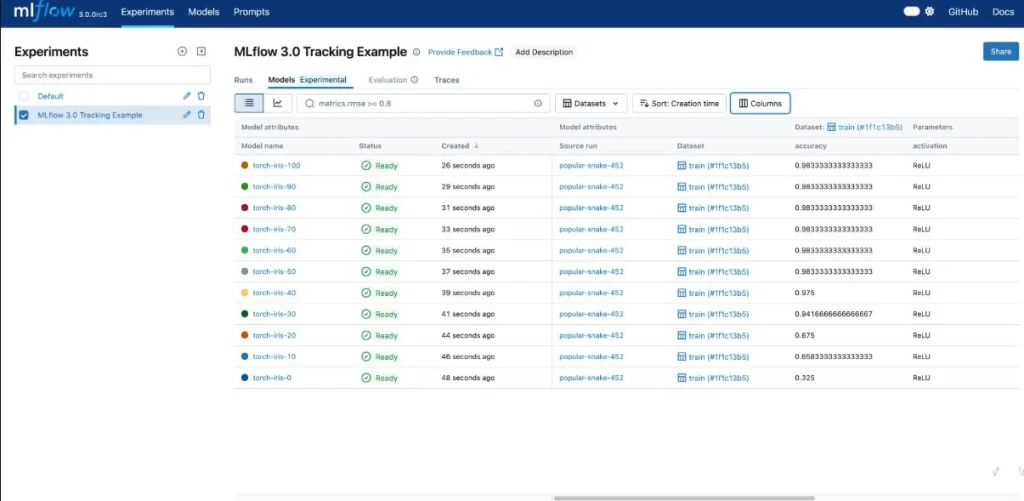
via MLflow
MLflow integrates with Snowflake through the Snowflake Model Registry, which supports MLflow-formatted model artifacts.
If your team uses MLflow for experiment tracking, you can log runs, parameters, and metrics. All this, while storing the resulting model artifacts in the Snowflake Model Registry for governed deployment. You don’t need a parallel model management system to preserve your existing MLflow workflows.
External Training Frameworks
For deep learning workloads requiring GPU compute, PyTorch and TensorFlow models are trained on external clusters. You source data from Snowflake via Snowpark or direct export to cloud storage.
Trained model artifacts are returned to the Snowflake Model Registry, maintaining centralized governance and versioning even when training runs externally.
Model Export and API Deployment
Models registered in Snowflake export to ONNX format or native framework formats for deployment to external serving infrastructure.
Platforms like AWS SageMaker, Azure ML, or custom FastAPI services handle your low-latency inference requirements. Snowflake remains your source of truth for feature data and model versioning, with inference happening outside the platform.
Performance and Cost Considerations for ML Workloads
Running ML workloads at production scale in Snowflake introduces compute cost patterns that differ from standard analytical workloads. Your training jobs, feature computation, and batch inference all have distinct resource profiles that require deliberate warehouse configuration.
Warehouse Sizing for Training Jobs
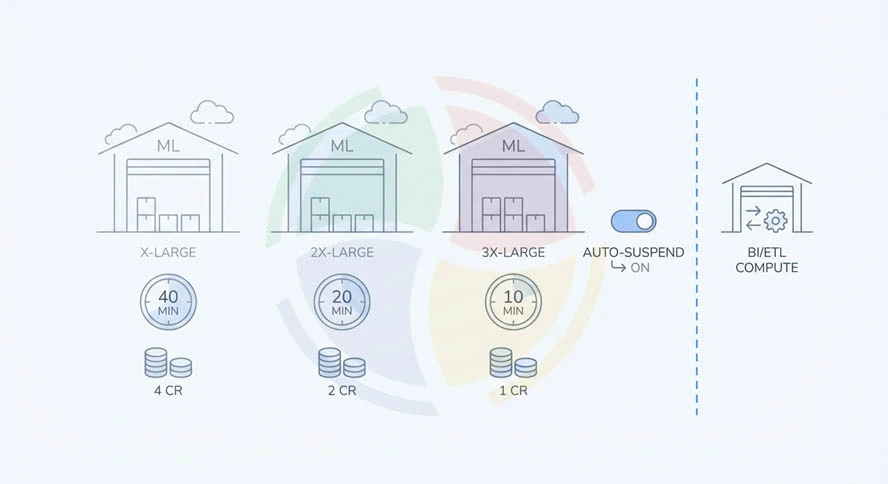
ML training workloads are compute-intensive and benefit from larger data warehouse sizes in ways that standard SQL queries don’t.
You can get a 40-minute training job done in 10 minutes on a 3X-Large data warehouse. The credit cost is often similar or lower when you compare total credits consumed per job rather than credits per hour.
Sizing guidance for your ML workloads:
- Use dedicated ML warehouses separate from BI and ETL compute to prevent training jobs from competing with analytical queries
- Start training runs on X-Large warehouses and profile execution time before scaling up, as some training workloads are memory-bound
- Enable auto-suspend with a short timeout on ML warehouses since training jobs run to completion and leave the warehouse idle immediately afterward
Managing Compute Costs
ML workloads generate credit consumption patterns that are harder to predict than standard analytical queries. A misconfigured training loop or an accidentally triggered retraining job on a large warehouse can generate significant unexpected spend within a short window.
Cost control tips specific to ML workloads:
- Set Resource Monitor limits on ML warehouses with credit caps sized to the expected cost of planned training runs
- Use Snowpark DataFrame lazy evaluation to inspect the execution plan and estimated data volume before triggering expensive training data preparation jobs
- Cache intermediate feature datasets as materialized Snowflake tables to avoid recomputing the same expensive feature joins on every training run
- Schedule batch inference jobs during off-peak hours when warehouse utilization is low to maximize credit efficiency
Scaling Concurrent ML Workloads
Multiple data science teams running experiments simultaneously on shared ML infrastructure create resource contention, degrading training performance and increasing costs.
Snowflake ML workflows at scale require workload isolation between experimental and production ML pipelines.
You can try these scaling strategies for concurrent ML workloads:
- Assign separate warehouses to experimental training runs and production batch inference
- Use multi-cluster warehouses for feature engineering workloads
- Apply query tags to all ML workloads to enable credit attribution by team, project, or model
Common Challenges in Snowflake ML Workflows
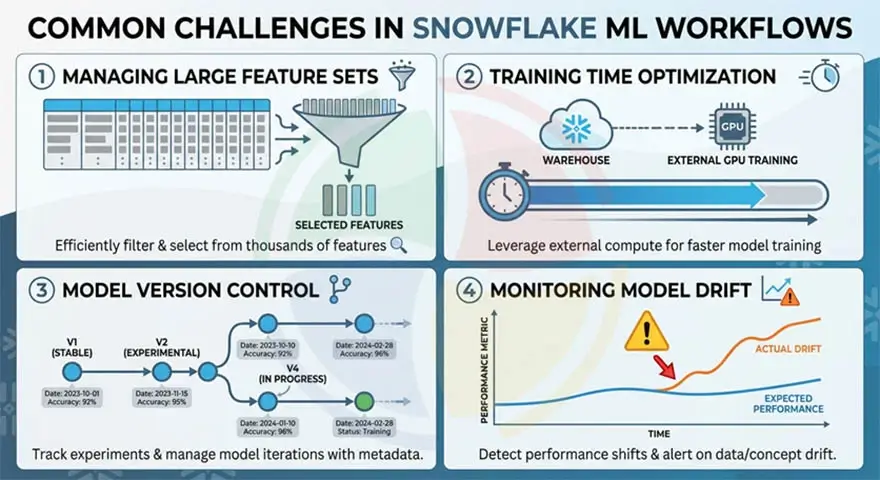
Even your well-designed Snowflake ML workflows encounter operational issues as they mature. Most are predictable and addressable with the right practices in place from the start.
Here are a few you must know:
Large Feature Sets
Feature tables that grow to hundreds of columns or billions of rows create performance problems during training data preparation.
Snowflake’s columnar storage handles wide tables efficiently, but training jobs that select all columns from large feature tables unnecessarily scan data that does not affect model performance.
Feature selection and dimensionality reduction should happen before the training data extraction step, not after.
Training Time Optimization
Long training runs on Snowpark ML reflect either warehouse under-sizing or training data volumes that exceed what in-warehouse training handles efficiently.
Ideally, you should profile execution time against warehouse size before committing to a configuration. Further, consider external GPU-based training for deep learning workloads where Snowpark ML’s compute profile is not the right fit.
Model Version Control
Without a disciplined Model Registry workflow, your production ML systems accumulate model artifacts without clear lineage between training data, feature versions, and deployed model versions.
Every model registered in Snowflake should include the training dataset version, feature pipeline version, and evaluation metrics as mandatory metadata.
Model Drift
Models degrade as the statistical properties of production data diverge from training data. Snowflake doesn’t provide native model monitoring out of the box.
Drift detection requires custom monitoring pipelines. These compare feature distributions between training and production data on a scheduled basis. They also trigger alerts or automated retraining when drift exceeds defined thresholds.
How Aegis Softtech Supports Machine Learning on Snowflake
Architecture decisions around feature pipelines, model governance, inference patterns, and cost management all compound over time. Getting them right at the start is significantly less expensive than rearchitecting after the first production incident.
Here is where we come in.
Aegis Softtech works with your data science and data engineering teams across every stage of the Snowflake ML workflow, from initial architecture through to production deployment.
If you’re designing a Snowflake ML architecture from scratch, our Snowflake consulting services help you:
- Assess workload requirements
- Define the right pipeline architecture
- Make feature store and model registry decisions before any code is written
For teams moving from design to build, we support you with a well-planned Snowflake implementation. Our team handles Snowpark development, Feature Store setup, Model Registry integration, drift-monitoring pipelines, and cost-governance frameworks.
FAQs
1. Is Snowflake a coding language?
No, Snowflake is a cloud data platform. It uses SQL as its primary query language and supports Python, Java, and Scala through Snowpark for programmatic data processing and ML workloads.
2. Is Snowflake an OLAP or OLTP system?
Snowflake is an OLAP system built for analytical queries and large-scale data processing. It’s not designed for high-frequency transactional operations requiring rapid row-level inserts and updates.
3. What are the limitations of Snowflake AI?
Snowflake ML does not natively support GPU-accelerated training, making it less suitable for large-scale deep learning. Real-time inference via model UDFs operates in the seconds range, not milliseconds, which limits applicability for low-latency serving. Native model drift monitoring is not built in and requires custom implementation.
4. What are the three layers in Snowflake?
Cloud, compute, and storage are the three layers of Snowflake’s architecture. The cloud layer for query optimization, authentication, and metadata management. The compute layer hosts virtual warehouses that execute queries and ML workloads. Finally, the storage layer comprises compressed columnar data in cloud object storage.
5. How many schemas are in Snowflake?
Snowflake imposes no hard limit on schemas. A single account can contain multiple Snowflake databases, each with multiple schemas, each containing multiple objects. The practical limit is organizational, not technical.
6. What is S3 in Snowflake?
S3 is Amazon Simple Storage Service, which Snowflake uses as its underlying storage layer on AWS. It’s an external stage for data ingestion via COPY INTO or Snowpipe. Snowflake also supports Azure Blob Storage and Google Cloud Storage on their respective clouds.