Software bugs slipping into production often cause costly delays, frustrated users, and damaged reputations.
What’s the root of most such issues? Inadequate testing at the smallest building blocks of code.
Without verifying individual components early, errors multiply and compound during integration.
That’s where unit testing comes in. It acts like high-precision sensors, catching faults early, reducing rework, and keeping your codebase clean as it scales.
That’s where software quality begins, when done right.
But what is unit testing, anyway? How did it become an essential branch of software testing?
In this blog, we will walk you through everything you need to know about unit testing, resulting in a stronger codebase and smoother releases.
Key Takeaways
Unit testing verifies isolated code units (functions, methods, classes) to catch early logic flaws, using mocks for dependencies
Core benefits:Enables safe refactoring, shift-left testing, and CI/CD integration for reliable, modular code
Types:State-based (input-output checks), interaction-based (dependency verification), parameterized (multiple inputs), and performance smoke tests
Process:Identify units, write/review cases, mock dependencies, execute, refactor, and re-test in CI/CD
Top tools:JUnit/TestNG (Java), pytest/unittest (Python), Jest/Mocha (JS), Mockito/Sinon
Metrics:Track code coverage (>80% ideal), pass rate, MTTR, and failure trends—not just quantity
What is “Unit” Testing in Software Testing?
Unit testing, in software testing, is the practice of verifying the smallest testable parts of code—called units—in isolation. A unit can be a function, method, class, or even a module, depending on the language and paradigm.
Industry standards like IEEE 1008 define unit testing as “the testing of individual software units or groups of related units.”
What counts as a unit varies by programming paradigm:
- Object-oriented languages (Java, C#) → typically a method or class
- Functional programming (Haskell, Elixir) → usually a pure function
- Scripting languages (Python, JavaScript) → often a standalone function or module
Unit tests focus only on the logic inside the unit. External systems, such as databases or APIs, are typically mocked to keep tests isolated.
Why Unit Testing Matters
- Catches logic flaws before they spread across components
- Fixing issues early is 10x cheaper than post-deployment
- Enables safe refactoring without fear of breakage
- Drives modular, clean code that’s easier to maintain
- Supports shift-left testing—test earlier, fail faster
- Seamless with CI/CD pipelines for continuous validation
Think of it as building a skyscraper: you don’t wait until the 20th floor to check the foundation.
Strategies and Process for Unit Testing
Once you’re clear on what to test, the next question becomes how. That’s where testing strategies and execution processes come into play.
Manual vs. Automated Execution
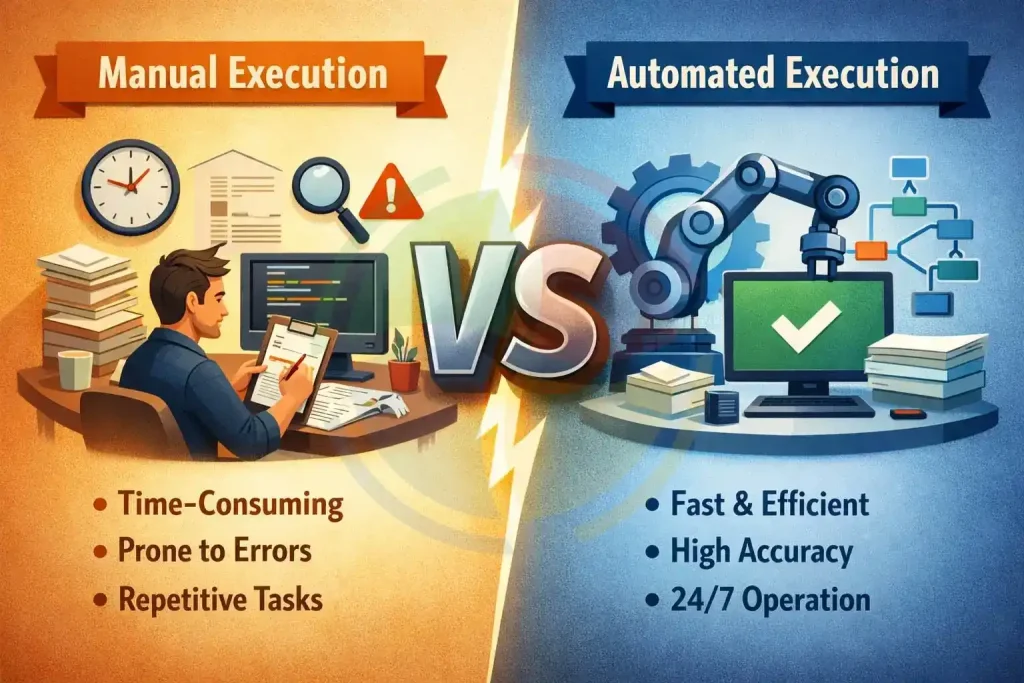
Before jumping into tools or frameworks, you’ll need to decide how tests will be executed: manually or automatically.
- Manual testing still has a place, especially for quick, exploratory tests or investigating unusual edge cases. It’s flexible but not scalable.
- Automated testing, on the other hand, shines in speed and consistency. You can integrate automated unit tests into your CI/CD pipeline to catch regressions instantly after each commit.
Example:
Let’s say you’re building a loan calculator. A manual test might verify one calculation with edge input. But automated tests can validate dozens of input scenarios in seconds, every time someone pushes code.
Unit Testing Strategies
There’s no one-size-fits-all approach. But here are the strategies that make the difference:
- TDD (Test-Driven Development):
In TDD, you write your test before writing the code. This flips the process, forcing you to think through the interface and expected behavior first.
- BDD (Behavior-Driven Development):
This extends TDD with a focus on user behavior. Tests are written in human-readable language, making them more collaborative across teams.
- Mocking & Stubbing:
Also called test doubles, these simulate dependencies (like databases or APIs) so the unit runs in isolation. This removes noise and flakiness from tests.
Core Steps (5-6 Stages)
A consistent process leads to more reliable, readable, and reusable test suites. Here’s how unit testing is done:
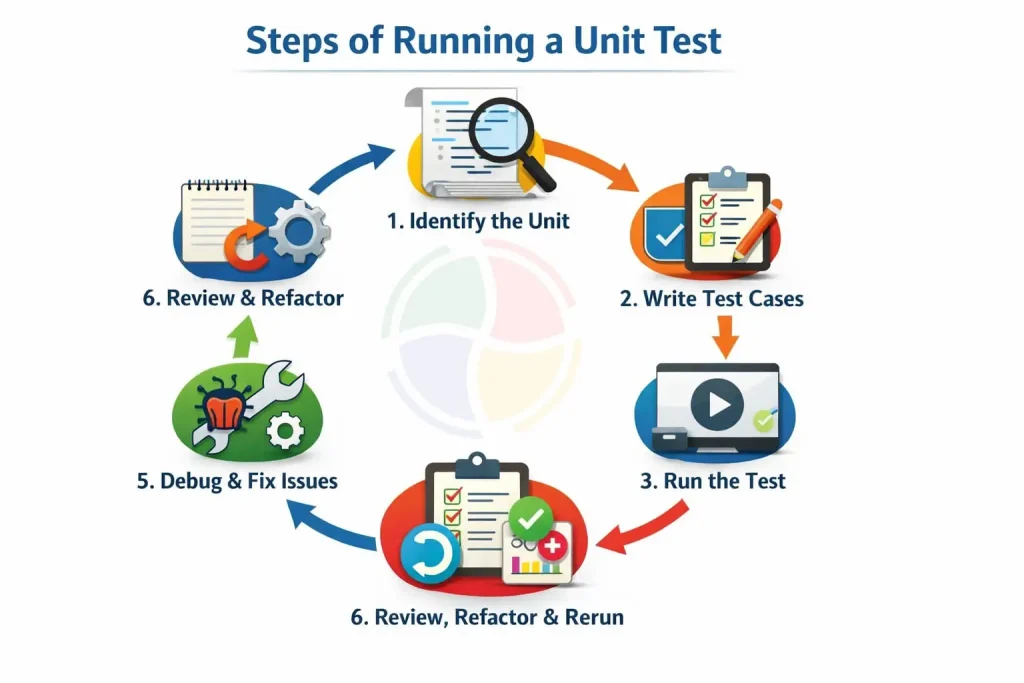
Types of Unit Testing in Software Testing
Let’s break down the core types of unit testing in software testing.
Each serves a distinct purpose in writing faster, more effective tests.
- State-Based Testing
Asserts outputs based on specific inputs. For example, given getDiscount(100) returns 10, the test passes if the expected output matches. It’s best used for pure functions and logic-heavy units.
- Interaction-Based Testing
Validates that a unit interacts correctly with other components or dependencies. Ideal when using mocks or stubs—like checking if sendEmail() was triggered after registerUser().
- Parameterized Testing
Runs the same test logic with multiple input values. For example, instead of writing five similar tests, use a data table to test edge cases in one loop.
- Performance Smoke Unit Tests
Performance testing happens as quick checks on runtime performance before deeper integration. These catch slow methods early, like flagging a 500ms response time in a unit that should run in under 50ms.
Used together, these types help you test better, faster, and with fewer surprises down the line.
Anatomy of a Useful Unit Test
Before you dive headfirst into writing unit tests, it’s worth asking—what separates a useful test from one that just clutters your repo?
Unit tests, at their best, are fast, isolated, and easy to maintain. But too often, they end up bloated, brittle, or so tightly coupled to implementation details that they break with every refactor.
So what makes a unit test actually useful?
- Clear purpose: Each test should validate one thing—no more, no less.
- Independent: A good unit test mocks dependencies and avoids hitting real databases or APIs.
- Repeatable: It should pass or fail the same way every time.
- Fast: Anything over a second starts to compound dangerously across large suites.
- Readable: Tests double as documentation. Future devs should understand what’s being tested without decoding the app itself.
A good test prevents bugs. A great test tells you why something failed.
Tools & Frameworks For Unit Testing: A Quick Roundup
Once you’ve mapped out your unit test cases, choosing the right tools can make or break efficiency.
Reliable automation frameworks boost dev confidence, catch regressions early, and support continuous delivery without slowing things down.
Here’s a deeper dive into what’s available across popular stacks:
| Category | Tool/Framework | Language / Use Case | Key Features |
| Unit Testing Framework | JUnit | Java | Annotation-based testing, widely used, CI/CD friendly |
| TestNG | Java | Data-driven tests, parallel execution | |
| unittest | Python | Built-in module, xUnit style | |
| pytest | Python | Powerful plugins, concise syntax | |
| Jest | JavaScript (React, Node.js) | Snapshot testing, zero config | |
| Mocha | JavaScript (Node.js) | Flexible with external assertions (e.g., Chai) | |
| Mocking Library | Mockito | Java | Dependency mocking, used with JUnit/TestNG |
| unittest.mock | Python | Mocking utilities for patching and assertions | |
| Sinon.js | JavaScript | Stubs, spies, mocks for browser or Node | |
| IaC Unit Testing | Terratest | Go (for Terraform, Packer, etc.) | Infrastructure testing using real cloud APIs |
| terraform-unit | HCL / Terraform | Lightweight Terraform unit testing tool |
Metrics & KPIs in Unit Testing
Unit testing without measurement is like debugging with your eyes closed. The following metrics give your quality assurance team visibility into test quality, stability, and long-term value:
| Metric | What It Tells You |
| Code Coverage (%) | Shows what % of the codebase is being tested. Helps identify untested logic or dead zones in your app. |
| Test Pass Rate | Measures test stability across runs. A low or volatile rate often points to fragile or poorly written tests. |
| Failure Trend Analysis | Detects recurring or clustering failures. Useful for flagging unstable modules or error-prone functions. |
| Mean Time to Repair (MTTR) | Tracks how long it takes to fix a failed unit test. Short MTTR signals a responsive, efficient dev team. |
| Maintenance Cost vs. Defect Drop | Compares the effort spent on maintaining tests to the number of bugs avoided. Reveals test suite efficiency. |
| ROI Assessment | Quantifies value from testing. E.g., developer hours saved and fewer regressions caught post-deploy. |
Common Challenges & Best Practices
Unit testing should make development faster and more predictable. But for many teams, it becomes a drag. If your tests aren’t driving confidence, they’re just noise.
Challenges & Solutions
Here’s a breakdown of real-world challenges and the practical ways top teams handle them.
Challenge #1: Meaningful vs. Brittle Tests
What Goes Wrong:
Tests tightly coupled to implementation details (like method names or internal states) break too often, even when the code still works.
What to Do:
Write black-box tests that validate outputs given inputs. Focus on observable behavior, not internal mechanics. This way, refactoring doesn’t break tests unnecessarily.
Challenge #2: External Dependencies
What Goes Wrong:
A unit test that hits a real database or API is not a unit test. It’s slow, unstable, and environment-dependent.
What to Do:
Use mocks, stubs, or fakes for anything outside the function’s core logic. Structure your code for testability by injecting dependencies instead of hardcoding them.
Challenge #3: Over-Mocking or Under-Tested Logic
What Goes Wrong:
Too much mocking means your tests pass even when core logic fails. Too little isolation means failures are hard to diagnose.
What to Do:
Mock only external services or side effects, never the logic you want to test. Validate real behavior, not just that “some function was called.”
Challenge #4: Low Coverage, Low ROI
What Goes Wrong:
Tests written after code often miss edge cases or feel bolted on. ROI drops fast.
What to Do:
Write tests with the code, not after. Adopt TDD for critical features. It’s about designing better code from the start.
Pairing that with software testing services can lead to smarter strategies and zero-defect delivery.
Best Practices
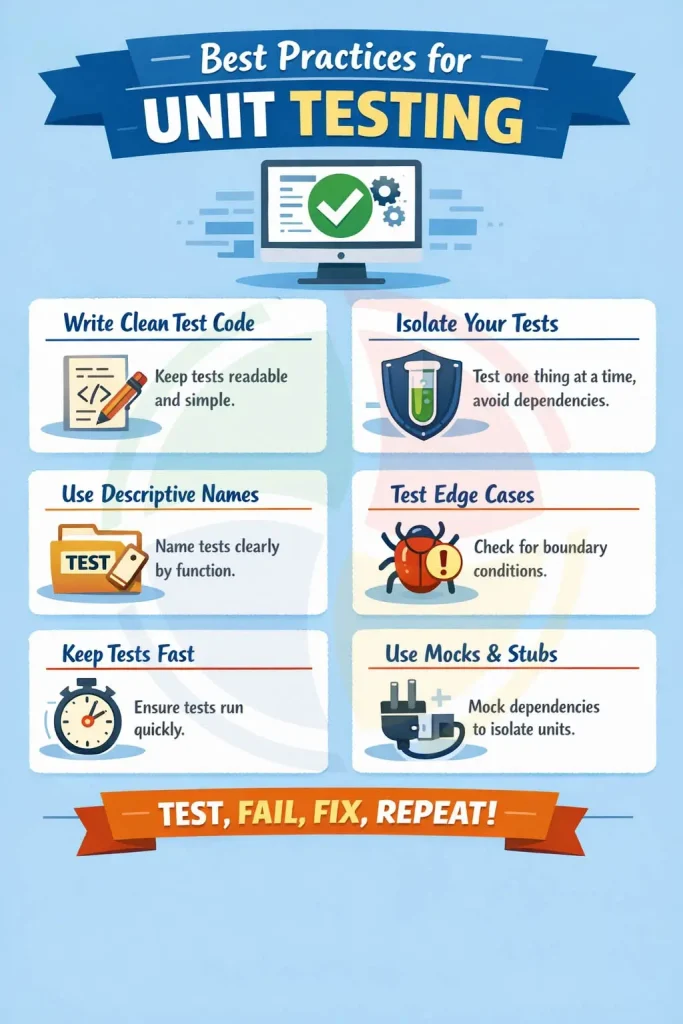
Check this infographic out for a quick checklist on the best practices for unit testing:
Supercharge Your Software Testing with Aegis Softtech Expertise
Unit testing is the foundation of robust software. It drives higher code quality and smoother deployments.
To implement unit testing effectively, begin with a pilot module, choose the right frameworks, integrate tests into your CI/CD pipelines, and track actionable metrics to optimize continuously.
Our QA outsourcing solutions take your unit testing to the next level with unmatched strengths:
- 100+ ISTQB-certified experts delivering precision testing backed by 19+ years of industry-leading experience
- ISO/IEC 27001 certified for ironclad security and data privacy
- Proven track record of zero-defect releases for top global brands
- Cutting-edge test automation services and CI/CD integration that accelerates time-to-market by up to 30%
- Flexible engagement models tailored to your needs, ensuring cost efficiency and scalability
FAQs
1. Is unit testing the same as QA testing?
No, unit testing targets individual code components, usually by developers, while QA testing covers broader functionality, integration, and user experience.
2. Is unit testing manual or automated?
Unit testing is almost always automated, using frameworks such as JUnit, NUnit, or pytest for rapid, repeatable validation.
3. Which testing is done after unit testing?
After unit testing, integration testing verifies interactions between modules, followed by system or regression testing to validate broader application behavior.