If you’ve ever waited hours for a production database to copy into a dev environment, zero-copy cloning in Snowflake will change how your team works. It creates a full, independent copy of any database, schema, or table in seconds with no data duplication and no upfront storage cost.
What Is Zero-Copy Cloning in Snowflake?
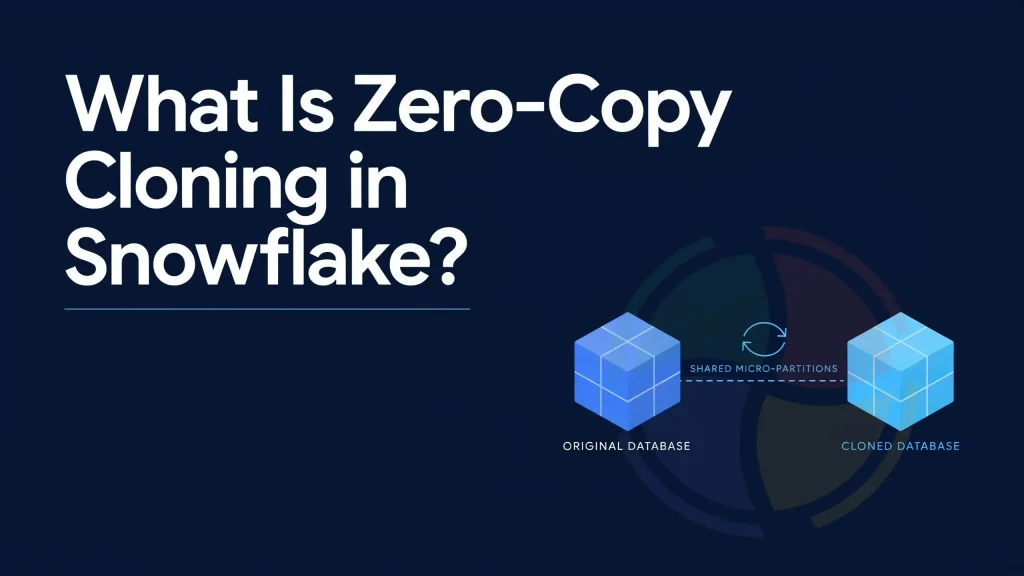
Zero-copy cloning is the ability of Snowflake to clone a database object without physically copying the data, thus helping users to save their time and reduce storage.
Snowflake does not create a duplicate of the database, but just another object that references the same storage as the initial data object does. In other words, a zero copy clone looks like a separate object; however, at first, the cloned and source databases contain the same data.
For instance, creating a clone of a production database for the purpose of testing will result in immediate access to a complete copy of it regardless of its size (terabytes or gigabytes).
What objects can be cloned in Snowflake?
Snowflake supports zero-copy cloning for many database objects, making it easy to create isolated environments without duplicating data. However, some account-level objects and data stored outside Snowflake cannot be cloned. The table below summarizes what can and cannot be cloned.
| Objects | Can Be Cloned? |
| Databases | Yes |
| Schemas | Yes |
| Tables | Yes |
| Streams | Yes |
| Tasks | Yes |
| Stages | Partially |
| File formats | Yes |
| Sequences | Yes |
| User Accounts | No |
| Resource Monitors | No |
| Network Policies | No |
| External Data Files | No |
| Internal Stage Data | No |
Because no data is copied during creation, the cloning process is nearly instantaneous.
sql-- Clone a table, schema, or database
CREATE TABLE orders_clone CLONE orders;
CREATE SCHEMA dev_schema CLONE prod_schema;
CREATE DATABASE dev_db CLONE prod_db;
What Cannot Be Cloned in Snowflake?
Although Snowflake provides a number of database objects to be cloned, there are exceptions that cannot be cloned. User accounts, resource monitors, network policies, and files in the external location are not included. Internal stage data is also not cloned. Since cloning only copies metadata, account-level configurations and external data files must be managed separately.
How Does Zero-Copy Cloning Work?
In Snowflake, all tables’ data is split into micro-partitions. These micro-partitions contain actual data, whereas metadata identifies where it exists.
Micro-Partitions: The Foundation
Snowflake organizes tables as small compressed partitions known as micro-partitions. Micro-partitions consist of anywhere from 50 MB to 500 MB of raw data. Once the micro-partitions are created, they can no longer be altered. Whenever data is updated, inserted, or deleted, Snowflake creates new micro-partitions instead of modifying the existing ones.
What Happens When You Run CLONE
When you run a CLONE command, Snowflake does three simple things:
- Creates a new metadata entry for the cloned object
- Points the clone to the same micro-partitions as the source
- Does not copy or move any actual data
As a result, the clone appears as a complete copy almost instantly while using the same underlying storage.
What Happens After Changes: Copy-on-Write
Snowflake uses a copy-on-write approach. In case you modify the object that has been cloned, then the original micro-partitions will remain untouched. New micro-partitions will only be generated for the data that was modified.
As a result, the data that did not undergo any modifications will keep being reused by the source and cloned object, while the modified data will take up extra space.
| Stage | What Happens |
| Clone creation | Metadata copied; no data moved |
| Initial storage cost | Near zero |
| Data modification | New micro-partitions created for changed data only |
| Independence | Source and clone evolve separately |
Storage cost formula:
Storage cost of a clone = Storage used by micro-partitions that exist only in the clone. Initially, this cost is close to zero and increases only when changes are made to the cloned data.
What Are the Benefits of Zero-Copy Cloning in Snowflake?
Zero-copy cloning helps teams create data copies in seconds for testing, recovery, analysis, and deployment without duplicating the underlying data. This delivers faster development cycles, lower storage costs, reduced risk, and greater operational flexibility.
- Faster and safer development and testing: Development and quality assurance teams can clone a production database and run tests against live data immediately. Because the clone is fully isolated from the source, any schema changes, bad queries, or data modifications made during testing have zero impact on production systems. If your team is evaluating a Snowflake consulting engagement, this is one of the first capabilities your architects will leverage to de-risk development workflows.
- Improved backup and recovery readiness: Before major updates, migrations, or schema changes, many organizations choose to make clones as their backups. If there is an issue, these clones allow for rapid recovery without having to rely on backups.
- Cost-effective data science sandboxes: Data scientists can analyze data, develop predictive models, and execute complex queries on a cloned platform without posing any threat to the production data. Several sandboxes can be set up with minimal additional costs.
- More reliable release validation: Before deploying new pipelines, dashboards, or transformations, teams use cloned environments to test everything with real data. This helps identify issues earlier, improves deployment confidence, and reduces the risk of production failures.
What Are the Four Types of Cloning in Snowflake?
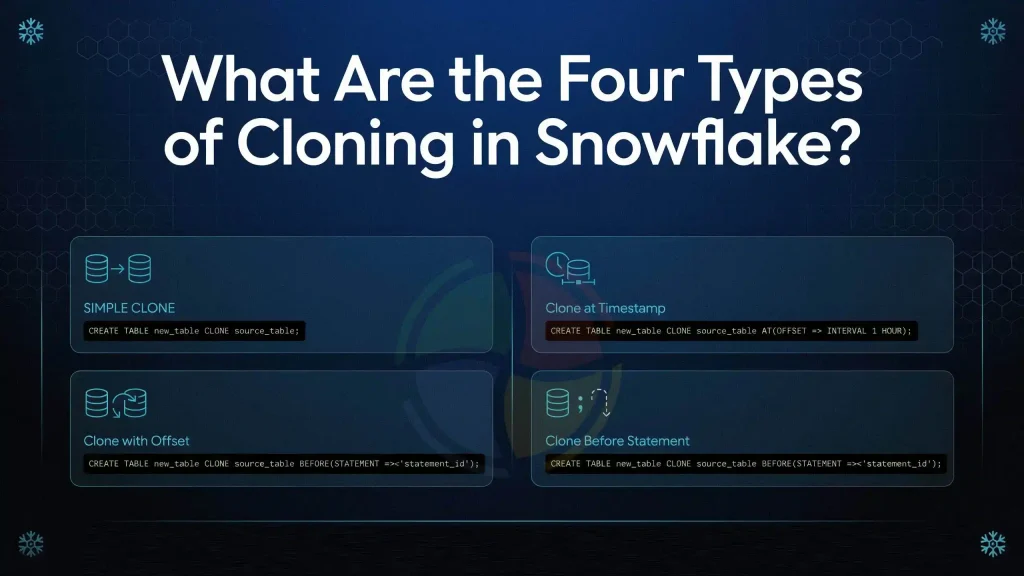
Snowflake enables four different types of cloning where users are allowed to make copies of their objects either based on their current state or at a specified point in time through Time Travel capabilities.
These include cloning by current state, timestamp, time offset, or just before a specific query ran.
| Cloning type | Description | Common use case |
| Simple Clone | Clones the current version of an object | Development and testing |
| Clone at Timestamp | Clones an object from a specific date and time | Data recovery |
| Clone with Offset | Clones an object from a specified time in the past | Quick rollback |
| Clone Before Statement | Clones an object before a specific query ran | Recovering from accidental updates or deletes |
sql-- Type 1: Simple clone (current state)
CREATE TABLE orders_clone CLONE orders;

-- Type 2: Clone at a specific timestamp
CREATE TABLE orders_clone CLONE orders
  AT (TIMESTAMP => '2026-05-01 09:00:00'::TIMESTAMP_TZ);

-- Type 3: Clone with time offset (30 mins ago)
CREATE TABLE orders_clone CLONE orders
  AT (OFFSET => -60*30);

-- Type 4: Clone before a specific statement ran
CREATE TABLE orders_clone CLONE orders
  BEFORE (STATEMENT => '8e5d0ca9-005e-44e6-b858-a8f5b37c5726');
How Do Streams, Tasks, Sequences, and Stages Behave After Cloning?
Each object carries its own post-clone behavior and getting this wrong in production is where most teams run into surprises.
| Object | Post-clone behavior | Action required |
| Streams | Offset resets to current time; prior CDC data not carried over | Verify offset before using for pipelines |
| Tasks | Cloned in suspended state regardless of source status | Must manually run ALTER TASK cloned_task RESUME |
| Sequences | Continues from source’s next value; no duplicate IDs | No action needed; just be aware values won’t start at 1 |
| External Stages | Metadata cloned; underlying cloud storage unaffected | Confirm cloud storage permissions apply |
| Internal Stages | Cannot be cloned | Recreate manually if needed |
What are the limitations of Zero-Copy Cloning in Snowflake?
There are several major restrictions associated with zero copy cloning. These include:
- Zero copy cloning cannot be used to clone any object, including users, roles, warehouses, internal stages, etc.
- Big tables with micro-partitions may require significant time to complete the process of cloning.
- Cloning actively may decrease the performance and increase the storage costs due to Time Travel and Fail-Safe retention periods.
- All cloned tasks become suspended and must be resumed manually.
Best Practices for Zero-Copy Cloning
Here are some of the best practices for zero copy cloning:
- Clone before major changes – Which gives you an instant rollback point with no storage cost
- Use transient tables for short-lived clones – Which eliminates Fail-Safe charges for dev/test environments
- Drop unused clones regularly – Diverged clones accumulate storage costs silently
- Always resume Tasks manually – Cloned Tasks are suspended by default and won’t run until explicitly resumed
- Set retention to 0 on throwaway clones – which will cut Time Travel storage overhead immediately.
Conclusion
Zero-copy cloning in Snowflake is a quick and economical approach to cloning databases, schemas, tables, and other objects. With zero copy cloning, Snowflake leverages micro partitions and metadata references for objects and thus does not incur any extra storage costs in duplicating them, while still allowing clones to be independent objects.
In short, Snowflake cloning enables teams to work quickly without incurring unnecessary expenses on storage costs, whether they want to make backup copies, test new features, create development environments, or validate data pipelines. As a result, many organizations rely on Snowflake services to implement cloning strategies that improve agility, lower costs, and support scalable data operations.
FAQs
How does Zero Copy Cloning save time and money?
Zero Copy Cloning eliminates the necessity to copy large datasets or use several full-fledged development environments. It helps reuse the existing storage metadata to create new environments almost instantly, which saves both time and storage space. This is one of the reasons organizations often engage snowflake consulting services to optimize development and testing workflows.
Can Snowflake objects be cloned?
It is possible to clone some objects within Snowflake. Named stages that point to an external storage area such as cloud buckets or containers, may be cloned without any changes to the underlying external storage. In contrast, internal named stages cannot be cloned, and they have to be remade in their entirety. Experienced Snowflake consultants can help teams identify which objects can be cloned and how to use cloning effectively within their data architecture.
How does Snowflake zero copy clone work?
Snowflake uses zero copy cloning in order to generate a new metadata link to the same set of micro-partitions as the original object. Instead of physically duplicating data, Snowflake reuses existing storage, allowing a new database, schema, or table to be created without copying the actual data.
How do snowflake consulting help organizations maximize Zero Copy Cloning?
Snowflake consulting services help organizations implement Zero Copy Cloning strategically across development, testing, analytics, and recovery workflows. Consultants can design environment management processes, establish governance controls, and identify opportunities to reduce storage costs while accelerating releases.
Can Snowflake consulting partners help establish governance for Zero Copy Cloning?
Snowflake consulting partners can define policies for clone creation, access controls, and lifecycle management to ensure cloned environments remain secure and compliant.