Nearly every enterprise runs something in the cloud, yet when it comes to picking where their analytical data actually lives, most teams end up guessing.
And the stakes aren’t small. A wrong call doesn’t just cost money today; it locks you into years of technical debt, sluggish queries, and painful migrations.
The real problem? Every vendor claims best-in-class performance.
But performance under YOUR workload, total cost of ownership for YOUR usage patterns, and ecosystem fit with YOUR stack—those vary wildly.
This guide gives you a concrete decision framework: seven evaluation criteria, comparisons, and use-case-specific recommendations. You can now match your business needs to the right cloud data warehouse without the guesswork.
Key Takeaways
A cloud data warehouse stores, processes, and analyzes large datasets using scalable, pay-as-you-go cloud infrastructure.
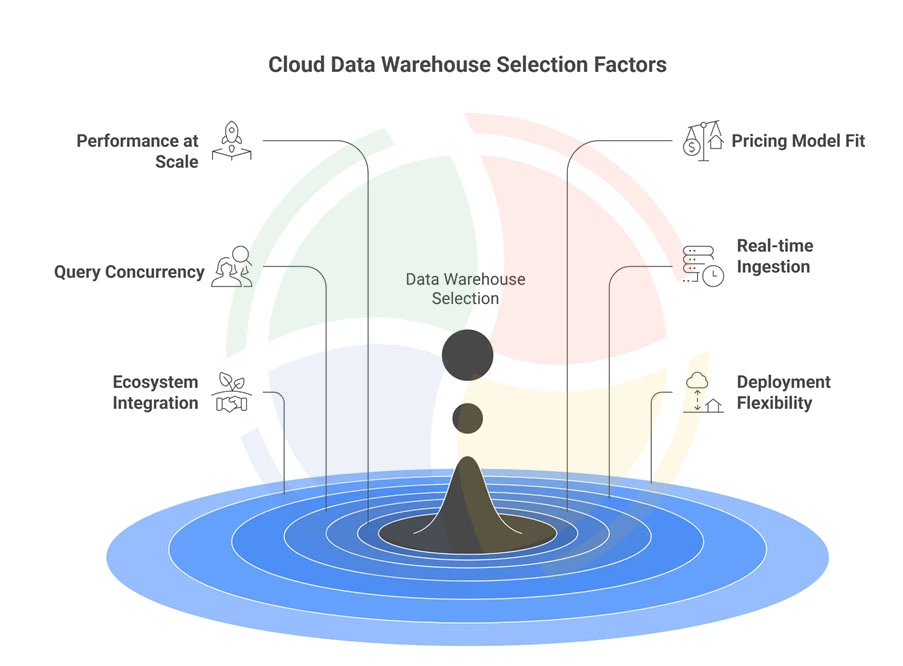
Key Evaluation Factors:- Performance at scale
- Pricing model fit
- Query concurrency
- Real-time ingestion
- Ecosystem integration
- Deployment flexibility
- Snowflake (multi-cloud flexibility)
- BigQuery (serverless simplicity)
- Redshift (AWS-native performance)
- Databricks (ML/AI workloads)
How to Choose the Right Cloud Data Warehouse? 7 Things to Consider
No two data stacks look alike, and no single warehouse wins every scenario.
But these seven factors will help you cut through the noise and evaluate what actually matters for your team.
1. Performance at Scale and Query Speed
Performance at scale determines whether your warehouse stays responsive as data volumes grow and more users pile on.
A platform that hums at 10GB can crawl at 10TB. And that’s exactly when your CFO starts asking uncomfortable questions.
Query latency matters differently based on use case. Internal BI teams can tolerate a few seconds of wait time; customer-facing dashboards need sub-second responses, or users bounce.
When evaluating, dig into how performance degrades under pressure.
2. Pricing Models and Total Cost of Ownership
Three primary pricing models dominate the market:
- Pay-per-query:
Costs scale with the data scanned. Predictable for light usage, expensive at scale, such as Redshift.
- Time-based compute:
Pay for active warehouse hours. Great for bursty workloads with downtime between runs, such as Snowflake.
- Reserved capacity:
Predictable monthly cost, but requires accurate capacity planning.
Beyond the compute bill, evaluate hidden costs:
- Data storage fees
- Data transfer and egress charges (especially in multi-cloud setups)
- Concurrency scaling surcharges
- Premium features like advanced security or ML integrations.
Your TCO calculation should also include engineering time spent on tuning, monitoring overhead, and potential migration costs if the platform doesn’t scale with you.
Comparing Pricing Models for the “Big 4”
Let’s see how the Big 4, i.e., Snowflake, BigQuery, Amazon Redshift, and Azure, stack up when it comes to pricing:
| Pricing Factor | Snowflake | BigQuery | Redshift | Azure |
| Compute Model | Credits (time-based) | Data scanned | Per-node/hour | DWU/hour |
| Storage Cost | Separate, per-TB | Included in query | Included in node | Separate, per-TB |
| Idle Cost | None (auto-suspend) | None | Continues unless paused | Pauses available |
| Egress Fees | Standard cloud rates | Standard cloud rates | Lower within AWS | Lower within Azure |
3. Query Concurrency and User Scalability
Query concurrency determines how well your data warehouse performs when multiple users run queries at the same time.
As analytics adoption grows, dashboards, ad hoc analysis, and scheduled jobs start competing for the same resources.
Without strong concurrency handling, performance degrades fast.
The right cloud data warehouse should scale automatically as demand spikes, isolate workloads, and prioritize interactive queries without manual tuning.
Otherwise, peak usage turns into slow dashboards, frustrated users, and constant firefighting.
4. Real-Time Data Ingestion and Freshness
Data is only useful if it’s current. When choosing a cloud data warehouse, real-time ingestion and data freshness directly impact how fast your teams can act on insights.
Key aspects to evaluate:
- Streaming and real-time ingestion support:
Look for native integrations with streaming platforms (like Kafka or cloud-managed streams) and databases. This reduces pipeline complexity and latency.
- Low-latency data availability:
Ingesting data fast is pointless if it takes minutes (or hours) to become queryable. The best platforms make new data available for analytics almost immediately.
- Change data capture (CDC) capabilities:
Built-in or managed CDC keeps warehouse data in sync with transactional systems without heavy ETL overhead.
- Freshness SLAs you can trust:
Some warehouses promise “real-time” but deliver batch-like behavior. Validate actual end-to-end latency, not marketing claims.
5. Ecosystem Integration and Tool Compatibility
A cloud data warehouse never works in isolation. Its value is reflected in how smoothly it plugs into the tools your teams already use.
Poor integration slows adoption, breaks pipelines, and forces teams to maintain brittle custom connectors.
What to evaluate:
| Layer | What to Check |
| BI & Analytics | Native support for Power BI, Tableau, Looker (not just “works with”) |
| ETL/ELT | Seamless integration with Fivetran, dbt, Airbyte |
| ML & AI | Compatibility with notebooks, feature stores, and ML platforms |
| APIs & Connectors | Native connectors vs. JDBC/ODBC fallback performance |
Also factor in your existing stack. If your warehouse clashes with your current tools, productivity drops faster.
6. Deployment Flexibility and Vendor Lock-In
Deployment flexibility defines how much control you retain as your data strategy evolves.
Some cloud data warehouses offer fully managed SaaS models that minimize operational effort, while others support BYOC (Bring Your Own Cloud) or self-hosted deployments for tighter governance, data residency, or cost control.
The right choice depends on how much ownership your organization needs versus how much complexity it’s willing to manage.
True flexibility also shows up in multi-cloud support:
| Platform Capability | Single Cloud | Multi-Cloud |
| Deployment Options | Limited | Flexible |
| Data Portability | Constrained | Easier |
| Cloud Dependency | High | Reduced |
— Head of Cloud Engineering, Aegis Softtech
7. Security, Compliance, and Data Governance
Security isn’t optional, especially when BFSI holds 27.83% of the cloud data warehouse market share.
For regulated industries, cloud data warehouse compliance is the entry ticket, not a bonus feature.
Evaluate encryption at rest and in transit, role-based access control (RBAC), audit logging, and dynamic data masking.
Check compliance certifications:
- SOC 2
- HIPAA
- GDPR
- FedRAMP (for government workloads).
Finally, don’t overlook data residency: can you deploy in the geographic regions your regulations require?
Why Does Choosing the Right Cloud Data Warehouse Matter?
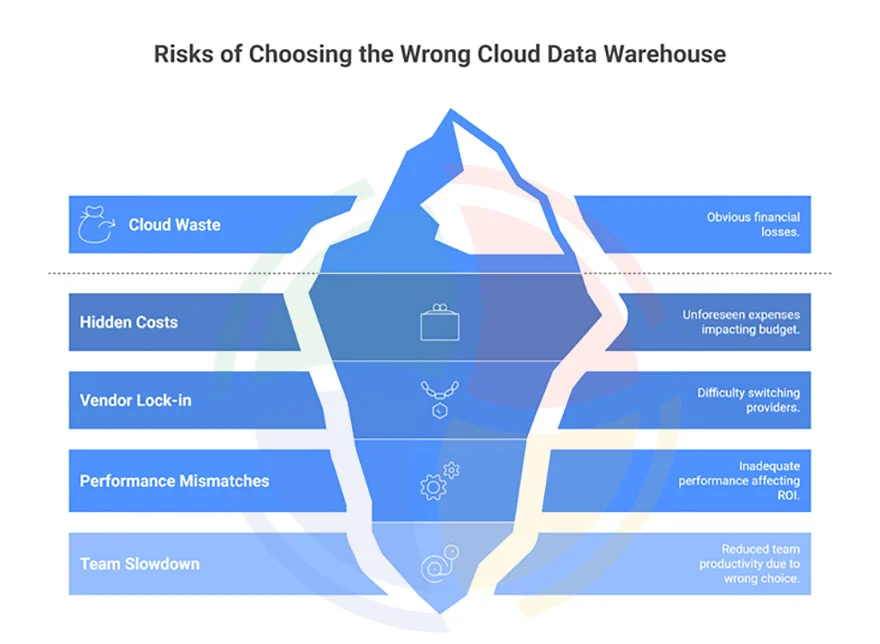
Here’s why the choice matters more than most teams expect:
- Cloud waste adds up fast:
According to Flexera’s State of the Cloud 2024 report, 32% of cloud spend is wasted due to poor platform fit and overprovisioning.
- Hidden costs aren’t always obvious upfront:
What looks affordable on day one can spiral anytime. For example, data egress fees can stack up every time you move data out.
- Vendor lock-in is real—and expensive:
Proprietary SQL extensions, platform-specific data formats, and custom stored procedures make migration painful.
- Performance mismatches kill ROI:
A warehouse designed for nightly batch reporting will struggle with real-time dashboards and ad hoc analytics. On the flip side, paying for ultra-low latency when users refresh reports once a day is pure waste.
- The wrong choice slows teams, not just queries:
When the platform fights your use cases, productivity drops. Analysts wait. Engineers patch. Leaders lose trust in the data.
The bottom line is that the right cloud data warehouse should align with your workload patterns, cost model, and growth plans. The wrong one quietly drains budget, time, and momentum.
— Senior Data Architect, Aegis Softtech
Snowflake vs. Redshift vs. BigQuery vs. Azure: Top Options Compared
The “Big 4” dominate enterprise adoption, but each excels in different scenarios.
Here’s an honest comparison based on architecture, not marketing.
| Factor | Snowflake | BigQuery | Azure Synapse | AWS Redshift |
| Best For | Multi-cloud BI, governed analytics | GCP-native analytics, ad-hoc queries | Microsoft/Azure-centric enterprises | AWS-centric, predictable batch loads |
| Performance | Consistent, good for BI | Good; strong for large scans | Good with tuning | Strong for tuned batch workloads |
| Pricing | Credits, time-based compute | Pay-per-query/slots | DWU/hour, capacity-based | Per-node/hour or serverless |
| Scaling | Elastic warehouses, multi-cluster | Auto-scales via slots | Scale up/down DWU | Add/remove nodes or RA3 serverless |
| Maintenance | Near-zero ops | Zero ops | Moderate (SQL Pool ops) | Moderate (VACUUM, ANALYZE, WLM) |
| Cloud Support | AWS, Azure, GCP | GCP only | Azure only | AWS only |
| Real-Time Ingestion | Near real-time (Snowpipe, seconds) | Strong streaming, ~sub-second | Batch-first; external streaming needed | Batch-first; external streaming needed |
| Compliance | Strong (SOC 2, HIPAA, GDPR) | Strong (SOC 2, HIPAA, GDPR) | Strong (SOC 2, HIPAA, GDPR, FedRAMP) | Strong (SOC 2, HIPAA, GDPR, GovCloud) |
| ML/AI Integration | Snowpark, Cortex AI ecosystem | BigQuery ML, Vertex AI | Azure ML, Synapse Spark | SageMaker, ML integrations via AWS |
| Ecosystem | Broad, vendor-neutral integrations | Deep GCP + Looker ecosystem | Deep Microsoft/Power BI ecosystem | Deep AWS data and analytics ecosystem |
Lean and Emerging Option
The Big 4 aren’t the only game in town. Several emerging platforms carve out compelling niches:
- ClickHouse
Open-source, high-performance columnar engine built for real-time analytics. Handles 1,000+ concurrent queries per node.
- MotherDuck (DuckDB in the cloud)
Ideal for startups and small teams with GB–low TB scale, SQL-savvy users, and zero-ops ambitions.
- Databricks
Databricks is a lakehouse platform combining warehousing and big data. The go-to for heavy ML/AI, data science, and streaming workloads at scale.
- Firebolt
Performance-optimized warehouse focused on low-latency queries and efficient compute for large-scale analytics.
- When should you look beyond the Big 4?
Consider these platforms if:
- You’re a startup needing fast time-to-value (MotherDuck)
- ML and data science are primary workloads rather than just BI (Databricks)
- You need sub-second queries at scale without Big 3/Snowflake lock-in (ClickHouse, Firebolt).
How to Choose the Best Cloud Data Warehouse by Use Case
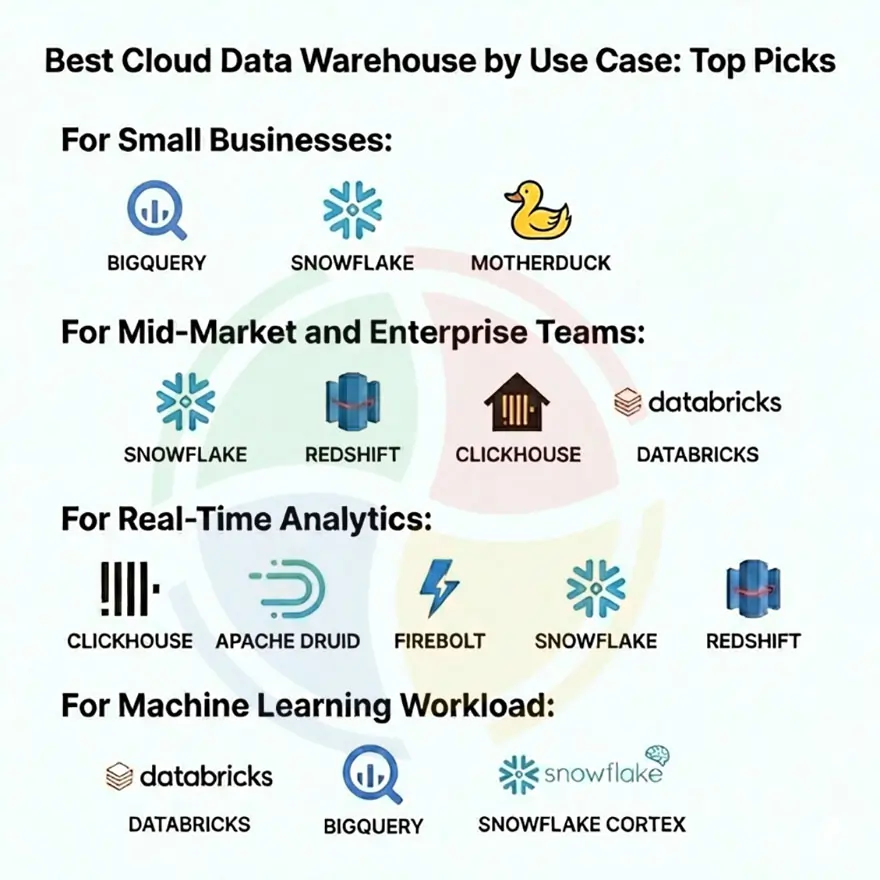
Frameworks are great, but let’s get specific.
Below, we’ve mapped common use cases to the platforms that fit them best—organized by company size, workload type, and latency requirements.
Best Cloud Data Warehouse for Small Businesses
If you’re a small team or early-stage startup, your priorities are simplicity, low idle costs, and fast setup.
You don’t need enterprise governance (yet); you need answers from your data without a dedicated infrastructure team.
Use Case → Cloud Data Warehouse Mapping
| Use Case | Primary Need | Recommended Warehouse | Why It Fits |
| Early-stage BI & reporting | Zero idle cost, fast setup | BigQuery | Pay-per-query scales from zero, no infra management |
| Startup analytics with growth plans | Flexibility + ecosystem | Snowflake | Generous free tier, strong BI integrations |
| Small data, SQL-heavy teams | Simplicity, local-first workflows | MotherDuck | DuckDB-based, zero infrastructure, low cost |
| Cost-sensitive experimentation | Avoid forecasting risk | BigQuery | No reserved capacity required |
Best Cloud Data Warehouse for Mid-Market and Enterprise Teams
Enterprises face a different set of constraints: multi-region compliance, deep ecosystem integration, and the need for governance that scales across hundreds of users and petabytes of data.
| Use Case | Key Constraint | Recommended Warehouse | Why It Fits |
| Multi-region BI & governance | Compliance, data residency | Snowflake | Multi-cloud support, strong governance & RBAC |
| AWS-centric enterprise analytics | Tight AWS integration | Redshift | Native AWS services, mature enterprise features |
| Hybrid/on-prem + cloud strategy | Lock-in avoidance | ClickHouse Cloud BYOC | BYOC flexibility, open-source core |
| Future-proof data architecture | Open standards | Snowflake / Databricks | Parquet & Iceberg support, semantic layers |
— Lead Data Engineer, Aegis Softtech
Best Cloud Data Warehouse for Real-Time Analytics
Real-time analytics is where the biggest gap between vendor promises and actual capability shows up.
| Use Case | Latency Requirement | Recommended Warehouse | Why It Fits |
| Customer-facing dashboards | <500ms queries | ClickHouse | 1000+ concurrent queries per node |
| Operational monitoring | High write + read throughput | Apache Druid | Streaming-first OLAP architecture |
| Embedded product analytics | Consistent low latency | Firebolt | Sub-second response with efficient compute |
| Fraud & anomaly detection | Near-instant ingestion | ClickHouse | Real-time ingestion without cache penalties |
| Batch-first BI tools | Not ideal | Snowflake / Redshift | Designed for batch, not streaming-first workloads |
— Lead Data Engineer, Aegis Softtech
Best Cloud Data Warehouse for Machine Learning Workload
If machine learning (ML) is a core part of your data strategy, your warehouse choice directly impacts pipeline speed, cost, and how tightly your models integrate with your analytical layer.
| Use Case | ML Requirement | Recommended Warehouse | Why It Fits |
| End-to-end ML pipelines | Unified data + ML | Databricks | Native Spark, MLflow, feature stores |
| SQL-driven ML models | Low ML barrier | BigQuery ML | Train models directly using SQL |
| AI-enhanced analytics | Embedded AI services | Snowflake Cortex | Emerging AI features inside warehouse |
| Feature engineering at scale | Cost control | Databricks / BigQuery | Optimized for large feature extraction jobs |
| Hybrid structured + unstructured data | Lakehouse approach | Databricks | Handles both warehouse and lake data natively |
Build Your Cloud Data Warehouse Strategy with Aegis Softtech
Choosing the right cloud data warehouse comes down to balancing performance, cost, and ecosystem fit.
If you’re evaluating, implementing, or migrating cloud data warehouses, Aegis Softtech brings 20+ years of engineering depth and vendor-agnostic expertise. We help you get it right the first time.
- Data Warehouse Services: Architecture design, platform selection, implementation, and optimization.
- Data Warehouse Consulting: Vendor-agnostic evaluation, POC support, and migration planning.
- Snowflake Services: Implementation, migration, and optimization for Snowflake-specific workloads.
- Cloud Consulting: Multi-cloud strategy, cost optimization, and governance frameworks.
FAQs
1. What is the best cloud data warehouse for my business?
The best cloud data warehouse depends on your workload profile. Snowflake suits multi-cloud strategies with variable workloads. BigQuery fits GCP-native organizations preferring serverless simplicity. Redshift works best for AWS-committed teams with predictable analytics patterns.
2. How do cloud data warehouse pricing models compare?
BigQuery charges per terabyte scanned, making costs variable but transparent. Snowflake uses time-based credits for active compute. Redshift offers per-node hourly pricing or serverless pay-per-query options. Each model favors different usage patterns.
3. Which cloud data warehouse is fastest for analytics queries?
Query speed depends on data volume and concurrency needs. ClickHouse handles 1000+ concurrent queries with sub-second latency. BigQuery auto-scales for ad-hoc workloads. Snowflake delivers consistent performance through workload isolation. Benchmark on your specific query patterns.
4. Which cloud data warehouse integrates best with existing tools?
Integration depends on your ecosystem. Redshift connects natively with AWS services like S3 and SageMaker. BigQuery integrates seamlessly with GCP’s Vertex AI and Looker. Snowflake supports broad third-party connectors across Fivetran, dbt, and major BI platforms.