Why do some ServiceNow deployments operate flawlessly while others constantly battle inconsistent environments, failed upgrades, or broken integrations?
The answer often lies in how environments are maintained and refreshed. For enterprises, maintaining multiple environments, such as development, testing, UAT, and production, is essential; however, copying changes safely is challenging.
This is exactly where the need to clone in ServiceNow becomes indispensable. Cloning enables you to replicate data, configurations, and customizations from a production Instance to one or more target instances, ensuring consistency, operational reliability, and controlled testing environments.
Let’s walk you through what cloning is, how it works, and how to manage it effectively. By the end, you’ll have a clear roadmap for implementing cloning processes that safeguard your environment, reduce risk, and accelerate ServiceNow development cycles.
Key Takeaways
- ServiceNow cloning refreshes Dev, QA, UAT, and sandbox environments so they stay aligned with production for accurate testing and smoother release cycles.
- Key elements: Data, configurations, customizations, integrations, preservers, exclusions, and scripted automation.
- Overall impact: Reduced environment drift, predictable deployments, improved QA reliability, and stronger platform governance.
- Risks involved: Integration mix-ups, overwritten assets, unmasked sensitive data, and post-clone inconsistencies.
- Effective cloning: Requires a structured workflow with automation, clear governance, and consistent validation across environments.
What is Cloning in ServiceNow?
Cloning in ServiceNow is a controlled, system-driven operation that ensures every non-production environment reflects the accuracy and maturity of your production instance.
It also follows a structured workflow that replicates the essential data, configurations, and custom components, while maintaining security integrity and system dependencies.
A well-executed clone ensures that development, testing, and UAT teams work with the same functional context as production. This alignment is critical for validating new features, resolving issues, checking integrations, and maintaining predictable system behavior across environments.
Key Elements of a Clone in ServiceNow
A ServiceNow clone is built on a few foundational elements that work together to replicate your production environment with accuracy. These ensure that every downstream instance behaves predictably during development, testing, or troubleshooting.
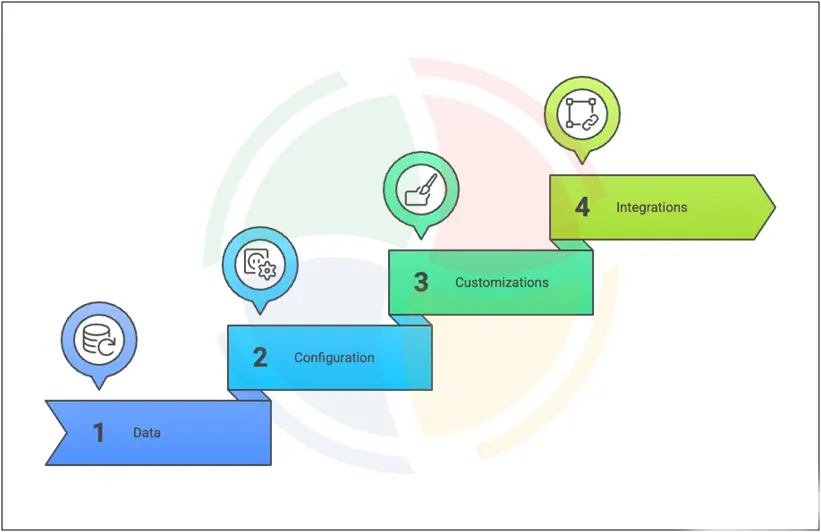
Data: It includes relevant tables, records, attachments, and historical logs that influence how applications behave. Accurate data replication ensures that workflows, approvals, and automations function realistically during testing or development.
Configuration: ServiceNow configurations such as business rules, client scripts, UI policies, Flow Designer flows, ACLs, and system properties are cloned to maintain consistency in logic and access control. It is essential because even small configuration drifts can lead to unexpected failures in downstream environments.
Customizations: Every enterprise instance contains custom tables, scoped applications, UI components, and platform extensions. Cloning carries these forward so developers and testers have an environment that mirrors the actual production footprint.
Integrations: Cloning also replicates integration configurations, connection definitions, and credentials. However, ServiceNow automatically applies exclusions and safeguards so sensitive tokens, passwords, and environment-specific endpoints are not unintentionally overwritten, preserving security boundaries.
Unlike backups or snapshots, which preserve an instance for disaster recovery, cloning refreshes other environments to match production for testing, validation, and experimentation.
Core Components of ServiceNow Clone
If you’re new to cloning, this section breaks down the essential components you must manage before the workflow begins, so you understand what influences each stage of the clone.
Data Source
Your source instance, typically production, serves as the foundation for every clone. Because it holds the most accurate, up-to-date data, pulling from this instance ensures your target environment aligns with real operational conditions.
It includes:
- Core operational data and transactional records
- Configuration items and service models
- Attachments, logs, and audit history
Default Exclusions
ServiceNow automatically removes certain items from the clone to protect security and prevent environment-specific disruptions. You don’t have to configure these manually—ServiceNow applies them by default.
Common exclusions include:
- Email logs, templates, and outbound mail configurations
- In-progress update sets
- MID Server credentials
- Integration tokens and secrets
- Scheduled jobs and timers
Data Preservers
Data preservers help you safeguard specific records or tables in the target instance. By defining preservers correctly, you avoid overwriting essential environmental components and minimize post-clone rework.
You may preserve:
- Developer or admin user accounts
- Sandbox-only API credentials
- Environment-specific ACLs
- Local configurations needed for testing
- Tables or workflows unique to the target instance
Source and Target Instances
The interaction between your source and target environments forms the backbone of the cloning process. During a clone, everything on the target is replaced with the source data, except for the elements you have deliberately added to the preserver list.
A clear relationship helps you avoid:
- Accidental data loss
- Broken integrations
- Misaligned workflows
- Failed post-clone testing
Cleanup Scripts
After a clone, cleanup scripts take care of the post-clone corrections that keep your target environment safe. These scripts automatically reset sensitive configurations so the instance behaves like a proper non-production environment.
In some enterprises, teams also document post-clone adjustments through a structured clone change request in ServiceNow, ensuring each refresh follows governance and audit requirements.
Cleanup tasks commonly include:
- Redirecting outbound emails to logs
- Resetting or anonymizing test data
- Updating integration endpoints to sandbox URLs
- Rebuilding indexes for search performance
- Reactivating required plugins or configurations
Consistency
Cloning maintains consistent configurations across environments. With aligned environments, your teams can test, debug, and validate features with confidence before moving them toward production.
Cloning helps maintain consistency across:
- UI policies and client scripts
- Workflows and flow logic
- Access controls (ACLs)
- Integration behavior and routing
Instance Synchronization
For enterprises managing multiple environments, synchronization ensures your DevOps and testing pipelines remain stable. Frequent cloning keeps downstream instances aligned with Production, so you can validate changes confidently.
You benefit through:
- Reliable upgrade preparation
- Stable development cycles
- Accurate functional and regression testing
- Reduced environment drift
How to Clone an Instance in ServiceNow
Cloning a ServiceNow instance requires a structured, step-by-step workflow to maintain reliability, accuracy, and minimal disruption across environments.
At Aegis Softtech, we follow a disciplined approach to ensure your instances remain aligned, stable, and fully optimized for development and testing.
Here’s how we do it for you:
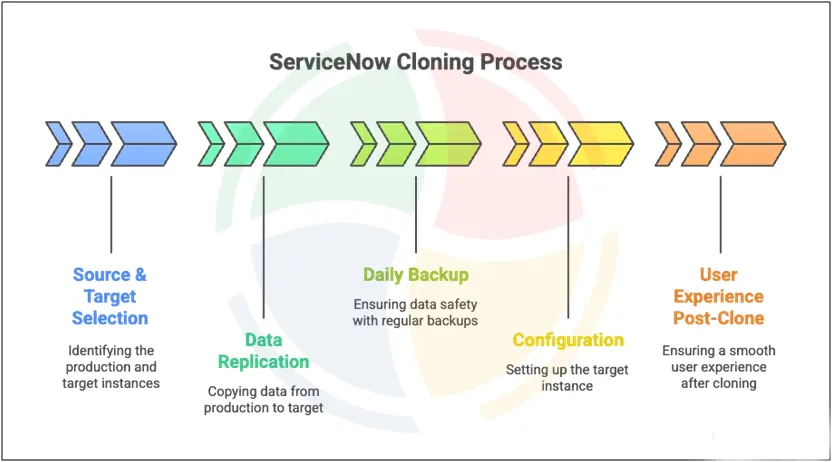
Source & Target Selection
We begin by helping you define the right source and target environments. Since the target instance is fully overwritten, this selection is critical for maintaining stable downstream environments.
Typically, our team recommends:
- Production is the source for the most accurate data and configurations
- Dev, QA, UAT, or sandbox as the target, depending on your release cycle
Data Replication
Once approved, we initiate the replication process, where ServiceNow transfers all relevant data from the source to the target. The duration depends on the size and complexity of your instance. Our team monitors the process end-to-end to ensure accuracy and timely completion.
Data included in the replication:
- Tables, records, and reference data
- Attachments, logs, and history
- Workflows, flows, and automation logic
- ACLs, roles, and security configurations
- Customizations, update sets, and scripts
Daily Backup
Before cloning begins, ServiceNow automatically creates a backup of the target instance. We treat this as a critical safety measure so your environment can be restored if required.
This provides:
- A reliable rollback point
- Protection from accidental overwrites
- Safeguards for custom development
Configuration
We help you tailor the clone with precise configurations to reduce post-clone effort and avoid environmental issues. Our goal is to minimize cleanup work and ensure the clone aligns with your governance and operational standards.
Common configuration tasks we conduct include:
- Defining preservers and exclusions
- Setting up pre- and post-clone scripts
- Coordinating communication with stakeholders
- Scheduling the operation during low-impact windows
User Experience Post-Clone
After the clone completes, we verify that the target environment behaves as expected and perform the necessary adjustments for your teams to resume work smoothly.
Our team oversees and carries out post-clone activities, such as:
- Reconnecting development tools like Studio
- Reactivating scheduled jobs
- Resetting integration endpoints to non-production URLs
- Redirecting outbound emails to logs
We support enterprises in managing cloning at scale—standardizing workflows, refining configurations, and automating post-clone steps to reduce environment drift. Discover our broader capabilities through our ServiceNow development services.
Why Cloning is Critical in ServiceNow
Cloning keeps ServiceNow environments synchronized, predictable, and safe for continuous development. When your workflows, automations, and integrations span multiple environments, even minor drift from Production can lead to failures, inconsistencies, and slowed delivery.
Here are the key areas to evaluate when planning your cloning strategy:
Realistic Testing
Testing loses its value when the underlying data doesn’t reflect real-world usage. Cloning provides a near-production environment so your teams can validate changes with confidence.
Realistic testing becomes possible when you have:
- Validation of workflows and business rules using actual data patterns
- Accurate reproduction of production issues for faster debugging
- Stress and integration testing at production-level complexity
Risk Mitigation
Environment drift is one of the most common yet overlooked sources of instability. Cloning mitigates these risks by ensuring all environments share the same schema, logic, and configuration.
Effective risk mitigation includes:
- Reducing deployment failures caused by misaligned environments
- Preventing schema mismatches that break automation logic
- Avoiding integration issues triggered by inconsistent endpoints
- Ensuring test outcomes reflect the true production environment
Supporting DevOps
DevOps pipelines require environments that behave predictably. Without cloning, inconsistencies between Dev, QA, and UAT quickly weaken automation and slow down delivery.
Cloning accelerates DevOps by enabling:
- Predictable environments across every stage
- Stable CI/CD workflows without configuration gaps
- More accurate ATF (Automated Test Framework) results
- Reproducible automation outcomes that reduce rollback risks
Disaster Recovery Preparation
Cloning plays a strategic supporting role in business continuity. Though it doesn’t replace backups, it helps you validate recovery steps, test failover plans, and prepare fallback environments safely.
Cloning supports disaster recovery by enabling:
- Creation of realistic sandbox replicas for simulation
- Validation of fallback environments before emergencies
- Testing recovery workflows with production-grade data
- Conducting safe rehearsals before major upgrades or migrations
Strengthening Your ServiceNow Ecosystem With Strategic Cloning
As enterprises scale their workflows, integrations, and automation across multiple environments, the need for precise, production-aligned instances becomes mission-critical. A well-orchestrated cloning strategy ensures every upgrade, customization, and release is validated in a safe, controlled, and fully synchronized environment before it impacts your business operations.
With Aegis Softtech as your ServiceNow engineering partner, you gain access to deep platform expertise that simplifies and strengthens every stage of the cloning lifecycle. Our ServiceNow developers help you define preservers and exclusions, implement post-clone cleanup scripts, and validate ACLs, workflows, and integrations.
We further streamline operations through automation and governance—ATF-driven checks, integration endpoint mapping, email rerouting, data masking, and role-based access control.
If your organization is expanding its ServiceNow ecosystem and needs expert support, you can use our ServiceNow consulting services or explore our broader development capabilities to strengthen ongoing platform management.
FAQs
Q1. What is a clone in ServiceNow?
A clone in ServiceNow is the process of copying data and configurations from a source instance to a target instance, ensuring that development, testing, and UAT environments remain consistent with production.
Q2. What’s the difference between cloning and imaging?
Cloning updates an existing target instance with data from a source instance, whereas imaging creates a fresh baseline template used to initialize new instances.
Q3. How do you check clone history in ServiceNow?
You can view clone history in ServiceNow by navigating to System Clone → Clone History, where you’ll find details on previous clones, including their status, preserved tables, timestamps, and any errors encountered.
Q4. How often should ServiceNow instances be cloned?
The frequency depends on your release cycle. Most enterprises clone their environments quarterly or before major upgrades, while DevOps-heavy teams may refresh them more frequently.
Q5. Does cloning affect production performance in ServiceNow?
No. Cloning runs entirely between the selected source and target instances, and production performance remains unaffected. However, scheduling during low-usage hours is recommended.