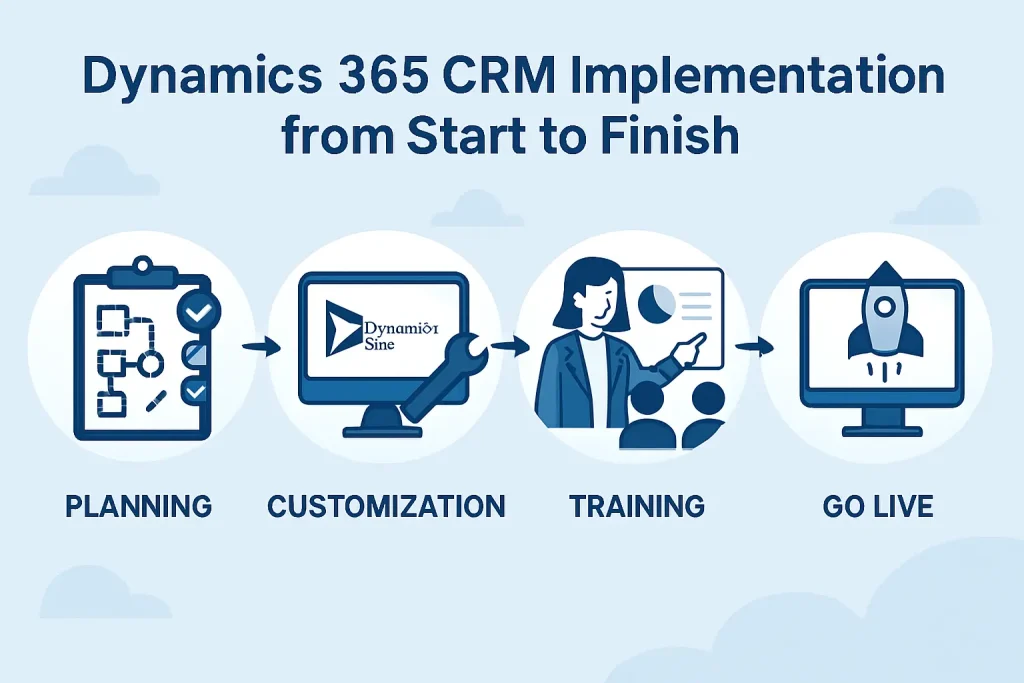
Every thriving business runs on two things: meaningful relationships and reliable systems. When those systems fail to meet customer expectations, even the best teams struggle to deliver consistent results.
Dynamics CRM use cases across industries show how to turn the platform into a growth engine to automate outreach, map complex sales cycles, and align service, marketing, and operations around shared goals.In this blog post, we’ll explore eight such use cases that show how organizations apply Dynamics CRM to achieve higher operational efficiency and lasting customer value.
Key Takeaways
Here are eight Dynamics CRM use cases:
- Sales pipeline and lead management Track every opportunity in one place, automate lead scoring, and give teams real-time visibility into deal progress for accurate forecasting.
- Marketing campaign management: Segment audiences, automate outreach across multiple channels, and measure campaign performance from first touch to closed deal.
- Customer service and support: Handle all customer interactions across phone, chat, and email while giving agents complete context with AI-suggested solutions.
- Project and resource management: Plan projects, assign resources based on availability, and monitor budgets and profitability directly within the CRM.
- Field service management: Schedule technicians intelligently, provide mobile access to work orders, and use predictive maintenance to prevent downtime.
- Compliance and regulatory reporting: Maintain detailed audit trails, enforce approval workflows, and generate reports that meet industry regulations.
- Subscription and membership management: Automate renewals, track usage data, and identify churn risks to strengthen recurring revenue.
- Contract and document management: Store all contracts in a central hub, set automated alerts for renewals, and route approvals efficiently across teams.
Top Dynamics CRM Use Cases
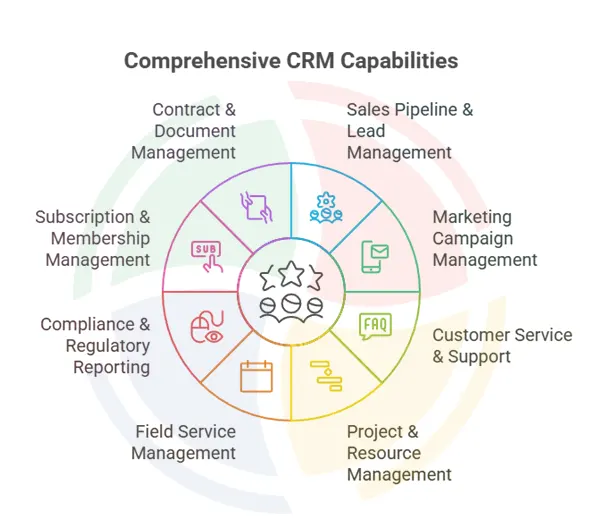
Microsoft Dynamics CRM powers a wide range of business activities. Here’s a look at its most impactful use cases.
1. Sales Pipeline and Lead Management
via Microsoft
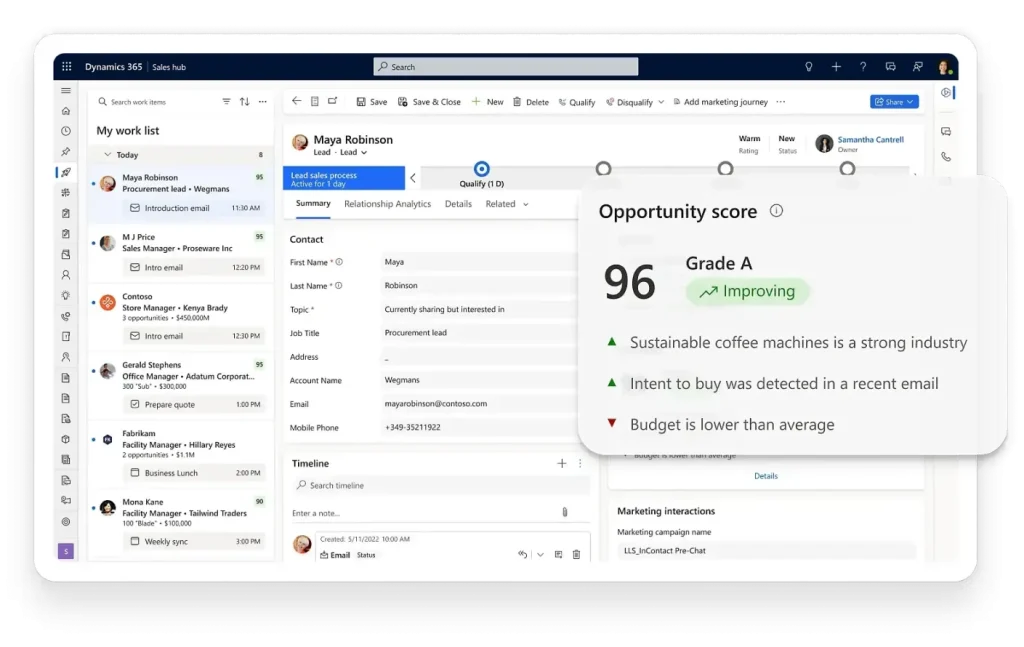
Sales teams lose deals when leads fall through or when they lack visibility into where opportunities stand. Dynamics CRM centralizes all prospect and customer interactions, creating a single source of truth for complete visibility.
The platform also automates lead scoring based on actual engagement behavior and demographic data.
For instance, when a prospect downloads a whitepaper or attends a webinar, the system automatically assigns a score and routes the lead to the appropriate sales rep based on territory, product expertise, or deal size. It ensures hot leads receive immediate attention while automated nurturing programs handle early-stage prospects.
What makes this particularly valuable for companies that use Microsoft Dynamics CRM:
- Territory-based lead assignment eliminates confusion over ownership and prevents duplicate outreach
- Visual pipeline dashboards display deal stage, probability, and forecasted revenue in real-time
- Guided selling processes prompt reps through qualification steps, reducing missed discovery questions
- Mobile access means customer data and deal status travel with reps to client meetings
- Email and calendar integration automatically captures activity without manual data entry
Financial services firms use this functionality to manage complex sales cycles involving multiple decision-makers and lengthy approval processes. Manufacturing companies track quotes and proposals across procurement cycles that span months.
The common thread: predictable revenue forecasting and measurably higher conversion rates.
Sales teams often have unique deal structures, approval layers, and reporting needs. Aegis Softtech helps tailor Dynamics CRM so it mirrors your exact sales rhythm. Our Dynamics CRM Consulting Services involve defining territory logic, customizing deal stages, or building dashboards that show what matters to your sales managers.
2. Marketing Campaign Management
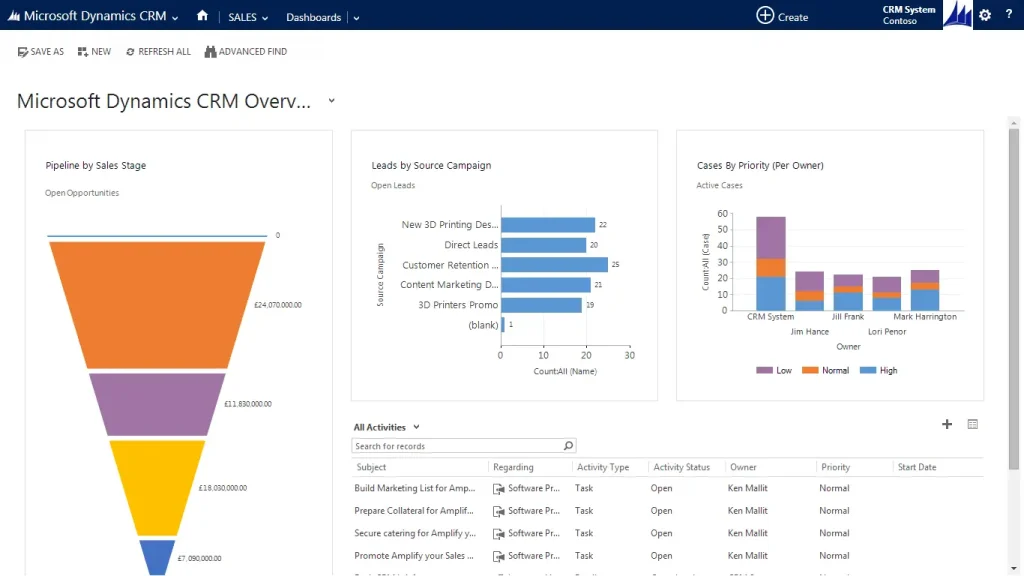
Marketing teams struggle to prove ROI when campaign data lives in spreadsheets and disconnected tools. Even worse, when leads convert to opportunities, the attribution often disappears.
Dynamics CRM connects marketing activities directly to sales results, showing which campaigns generate qualified leads and, ultimately, closed revenue.
The platform enables marketers to segment audiences based on firmographic data, past purchase behavior, website engagement, and interaction history.
A healthcare technology provider might create distinct segments for hospitals, outpatient clinics, and private practices, then tailor messaging and offers for each group’s specific pain points. Campaign execution happens within the CRM or through seamlessly integrated tools like Dynamics marketing.
Beyond basic email blasts, its marketing automation capabilities include:
- Multi-channel campaign orchestration that coordinates messaging across email, social media, events, and direct mail
- A/B testing functionality for subject lines, content variations, and calls-to-action with statistical significance tracking
- Behavioral trigger workflows that nurture leads based on specific actions or time intervals
- Full-funnel attribution showing which touchpoints influenced deals at each stage
- Budget tracking and spend analysis broken down by campaign, channel, or product line
Retail brands use these capabilities to coordinate seasonal promotions across digital and physical channels while tracking performance in real time. B2B software companies run targeted account-based marketing programs that align sales and marketing around high-value prospects.
Both teams share a unified view of the customer journey, eliminating the typical finger-pointing over lead quality.
Our Dynamics CRM Services assess your current workflows, configure the CRM to match your needs, migrate data from legacy systems, and train your teams for rapid adoption.
3. Customer Service and Support
via Microsoft
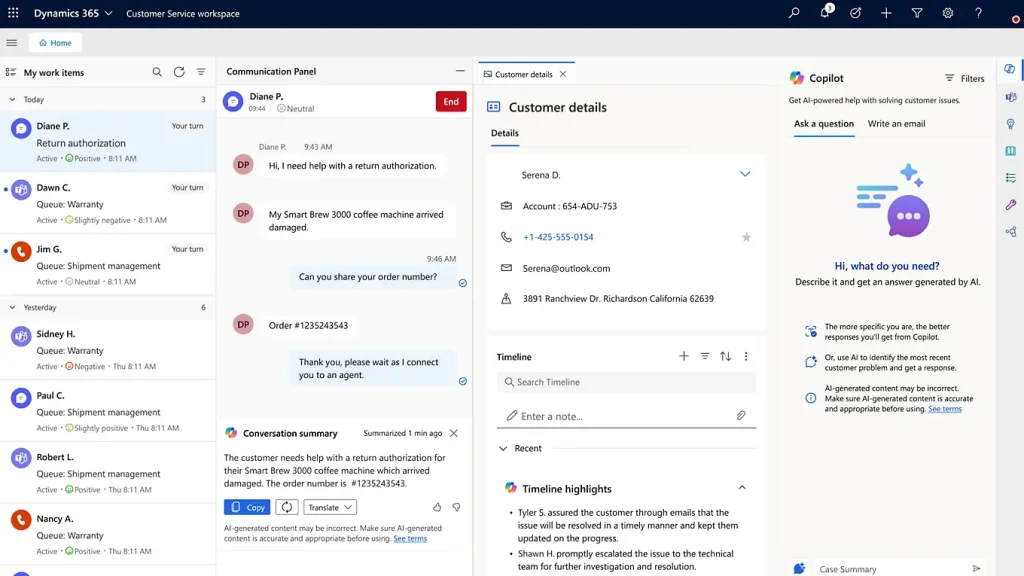
Service organizations lose customers when support interactions feel transactional or when agents lack context regarding past issues. Nothing frustrates customers faster than having to repeat their problem to multiple agents.
Dynamics CRM creates a complete service history accessible to any agent, regardless of which channel the customer chooses. This indicates that when a customer contacts support, agents immediately see previous cases, product purchases, open issues, communication preferences, and even sentiment from past interactions.
Meanwhile, intelligent routing directs cases to the right team based on product expertise, language requirements, or service-level agreements.
These service management capabilities define how companies benefit from Dynamics CRM:
- Omnichannel case management covering phone, email, live chat, social media, and self-service portals
- AI-powered knowledge base integration that suggests relevant articles to both agents and customers
- SLA tracking with automatic escalation when response times approach breach thresholds
- Customer self-service portals where people can check case status, access documentation, and find answers independently
- Service analytics dashboards showing resolution time, customer satisfaction scores, and recurring issue patterns
Technology companies use these MS Dynamics CRM features to support global customer bases across time zones without duplicating teams in every region. Equipment manufacturers coordinate warranty claims and repair requests that involve multiple departments.
The platform scales seamlessly from small support teams to enterprise contact centers handling thousands of daily interactions.
4. Project and Resource Management
via Microsoft
Professional services firms and agencies face constant tension between resource allocation and project profitability. When you bill by the hour, knowing who’s working on what and whether projects are tracking to budget becomes critical to survival.
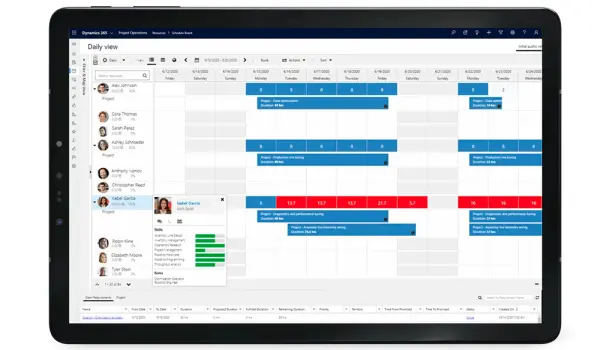
Dynamics CRM provides visibility into team capacity, project progress, and financial performance in real time.
Project managers define tasks, milestones, and dependencies directly within the CRM, creating a connected workflow between business development and delivery. As team members log time against specific tasks, the system automatically tracks progress against estimates and flags projects trending over budget before they become problems.
Resource managers gain a comprehensive view of team capacity and can allocate staff to incoming projects based on skills, availability, and utilization targets.
Key project management features include:
- Time and expense tracking linked to specific projects, clients, and billing categories
- Visual resource scheduling with calendars showing team availability and allocation percentages
- Reusable project templates for common engagement types, reducing setup time
- Real-time budget vs. actual reporting with margin analysis by project, client, or practice area
- Client collaboration portals for secure document sharing, deliverable approval, and status updates
Consulting firms track billable utilization and project profitability by practice area, identifying which service lines drive the highest margins. Marketing agencies manage campaigns as projects with clear deliverables, timelines, and budget constraints.
Construction companies coordinate subcontractors, material orders, and inspection schedules.These industries using Microsoft Dynamics CRM for project work gain control over their most valuable asset: billable time.
5. Field Service Management
via Microsoft
Organizations with mobile workforces struggle to coordinate technicians, manage inventory, and deliver predictable service experiences. The challenge intensifies when customer equipment breaks down, and fast response times have a direct impact on retention.
Dynamics CRM extends field service capabilities through mobile apps that equip technicians with everything they need in the field.
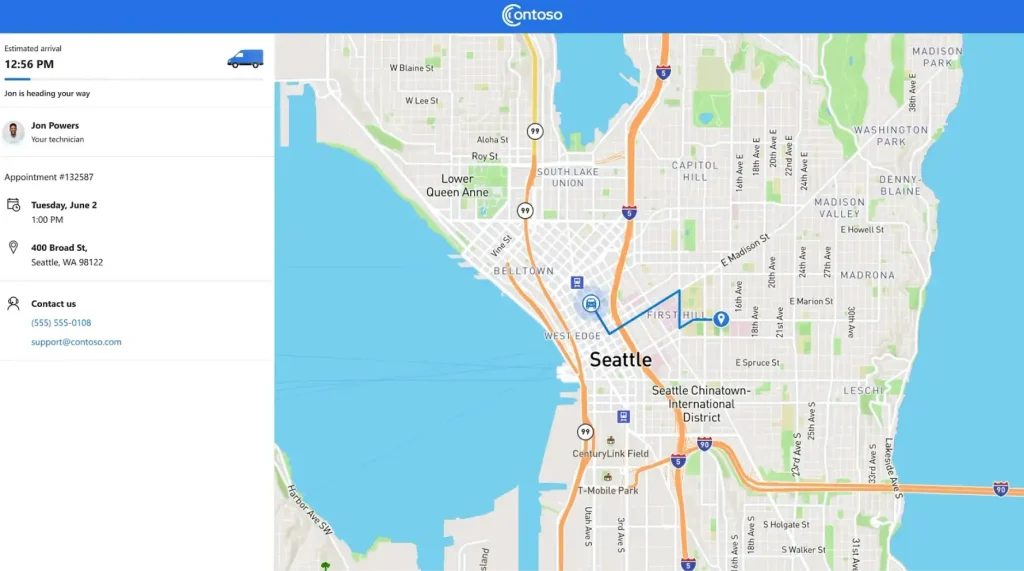
Dispatchers schedule appointments intelligently based on technician location, skill sets, and parts availability, minimizing travel time while maximizing first-time fix rates. Technicians receive detailed work orders on their mobile devices, complete with customer history, equipment specifications, service procedures, and troubleshooting guides.
After completing work, they capture digital signatures, update inventory levels, and trigger billing—all from the job site without returning to the office.
Field service functionality covers:
- Intelligent scheduling algorithms that optimize routes and minimize windshield time
- IoT sensor integration for predictive maintenance alerts before equipment fails
- Offline mobile access to service history, product manuals, and diagnostic tools when connectivity drops
- Real-time inventory management tracking parts usage and automatically triggering reorders
- Automated customer notifications with arrival windows, technician profiles, and live location tracking
6. Compliance and Regulatory Reporting
via Microsoft
Regulated industries face significant penalties for compliance failures and the reputational damage often exceeds the fines.
Dynamics CRM helps organizations track required activities, maintain comprehensive audit trails, and generate compliance reports that satisfy regulatory scrutiny.
The system enforces mandatory fields and multi-level approval workflows for activities that require documentation. Financial institutions track Know Your Customer (KYC) checks and anti-money laundering reviews with timestamps showing exactly when due diligence occurred. Healthcare organizations document patient consent and privacy practices according to HIPAA requirements.
Every interaction creates an immutable audit trail showing who accessed what information and when, which becomes invaluable during regulatory examinations.
Compliance features that Microsoft Dynamics CRM customers rely on:
- Configurable approval workflows that enforce review processes for regulated activities
- Comprehensive audit logging of all data changes, user actions, and system access
- Granular role-based access controls that limit data visibility to authorized personnel
- Automated compliance reports formatted for regulatory submissions and internal audits
- Data retention policies that align with industry-specific requirements while supporting legal holds
Pharmaceutical companies track interactions with healthcare providers to meet Sunshine Act transparency requirements, recording everything from sample distribution to speaker fees. Similarly, financial advisors document suitability assessments and disclosure delivery, protecting both clients and the firm.
The platform adapts to specific regulatory frameworks while maintaining the flexibility needed for efficient business operations.
Case in Point: World Vision New Zealand had been using Microsoft Dynamics 365 CRM for years but wanted to make it faster and easier for their team to work with.
They turned to us to refine their system, such as adding smarter alerts, flexible field visibility, and editable grids that simplified day-to-day operations.
The result was a smoother, more intuitive CRM experience that improved load times, reduced user frustration, and made managing donor and project data far more efficient.
7. Subscription and Membership Management
via Microsoft
Organizations with recurring revenue models need to track subscriptions meticulously, manage renewals proactively, and identify churn risks before customers leave.
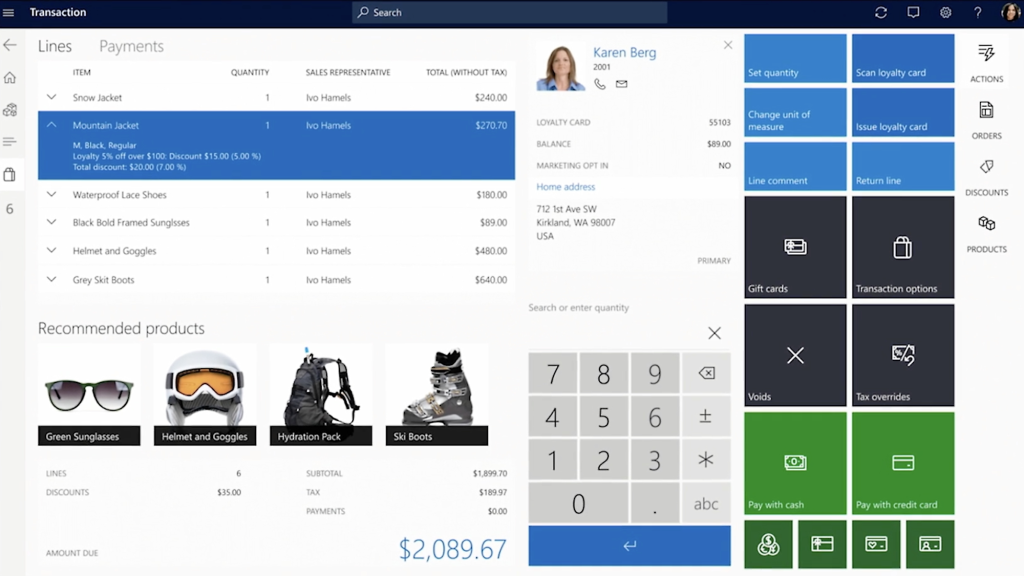
Dynamics CRM provides complete visibility into the subscription lifecycle from initial signup through renewal or cancellation, with all the context needed to maximize lifetime value. The platform tracks subscription start dates, billing cycles, renewal dates, and contract terms for every customer.
Automated workflows trigger renewal outreach at predetermined intervals—perhaps 90 days before expiration for annual contracts or 30 days for monthly subscriptions. Integration with product usage data helps identify at-risk accounts showing declining engagement. Customer success teams receive alerts when accounts approach renewal with low product adoption, enabling proactive intervention.
Subscription management capabilities include:
- Automated renewal reminders sent to both customers and account teams with customizable lead times
- Intelligent upsell and cross-sell recommendations based on usage patterns and feature adoption
- Predictive churn models that identify at-risk accounts using engagement scores and support ticket trends
- Customer self-service portals for subscription changes, upgrades, and payment method updates
- Comprehensive subscription analytics showing lifetime value, retention rates, and expansion revenue
SaaS companies track product usage metrics alongside CRM data to coordinate customer success activities and reduce involuntary churn from failed payments. Media organizations manage digital subscriptions while controlling content access based on subscription tier.
Professional associations handle member renewals and benefit tracking, maintaining engagement between annual conferences. These examples of Microsoft Dynamics CRM in action demonstrate how the platform supports predictable recurring revenue.
8. Contract and Document Management
via Microsoft
Contract chaos costs businesses money through missed renewals, unfavorable auto-renewal terms, and compliance risks from untracked obligations.
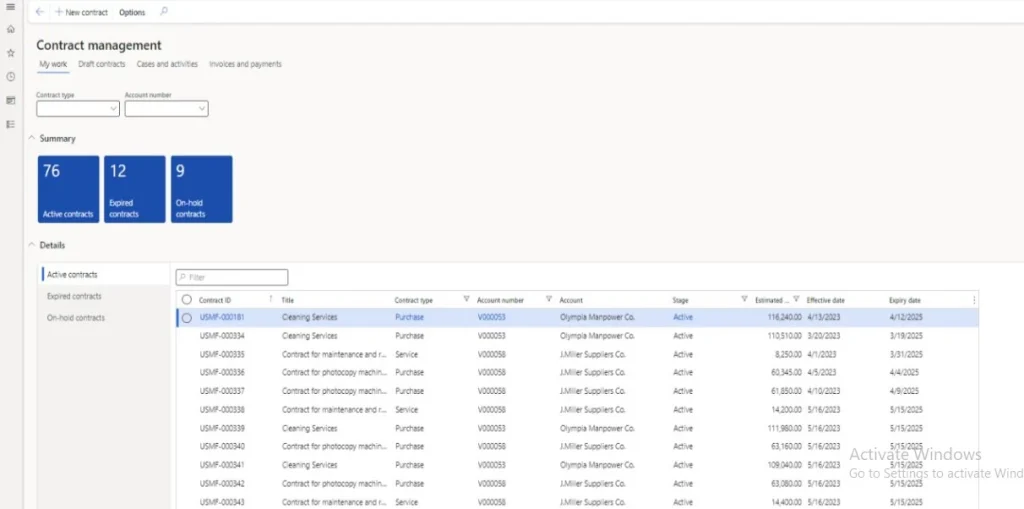
When contracts live in email attachments and shared drives, organizations lose visibility into expiration dates, payment terms, and performance requirements. Dynamics CRM centralizes contract storage and automates tracking of key dates and obligations.
All contracts link directly to relevant customer or vendor records, maintaining context between commercial relationships and legal agreements. The system tracks effective dates, expiration dates, payment terms, renewal conditions, and specific performance obligations.
Contract management features include:
- Centralized repository with role-based access controls, ensuring only authorized users view sensitive agreements
- Automated alerts for renewal dates, payment milestones, and contractual obligations with customizable advance notice
- Standardized contract templates with pre-approved terms and language, reducing legal review cycles
- Multi-stage approval workflows that route contracts through legal, finance, and executive teams based on value thresholds
- Native integration with e-signature tools for digital execution, eliminating printing and scanning
Procurement teams manage vendor contracts and track spending against negotiated agreements, identifying opportunities to consolidate suppliers or renegotiate terms. Sales organizations handle customer contracts, amendments, and renewals while maintaining visibility into revenue commitments.
On the other hand, legal departments gain comprehensive oversight of all contractual obligations across the organization, reducing risk from overlooked terms or missed deadlines.
Industry-Specific Examples of Microsoft Dynamics CRM in Action
Across sectors, CRM use grows when organizations confront specific pressure points, like regulatory risk, service delays, and fragmented data. Dynamics 365 CRM helps solve those.
Here’s a closer look.
Retail and E-Commerce
Retailers handle massive volumes of customer interactions—web, store, support—with high expectations for speed and personalization. Organizations using Dynamics 365 CRM unify these channels so marketing, sales, and service teams share a single view of the customer. A good example is CanFitPro, a fitness education and certification business in Canada, which pivoted quickly when lockdowns hit. They replaced legacy systems with Dynamics 365, enabling them to virtualize training, streamline customer engagement workflows, and cut ‘time to market’ by 50%.
Healthcare
Healthcare requires sensitive coordination: patient records, clinicians, admin staff, follow-ups, and predictive care.
Fragmentation between clinical and administrative systems often causes delays or missed outreach.
Wellstar Health System addressed those gaps with Microsoft Cloud for Healthcare and Dynamics 365. They pulled data from clinical, administrative, and customer service sources into one platform. That enabled them to personalize patient communication and remove redundancies in administrative tasks.
Financial Services
The financial sector demands compliance, swift issue resolution, and maintaining trust. Legacy systems often slow down dispute resolution, risk checks, and customer service requests.AFCA (Australia’s Financial Complaints Authority) replaced multiple legacy systems with Dynamics 365 Customer Service and Finance modules. They slashed daily admin tasks by 40%, reduced manual email routing by 27%, and sped up invoice creation by 80%.
Professional Services
In professional services like consulting, training, and certification, the challenge lies in capturing client context, managing proposals, tracking service delivery, and keeping internal units aligned.
Accenture built a modern case-management solution using Dynamics 365 for a U.S. state agency. Multiple legacy tools were replaced; case handling got more automated; reports via Power BI became easier to generate.
Employees now serve more cases with less manual effort.
How Aegis Softtech Supports Your Business Needs
Microsoft Dynamics 365 CRM performs best when guided by experts who understand both the technology and the business outcomes it should deliver. We combine technical skill with industry insight to help organizations turn CRM capabilities into meaningful results.
Here’s how we support your success:
- Tailored implementation: We align Dynamics 365 CRM with your workflows across sales, marketing, and service functions
- Seamless integration: Our Dynamics CRM experts connect the platform data with your existing systems to create unified visibility across operations
- Data-driven customization: We build dashboards and reports that turn data into clear, actionable insights
- Scalable support: We refine and expand your CRM setup as your business grows and objectives evolve
- Industry experience: We’ve supported customers in manufacturing, finance, healthcare, and retail to improve collaboration and strengthen customer engagement
Plus, we help organizations identify which CRM use cases deliver the most value for their industry and goals.
FAQs
1. Which companies use Microsoft Dynamics CRM?
Many medium-to-large companies across industries rely on Microsoft Dynamics 365 CRM. For example, Saint-Gobain Building Distribution (CZ) uses Dynamics CRM to centralize sales data, monitor customer orders, and avoid duplicate offers.
Further, ISS Worldwide deployed Dynamics CRM to improve customer retention, enable cross-selling, and speed up collections with large global operations.
2. How does Dynamics CRM compare to Salesforce for different use cases?
Dynamics CRM integrates seamlessly with Microsoft tools like Teams, Outlook, and Power BI, making it ideal for companies already in the Microsoft ecosystem. Salesforce offers strong third-party integrations, but D365 CRM provides greater flexibility for industry-specific and compliance-heavy use cases.
3. Can Dynamics CRM be customized for niche business processes?
Yes. Microsoft Dynamics 365 CRM customization is possible across workflows, dashboards, and automation. Businesses can adapt it for any process using tools like Power Apps and Power Automate.
4. Can we manage influencer or brand ambassador programs in CRM?
Yes, it can track deliverables, referral codes, payout cycles, campaign performance, and content approvals tied to each influencer.
5. Can Dynamics CRM track customer sentiment from emails and conversations?
Yes. With sentiment analysis and conversation intelligence, the system can score how customers feel during interactions and flag accounts that are becoming unhappy.
6. Can Dynamics CRM support GDPR and data privacy compliance?
Yes, it allows customer consent tracking, data retention rules, access restriction, and data deletion requests to support privacy compliance.