Two companies with identical sales teams can receive Microsoft Dynamics CRM implementation cost quotes that differ by $150,000. The reason comes down to one critical factor: how well each organization understands what they’re buying.
Cost transparency can make or break your CRM project. Without clear visibility into the true total cost of ownership (TCO), you might choose a vendor based on their initial quote only to face budget overruns when hidden costs surface during implementation.
The companies that succeed are the ones that know exactly what drives these costs before they sign any contracts.
In this blog post, we’ll break down every component of Microsoft Dynamics CRM implementation costs so you can budget accurately and avoid costly surprises. This guide will also help you evaluate the right Microsoft Dynamics 365 CRM services to ensure maximum ROI and long-term value.
Key Takeaways
- Cost Range: Dynamics CRM implementation typically falls between $50,000 and $500,000+, depending on business size and complexity.
- Main Cost Drivers: Licensing model, customization depth, integrations, data migration effort, and training/support requirements shape the final budget the most.
- Cloud vs. On-Prem: Cloud requires lower upfront investment but ongoing subscription fees; on-prem has high setup costs but can be cheaper long-term for stable, large user bases.
- Common Overspends: Wrong license selection, underestimated training, post-launch integration requests, and cloud storage/API overages.
- Smart Budgeting: Mix user license types, clean data before migration, request itemized quotes, and plan a 20-25% contingency to avoid surprise costs.
How Much Does it Cost to Implement Microsoft Dynamics?
The Microsoft Dynamics CRM implementation cost varies widely depending on your specific needs, but most businesses can expect to invest anywhere from $50,000 to $500,000 for a complete implementation. This range might seem broad, but it reflects the fact that every organization has unique needs.
Small businesses with basic CRM needs typically spend $50,000-$100,000, while mid-sized companies with moderate customization requirements fall into the $100,000-$250,000 range. Large enterprises with complex integrations and extensive customization can see costs reach $500,000 or more.
Licensing Options and Their Impact on Your Budget
Microsoft offers flexible Dynamics 365 CRM pricing models that can significantly impact your budget. The per-user model charges you based on how many people access the system, while the per-app model lets you pay only for specific applications your team uses.
Cloud licensing typically costs less upfront than on-premise solutions because you avoid hardware and infrastructure investments. However, cloud subscriptions create ongoing monthly expenses that can add up over time.
Many businesses overspend by choosing the wrong license type. If you select enterprise licenses when basic plans would suffice, you’ll pay for features your team never uses.
Subscription vs. Perpetual Licensing
Growing businesses often benefit from subscription models because they provide predictable monthly costs and automatic updates. You can scale up or down as your team changes without major capital investments.
Subscription works best when you:
- Have fewer than 100 users or expect significant growth
- Want automatic updates and new features included
- Prefer spreading costs over time instead of large upfront payments
Established enterprises with stable user counts might prefer perpetual licensing for long-term cost control. While the upfront investment is higher, you own the software and avoid ongoing subscription fees after 3-5 years.
Perpetual licensing makes sense if you have 200+ stable users and don’t need the latest features immediately. The break-even point typically occurs around year four, making it more cost-effective for organizations that plan to use the system long-term without major changes.
7 Major Factors That Influence Implementation Cost
Understanding these factors helps you create accurate budgets and avoid surprises during your Microsoft Dynamics 365 CRM implementation.
1. Deployment Model (Cloud vs. On-Premise)
Cloud deployments typically cost 40-60% less upfront than on-premise installations. You skip server hardware, infrastructure setup, and IT maintenance overhead. However, cloud solutions require ongoing subscription payments that can exceed on-premise costs over 5-7 years.
On-premise deployments demand significant upfront investments that many businesses underestimate:
- Server hardware: $25,000-$100,000 for mid-sized deployments
- Windows Server and SQL Server licensing: $15,000-$50,000
- Dedicated IT staff or consultant retainer: $60,000-$120,000 annually
2. Number and Type of Users
Your user count directly impacts licensing costs, but user types matter more than total numbers. Sales managers need full CRM access, while customer service representatives might only require basic functionality.
Here’s a smart approach to user licensing:
- Full users ($65-$95/month): Sales managers, account executives, service managers
- Team members ($8/month): Inside sales, customer service reps with read-only needs
- External users: Partners or contractors needing limited access
For example, a 50-person sales team might need only 20 full licenses, 25 team member licenses, and 5 external licenses. This approach saves about $40,000 annually compared to giving everyone full access.
3. Customization Depth
Basic implementations with minimal customization typically add 20-30% to your base licensing costs. This includes custom fields, basic workflows, and standard report modifications.
Moderate customization can increase costs by 50-100% and includes:
- Custom entities and relationships
- Advanced business process flows
- Third-party app integrations from AppSource
Extensive customization requiring custom .NET development, complex business logic, and specialized interfaces can double or triple your implementation budget. The more you deviate from standard Dynamics functionality, the higher your costs climb.
4. Data Migration Complexity
Clean, well-organized data migrates quickly and cheaply. Most businesses can expect to spend $10,000-$25,000 on straightforward data migration from modern systems.
Your migration becomes expensive when you have:
- Multiple data sources requiring consolidation
- Inconsistent data formats and duplicate records
- Historical data spanning 5+ years
- Custom field mappings and complex transformations
5. Integrations With Other Business Tools
Each integration adds complexity and cost to your project. Simple integrations with Outlook or other Office 365 apps might add $5,000-$15,000 to your budget.
Complex integrations with ERP systems, accounting software, or proprietary databases can cost $25,000-$75,000 each. Legacy system integrations often require custom development that significantly increases project timelines and costs.
6. Training and Change Management
User adoption determines your CRM’s success, making training investments crucial. Basic training for 20-50 users typically costs $15,000-$30,000.
Comprehensive training programs involving multiple user groups, custom documentation, and ongoing support can reach $75,000-$125,000 for large organizations.
7. Post-Go-Live Support and Maintenance
Cloud deployments include basic support in subscription fees, but premium support packages cost extra. Budget 15-25% of your implementation cost annually for ongoing support and optimization.
On-premise installations require dedicated IT resources or external support contracts. Annual maintenance typically runs 18-22% of your initial implementation investment.
Microsoft Dynamics CRM Implementation Cost Breakdown
Here’s a practical Dynamics CRM cost breakdown showing typical expenses:
One-Time Costs
- Software licenses: $30,000-$200,000
- Implementation services: $40,000-$300,000
- Data migration: $10,000-$75,000
- Training: $15,000-$50,000
Total upfront: $95,000-$625,000
Ongoing Annual Costs
- Subscription fees (cloud): $25,000-$150,000
- Support and maintenance: $15,000-$100,000
- System optimization: $10,000-$50,000
Total annual: $50,000-$300,000
Small businesses typically invest $75,000-$150,000 total, mid-sized companies spend $150,000-$400,000, and large enterprises invest $400,000-$1,000,000+ for comprehensive implementations.
Hidden Costs Businesses Often Overlook
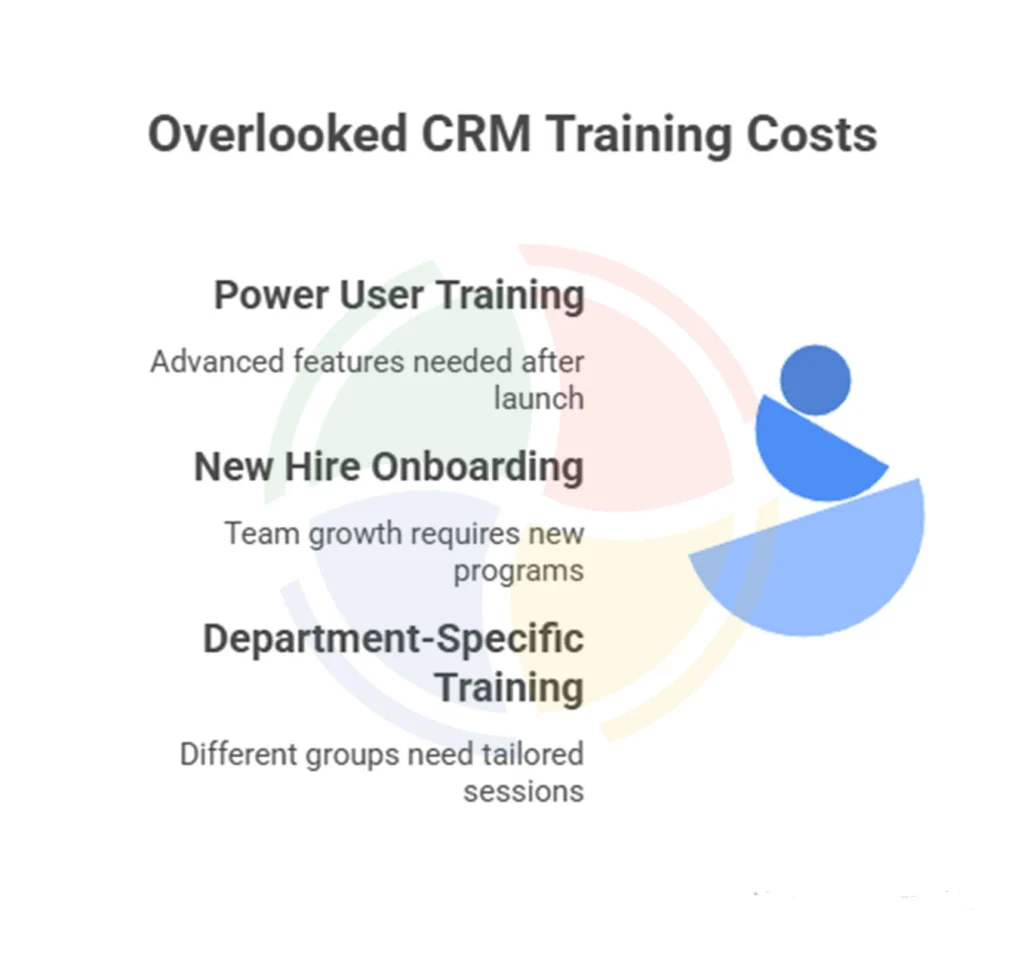
Many organizations underestimate training requirements, budgeting only for initial user sessions. Effective CRM adoption requires ongoing education, advanced feature training, and support for new hires.
Training costs that catch businesses off guard include:
- Power user training 3-6 months after launch, when teams want advanced MS Dynamics CRM features
- New hire onboarding programs as your team grows
- Department-specific training for different user groups
Plan for 25-30% more training costs than your initial estimate. The upfront investment pays off through faster user adoption and better system utilization.
Post-launch integration needs often exceed the original scope. As teams become comfortable with CRM functionality, they identify additional systems that should connect to Dynamics 365. Marketing automation platforms might cost $15,000-$35,000 to integrate, while accounting system connections run $10,000-$25,000.
Cloud environments have storage limits and API call restrictions that can generate surprise charges:
- Additional storage costs $2/GB/month beyond included allowances
- Power Platform connections can trigger API overage fees
- Large file attachments and document storage increase bandwidth costs
Most businesses see $200-$1,500 in monthly overages during their first year as usage patterns stabilize. Poor initial data migration creates the most expensive long-term problems. Inadequate migration results in 6-12 months of reduced productivity, duplicate record cleanup, and missing historical data that impacts reporting.
How Aegis Softtech Delivers Cost-Effective Dynamics CRM Implementations
Aegis Softtech provides detailed Microsoft Dynamics CRM implementation cost estimates before any project begins, so you know exactly what to expect. Our transparent approach eliminates surprise charges and helps you budget accurately from day one.
Plus, our CRM Implementation Services & Solutions tailor each deployment to match your budget and business goals rather than pushing expensive features you don’t need. We focus on delivering maximum value within your investment parameters through proven methodologies that reduce implementation time by 25-35%.
Whether you choose cloud or on-premise deployment, you can hire Dynamics CRM developers to deliver successful implementations across manufacturing, healthcare, professional services, and retail industries. We recommend the most cost-effective approach based on your specific requirements, user patterns, and growth projections.
Make Smart Investment Decisions for Your CRM
Your licensing decisions alone can create $50,000+ annual variations in operating costs. Factor in customization scope, integration complexity, and training requirements, and the difference between a well-planned implementation and a rushed one becomes even more dramatic.
The smartest approach involves getting detailed quotes from multiple vendors, planning for 20-25% contingency costs, and choosing partners who provide transparent pricing from day one.
FAQs
1. How long does it take to implement Microsoft Dynamics?
The timeline for a Microsoft Dynamics CRM project varies. A basic implementation can take a few weeks, while a more complex setup may take several months. Factors affecting the implementation cost include project scope, customization, and user training.
2. How do you buy a Dynamics 365 license?
You can buy a Dynamics 365 license directly from Microsoft, through a certified partner, or via a cloud solution provider. It’s a good idea to compare Dynamics 365 CRM pricing options to find the best fit for your school or business.
3. Is Dynamics CRM cheaper in the cloud or on-premise?
Generally, cloud-based solutions have a lower initial cost and are easier to maintain. On-premise options may require a higher upfront investment. Reviewing Aegis Softtech’s Dynamics CRM cost breakdown can help you decide which option is more affordable in the long run.
4. Are there hidden expenses in Microsoft Dynamics CRM projects?
Yes, there can be hidden costs such as customization, data migration, and ongoing support. Always request a detailed Microsoft Dynamics CRM implementation cost estimate before starting your project to avoid surprises.