Ever wondered why two ServiceNow environments running the same applications behave differently after an update?
With two major platform releases each year, schema changes, feature updates, and deprecations affect every ServiceNow instance in ways that vary across development, test, and production.
When instance management and version control are treated as routine admin tasks, you see environment drift, failed upgrades, broken integrations, and avoidable downtime.
In this blog, we will show you how ServiceNow instances are structured, how environments differ, and how to check versions and upgrade without putting critical workflows at risk.
Key Takeaways
- ServiceNow instance management: Defines how stable, upgrade-ready, and scalable your platform remains across development, test, and production environments.
- Key controls: Clear environment separation, disciplined promotion paths, version visibility, cloning strategy, and structured lifecycle governance.
- Upgrade readiness: Requires release note analysis, plugin validation, ATF testing, sub-production upgrades, and controlled production deployment.
- Common risks: Configuration drift, version inconsistency, over-customization, integration failures, and weak role-based access control.
- Operational outcome: Predictable releases, reduced upgrade disruption, stronger compliance posture, and long-term platform reliability.
ServiceNow Instance: What It Entails
A ServiceNow instance is a fully isolated, cloud-hosted environment on the Now Platform. It holds your data, application logic, configurations, integrations, users, and security controls as a self-contained system.
Changes in one instance don’t impact another unless you intentionally promote or migrate them via controlled mechanisms—update sets, application repositories, or source control.
ServiceNow operates on a multi-tenant SaaS model where infrastructure is shared while data and runtime execution remain isolated at the instance level. This model supports scalability, controlled upgrades, and enterprise-grade security while reducing infrastructure management overhead.
Operationally, an instance functions as:
- An execution layer for business workflows and automation
- A data boundary that enforces security, compliance, and auditability
- A controlled surface for integrations with external systems
- A governance unit where access, change, and risk are managed independently
Inside a single ServiceNow instance, you can manage:
- Core platform tables, system metadata, and dictionary definitions
- ITSM, ITOM, CSM, HRSD, or purpose-built custom applications
- Business rules, client scripts, flows, and orchestration logic
- Integration endpoints, credentials, and authentication mechanisms
- Role-based access controls, policies, and audit configurations
Types of ServiceNow Instances
It is only when you go with the right instance type that your platform strategy proves to be stable and scalable. And, you have a few options to choose from based on your delivery lifecycle phase.
Each instance plays a specific role in the delivery lifecycle, from development to live operations.
Blurring these roles increases the risk of configuration drift, upgrade failures, security gaps, and inconsistent behavior across environments.
Here’s how each ServiceNow instance type fits into the overall platform architecture and its role in the delivery lifecycle.
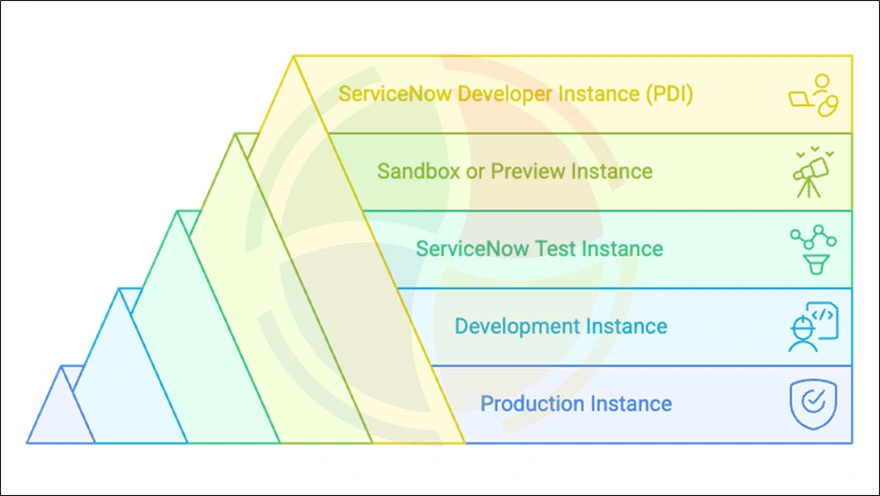
1. Production Instance
The production instance is the operational core of your ServiceNow ecosystem. It supports live users, customer interactions, business workflows, integrations, and reporting. Instability in production directly impacts your business operations, particularly in high-volume ITSM environments.
A well-governed production instance is characterized by:
- Changes are deployed only through approved release and change management processes
- No direct configuration, scripting, or experimentation outside controlled deployments
- Strict role-based access using ACLs and separation of duties
- Continuous monitoring, logging, and audit trails for compliance, traceability, and sustained ServiceNow instance performance optimization
2. Development Instance
The development instance is where platform changes are built and refined safely. Developers and administrators use this environment to build applications, configure workflows, write scripts, and experiment with platform capabilities without impacting live users.
Common characteristics of a development instance include:
- Relaxed access for developers, configurators, and architects
- Frequent updates, refactoring, and iterative changes
- Integration with source control for version tracking
- Use of experimental plugins, APIs, and proof-of-concept functionality
3. ServiceNow Test Instance
A ServiceNow test instance is a controlled environment used to validate changes under production-like conditions before they are released into live operations.
Test instances are primarily used for:
- Regression testing during upgrades and patching
- User acceptance testing (UAT) with business stakeholders
- Automated Test Framework (ATF) execution
- Validation of integrations, authentication, and data flows
4. Sandbox or Preview Instance
A sandbox or preview instance is an isolated environment that supports ServiceNow releases and enables teams to evaluate upgrade impact before production deployment.
These instances are best suited for:
- Exploring new features introduced in upcoming releases
- Testing plugin behavior and compatibility on future versions
- Identifying deprecated functionality and required remediation
5. ServiceNow Developer Instance (PDI)
A ServiceNow Developer Instance, commonly referred to as a PDI (Personal Developer Instance), is a free, single-tenant instance for individual learning and experimentation. Provided by ServiceNow for learners, it operates independently from enterprise ServiceNow environments and is intended solely for personal skill development.
A ServiceNow developer instance includes:
- Core Now Platform capabilities for hands-on learning
- Limited access to plugins and platform features
- Sample data for experimentation and practice
Limitations of a ServiceNow Developer Instance
As suggested, PDIs are for learning, not enterprise use. If you still go ahead with it, here are the constraints you will face:
- No SLA, uptime guarantee, or enterprise-grade support
- Not licensed for organizational or client-delivered work
- Subject to hibernation or full reset due to inactivity
ServiceNow Instance Lifecycle
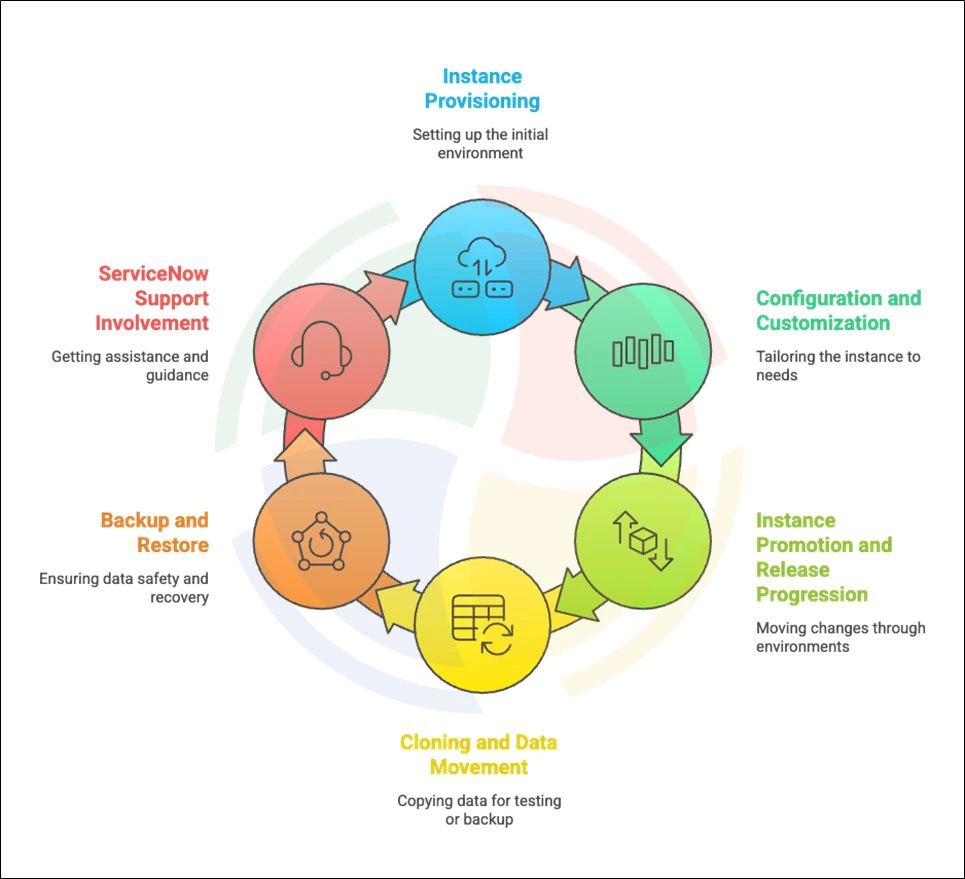
Your ServiceNow instance operates in a continuous cycle of configuration, validation, release, and improvement. Managing this lifecycle right reduces risk and maintains platform stability.
Take a look at the outlined steps forming the lifecycle:
Phase 1: Instance Provisioning
The instance lifecycle begins with provisioning. This is where naming conventions, plugins, access controls, and governance standards are defined. These early choices determine how easily the instance can be managed, scaled, and secured later. A strong foundation simplifies long-term governance, scalability, and security.
Phase 2: Configuration and Customization
After provisioning, it’s time to configure workflows, build applications, integrate systems, and establish security models that support your business needs. Clear documentation and source control provide context and traceability for each change, ensuring smoother future upgrades.
Phase 3: Instance Promotion and Release Progression
Once functionality is built, release control becomes the priority. Changes are validated in test environments that mirror production and refined in development before release. A structured promotion process keeps releases predictable and supports faster recovery when issues occur.
Phase 4: Cloning and Data Movement
To keep non-production environments relevant and useful, you refresh them with production data. Cloning enables validation of features in realistic conditions while masking sensitive information. This feedback loop helps you catch issues earlier, iterate faster, and strengthen confidence before final release.
Phase 5: Backup and Restore
Backup and restore processes provide operational safeguards. Backups protect your data, and preparedness determines how quickly you can recover. Clear restore procedures define what can be recovered, recovery timelines, and when ServiceNow support is required.
Phase 6: ServiceNow Support Involvement
Because lifecycle management doesn’t stop at release or recovery, ongoing support plays a critical role. Support is a partner throughout your instance’s lifecycle. Proactive engagement with ServiceNow improves issue resolution, upgrade execution, and operational stability.
How to Check the Version of a ServiceNow Instance
Once your instance lifecycle and promotion paths are clearly defined, version visibility becomes the next critical control point.
Clear version visibility underpins upgrade planning, plugin compatibility, and troubleshooting. Gaps lead to failed upgrades and unstable instance behavior.
But you need not worry.
ServiceNow provides multiple reliable ways to check instance version details, each useful in different operational scenarios:
1. Using /stats.do
The fastest and most widely used method is the stats page. Open a browser and navigate to /stats.do.
This page provides a concise snapshot of your instance, including the release name, current patch level, and build information. The minimal permissions it asks for make this an accessible way to verify your version details.
Rely on this version verification method for confirmation during upgrade planning, cross-team coordination, and support interactions.
2. Using “About” in the Application Navigator
Another simple approach is to search for About in the application navigator. It shows a modal window displaying the instance release and patch information in a clean, user-friendly format.
It works well when you are already logged into the platform and need to confirm version details without navigating away from the UI.
3. Using System Diagnostics > Stats
Want more information about your ServiceNow Instance version as an administrator? Navigate to System Diagnostics > Stats for details like release and patch information, node-level details, memory usage, and system health indicators.
This method is especially useful when your version checks are part of broader performance analysis, upgrade validation, or incident investigation.
A ServiceNow version is a combination of multiple components that together determine platform behavior, compatibility, and upgrade readiness. Treating any one of these in isolation leads to incorrect assumptions about stability or support.
The table below breaks down each version component and explains why it matters in real-world administration and upgrade planning.
| Version Component | What It Represents | Why It Matters |
| Release Family | The major ServiceNow platform release (for example, Vancouver or Washington) | Determines overall platform capabilities, deprecated features, and upgrade eligibility |
| Patch Level | Cumulative fixes and enhancements applied within a release family | Affects stability, security updates, and plugin compatibility |
| Hotfixes | Targeted corrections applied outside standard patch cycles | Resolves specific defects without changing the core release or patch level |
How to Upgrade a ServiceNow Instance
After establishing clear lifecycle governance and version visibility, upgrading your ServiceNow instance becomes a methodical process. Successful upgrades progress through preparation, execution, and stabilization phases.
Below is a structured approach to executing a safe upgrade:
1. Pre-Upgrade Preparation
Successful upgrades start well before anything is scheduled. Strong preparation reduces uncertainty and limits post-upgrade disruption.
- Begin by reviewing official release notes to spot breaking changes and deprecated features that may affect your setup.
- Validate plugin compatibility early, especially for ITOM, CSM, and third-party integrations.
- Run the Customization Impact Analyzer to identify scripts, business rules, and UI changes that may behave differently after the upgrade.
- Execute Automated Test Framework (ATF) suites to establish a reliable functional baseline.
2. The Upgrade Execution Process
Upgrades are scheduled through the Now Support portal, but outcomes depend on execution discipline.
- Start by upgrading a sub-production instance, typically test or staging.
- Validate workflows, integrations, and custom logic under production-like conditions.
- Address issues using update sets or controlled fix scripts, not ad hoc changes.
- Move to production only after a formal sign-off confirms stability.
3. Post-Upgrade Validation and Stabilization
An upgrade isn’t finished when the instance comes back online. Post-upgrade validation determines long-term stability.
- Compare post-upgrade ATF results against baselines to catch regressions early.
- Validate integrations, authentication flows, and scheduled jobs explicitly.
- Review logs and error queues for silent failures, and address deprecated functionality before it becomes unsupported.
Best Practices for Managing ServiceNow Instances
After upgrades stabilize, long-term platform health depends on maintaining a disciplined approach to day-to-day instance management. Clear ownership and repeatable practices ensure consistent operations as your ServiceNow footprint expands.
Best practices that keep ServiceNow instances stable and predictable include:
- Never make direct changes in production: Production should only receive changes that have already been built, tested, and approved in lower environments.
- Keep development and test environments purpose-driven: Development is for building and refinement, test is for validation. Blurring these roles introduces instability downstream.
- Automate testing wherever possible: Automated Test Framework (ATF) reduces manual effort and catches regressions early, especially during upgrades.
- Maintain strict role-based access controls: Limit who can configure, script, or deploy changes to prevent accidental or unauthorized impact.
- Standardize naming, cloning schedules, and documentation: Consistency makes environments easier to manage, audit, and scale over time.
Common Challenges in ServiceNow Instance Management
Even with strong governance, instance management can erode as small gaps accumulate over time. Identifying these issues early is what separates controlled growth from ongoing instability. At Aegis Softtech, we support enterprises with ServiceNow consulting to stabilize environments and restore upgrade discipline.
Here are some common issues you might encounter and how to address them:
- Configuration drift: Occurs when changes are made inconsistently across environments. You can fix this through disciplined promotion paths and regular cloning from production to non-production instances.
- Version drift: Happens when instances run different patch levels or skipped releases. Resolve it by enforcing a shared release calendar and consistent patching strategy.
- Integration failures after upgrades: Often caused by unvalidated endpoints or deprecated APIs. Try to mitigate risk by validating integrations and credentials before scheduling upgrades.
- Lack of automated testing: Leads to late defect discovery and manual rework. Adopt an Automated Test Framework (ATF) early, not as a reaction to incidents.
- Over-customization: Increases upgrade effort and long-term maintenance cost. Favor out-of-the-box configuration and flows over custom scripting wherever possible.
Build a Resilient & Scalable ServiceNow Instance Strategy
A ServiceNow instance functions as the control layer that determines upgrade stability, release discipline, and long-term platform scalability.
Clear role separation across development, test, and production supports predictable releases. Structured promotion reduces risk, and version visibility improves upgrade predictability.
Our ServiceNow development solutions apply a lifecycle-driven approach to instance management, supporting operational control and scalable innovation. You can also hire our remote ServiceNow developers to accelerate upgrades and enhancements.
FAQs
Q1: How many ServiceNow instances should an enterprise maintain?
The right number depends on scale, risk tolerance, and release frequency. Most enterprises maintain at least development, test, and production, with sandbox or preview instances added for upgrade readiness and complex integrations.
Q2: Can different ServiceNow instances run different patch levels?
Yes, but it is not recommended long-term. Patch-level differences increase troubleshooting complexity and upgrade risk. Maintaining consistent patching across environments improves predictability.
Q3: What is the difference between a test instance and a production instance?
Test instances validate changes under realistic conditions, while production supports live business operations with strict controls.
Q4: What is a ServiceNow developer instance, and how do I request one?
A ServiceNow developer instance is a free personal environment available through the ServiceNow Developer Portal, intended for learning and experimentation only.