You push code, trigger builds, and invest significant time in detailed testing, only to find that basic functionality doesn’t work.
Let’s take the simplest example. Your QA team just spent three hours running comprehensive tests on the latest build. Everything seemed promising until they discovered the login function was completely broken. A critical failure that should have been caught in minutes, not hours.
This, of course, means wasted QA hours, delayed releases, frustrated developers, and mounting pressure to ship features faster while maintaining quality.
Smoke testing in software testing solves this problem by acting as your first line of defense, catching fundamental issues within minutes of deployment and preventing costly downstream failures.
But to deploy solid smoke testing, you must understand what it is and how it works.
This guide breaks down what smoke testing is, how it works, the types, implementation strategies, and best practices to move your QA process from reactive to proactive.
Key Takeaways
- Definition: Smoke testing is a quick, preliminary test to check if a new build’s core functions work, acting as a stability gate before deeper testing (sanity, regression).
- Types of Smoke Testing: Manual, automated, hybrid, daily, acceptance, and UI-focused. Automated smoke testing integrates directly with CI/CD for fast validation.
- How Automated Smoke Testing Works: Triggered after each build in CI/CD. It stops unstable builds from moving forward. Uses tools like Selenium, Cypress, Postman, Appium, Jenkins, GitHub Actions.
- When to Use: Certain scenarios include fast-paced Agile development, API-heavy architectures, web/mobile apps with frequent UI updates, microservices environments.
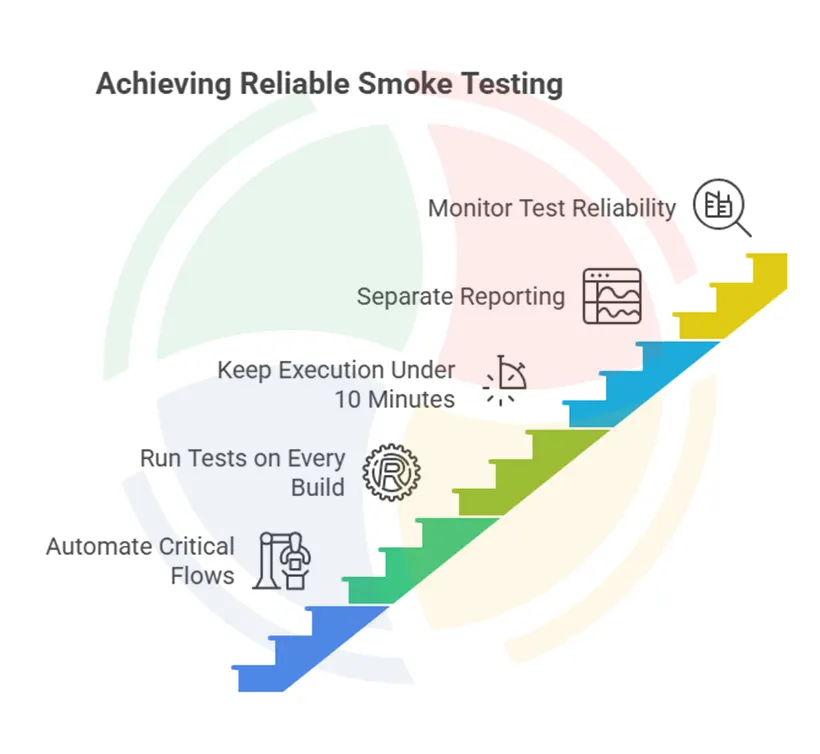
- Best Practices: Automate only critical flows, keep execution under 10 minutes, run after every successful build, maintain separate reporting, and monitor test reliability carefully.
- How to Implement: Start with the most critical workflows, automate gradually, integrate into CI/CD as a quality gate, and focus on reliability over coverage.
What is Smoke Testing in Software Testing?
Smoke testing is a preliminary testing technique that verifies whether the most critical functions of a software build work correctly after deployment or installation.
Think of it as a “confidence check.” Basically, ensuring the application doesn’t crash when you perform basic operations before investing time in deeper testing phases.
The primary purpose is stability verification, not comprehensive validation. Unit tests focus on individual components, and regression tests examine the entire system. Smoke testing sits between them, answering one crucial question: “Is this build stable enough to proceed with detailed testing?”
In modern SDLC (Software Development Life Cycle) workflows, smoke testing runs immediately after a successful build in CI/CD pipelines. It acts as a quality gate, which if failed, results in the build getting rejected before reaching QA teams or staging environments.
Types of Smoke Testing
Understanding different smoke testing approaches helps you select the right strategy for your development workflow and team structure.
Manual Smoke Testing
It involves QA engineers manually executing predefined test cases to verify basic functionality. Testers follow a checklist covering core features like user login, navigation, data entry, and basic workflows. While thorough, manual smoke testing becomes time-intensive and inconsistent across different testers.
Hybrid Smoke Testing
Hybrid Smoke Testing combines automated scripts for repetitive checks with manual validation. It is used for areas that require human judgment, such as UI/UX elements or complex user workflows that are difficult to automate.

Daily Smoke Testing
Daily Smoke Testing runs smoke test suites on a scheduled basis, typically overnight or during low-traffic periods. This approach works well for teams with less frequent deployments but still need regular build validation.
Acceptance Smoke Testing
It occurs after major releases or deployments to production, ensuring critical business functions remain operational for end users.
UI Smoke Testing
It specifically targets user interface elements, verifying that key pages load correctly, forms accept input, and navigation works as expected across different browsers or devices.
Automated Smoke Testing
It uses scripts and tools to execute the same basic checks without human intervention. Tests run automatically after each build, providing consistent validation and immediate feedback. This approach scales better with frequent deployments and reduces the manual testing burden on QA teams.
Automated Smoke Tests: How It Works
The shift from manual to automated smoke testing represents a fundamental change in how teams approach build validation. Instead of waiting for human testers to verify basic functionality, automated systems provide immediate feedback on code commits.
The typical automated smoke testing flow follows this sequence:
If smoke tests fail, the pipeline stops, preventing unstable code from reaching quality assurance or production environments.
Automated Testing Tools
Each automation testing tool serves specific testing needs while merging seamlessly with CI/CD platforms. Popular tools for automated smoke testing include
- Selenium for web applications
- Cypress for modern JavaScript frameworks
- Postman for API validation
- Appium for mobile applications.
Professional QA automation testing services ensure these tools are configured correctly, test scripts remain stable, and CI/CD pipelines scale smoothly as your application grows – without introducing flaky tests or execution bottlenecks.
Let’s understand how automated smoke testing works with a small example.
Consider a typical Jenkins pipeline. After a successful Maven build, Jenkins triggers a smoke test stage that runs Selenium scripts verifying user login, dashboard loading, and basic CRUD operations.
If all tests pass within the defined timeout (usually 5-10 minutes), the build advances to comprehensive regression testing. Failures trigger immediate notifications to development teams, enabling rapid fixes before issues compound.
GitHub Actions provides similar capabilities with workflow files that define smoke testing as a required check before code merges. This integration ensures no pull request reaches the main branch without passing basic stability verification.
When to Use Smoke Testing: Ideal Scenarios
Fast-Moving Agile Development
Agile sprints with daily or multiple builds are ideal for smoke testing. When development teams deploy frequently, manual validation becomes impossible, making automated smoke testing essential for maintaining velocity without sacrificing quality. The rapid iteration cycles demand immediate feedback on build stability.
API-Heavy Backend Systems
Backend systems with multiple service integrations benefit significantly from smoke testing because service integrations often break in subtle ways. A smoke test suite can verify that critical endpoints respond correctly and return expected data formats. This approach helps you catch integration failures before they impact frontend applications or third-party consumers.
Web and Mobile Applications with Frequent UI Changes
Applications with frequent UI updates need smoke testing to ensure basic user workflows remain functional. When teams modify layouts or UI frameworks, smoke tests ensure core interactions like login, navigation, and form submissions keep working.
Microservices Architecture Projects
Projects using microservices architecture face unique challenges where individual service changes can break system-wide functionality. Smoke testing helps identify when service communications fail or when API contracts change unexpectedly.
Smoke Testing vs Sanity Testing vs Regression Testing
To apply each technique appropriately and avoid redundant effort, you need to understand the key distinctions between these testing approaches.
| Type | Scope | Purpose | When Used |
| Smoke Testing | Broad & shallow | Basic build stability | After each build |
| Sanity Testing | Narrow & deep | New fix/feature check | After minor changes |
| Regression Testing | Comprehensive | Detect new bugs | Before release |
Smoke testing casts a wide net with minimal depth, checking that major functionality areas work without diving into edge cases or detailed scenarios. Sanity testing focuses deeply on specific areas, typically validating that recent fixes or new features work correctly. Regression testing provides comprehensive coverage, ensuring that new changes don’t break existing functionality.
A typical workflow might run smoke tests after every build, sanity tests after bug fixes, and regression tests before major releases. Teams often sequence them strategically:
Smoke tests first to ensure basic stability, followed by sanity tests for recent changes, and finally, regression tests for comprehensive validation.
The key is timing and scope.
Best Practices for Smoke Testing
Effective smoke testing requires discipline in scope and execution. Here are some best practices to follow:
Automate Critical Flows Only
Focus on workflows that represent core business value rather than attempting comprehensive coverage. Prioritize user authentication, primary navigation paths, essential data operations, and key integrations that would cause immediate business impact if broken.
Run Tests on Every Successful Build
Configure your CI/CD pipeline to trigger smoke tests automatically after each successful build, ensuring problems are caught immediately rather than accumulating over multiple commits. This removes human intervention and maintains continuous validation.
Keep Execution Under 10 Minutes
Maintain fast feedback loops by limiting smoke test execution time. Longer execution times defeat the purpose of rapid validation and create bottlenecks in deployment pipelines. If your suite exceeds this timeframe, reduce the scope or optimize test performance.
Separate Reporting from Regression Tests
Maintain distinct dashboards and notification systems for different testing tiers. Developers need immediate feedback on build stability, while QA managers require detailed coverage reports. Avoid confusion by keeping smoke test results separate from comprehensive regression test reports.
Monitor Test Reliability Closely
Address intermittent failures immediately because unreliable smoke tests undermine confidence in the entire validation process. Fix underlying issues or improve test stability to prevent false positives that erode trust in automated systems and lead teams to ignore legitimate failures.
Advantages and Disadvantages of Smoke Testing
| Advantages | Disadvantages |
| Fast feedback on build stability | Limited test coverage – only surface-level validation |
| Saves time by catching critical issues early | Cannot detect deeper functional or integration bugs |
| Helps prioritize detailed testing efforts | Requires frequent updates as the application evolves |
| Supports CI/CD pipelines with quick validation | May give a false sense of security if over-relied upon |
| Prevents wasting resources on unstable builds | Not a substitute for regression or exhaustive testing |
The primary advantage of smoke testing lies in its speed and early detection capabilities. Teams receive immediate feedback about build stability, enabling rapid fixes before issues compound. This early warning system prevents QA teams from wasting time on fundamentally broken builds.
However, smoke testing’s shallow coverage means deeper bugs remain undetected. Teams must resist the temptation to rely solely on smoke tests for quality validation. The technique serves as a preliminary check, not a comprehensive quality assessment.
Maintenance overhead represents another consideration. As applications evolve, smoke test suites require regular updates to remain relevant. Outdated tests may miss new critical functionality or continue testing deprecated features.
Implement Smoke Testing the Smart Way with Aegis Softtech
Smoke testing transforms quality assurance from reactive problem-solving to proactive risk management. By implementing automated smoke testing as a quality gate in your CI/CD pipeline, you create faster feedback loops, reduce QA costs, and improve overall software reliability.
The business value extends beyond technical benefits. Faster feedback enables more frequent deployments, better customer responsiveness, and reduced time-to-market for new features. Teams gain confidence in their deployment processes while maintaining quality standards.
Start small with your most critical user workflows, automate gradually, and integrate with your existing CI/CD infrastructure. Focus on stability and reliability over comprehensive coverage, and remember that smoke testing complements rather than replaces other testing approaches.
Not sure where to start or how to scale? That’s where we come in.
At Aegis Softtech, we help fast-moving teams implement practical, scalable QA strategies. We’ll help you all the way from setting up test automation frameworks to integrating quality gates within CI/CD pipelines.
Our quality assurance software testing services can help you build a stable, scalable QA strategy tailored to your development environment.
FAQs
Which tool is used for smoke testing?
Popular smoke testing tools include Selenium for web applications, Cypress for modern JavaScript frameworks, Postman for API testing, and Appium for mobile apps. The choice depends on your application type and technology stack.
What is unit testing and smoke testing?
Unit testing validates individual code components in isolation, while smoke testing verifies basic functionality across the entire application. Unit tests run during development, while smoke tests run after builds to ensure overall stability.
What is the smoke cycle in QA?
The smoke cycle refers to the recurring process of running smoke tests after each build or deployment. It typically includes build trigger, test execution, result evaluation, and feedback provision to development teams.
Is smoke testing safe?
Yes, smoke testing is safe when properly implemented. It uses non-destructive test cases that verify functionality without modifying data or system state. However, ensure smoke tests run against appropriate test environments rather than production systems.
Are smoke tests and build verification tests (BVTs) the same?
Mostly, yes. Many organizations use the terms interchangeably. Both validate whether a build is stable enough for deeper testing.
How frequently should smoke tests be updated?
Anytime you add, remove, or modify critical workflows. Ideally, review smoke test cases at the end of every sprint to ensure they reflect the current product state.
Can smoke testing be done without automation?
Yes, but manual smoke testing is only feasible for teams with low-release frequency. For Agile or CI/CD environments, automation is crucial for scaling and consistency.
Should smoke tests run on production?
Not directly. However, many teams run non-destructive smoke checks (e.g., API health, page load validity) on production-like monitors after deployment.
What metrics help measure smoke testing effectiveness?
Common metrics include:
- % of builds failing smoke tests
- Average smoke test execution time
- False positives/false negatives
- Time saved in QA by rejecting unstable builds early
- Mean time to fix (MTTF) after smoke test failures
What’s the ideal balance between smoke testing and regression testing?
Smoke testing should validate core stability quickly; regression should validate correctness deeply.
A typical ratio is:
- 10-20 smoke tests (fast)
- 200-2000 regression tests (comprehensive)
What are common mistakes teams make with smoke testing?
Some of the typical mistakes we often observe include:
- Overloading the smoke suite (too slow)
- Testing edge cases instead of core flows
- Running them manually in fast-paced environments
- Not maintaining the tests as the app evolves
- Ignoring flaky tests, reducing trust in the pipeline