Over $2 trillion. That’s what software failures and defects cost the U.S. economy in 2020 alone, according to the Consortium for Information & Software Quality (CISQ). Behind that number are real-world consequences, from system outages and data breaches to missed business opportunities and irreparable damage to customer trust.
In this context, ‘what is software testing’ becomes more than a technical question. It’s a strategic concern at this point.
Modern development practices like Agile, DevOps, and CI/CD have accelerated release cycles, but they’ve also amplified the stakes of shipping defective software.
Teams deploy code multiple times daily, with each release potentially reaching millions of users instantly. This speed in product delivery demands a fundamental shift from reactive bug-fixing to proactive quality engineering.
We have compiled clear definitions, QA fundamentals, testing methodologies, essential tools, and strategic insights for you to infuse quality into your development process.
Key Takeaways
- Definition: Software testing is a strategic and continuous process, not just a final step. It prevents defects, reduces costs, and allows for faster, safer releases by ensuring quality, performance, and user trust from the start of development.
- QA vs. QC vs. Testing: QA ensures processes prevent defects, QC detects them in the product, and testing validates software behavior through execution.
- Key concepts: Verification vs. validation, static vs. dynamic testing, and manual vs. automated testing.
- Testing types: From unit and integration to performance, security, and usability, each test type plays a unique role in product quality.
- Popular tools: Selenium, JMeter, TestRail, Cypress, Jira, and more support testing efficiency across development pipelines.
- Best practices: Shift testing left, automate wisely, document thoroughly, and collaborate across functions.
- Impact: Testing improves product quality, enhances security, reduces cost, ensures compliance, and drives user satisfaction.
What is Software Testing?
Software testing is the process of evaluating and verifying that a software application or system meets its requirements and functions as expected under various conditions. It involves executing software components or systems to identify bugs, defects, or gaps between expected and actual behavior before the product reaches end users.
The primary purpose extends beyond simple bug detection. It’s a systematic approach to risk mitigation that answers critical questions:
Does the software work as designed?
Will it perform reliably in production?
Does it meet user expectations and business requirements?
In the software development lifecycle (SDLC), testing serves as a quality gate and a feedback mechanism. It provides objective data about software readiness, helps teams make informed release decisions, and creates a safety net that enables faster, more confident deployments.
Rather than being a bottleneck at the end of development, modern testing practices are integrated throughout the SDLC. It starts with requirement validation and applies through the stages until post-deployment monitoring, ensuring quality is built in.
What is QA in Software Testing?
Quality Assurance (QA) in software testing ensures software meets specified quality standards and user expectations throughout the development process.
Unlike testing, which focuses on finding defects in completed code, QA encompasses the entire quality management framework. It includes establishing processes, standards, and methodologies that prevent defects from occurring in the first place.
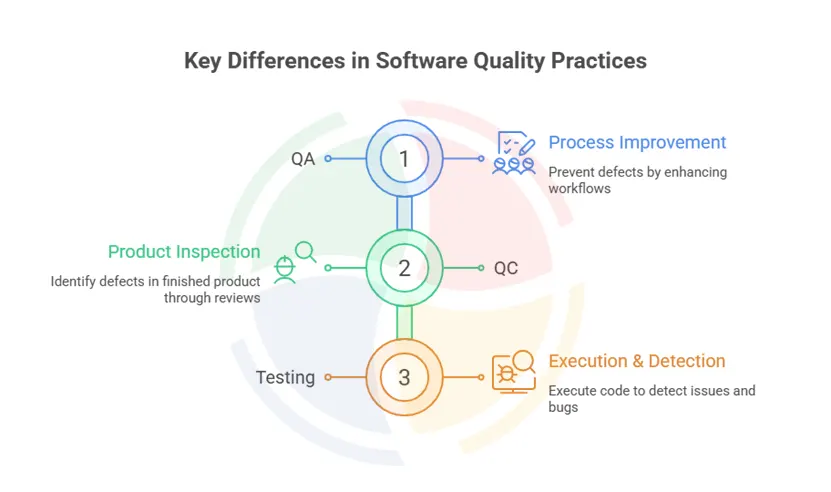
To understand their roles, it is crucial that you understand quality control vs. quality assurance, vs. testing.
QA is process-oriented and preventive, focusing on “how” software is built through proper methodologies, standards, and team practices. QC is product-oriented and detective, involving activities like code reviews, walkthroughs, and inspections to identify defects before testing begins. Testing is execution-oriented and corrective, running software to find bugs and validate functionality.
QA teams ensure testing activities align with your business objectives, maintain traceability between requirements and test cases, and foster a culture where quality is everyone’s responsibility.
Basics of Software Testing: Key Concepts and Fundamentals
Before diving into testing types and tools, it’s important to understand a few foundational concepts that shape how software testing in software engineering is designed and executed in modern development workflows.
Verification vs. Validation
- Verification checks whether the product is being built right, i.e., does it meet the specified requirements?
- Validation checks whether the right product is being built, i.e., does it fulfill user needs and business intent?
Both are essential. Verification ensures technical correctness, while validation ensures usefulness.
Static vs. Dynamic Testing
- Static Testing involves reviewing code, documentation, or requirements without executing the code (e.g., code reviews, walkthroughs).
- Dynamic Testing involves running the software to validate its behavior during execution (e.g., unit tests, UI tests, integration testing).
Static testing helps catch issues early. Dynamic testing confirms that the application performs correctly in action.
Manual vs. Automated Testing
- Manual Testing is performed by human testers executing test cases without automation. It’s ideal for exploratory testing, usability evaluation, and short-term projects.
- Automated Testing uses scripts and tools to run tests automatically, especially useful for regression tests, performance checks, and CI/CD pipelines.
While manual testing offers flexibility, automation delivers speed and repeatability. Both are necessary depending on context.
The Software Testing Life Cycle (STLC)
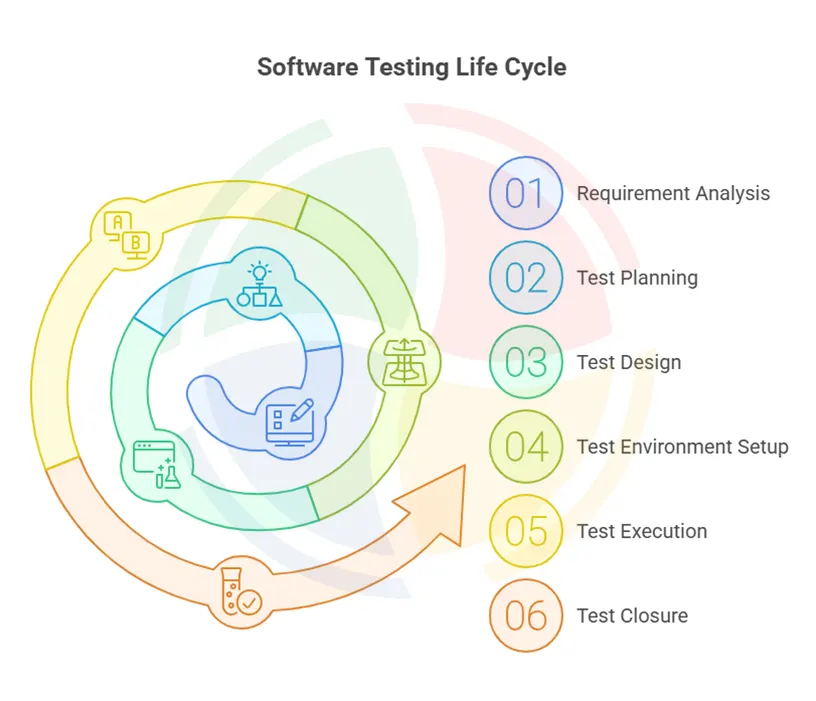
The STLC defines the structured phases of testing, regardless of methodology:
- Requirement Analysis – Understand what needs to be tested and identify testable requirements.
- Test Planning – Define strategy, scope, tools, resources, timelines, and risk mitigation.
- Test Design – Create test cases, test data, and traceability matrices.
- Test Environment Setup – Configure hardware, software, and network settings for testing.
- Test Execution – Run the tests and log results.
- Test Closure – Analyze test completion criteria, document findings, and assess test coverage.
This life cycle ensures that testing isn’t reactive. It’s designed, planned, and aligned with business and technical goals from the start.
Types of Software Testing
The testing fundamentals in software testing involve a wide range of methods. Each serves a specific purpose in verifying application functionality, performance, and resilience.
Let’s understand the most critical types of software testing a little better:
Functional Testing
Focuses on validating that the software functions according to requirements. Functional testing can be further broken down into several layers. Each targets a specific level of the software architecture, from individual code units to complete user workflows.
- Unit Testing: Tests individual components or functions in isolation. Typically automated and written by developers.
- Integration Testing: Checks how different modules or services interact, especially important in APIs or microservices-based systems.
- System Testing: Validates the entire application’s behavior in a complete, integrated environment.
- Acceptance Testing: Confirms whether the system meets business requirements. Often includes User Acceptance Testing (UAT) by stakeholders.
Non-Functional Testing
Evaluates how the software performs, rather than what it does. Non-functional testing covers critical quality attributes that define how the software behaves, especially under real-world conditions. It includes several categories that assess the software’s performance and security to usability, and compatibility.
- Performance Testing: Measures speed, scalability, and responsiveness under load. Includes stress testing and load testing.
- Security Testing: Identifies vulnerabilities, access control issues, and data exposure risks.
- Usability Testing: Assesses the user experience for clarity, consistency, and ease of use.
- Compatibility Testing: Ensures consistent behavior across devices, browsers, operating systems, and networks.
Manual Testing
Manual testing remains essential for exploratory scenarios, user experience validation, and complex workflows that require human judgment and intuition. Testers can adapt their approach in real-time, identify unexpected behaviors, and provide qualitative feedback about user experience.
Automation Testing
Automation testing excels at repetitive tasks, regression validation, and scenarios requiring precise timing or large datasets. It enables continuous testing in CI/CD pipelines, provides faster feedback loops, and ensures consistent test execution. However, it requires an initial investment in script development and maintenance.
Curious about the ROI of implementing automated testing? Get a free consultation to explore how our tailored automation testing services can save you time and money.
Static Testing
Static Testing analyzes code, documentation, and design artifacts without execution, using tools like SonarQube or manual code reviews. Dynamic Testing executes code with various inputs to observe runtime behavior, memory usage, and performance characteristics under real conditions.
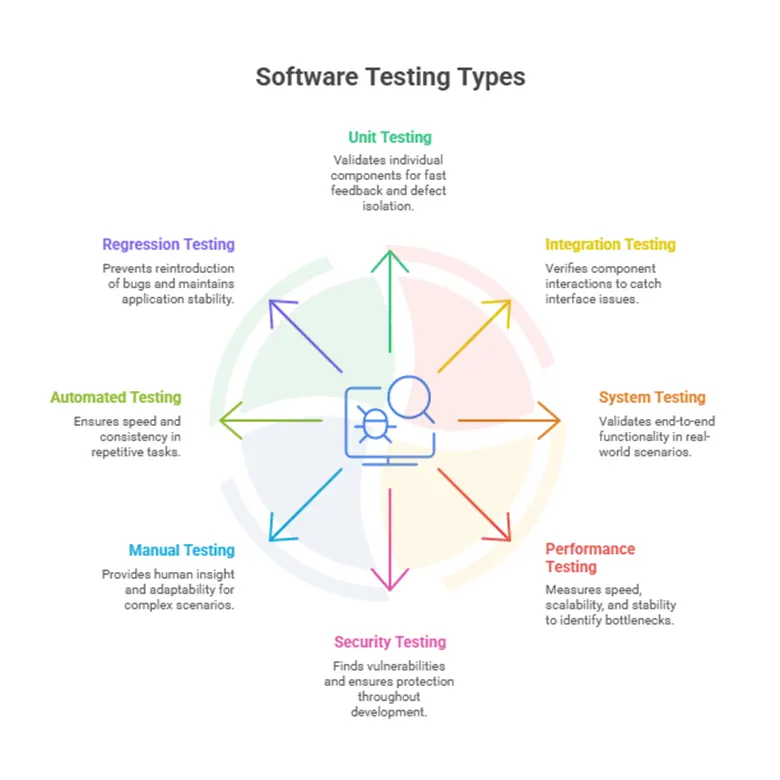
TL;DR: Comprehensive Table Highlighting Types of Software Testing
| Testing Type | Purpose | When to Use | Key Benefits |
| Unit Testing | Validate individual components | During development | Fast feedback, isolates defects, supports refactoring |
| Integration Testing | Verify component interactions | After unit testing | Catches interface issues, validates data flow |
| System Testing | End-to-end functionality validation | Complete system ready | Validates business requirements, real-world scenarios |
| Acceptance Testing | Validate against user/business requirements | Before release | Ensures customer satisfaction, meets business goals |
| Performance Testing | Measure speed, scalability, stability | Before production release | Identifies bottlenecks, ensures scalability |
| Load Testing | Assess behaviour under expected load | Pre-deployment, traffic peaks | Validates capacity, ensures uptime during high traffic |
| Stress Testing | Test limits under extreme/unexpected load | System stability assessment | Identifies breaking points, ensures graceful failure |
| Spike Testing | Check response to sudden, extreme load increase | During promotional events or spikes | Ensures performance under rapid, high-volume surges |
| Endurance Testing | Validate stability over prolonged use | Long-duration usage scenarios | Detects memory leaks, resource degradation |
| Security Testing | Find vulnerabilities, validate protection | Throughout development | Prevents breaches, ensures compliance |
| Penetration Testing | Simulate real-world attacks | Pre-release, audits | Tests defense mechanisms, uncovers exploitable weaknesses |
| Manual Testing | Exploratory, usability, complex scenarios | User experience validation | Human insight, adaptability, qualitative feedback |
| Exploratory Testing | Simultaneous learning, test design, and execution | Early-stage features or unclear requirements | Detects hidden issues, mimics real user interactions |
| Usability Testing | Evaluate ease of use and user satisfaction | Before product launch | Improves UI/UX, ensures accessibility and intuitiveness |
| Automated Testing | Repetitive tasks, regression testing | CI/CD pipelines | Speed, consistency, continuous validation |
| Regression Testing | Ensure new changes don’t break existing code | After bug fixes, enhancements, releases | Prevents reintroduction of bugs, maintains application stability |
| Smoke Testing | Basic health check of the application | After a new build or deployment | Early defect detection prevents deeper testing on broken builds |
Popular Software Testing Tools
Testing efficiency and coverage depend heavily on the tools used. The right mix of tools can accelerate feedback cycles, improve traceability, and integrate testing seamlessly into your development workflow.
Below are some widely adopted tools across key testing domains.
Manual Testing Tools
These tools help testers create, manage, and execute test cases manually while tracking progress and results.
- TestLink: Open-source tool for test case management and execution tracking.
- PractiTest: Centralized platform offering real-time visibility, traceability, and customizable dashboards.
- TestRail: A popular test management solution used by QA teams to organize test runs and integrate with issue trackers.
Automated Testing Tools
The right test automation frameworks and tools are essential for speeding up regression testing, API testing, and CI/CD workflows.
Some of these include:
- Selenium: Widely used for web automation. Supports multiple languages and browsers.
- JUnit / TestNG: Java-based frameworks for unit testing and test orchestration.
- Cypress: Fast, developer-friendly framework for end-to-end testing of modern web apps.
- Playwright: Microsoft-backed automation framework supporting reliable cross-browser testing.
Performance Testing Tools
Used to measure system performance under various load conditions.
- Apache JMeter: Open-source tool for load, stress, and performance testing of web apps and APIs.
- Gatling: Developer-focused performance testing tool with Scala-based scripting.
- K6: Lightweight, scriptable tool ideal for testing APIs in CI pipelines.
Bug Tracking and Test Integration
These tools help QA teams log, prioritize, and collaborate on defects and enhancements.
- Jira: The industry standard for issue tracking and Agile project management. Integrates well with most test tools.
- Bugzilla: A solid open-source platform for managing software defects.
- Azure DevOps: End-to-end platform with test management, version control, and CI/CD integration.
Benefits of Software Testing
Implementing comprehensive software testing strategies delivers measurable business value beyond simple defect detection.
Product Quality and User Satisfaction
Testing ensures software behaves predictably under various conditions, handles edge cases gracefully, and provides consistent performance across different environments. This reliability translates directly into user trust, reduced support tickets, and higher customer retention rates.
Cost Reduction
The cost of fixing defects increases exponentially through the development lifecycle. Bugs caught during development cost $1 to fix, while the same bugs discovered in production can cost $10,000 or more. Comprehensive testing identifies issues early when they’re cheapest to resolve, preventing expensive emergency fixes, rollbacks, and customer compensation.
Enhanced Security and Performance
Through rigorous testing, your team can significantly strengthen security and performance. It helps identify vulnerabilities before they can be exploited, ensuring that security risks are addressed proactively. It validates that the application can handle real-world traffic volumes without degradation, maintaining speed, stability, and responsiveness even under peak load conditions.
Compliance and Risk Management
Testing also validates adherence to standards like GDPR, HIPAA, or SOX, preventing costly penalties and legal exposure. Documentation generated during testing provides audit trails and evidence of due diligence, supporting compliance reporting and risk assessment processes.
Tired of release delays and high operational costs? Let our team of 100+ experts handle your QA. Explore our full-cycle software testing services and secure your product’s success.
Best Practices and Testing Fundamentals
Software testing is about establishing disciplined, repeatable practices that improve quality over time. Mature QA teams follow principles that integrate seamlessly with modern development workflows.
Start Early, Test Continuously
Testing should begin as early as the requirements phase and continue through post-release. This shift-left approach helps:
- Catch defects when they’re cheapest to fix
- Align QA with development through shared ownership
- Enable faster, safer deployments in CI/CD pipelines
Maintain Clear Documentation and Test Case Traceability
Well-documented test cases ensure consistency, coverage, and onboarding ease. Best practices include:
- Mapping test cases to requirements and user stories
- Version-controlling test artifacts
- Updating cases as the product evolves
Prioritize Regression and Smoke Testing
As software scales, regressions become inevitable. Effective QA teams:
- Automate high-priority regression suites
- Run smoke tests on every build to detect blockers early
- Continuously review test cases based on usage patterns and defect data
Collaborate Across Functions
QA isn’t an isolated activity. Cross-functional collaboration between QA engineers, developers, product owners, and even end users results in:
- Better understanding of real-world scenarios
- Faster triaging and resolution of issues
- Shared accountability for product quality
Monitor Metrics to Drive Improvement
Quantitative metrics help measure and refine QA effectiveness. Track:
- Test coverage (functional and risk-based)
- Defect leakage rate (escaped bugs post-release)
- Test execution velocity and flakiness rates (for automation)
Building Dependable Software Through Testing with Aegis Softtech
Software testing has evolved from a final checkpoint to a strategic discipline that determines product success. Especially critical today.
Implementing comprehensive testing requires more than understanding concepts. It demands expertise in strategy development, tool selection, process optimization, and team coordination.
Organizations that excel at software quality invest in both testing capabilities and the strategic guidance to implement them effectively.
At Aegis Softtech, we help engineering teams build future-ready functional software. Our software testing services are designed to integrate tightly into your development lifecycle.
From test automation frameworks to performance engineering and security validation, we bring deep technical expertise and real-world experience to every engagement.
FAQs
Do software testers need coding skills?
Not always. Manual testers may not need coding, but automation testers do. Knowing programming languages like Java or Python is a significant advantage, especially for roles involving automated and API testing.
How does automation impact software testing?
Automation accelerates testing, minimizes human error, and facilitates continuous integration. It’s ideal for repetitive tasks like regression testing and helps QA teams scale with faster, more reliable feedback.
How do testers improve quality beyond finding bugs?
Testers ensure clarity in requirements, design real-world test scenarios, assess usability, and highlight risks. Their work helps prevent issues early.
How should QA handle last-minute changes?
QA can adapt by using modular test cases, automating regression tests, prioritizing high-risk areas, and collaborating closely with developers. Agile processes and traceability help maintain quality.