Ever chased a bug that appeared sporadic, only to realize it exposed a far deeper flaw in how your team thinks, tests, and communicates?
Consider this: a seemingly random issue may be dismissed as noise. It isn’t reproducible. It isn’t urgent. But as it lingers, it begins to erode team credibility.
Eventually, the exploratory investigation reveals the real problem is something else.
A breakdown in assumptions about shared test data and communication gaps across the pipeline.
What appeared to be a fluke was, in fact, a systemic failure. One that no amount of scripted automation could have caught.
It’s in these unpredictable, high-stakes moments that exploratory testing proves indispensable. This approach helps QA teams identify blind spots, navigate ambiguity, and uncover issues that automation was never designed to detect.
If you’ve been wondering “what is exploratory testing in software testing,” and why top teams rely on it to catch bugs others miss, this guide will take you through it.
Let’s begin with the basics.
Key Takeaways
Exploratory testing is an adaptive, intuition-driven approach in which learning, test design, and execution occur simultaneously. It thrives in Agile and DevOps environments where speed, change, and unpredictability are constant.
Purpose:Filling critical coverage gaps early in the SDLC by identifying rare yet important issues, such as UI glitches, edge cases, or integration flaws overlooked during traditional scripted test approaches.
Types:Freestyle, scenario-based, and strategy-based testing; each suited to different product maturity and risk levels.
Process: With Automation:Maximizes coverage, insight, and speed; a mindful strategy in modern QA.
What is Exploratory Testing in Software Testing?
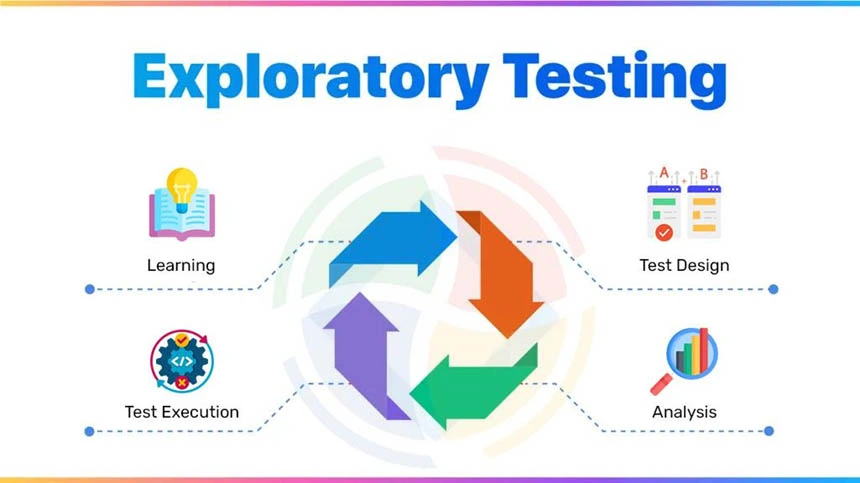
At its simplest, exploratory testing means testing a system without a strict script, thinking and testing simultaneously. Technically, exploratory testing is the simultaneous process of learning about the system, designing tests, and executing them on the fly.
It’s an adaptive, investigative testing method, often used when requirements are unclear, time is limited, or real-world usage requires deeper validation.
Rather than verifying that the system does what it’s supposed to, exploratory testing asks: What happens when we test beyond expectations?
Test design and execution aren’t separate phases; exploratory testing blends them into one fluid activity, allowing testers to:
- Generate test ideas based on real-time feedback
- Question assumptions about how features should behave
- Pursue anomalies or oddities that automated scripts might ignore
Simply put, it’s a thinking tester’s approach. Focused on investigation, intuition, and insight over repetition and checklists.
What is Exploratory Testing in Agile & DevOps?
Agile and DevOps demand speed. But speed without insight is just reckless delivery.
Agile thrives on adaptability, collaboration, and rapid feedback. Exploratory testing delivers exactly that.
Since it can be moved at the pace of development, the approach aligns perfectly with Agile’s iterative nature.
In an Agile setup, test cases written weeks in advance often become obsolete before they’re executed. Each sprint brings new functionality, edge cases, and user journeys that no pre-written script could anticipate.
Exploratory testing counters this rigidity with intentional flexibility. Instead of relying on predefined scripts, testers explore the system in real time, guided by context, intuition, and emerging risks.
This flexibility can be introduced in the following ways:
Sprint Demos
While test automation covers known paths, exploratory sessions tackle the “what-ifs” that stakeholders raise. Instead of saying, “let me check our test cases,” testers can investigate live, offering instant insights and real-time validation. It becomes your safety net during sprint demos.
Bug Bashes
Bug bashes are time-boxed, collaborative testing events where developers, testers, and product owners swarm the app. It’s like a bug-hunting hackathon—diverse perspectives pounding on the product to surface issues traditional tests may miss. This spontaneous quality assurance (QA) fosters shared ownership and is a cornerstone of Agile quality culture.
Continuous Testing Requires Continuous Thinking
Exploratory testing bridges the gap between speed, automation, and delivery by validating UX flows, identifying integration quirks, and detecting unexpected regressions. It brings that irreplaceable “human-in-the-loop” perspective to continuous testing cycles. Especially when the stakes are high and the timelines are tight.
Shift Left with Context
Exploratory testing fits naturally into the shift-left approach, starting during story grooming or prototype reviews. This early involvement leads to sharper test design, earlier bug discovery, and less sprint rework.
Built for Agile, XP & CI/CD
It strengthens Agile rituals:
- In Scrum, testers evolve charters as stories shift
- In XP, it complements Test-Driven Development (TDD) and pair programming by identifying behavioural gaps
- In CI/CD, it acts as a final human checkpoint before production
What is the Purpose of Exploratory Testing?
The primary purpose of exploratory testing is to fill the blind spots left by traditional scripted approaches. It is best used to probe unpredictable edge cases, UI oddities, and integration quirks that only surface in real-world usage.
Let’s look at the few stages it excels:
Early-stage Product Testing
When documentation is sparse and features are still evolving, exploratory testing lets QA dive in early. Validating behavior based on intuition, experience, and user expectations.
UI/UX Bug Discovery
Automated tests don’t “feel” an interface. Exploratory testing figures out broken flows, inconsistent layouts, and frustrating micro-interactions that scripted tests don’t.
Testing Amid Changing Requirements
When specs shift mid-sprint (as they often do), rigid test plans can’t keep up. Exploratory sessions offer fluid validation that adapts in real-time—no need to rewrite scripts every time a button moves.
When to Use and When Not to Use Exploratory Testing
With exploratory testing, the key is knowing where it delivers the most value. Here are a few examples to help you decide:
| Scenario | Recommended Use? | Reason |
| Early-stage builds with incomplete requirements | ✅ Yes | Thrives when documentation is minimal, and requirements evolve. It helps uncover unexpected behavior early. |
| UI/UX testing to simulate real user behavior | ✅ Yes | Simulates user flows and detects issues that predefined scripts may miss, particularly in the visual and interaction layers. |
| Regression escape analysis | ✅ Yes | Complements automated regression by identifying bugs that slipped past scripted tests. |
| Post-deployment checks and smoke tests | ✅ Yes | Quick, unscripted exploration can validate key functionality and uncover deployment-specific issues. |
| Cross-browser or real-device variation testing | ✅ Yes | Great for uncovering rendering or interaction inconsistencies across platforms that automation may overlook. |
| During sprint reviews or bug bashes in Agile teams | ✅ Yes | Encourages collaborative, intuitive testing by QA, devs, and stakeholders to catch last-minute issues. |
| Compliance-heavy scenarios needing full traceability | ❌ No | Often lack the repeatability and audit logs required for compliance or certification. |
| Projects requiring test repeatability (e.g. banking, healthcare) | ❌ No | Environments that require deterministic outcomes benefit more from scripted, automated tests. |
| Where large-scale automation coverage is already validated | ❌ No | Additional exploratory testing may offer diminishing returns in highly stable, mature automation pipelines. |
| For acceptance testing with predefined pass/fail criteria | ❌ No | Acceptance tests must adhere to strict pass/fail criteria, making exploratory methods unsuitable. |
| When junior testers are unfamiliar with system behavior | ❌ No | Relies heavily on tester intuition and domain knowledge; inexperience can limit its effectiveness. |
Types of Exploratory Testing
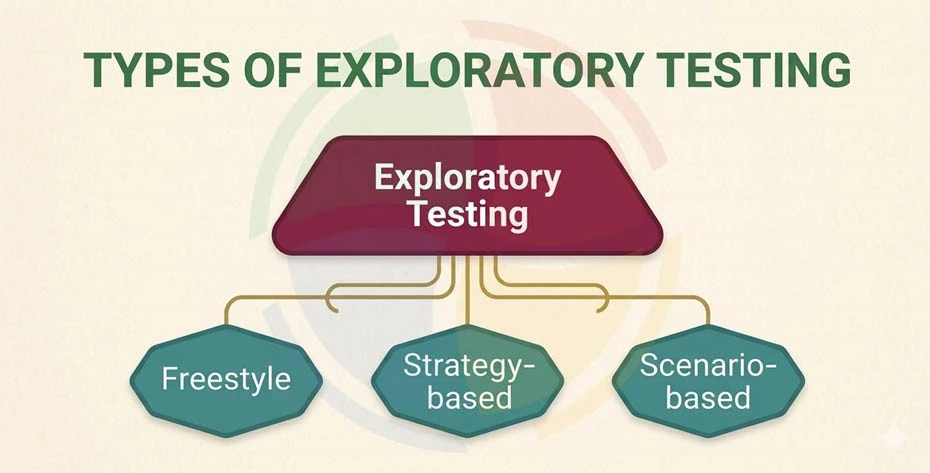
Exploratory testing isn’t a one-size-fits-all technique. It flexes based on intent, risk, and product maturity.
Here are the three primary forms QA teams adopt:
1. Freestyle Testing
Open-ended exploration without predefined goals.
This is the purest form of exploratory testing. Testers dive into the application with minimal direction, relying on intuition, domain knowledge, and curiosity. It’s ideal for early-stage builds, prototypes, or newly integrated modules where documentation is lacking.
Best suited for: Smoke tests, new features, UI validation.
2. Scenario-Based Testing
Simulates real-user workflows and use cases.
In this approach, testers follow realistic user journeys mimicking how a customer might search, navigate, or make decisions in the application. It helps you expose logical errors, usability blockers, and flow disruptions that scripted paths miss.
Best suited for: End-to-end flows, UX testing, bug reproduction.
3. Strategy-Based Testing
Structured by heuristics, risk areas, or product priorities.
This type blends exploration with guidance. Testers use mental models like the “CRUSSPIC STMPL” or “SFDIPOT” heuristics, or focus on high-risk components flagged during sprint planning. It ensures deep coverage without losing agility.
Best suited for: Regression gaps, critical modules, time-boxed sessions.
Session-Based Test Management (SBTM) is a proven method to make exploratory efforts measurable and repeatable, especially in high-stakes environments. It brings structure and accountability without sacrificing speed. It’s
With SBTM, your teams can answer: “What exactly did we test today, and what did we learn?”
This formalized framework guides exploratory testing through clearly defined sessions, each with:
- A charter (what to test and why)
- A timebox (typically 60-120 minutes)
- A test log (detailed notes of what was tested, findings, and time distribution)
- A review or debrief (evaluation of results, issues, and coverage)
Exploratory Testing Process: Step-by-Step
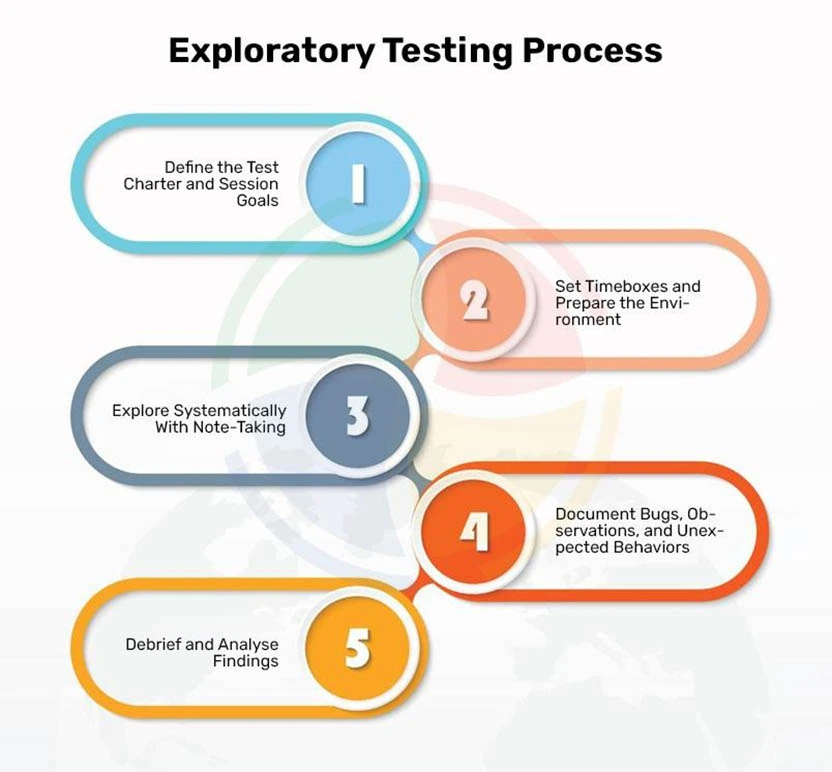
Though unscripted in execution, exploratory testing follows a disciplined framework to drive repeatability, learning, and value.
Here’s how experienced QA teams structure it for you:
Step 1: Define the Test Charter and Session Goals
Every exploratory session starts with intent. A test charter outlines the purpose. What to test, why, and how deep. It may target a specific feature, user flow, or risk area.
Example: “Explore the cart and checkout flow for edge case bugs during promo application.”
Step 2: Set Timeboxes and Prepare the Environment
Exploration is focused, not endless. Sessions are typically timeboxed (e.g., 60-90 minutes) to maintain intensity and encourage concise documentation. Ensure test environments, test data, and tools are prepped.
Tools such as TestBuddy and qTest Explorer can support session setup and tracking.
Step 3: Explore Systematically With Note-Taking
After preparing the environment, testers interact freely but not aimlessly. Observations, questions, and anomalies are logged in real-time, often using structured notes or mind maps to track coverage and hypotheses.
Use tags like “Bug?”, “Unexpected,” or “UX friction” to label emerging patterns on the fly.
Step 4: Document Bugs, Observations, and Unexpected Behaviors
As QA experts explore, they also capture unusual or confusing behaviors, in addition to reporting clear-cut bugs, even when the app still works.
These observations may not be immediate defects, but they often indicate deeper issues with design, usability, or stability that warrant follow-up.
Step 5: Debrief and Analyse Findings
Post-session, findings are reviewed in a debrief solo or with peers. The focus should be on identifying patterns, risk clusters, and areas for improvement. This step ensures knowledge sharing, traceability, and feedback for developers and product owners.
Automated Exploratory Testing: Is It Possible?
Fully automating exploratory testing? Not quite.
By its nature, exploratory testing relies on human intuition, real-time decision-making, and the ability to adapt to unexpected behaviors. These are traits no tool can truly replicate.
Let’s get to the facts.
QA Automation testing services – when planned right—can powerfully augment exploratory sessions by handling the repetitive, setup-heavy parts of the workflow.
How Automation Supports Exploration
While testers explore, automation can:
- Pre-populate complex test data: Speeding up access to edge cases and rare user states.
- Spin up clean, consistent environments: Reducing friction from flaky staging setups or misconfigured dependencies.
- Collect logs, traces, and screenshots in real time: Allowing testers to focus on what went wrong, not how to capture it.
In modern software development, semi-structured testing has also taken centre stage, with tools helping:
- Suggest exploratory paths based on app behavior
- Detect anomalies or regressions automatically
- Generate tests from user sessions or interactions
However, even the smartest AI can’t replicate a tester’s domain knowledge, gut instinct, or pattern recognition. It won’t catch a confusing UX flow or a misleading error message the way a human can.
Automation is a co-pilot in exploratory testing, not the pilot.
For teams embracing Agile and DevOps, blending automation with human-driven exploration yields a fast, adaptive, and insight-rich testing process that no single approach can deliver on its own.
Best Practices for Effective Exploratory Testing
To maximize impact, blend creative freedom with a lightweight structure using these proven practices:
Define Charters & Timeboxes
Set a clear mission (charter) for each session, and limit the duration to 60-120 minutes to stay focused and iterate quickly.
Map Ideas & Take Testing Tours
Use mind maps to visualize coverage and identify gaps. Try using feature, scenario, or error tours to guide exploration.
Log Bugs as You Go
Integrate with tools like Jira, Xray, or TestRail to capture bugs and insights in real time. Add screenshots or recordings for clarity.
Take Smart Notes
Keep lightweight logs of actions, outcomes, and observations. A simple 3-column table works—no need to over-document.
Debrief Every Session
Wrap up with a quick review, solo or with a peer. Discuss bugs, surprises, open questions, and ideas for next steps.
Benefits and Drawbacks of Exploratory Testing
Like any testing approach, exploratory testing shines in specific contexts, but also comes with trade-offs.
| Benefits of Exploratory Testing | Drawbacks of Exploratory Testing |
| Detects bugs early in the development cycle | Difficult to reproduce issues consistently |
| Simulates real-world user behaviour effectively | Relies heavily on the tester’s experience and intuition |
| Requires minimal test planning or scripting upfront | Challenging to document for future traceability |
| Promotes creative and critical thinking in testing | Lacks repeatable, structured execution for audits |
Make Exploratory Testing Work for You with Aegis Softtech
Exploratory testing is often misunderstood as unstructured or merely “manual.” In reality, it’s an adaptive, insight-driven practice that empowers testers to think critically, find hidden defects, and respond in real time to product changes.
Its value becomes especially clear in complex, fast-moving environments.
In Agile, requirements shift, and automation takes time to catch up; real-user behaviour isn’t easily scripted. When used deliberately, exploratory testing shortens feedback loops, strengthens quality signals, and fills the gaps that traditional methods often miss.
But the sweet spot is blending exploratory testing with automation—the best mix of AI’s speed and human intuition and experience.
At Aegis Softtech, we understand that ideal software testing goes beyond scripts and checklists. We believe it’s more about combining strategy, skill, and adaptability.
Our QA experts embed these principles into every project, helping you stay ahead in fast-paced Agile and DevOps environments.
Accelerating releases, tackling complex systems, or aiming for flawless user experiences? We’ve got you covered with a full spectrum of software quality assurance testing services.
FAQs
1. Is exploratory testing black box testing?
Yes, exploratory testing is a form of black-box testing. Testers focus on exploring the system without access to internal code, relying instead on inputs, outputs, and system behavior to uncover defects.
2. What is the difference between manual testing and exploratory testing?
Manual testing follows predefined test cases, while exploratory testing is unscripted and relies on the tester’s intuition, experience, and real-time learning. All exploratory testing is manual, but not all manual testing is exploratory.
3. What is the difference between functional and exploratory testing?
Functional testing validates that software behaves as expected against requirements. Exploratory testing, on the other hand, is more open-ended—it goes beyond verification to discover unknown issues and edge cases without a fixed test plan.
4. What is the difference between exploratory testing and experience-based testing?
Experience-based testing is a broader category that includes techniques like exploratory testing, error guessing, and checklist-based testing. Exploratory testing specifically involves simultaneous test design, execution, and learning.