“But we don’t have time to read thousands of lines just to test!” That’s the top objection engineers raise against white box testing.
Fair—yet relying only on a black box can let a one-character overflow sit quietly until Cyber Monday traffic explodes it.
Handle the dilemma by seeing both tools for what they are: black box equals fast, requirement-level safety; white box equals deep, code-level certainty. The reward is a release you can explain to stakeholders without crossed fingers. Below, we give QA analysts, devs, and EMs a concise scorecard of black box vs white box testing that shows when the extra hour inside the code pays for itself (and when it doesn’t).
Key Takeaways
- Black box testing: checks what the system does
- Focuses on inputs, outputs, and user behavior
- Best for functional testing, UI validation, regression, and UAT
- Fast, scalable, and mirrors real user experience
- White box testing checks how the system works internally
- Examines code logic, branches, and execution paths
- Best for unit testing, integration testing, security, and performance optimization
- Deep, precise, and ideal for catching defects early
- Neither is better alone
- Black box can miss hidden logic flaws
- White box can miss broken user journeys
- The smartest approach is layered
- Use white box testing early in development to prevent defects
- Use black box testing later to validate real-world behavior
- Combine both as grey box testing for maximum coverage and speed
A Quick Primer on Black Box & White Box Testing
Before we dive into frameworks, tools, and deeper comparisons, let’s level-set with the fundamentals:
What is Black Box Testing?
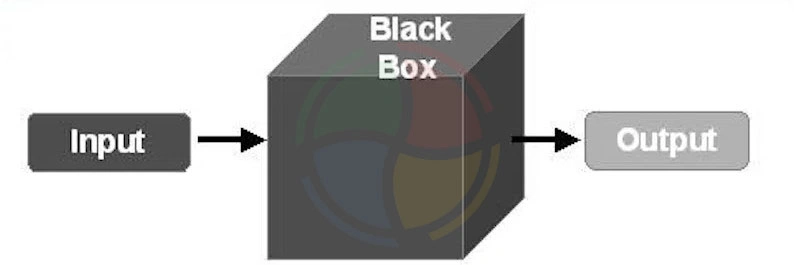
Black box testing is all about external validation. You feed the system an input and observe the output.
You can not be peeking under the hood, reading the source code, or making any assumptions about how the logic flows behind the scenes. You’ll see this technique show up most often in functional testing, UI testing, regression testing, and user acceptance testing.
-
Pros:
- Mirrors real user behavior
- Doesn’t require deep technical knowledge
- Highly effective for requirements validation
- Scales well for large systems
-
Cons:
- Limited visibility into root causes
- Can miss hidden code-level defects
- Test coverage is harder to quantify
What is White Box Testing?
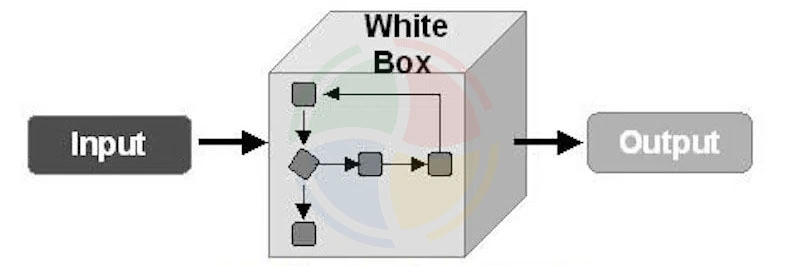
Before you decide which approach, between black box vs white box testing, belongs in your QA strategy, it helps to understand how these two testing methods differ from each other:
| Criteria | Black Box Testing | White Box Testing |
| Definition | Testing software functionality without internal knowledge of code or logic. | Testing internal structures or workings of an application with full code visibility. |
| Knowledge of Code Required | ❌ No knowledge of internal code is needed. | ✅ Requires in-depth knowledge of code, logic, and architecture. |
| Performed By | QA testers, end-users, or functional testers. | Developers or technical testers with programming skills. |
| Focus Area | Functional behavior: “What the system does.” | Code logic and structure: “How the system works.” |
| Testing Techniques | Equivalence Partitioning, Boundary Value Analysis, Decision Tables, Use Case Testing, Error Guessing. | Statement Coverage, Branch Coverage, Path Coverage, Loop Testing, Control Flow Testing. |
| Test Basis | Requirements, specifications, and user stories. | Source code, control flow, and design documentation. |
| Execution Level in SDLC | Later stages (System Testing, Acceptance Testing, UAT, Regression Testing). | Earlier stages (Unit Testing, Integration Testing, Code Review phases). |
| Tools Used | Selenium, Postman, Katalon Studio, TestComplete, JIRA (for test tracking). | JUnit, NUnit, PyTest, SonarQube, Clover, JaCoCo, Cobertura. |
| Type of Bugs Detected | Missing functionalities, broken links, UI errors, integration issues, incorrect/missing outputs. | Logic errors, hidden defects, memory leaks, unreachable code, conditional path flaws. |
| Automation Feasibility | High for GUI/API-level testing; limited flexibility due to lack of code access. | High for unit/integration testing; ideal for CI/CD pipelines and regression suites. |
| Test Case Design Complexity | Relatively simple, based on external inputs/outputs. | Complex; requires deep understanding of logic, branches, and test paths. |
| Coverage Level | Low to moderate — may miss internal flows and edge logic. | High — targets every possible execution path and decision point. |
| Security Testing Capability | Can detect unauthorized access, broken authentication, and UI-level vulnerabilities. | Ideal for detecting security loopholes at code level (e.g., buffer overflows, injection flaws). |
| Bias Risk | Low — tester is unaware of how the software is built, leading to unbiased user perspective. | Higher — developer/tester might overlook areas they assume to be correct. |
| Cost & Time Efficiency | Faster to execute and cheaper (esp. in early projects without access to code). | Time-consuming and resource-intensive; adds significant value if used early in SDLC. |
| Scalability in Agile/DevOps | Good for quick UI/functional testing per sprint; complements sprint-level feedback cycles. | Excellent for automation testing in CI/CD pipelines; supports shift-left practices and early defect identification. |
| Limitations | Cannot test code-level issues or optimize logic. Limited by the accuracy of specifications. | Cannot test UI, usability, or missing functionality from user perspective. |
| Real-World Use Cases | User acceptance testing, exploratory testing, regression testing after feature completion. | Unit testing of functions, validation of algorithms, security audits, and complex logic verification. |
| Best For | Final verification of end-user experiences and full-system functionality. | Ensuring robust, efficient, and logically sound internal code before higher-level testing. |
Strategic Use Cases – When to Use What?
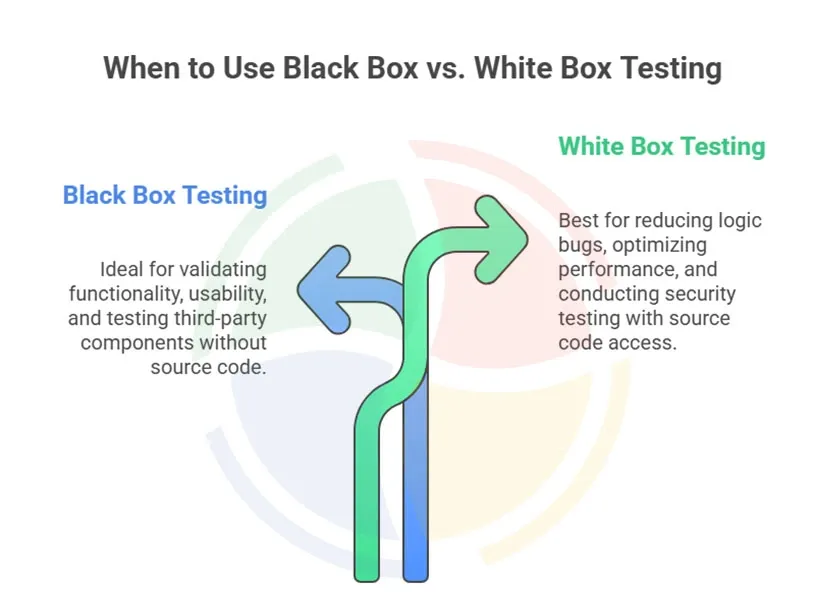
The smartest teams don’t choose one type of QA testing. They choose the right one for the right moment based on risk, speed, and visibility into the codebase. In practice, this consistency is easier to achieve with a reliable QA automation testing solution that embeds both approaches into CI/CD workflows and sprint cycles.
When to Use Black Box Testing
Black box testing shines when you care about what the system does, not how it gets there. It’s the frontline of functional validation and the closest to how real users experience your product.
Use black box testing when:
- Validating functionality after builds:
Perfect for regression cycles, post-release checks, and verifying user stories—especially when new features touch existing workflows.
- Usability and UX acceptance testing:
Since testers don’t see the code, they react to the interface the same way a customer would. Great for mobile apps, consumer portals, or onboarding flows.
- Testing third-party components where source code isn’t available:
APIs, payment gateways, and vendor modules often operate as black boxes by default. This method keeps validation independent and objective.
When to Use White Box Testing
White box testing is all about visibility. This includes logic, branches, edge cases, and the internal plumbing that keeps software stable.
Use white box testing when:
- During development, to reduce logic-based bugs:
Unit and component tests help developers catch issues before they ever reach quality assurance (QA).
- For performance optimization or algorithm-level validation:
Think data-heavy apps, calculation engines, ML pipelines, or pricing algorithms; anywhere complexity lives.
- For security testing in high-stakes or regulated domains:
Penetration paths, input validation, and vulnerability discovery depend on knowing the code intimately.
Choosing Based on Project Type & Risk
Different environments call for different testing blends. Here’s a quick cheat sheet:
| Scenario | Best Fit | Why |
| Agile sprints | White box early + Black box each sprint | Fast cycles need tight dev-level checks + user-facing validation |
| Waterfall projects | Heavy Black box at system test | Large releases require broad functional verification |
| Legacy systems | Black box | Code may be outdated or undocumented—focus on behavior |
| Greenfield builds | White box early, mixed methods later | New architecture benefits from deep logic testing |
| High-compliance sectors (finance, healthcare, pharma) | Layered approach: White box + Black box | Regulatory expectations demand thorough coverage |
Combining Both – The Grey Box Strategy
“Which finds more bugs: black-box or white-box testing?” Trick question—neither wins alone.
There’s a middle path that often delivers the best real-world results.
Most modern engineering teams don’t live at extremes. They combine both methods to enhance coverage, speed, and confidence in what they refer to as grey box testing.
What is Grey Box Testing?
Grey box testing is a hybrid approach where testers understand key internal structures—like architecture diagrams, data flows, or API contracts—but still execute tests externally, just like end-users would.
It’s about having “just enough” inside knowledge to design smarter scenarios without diving fully into the codebase.
Why Combine Black Box and White Box Approaches?
When teams merge both methods, they get a compound effect:
- Better Coverage:
You validate functional behavior (black box) and structural integrity (white box). This eliminates blind spots that single-method teams often miss.
- Earlier Defect Detection:
Grey box strategies surface logic defects, integration issues, and data-handling flaws before they escalate, cutting fix costs dramatically.
- Stronger QA in DevOps:
Fast-paced DevOps pipelines need both depth and speed. The hybrid model offers targeted testing without slowing builds.
What Aegis Softtech Experts Say
Integrate grey box testing early in your CI/CD pipeline. Automate what you can, run hybrid checks at every merge, and let your QA stack scale with your engineering velocity. It’s the most reliable way to strengthen quality across modern, distributed systems.
The debate around black box vs white box testing is about understanding intent, timing, and risk.
Black box testing gives teams confidence that the software behaves correctly from a user’s point of view.
White box testing, on the other hand, ensures that what’s happening under the hood is logically sound, secure, and built to scale.
Each approach answers a different but equally critical question.
Relying on only one leaves gaps.
In practice, high-performing teams don’t ask which is better. They ask when to use black box testing, where white box testing adds the most value, and how to integrate both seamlessly into their SDLC and CI/CD pipelines. That mindset is what turns testing from a checkpoint into a competitive advantage.
If you’re looking for a reliable quality assurance software testing solution, Aegis Softtech can help you design a testing approach that aligns with your product complexity, risk profile, and delivery goals, without slowing innovation.
FAQs
1. What is black box testing with an example?
Black box testing evaluates system behavior without viewing internal code or architecture. For example, testers validate login functionality by checking inputs, outputs, and expected user flows.
2. What is the difference between black box and white box engineering?
Black box engineering focuses on external behavior, while white box engineering examines internal structures. This distinction helps teams balance user-facing validation with code-level quality assurance.
3. Which tool is used for white box testing?
White box testing commonly uses tools that support code analysis and detailed path coverage. Examples include unit-testing frameworks that reveal logic errors before integration begins.
4. Is Selenium a black box or a white box?
Selenium is primarily considered a black box automation testing tool for evaluating user workflows. It interacts with applications through the UI, without requiring access to source code.
5. What is black box vs white box penetration testing?
Black box penetration testing simulates an external attacker with no internal system knowledge, emphasizing real-world exploitation paths. White box penetration testing provides full access to architecture, credentials, and source code, enabling deeper vulnerability discovery and precise remediation insights.