Your CFO just walked into your office with a stack of ERP proposals, and Microsoft’s Business Central (BC) sits at the top.
The vendor demo looked polished, the integration promises sound appealing, and the pricing seems reasonable compared to SAP or Oracle. But here’s what those hour-long presentations don’t tell you: every ERP system has trade-offs, and Business Central is no exception. Before you sign that contract, let’s examine the Dynamics 365 Business Central pros and cons that will impact your daily operations.
Key Takeaways
- Strong Financials and Reporting: Offers robust accounting, real-time reporting, multi-currency support, and AI-driven forecasting that help SMBs and mid-market companies gain better financial control.
- Great Microsoft Ecosystem Fit: Works best for organizations already using Microsoft 365, Teams, Azure, and Power Platform, delivering smoother workflows and lower integration effort.
- Flexible Deployment Options: Provides cloud, on-premise, and hybrid choices, though switching between models adds configuration costs.
- Higher Total Ownership Costs: Licensing looks affordable at first, but data migration, integrations, extensions, and training often double first-year budgets.
- Learning Curve and Integration Hurdles: Users coming from QuickBooks or Excel need extensive training, and connecting Business Central to non-Microsoft legacy systems can be costly and complex.
What is Microsoft Dynamics 365 Business Central?
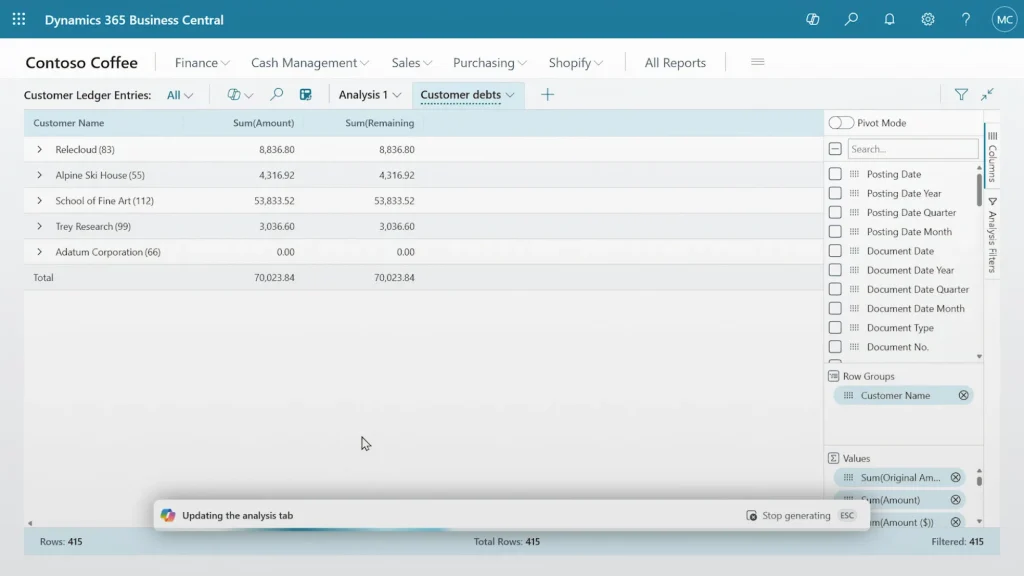
via Microsoft
Microsoft Dynamics 365 Business Central serves as Microsoft’s comprehensive ERP solution designed specifically for small to mid-market businesses.
The cloud-based platform combines financial management, supply chain operations, sales, and customer service into one integrated system.
Here’s what makes BC stand out from other ERP options:
- Scales from startups to enterprises with thousands of employees
- Offers both cloud and on-premise deployment options
- Built-in AI capabilities and seamless Microsoft ecosystem integration
- Modern alternative to traditional ERP systems like QuickBooks or legacy on-premise solutions
Business Central Pros and Cons: Brief Comparison
Now, here’s a brief comparison of Dynamics 365 Business Central pros and cons.
| Advantages | Disadvantages |
| Strong financial management and real-time reporting | Higher total cost of ownership than initially projected |
| Seamless Microsoft ecosystem integration | Integration challenges with non-Microsoft legacy systems |
| Flexible cloud and on-premise deployment options | Requires commitment to Microsoft technology stack |
| Robust supply chain and inventory management | Steep learning curve for users |
| Extensive AppSource marketplace for customization | |
| Built-in compliance and audit capabilities |
Companies already invested in Microsoft technologies typically see faster ROI and smoother implementations, while those using competing platforms may face unexpected complexity and costs.
Pros of Dynamics 365 Business Central
Business Central brings several compelling advantages that make it attractive to growing companies, especially those already working within Microsoft’s ecosystem.
Let’s take a closer look.
Strong Financial and Accounting Features
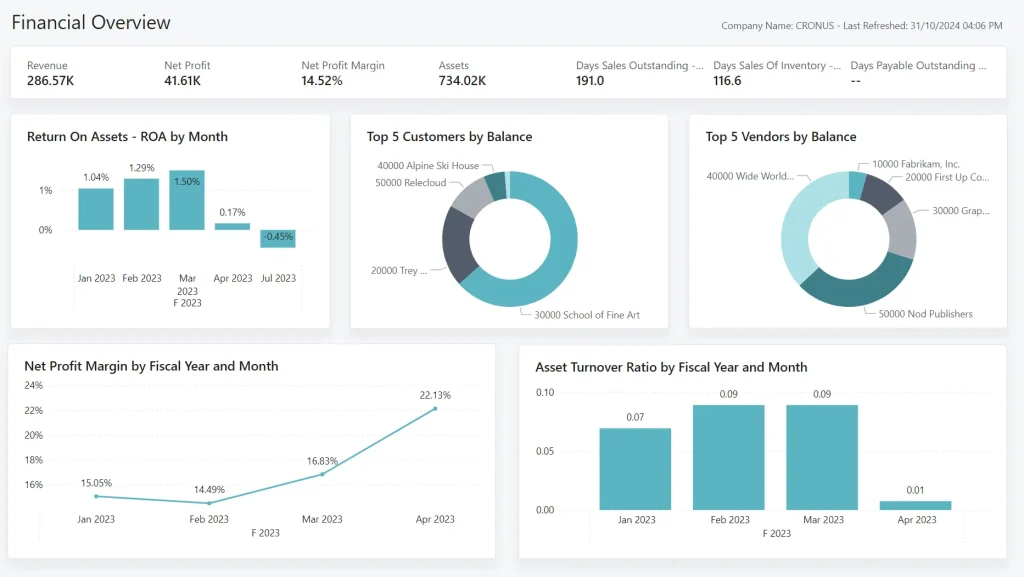
via Microsoft Learn
Business Central excels in financial management, offering robust accounting capabilities that many SMBs find transformative. The platform provides real-time financial reporting that updates automatically as transactions occur, giving you instant visibility into cash flow, profit margins, and budget performance.
Beyond basic accounting, the platform offers sophisticated financial tools that typically require expensive add-ons in other systems:
- Cash flow forecasting predicts funding needs 6-12 months in advance using AI algorithms
- Automated tax calculations and compliance reporting for multiple jurisdictions
- Multi-currency support with automatic exchange rate updates and hedging capabilities
- Dimension-based reporting for project and department profitability analysis
- Intercompany transaction processing for multi-entity organizations
What sets Business Central apart is how it connects financial data to operational metrics.
Track project profitability in real time, analyze customer lifetime value, and identify product lines driving maximum margin—all from the same dashboard your accountant uses for month-end close.
Integration with Microsoft Ecosystem
via Microsoft
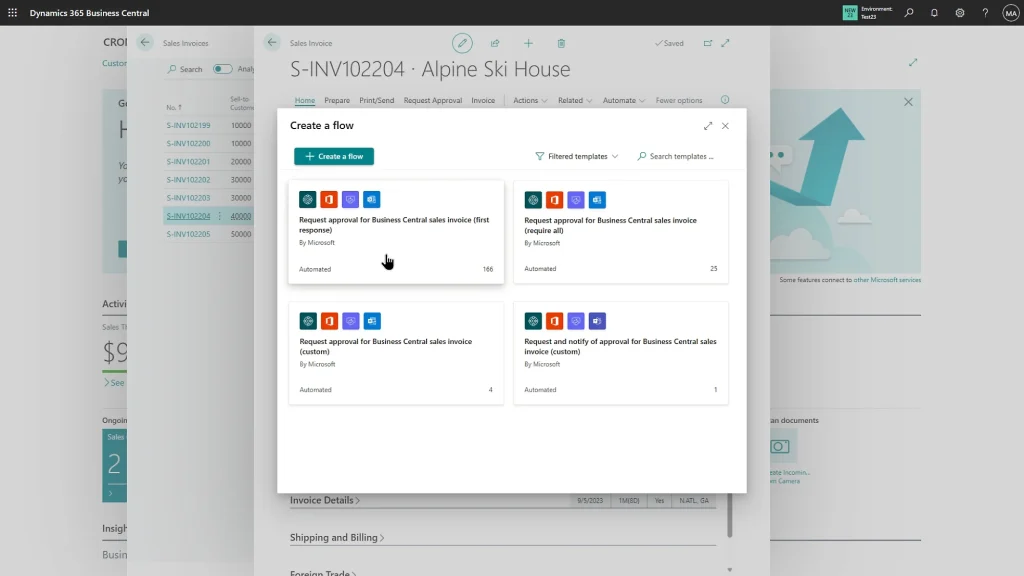
If your organization already uses Microsoft 365, Teams, or Azure, Business Central feels like a natural extension of your existing workflow. This ecosystem advantage becomes particularly valuable for remote teams who need seamless access to business data.
The integration also offers several productivity enhancements:
- Edit customer records directly in Outlook without switching applications
- Share live inventory dashboards in Teams meetings with real-time updates
- Automate approval workflows through Power Automate triggers based on ERP events
- Connect to Azure IoT devices for real-time production monitoring and alerts
- Use Copilot AI tools for data analysis and report generation
The cost savings here are significant: these integrations would require expensive third-party tools or custom development with other ERP systems. Organizations already paying for Microsoft 365 E3 or E5 licenses get additional value from features that complement Business Central.
Cloud Flexibility with On-Premise Option
Business Central offers deployment flexibility that many competitors can’t match. Start with the cloud version to minimize upfront costs and IT overhead, then migrate to on-premise or hybrid configurations as your needs evolve.
This flexibility provides several operational advantages that impact your bottom line:
- Cloud version auto-scales during peak periods (crucial for seasonal businesses)
- Microsoft manages security patches, backups, and performance optimization
- Hybrid configurations allow on-premise data control with cloud analytics
- Switch between deployment models without losing customizations or historical data
- Built-in disaster recovery and business continuity features included in licensing
For organizations with strict data governance requirements, the on-premise option provides complete control while maintaining access to cloud-based AI and analytics features through hybrid connectivity.
Supply Chain and Inventory Management Strengths
Business Central’s supply chain capabilities rival systems costing 3x as much. The demand forecasting uses historical data and seasonal patterns to optimize inventory levels, while automated reorder points prevent stockouts without tying up excessive capital.
The system includes sophisticated inventory management features, such as:
- AI-powered demand forecasting considers weather, seasonality, and market trends
- Lot and serial number tracking with full traceability for recalls and quality control
- Cross-docking capabilities to reduce warehouse handling costs by 15-25%
- Drop shipment processing for made-to-order scenarios without inventory investment
- Advanced warehouse management with directed put-away and picking optimization
These capabilities prove particularly valuable for growing manufacturers and distributors who need sophisticated inventory control without enterprise-level complexity.
The system handles multiple units of measure, catch weights, and complex pricing structures that challenge simpler inventory systems.
Customization and Extensions Through AppSource
Microsoft’s AppSource marketplace offers hundreds of industry-specific extensions that enhance Business Central’s core functionality.
The marketplace provides solutions that address specific business needs without breaking the bank:
- Industry-specific extensions for construction, healthcare, retail, and manufacturing
- Pre-built connectors for Shopify, Magento, Amazon, and other e-commerce platforms
- Regulatory compliance apps for specific countries and industries
- Advanced reporting tools beyond standard Power BI integration
- Mobile apps for field service, warehouse operations, and sales teams
The platform’s underlying architecture supports deep customization without compromising future upgrade paths. This means you can tailor workflows, reports, and user interfaces to match your specific processes while still receiving regular Microsoft updates and new features.
Cons of Dynamics 365 Business Central
Like any ERP system, BC comes with challenges that can catch buyers off guard. Knowing these cons will help you plan more effectively.
Cost Considerations
While Business Central’s licensing appears straightforward, total ownership costs often exceed initial projections by 50-100%. This represents one of the biggest surprises for organizations evaluating ERP options.
Here’s where the real costs add up beyond the advertised licensing fees:
- Essentials licensing ($70/user/month) lacks manufacturing and advanced warehouse features most companies need
- Premium licenses ($100+/user/month) required for full functionality, increasing budget by 40%
- Data migration from existing systems typically costs $10,000-50,000, depending on complexity
- Custom integrations with legacy systems range from $5,000-100,000+ per connection
- Training investment averages 40-80 hours per user for comprehensive adoption
Third-party extensions from AppSource add $500 to $2,000 monthly for typical mid-market implementations. When you factor in testing environments, change management, and internal project resources, many organizations find their actual first-year costs are double their initial budget.
Integration Challenges with Legacy Systems
Despite Microsoft’s ecosystem advantages, connecting BC to older third-party systems often proves challenging. Legacy manufacturing equipment, specialized industry software, or custom databases may require expensive custom connectors that weren’t budgeted initially.
The technical challenges create both cost and timeline impacts:
- API limitations restrict real-time data synchronization with certain applications
- Integrations that work perfectly during testing may struggle under production data volumes
- Performance bottlenecks emerge when processing large batch updates from external systems
- Data mapping complexities increase when legacy systems use different field structures
- Version dependencies create ongoing maintenance headaches as systems update independently
Organizations not using Microsoft technologies face additional hurdles and costs. The integration complexity increases significantly if you’re running primarily Google Workspace, Salesforce, or AWS infrastructure, potentially making alternative ERP solutions more cost-effective.
The biggest difference between a smooth ERP rollout and a frustrating one is having the right partner. Aegis Softtech helps businesses maximize Business Central’s strengths while addressing common pitfalls like cost overruns, legacy integrations, and user adoption.
With tailored training, smart licensing guidance, hands-on support, and third-party BC integrations, we ensure your ERP delivers real business value.
Reliance on Microsoft Ecosystem
Business Central delivers maximum value when you’re committed to Microsoft’s entire technology stack. Organizations using competing platforms don’t capture the same synergies and may find better alternatives elsewhere.
This ecosystem dependency creates several long-term considerations that impact your technology strategy:
- Best ROI requires Microsoft 365, Azure, and Power Platform investments
- Switching cloud providers becomes complex when ERP integrates deeply with Microsoft services
- Feature updates sometimes break existing customizations, requiring additional consultant time
- Licensing negotiations become more complex with multiple Microsoft product dependencies
- Alternative technology choices become limited as your Microsoft investment grows
Microsoft’s rapid feature releases sometimes break existing customizations or require additional training, straining IT resources in smaller organizations.
Learning Curve and User Adoption
Business Central’s interface, while modern, requires significant training for users accustomed to simpler accounting software. The transition from QuickBooks or Excel-based processes often takes months rather than weeks, impacting productivity during the critical adoption period.
User adoption challenges often derail otherwise successful implementations:
- Advanced features like workflow automation require specialized knowledge many SMBs lack internally
- Power BI integration and custom reporting need dedicated training programs beyond basic ERP use
- Mobile apps require separate training and change management for field-based users
- Role-based security configurations confuse users accustomed to simpler permission structures
- Integration features create complexity that overwhelms users who just want basic functionality
This creates ongoing dependence on consultants or the need to hire more technical staff, adding to total ownership costs beyond the initial implementation.
How Aegis Softtech Maximizes Your Business Central Investment
Aegis Softtech helps organizations address the most common pitfalls that derail Business Central projects. We focus on maximizing the benefits while systematically mitigating the drawbacks.
Our Business Central Services support you with:
- Analyzing existing processes to recommend optimal licensing mix, avoiding over-licensing or feature gaps
- Designing integration strategies that minimize custom development costs and timeline risks
- Creating comprehensive training programs tailored to your industry and user skill levels
- Establishing governance frameworks that ensure successful adoption and ongoing optimization
- Providing post-implementation support that evolves with your business needs
A client shares, “Partnering with Aegis Softtech for our Dynamics 365 BC implementation was a great decision. They understood our business needs and provided a solution that kept all our remote locations connected and up to date with business changes.”
Making the Right ERP Decision for Your Business
Understanding the complete picture of Dynamics 365 Business Central pros and cons helps you make an informed decision that aligns with your business goals and technology strategy. While signing up for Business Central consulting offers powerful capabilities and ecosystem advantages, success depends on proper planning, implementation, and ongoing optimization.
The most important factors to consider when evaluating Business Central include:
- Your existing Microsoft technology investments and future technology roadmap
- Integration requirements with current systems and data migration complexity
- Total cost of ownership (TCO) budget including licensing, customization, and training
- Internal technical capabilities and change management capacity
- Industry-specific requirements and available AppSource solutions
FAQs
1. Is Dynamics 365 Business Central good for SMBs?
Yes, Business Central works well for SMBs, especially those already using Microsoft 365. The cloud deployment reduces upfront IT costs, and the platform scales as you grow.
However, total costs often exceed initial projections due to licensing, customization, and training requirements.
2. What industries benefit most from Business Central?
Manufacturing, distribution, retail, and professional services see the strongest results. These industries leverage Business Central’s inventory management, financial reporting, and project tracking capabilities most effectively. Highly regulated industries may need additional compliance modules.
3. How does Business Central compare to other ERP solutions like NetSuite or SAP?
Business Central offers stronger Microsoft ecosystem integration and typically costs less than SAP. NetSuite provides better e-commerce integration, while SAP offers more robust manufacturing capabilities.
The choice depends on your existing technology stack and specific industry requirements.
4. Can the drawbacks of Business Central be resolved with customizations?
Many limitations can be addressed through AppSource extensions or custom development, but this increases total costs and complexity.
Working with experienced implementation partners like Aegis Softtech helps you identify which customizations provide the best ROI and avoid unnecessary complications.