Every day, the world creates 2.5 quintillion bytes of data, yet most of it is never analyzed. The small portion that does reach a dashboard travels through two separate highways: OLAP and OLTP.
OLTP (Online Transaction Processing) powers daily operations such as order processing, payments, and customer management.
OLAP (Online Analytical Processing), on the other hand, turns historical and aggregated data into business insights. These could be trends, forecasts, strategic reports, etc.
But you’re not here for textbook definitions. You are here ‘cause you just asked Google “OLAP vs OLTP”. After all, a board member, client, or cloud bill forced you to pick one stack by Friday.
The comparison of the two isn’t tech bravado; it’s the quiet reason your paycheck clears today, and your bank can warn you about suspicious activity tomorrow.
Stick around, and we’ll translate the jargon into plain English and show real-world examples.
By the end, you’ll know which system to shortlist (and exactly what to tell your CFO).
Key Takeaways
- OLTP (Online Transaction Processing): Handles real-time transactions like orders, payments, and profile updates. Fast, reliable, ACID-compliant.
- OLAP (Online Analytical Processing) Designed for historical and multidimensional analysis—trends, forecasts, reports. Uses cubes/columnar storage for speed.
- Key Difference: OLTP records the present; OLAP analyzes the past for insights.
- Examples: Banking withdrawals → OLTP. Fraud detection or sales trends → OLAP.
- Critical Tip: Running analytics on OLTP slows transactions; using OLAP for writes risks data integrity.
What are OLTP and OLAP?
Consider two coworkers in the same office: one answers the phone all day, the other stares at spreadsheets. That’s basically the split between OLTP and OLAP.
At its core, OLTP is the engine behind your daily transactions. This includes online shopping carts, bank transfers, and ticket bookings. It is built for speed, reliability, and high concurrency.
Every time you swipe, click “pay,” or update a profile, OLTP locks the row, writes the change, and moves to the next customer. All of this happens in milliseconds. It keeps today’s data accurate and ready for the next operation.
OLAP, in contrast, is the brain behind your dashboards and reports. Consider sales trends, customer segmentation, and annual forecasts.
Built for deep, flexible analysis across time and dimensions, it scoops up yesterday’s (or even last year’s) data, arranges it into cubes or columns. Then, lets you pivot, slice, and ask “what if?” without slowing the checkout line.
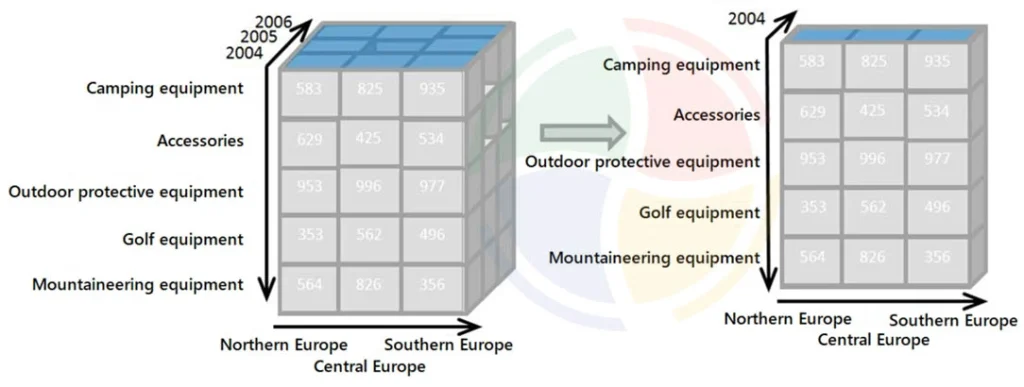
So, basically, it’s the same data, two personalities: one records the game in real time, the other rewinds the tape to show you the patterns.
When companies need to bridge these two worlds effectively, they often seek to hire data warehouse developers. Experts who can build the bridges between operational databases and analytical engines.
OLTP vs OLAP Differences: A Head-to-Head Comparison
Let’s see the core OLTP vs OLAP differences to understand how the two systems line up side-by-side so you can pick the right one at a glance:
| Criteria | OLTP | OLAP |
| Purpose | Real-time transaction processing | Complex data analysis & reporting |
| Data Type | Current, operational, granular | Historical, aggregated, multidimensional |
| Data Volume | GB to TB (current data only) | TB to PB (years of data) |
| Query Type | Simple (CRUD: Create, Read, Update, Delete) | Complex (aggregations, joins, drill-down) |
| Response Time | Milliseconds | Seconds to hours (sometimes sub-second) |
| Data Model | Normalized, row-oriented | Denormalized, star/snowflake, columnar |
| User Concurrency | High (1,000s) | Medium (100s) |
| Update Frequency | Continuous, real-time | Batch, periodic |
| Backup Strategy | Frequent, mission-critical | Less frequent, can be restored from OLTP |
| Typical Users | Operational staff, customers | Analysts, data scientists, executives |
Technical Differences Between OLAP vs OLTP(Beyond the Basics)
Once you move past the textbook labels of OLTP vs OLAP, the real distinctions appear in hardware usage, cost curves, and risk tolerance.
We’ll now translate those distinctions into decisions you can defend in a budget meeting:
Data Storage and Access Patterns
OLTP
OLTP systems lay data down in neat rows, the way you’d fill a spreadsheet one customer at a time. This row-based layout keeps each write operation inside a small set of disk pages, so commits complete in milliseconds.
Every change obeys ACID properties: atomic, consistent, isolated, and durable. The result is a ledger that never contradicts itself, even during power loss.
In plain English, the money leaves your account only once, even if the server hiccups.
OLAP
OLAP flips the shelf sideways. Columnar storage keeps every “Amount” or “Region” in its own compressed file. So, when the CEO asks, “What were total sales in the West for the last three years?” the database touches only those columns.
Implementing modern data warehouse solutions ensures these columnar structures are optimized for query speed rather than individual row updates.
Data in OLAP is often pre-aggregated and denormalized. Think of it as keeping the total on a sticky note so you don’t have to add it up again.
OLTP excels at updating a single customer’s record; OLAP excels at summing sales across regions and years.
Performance and Scalability
OLTP
Production OLTP systems routinely exceed 10,000 transactions per second while holding latency below 100 milliseconds.
Achieving this throughput requires narrow indexes, in-memory caches, and lock managers that resolve conflicts faster than human reaction time.
OLAP
OLAP workloads, in contrast, execute fewer queries, yet each query may scan terabytes. Modern cloud warehouses such as Redshift, Snowflake, or ClickHouse distribute the data across many nodes and execute plans in parallel, narrowing the latency gap. However, they still favor bulk loads over single-row inserts.
Hybrid HTAP platforms promise to unify both patterns.
In practice, the locking and logging mechanisms that protect transactional integrity also impede large-scale scans, so architects must choose where to accept compromise.
See this aviation case study to understand how real-time pipelines and governance reduced costs and audit effort—an operational example of OLAP delivering measurable ROI.
Data Integrity and Recovery
OLTP
OLTP data is mission-critical. For example, Airlines cannot sell the same seat twice, and banks cannot misplace a transfer.
Continuous replication, point-in-time backups, and automatic failover are standard.
OLAP
One of the key OLTP vs OLAP differences is that OLAP is more relaxed. If last quarter’s summary table vanishes, you can usually reload it from the OLTP source, replay the ETL scripts, and apologize to the analysts.
The stakes rise only when dashboards feed real-time personalization or fraud alerts.
OLAP vs OLTP Diagram
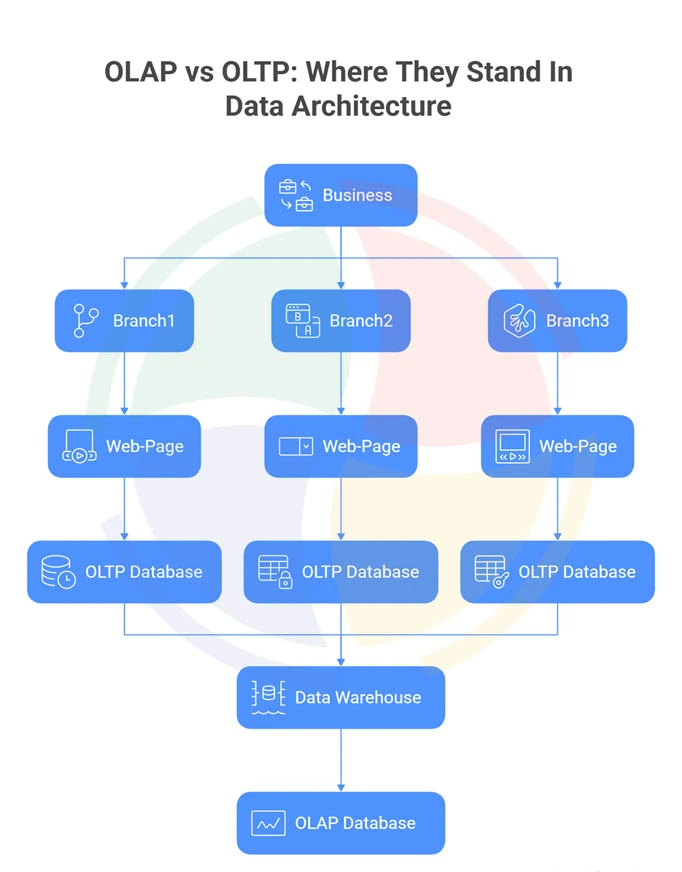
Consider the above diagram, which outlines a typical data architecture for a business with multiple locations.
Each Branch uses a Web page that feeds data into its own separate OLTP Database (Online Transaction Processing).
These OLTP databases handle the real-time, daily transactions of that specific branch. Critically, data from all these individual branch databases is consolidated into a central data warehouse, which functions as an OLAP Database (Online Analytical Processing).
This separation ensures that complex analysis and reporting can be performed on the combined historical data without impacting the speed of the daily business operations.
OLAP vs OLTP Examples: Real-World Use Cases
When people first hear OLAP and OLTP, these terms often sound technical. But the difference is actually easy to see when you look at how they work in everyday industries.
Here are some OLAP vs OLTP examples to help you understand the concept better:
OLTP in Action
OLTP (Online Transaction Processing) handles real-time activities, such as:
- Retail:
When an e-commerce site processes thousands of online orders every minute, OLTP systems ensure each order is captured instantly and correctly.
- Banking:
ATM withdrawals, deposits, or money transfers rely on OLTP to update account balances immediately.
- Healthcare:
As doctors update patient records during an appointment, OLTP systems make sure the data is stored and available right away.
OLAP in Action
OLAP (Online Analytical Processing) looks at data over time to reveal patterns and insights.
- Retail:
Stores use OLAP to study seasonal sales trends, helping them stock the right products before demand peaks.
- Banking:
By analyzing millions of past transactions, OLAP can reveal unusual patterns that point to fraud.
- Healthcare:
Hospitals may use OLAP to spot regional disease outbreaks by analyzing years of patient data.
— Data Lead, Aegis Softtech
How to Decide Between OLAP vs OLTP?
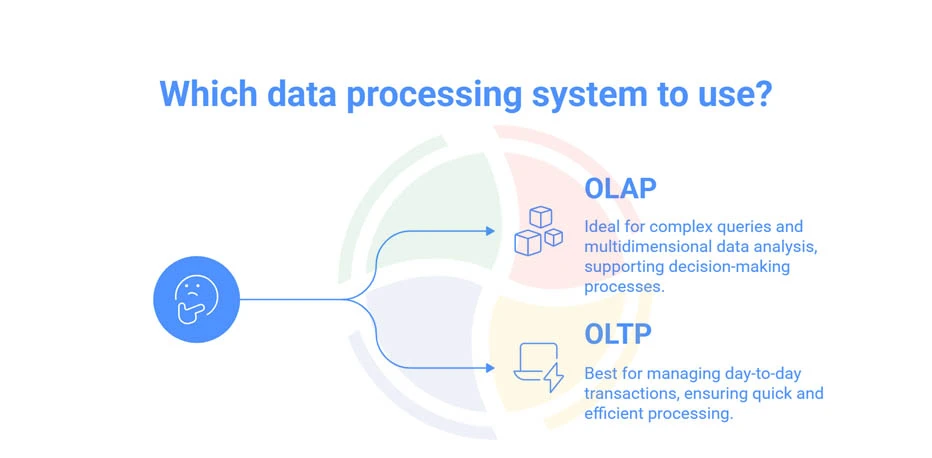
Choosing between OLAP vs OLTP depends on what problem you’re trying to solve. The two serve very different needs.
If your priority is fast, reliable updates for everyday apps—like processing customer orders, booking tickets, or recording payments—OLTP is the right fit.
It’s designed for speed and accuracy in handling frequent inserts and updates.
BUT, if your goal is analyzing trends across periods—like comparing sales year-over-year, spotting seasonal patterns, or drilling into performance by region—you need OLAP.
OLAP systems are optimized for slicing and dicing historical data, not for live transactions.
However, the deal is that many businesses need both.
For example, transactions are first captured in OLTP systems, then moved into OLAP through ETL pipelines for reporting. Modern platforms even support HTAP (Hybrid Transactional/Analytical Processing), letting you do both in near real-time.
Here’s a quick mapping:
- Banking app (recording deposits/withdrawals) → OLTP.
- Retail sales dashboard (tracking performance over years) → OLAP.
- E-commerce platform (order processing + customer analytics) → Both OLTP and OLAP, often linked together.
Can One Database Do Both? The Mixed Workload Trap
It’s tempting to think one database can handle both OLTP (transactions) and OLAP (analytics). But in practice, this often backfires.
A client with whom we worked recently said, “We tried to run analytics on Aurora MySQL—CPU pegged at 100%, checkout froze.” In other words, mixing workloads can stall the very systems customers depend on.
Here’s the problem: OLTP is designed for fast inserts and small lookups (e.g., processing an online order). OLAP queries, by contrast, scan millions of rows for trends. When both run on the same database, heavy reads fight with critical writes, and performance drops across the board.
— Data Lead, Aegis Softtech
So, what are your options?
- MySQL + replica (lag ≤ 1s) → works for operational reports, but can’t handle 6-month trend analysis.
- PostgreSQL + pg_cron unload to BigQuery → adds a 30-minute delay, but very cheap at $0.02/GB.
- SingleStore / AlloyDB / TiFlash → cost 2–4× more, simplify operations, but still require careful scaling.
The takeaway is you can blur the line, but you can’t escape physics. Hence, separating workloads remains the safer bet.
Common Pitfalls and How to Avoid Them
When working with OLTP vs OLAP, it’s easy to misuse one system for the other. Here are the most common pitfalls, and how to steer clear of them:
| Pitfall | Why It’s a Problem | How to Avoid It |
| Running analytics on OLTP systems | OLTP is optimized for fast inserts and updates, not heavy queries. Analytics here becomes slow, expensive, and shallow in insight. | Push data into a warehouse or OLAP engine built for analysis. |
| Using OLAP for transactions | OLAP engines struggle with constant writes, and ACID guarantees may be weak. This makes them unsafe for core transactions like payments or orders. | Keep OLTP as the system of record for all transactional workloads. |
| Ignoring data latency | Nightly or batch updates fall short when real-time insights are needed, e.g., fraud monitoring or live inventory. | Use streaming or micro-batch pipelines for time-sensitive analytics. |
| Overlooking security | Both systems need protection, but OLTP requires stricter, row-level security to safeguard sensitive records. | Apply access controls tailored to each system’s role. |
It’s Not Always OLAP vs OLTP: Get Clarity That Pays Off
OLTP keeps daily operations fast; OLAP turns history into profit. Mixing the two without a plan breeds slow reports, angry users, and risk.
Clear separation lets you scale transactions today and analytics tomorrow. Our data warehouse consulting experts design hybrid estates that respect this boundary.
We migrate, model, and monitor so OLTP stays millisecond-quick. Meanwhile, our cloud warehouse solutions deliver governed OLAP cubes in real time.
One unified team, no outsourcing, keeps your data compliant and elastic.
Bonus: Leave with a roadmap and peace of mind!
FAQs
1. Is MySQL OLAP or OLTP?
MySQL is primarily an OLTP database designed for fast transactional operations. However, with extensions or replicas, it can support limited analytical workloads—bridging basic OLTP vs OLAP differences.
2. Is SQL Server OLAP or OLTP?
SQL Server supports both. Its Database Engine handles OLTP workloads, while SQL Server Analysis Services (SSAS) provides OLAP capabilities for multidimensional analysis and reporting.
3. What is the difference between OLAP and OLTP graph?
An OLAP vs OLTP graph visually contrasts them—OLTP shows high transaction frequency and low query complexity, while OLAP shows fewer transactions but deeper, aggregation-heavy queries.
4. Is MongoDB OLAP or OLTP?
MongoDB is primarily OLTP-oriented, optimized for fast writes and real-time operations. However, it supports analytical workloads through integrations like MongoDB Atlas Data Lake or BI connectors.
5. What is HTAP?
HTAP (Hybrid Transactional/Analytical Processing) combines OLTP and OLAP in one system, enabling real-time analytics on live transactional data without separate data movement or latency.