You already know the pain when users open your Employee Center, skim a few knowledge articles, fail to find the right form, and drop off. And then raise repetitive incidents that your support teams shouldn’t be working on in the first place.
Most traditional self-service experiences break down exactly at this moment. They work well when the problem is simple, but fail the moment a request needs multiple decision steps.
ServiceNow Guided Self-Service Center transforms complex employee requests into clear, step-by-step Q&A journeys. It guides users toward the right knowledge, form, or request without depending on agents.
Today, in this guide, you’ll explore how Guided Self-Service (GSS) works, when to use it, the prerequisites, real-world patterns, and the best practices you need to deploy it.
Key Takeaways
- ServiceNow Guided Self-Service Center (GSS) enables employees to resolve issues independently through dynamic, step-based Q&A flows rather than manually browsing catalog items or knowledge articles.
- Core value of GSS: Cuts misrouted tickets, reduces agent load, increases request accuracy, and delivers a smooth support experience across ITSM, HRSD, and CSM.
- When teams need it: Users struggle to find the right form, repetitive queries flood support, decisions require multiple branching steps, or self-service adoption is low.
- Implementation focus: PAD + Playbooks setup, clean knowledge/catalog mapping, security and targeting rules, and iterative flow optimization via analytics.
- Outcome & impact: Faster resolution, higher deflection, improved self-service adoption, and scalable employee journeys that feel intelligent.
What is ServiceNow Guided Self-Service?
Guided Self-Service (GSS) in ServiceNow is a dynamic, rule-driven, conversational support interface that helps employees resolve issues without interacting with a live agent.
Unlike traditional self-service, where users must search manually, interpret knowledge, and find their own forms, GSS predicts intent, asks targeted questions, and determines the correct outcome automatically.
The experience is built on the Process Automation Designer (PAD) framework and surfaces through the Employee Center. Each user interaction becomes a structured journey where every step is purposeful:
- Ask the right question at the right time
- Detect the user’s intent
- Choose the correct knowledge, catalog item, or automated workflow
- Reduce unnecessary choices and ambiguity
Guided Self-Service is particularly powerful for environments where employees know the problem, but don’t know the correct terminology, the right team, or which catalog item to submit.
Core Components of GSS You Must Understand
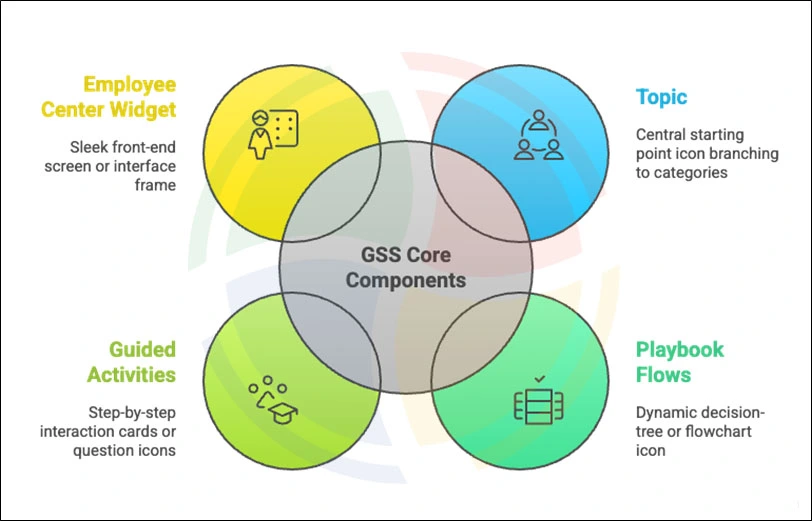
Guided Self-Service is built on four core components, such as the GSS topic, playbook flows, guided activities, and employee center experience widget. Each of these plays a distinct role in how employees navigate and resolve issues.
Let’s look at each of them in detail:
1. Guided Self-Service Topic
A Topic is the starting point of the GSS journey. It defines the problem area and organizes related flows under a clear, employee-friendly label. Good Topic design ensures that users immediately recognize where to begin, without needing to understand internal taxonomy.
Examples of effective Topics include:
- VPN or network access challenges
- Laptop troubleshooting and performance issues
- Payroll discrepancies or corrections
- Leave entitlement or policy clarifications
- HR process questions (transfers, onboarding, benefits)
2. Playbook Flows
The Playbook is the intelligence layer behind Guided Self-Service. It defines the diagnostic questions, their sequencing, the conditional rules, and the outcomes. Every step in the flow determines what the user sees next, creating a dynamic resolution path that many organizations refine with expert ServiceNow consulting support.
A well-designed flow typically includes:
- Questions that progressively narrow down the issue
- Conditional branching to route users based on their responses
- Targeted KB recommendations triggered contextually
- Catalog item triggers when the system determines that a form is required
- Automated case or request creation for ITSM, HRSD, or CSM scenarios
- Validation logic that ensures data completeness before proceeding
- Fallback or escalation options when the system cannot resolve the issue
A longer flow with precise branching often resolves more issues than a short, generic one that leads users to the wrong form.
3. Guided Activities
Guided activities represent the functional units within a flow. They define what action occurs at each step and how the user experience progresses. Effective use of activities ensures that GSS behaves like a guided conversation rather than a generic web form.
Common activity types include:
- Question activities
- Multiple-choice
- Dropdown
- Free text
- Conditional questions that appear only when relevant
- Knowledge surfacing activities that display targeted KB articles
- Catalog item triggers to launch the appropriate form automatically
- Case or request creation activities for IT, HR, or service workflows
- Information or message panels for instructions, caveats, or policy notes
4. Employee Center Experience Widget
The Widget is the front-end interface through which the entire Guided Self-Service journey is delivered. It presents questions and outcomes in a clean, step-based layout that feels familiar and intuitive, even for non-technical employees.
Key characteristics of the GSS front-end experience:
- A progressive, step-by-step interface
- Clear visual cues that guide users through each stage
- Dynamic adjustments based on user inputs
- Minimal on-screen clutter to reduce cognitive load
- Support for both desktop and mobile interaction
- Consistent design standards across Topics and flows
Core Features of ServiceNow Self-Service
Guided Self-Service extends far beyond search bars and catalog navigation. It introduces an adaptive, logic-driven layer that elevates the entire support experience.
Below are the key features that make self-service work effectively:
1. Interactive Q&A Engine
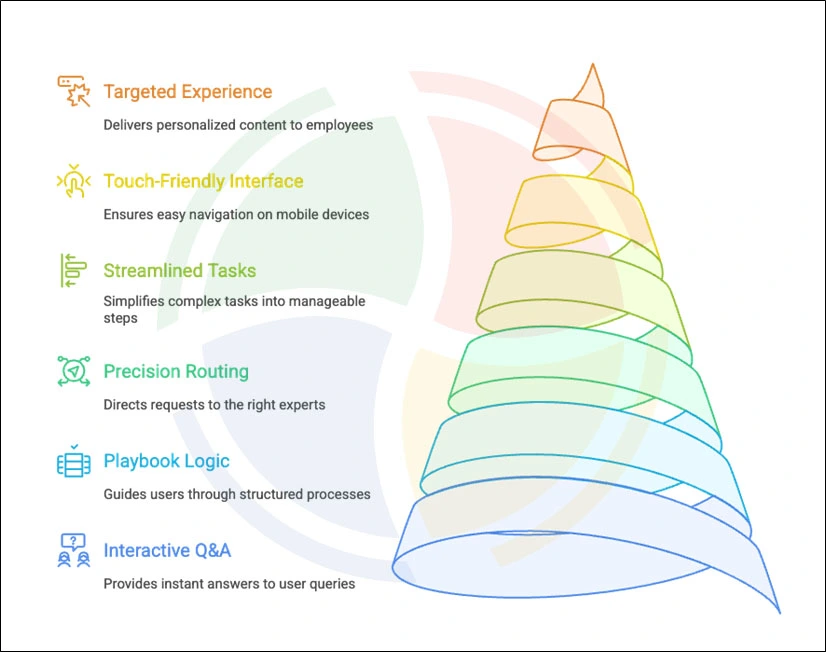
The Interactive Q&A model transforms the user journey from guesswork into guided clarity. Instead of browsing through catalog categories or searching for keywords they may not know, employees are led through a structured, conversational flow.
Each answer directly influences the next step they see, ensuring the system gathers the right information while minimizing cognitive load.
Real-time branching helps users describe issues without technical understanding.
2. Playbook-Driven Logic
Playbooks provide the underlying logic that makes Guided Self-Service scalable and maintainable, often supported by structured ServiceNow development services. They centralize decision branches into a visual, modular structure that is easier to update and govern compared to custom workflows.
Because the logic is transparent and componentized, business teams can refine flows without deep development expertise, reducing dependency on Flow Designer or backend scripting.
It allows organizations to iterate faster and ensure consistent resolution behavior across all Guided Self-Service topics.
3. Precision Routing to the Right Resources
GSS improves the accuracy of self-service by delivering the correct resolution asset at the exact step it is needed. Instead of exposing long catalog lists or broad knowledge categories, the system narrows the options based on user responses and directs them toward the most appropriate outcome.
It reduces misclassification, eliminates browsing fatigue, and ensures every path leads to a valid resolution.
4. Streamlined Support for Complex Tasks
It is effective for workflows involving policy checks, dependent questions, or multi-stage decisions. Complex processes are broken into small, digestible steps, allowing employees to progress confidently without needing to understand internal terminology or departmental structures.
The approach reduces errors, prevents misrouted submissions, and markedly improves completion rates for requests that historically required back-and-forth clarification with agents.
5. Touch-Friendly, Clean Interface
The GSS interface is designed for simplicity, speed, and accessibility across devices. Its step-based layout, clear progress indicators, and minimal text presentation create a frictionless experience for users, particularly those on mobile or in field roles.
The interface focuses on interaction rather than reading, enabling employees to complete requests quickly without feeling overwhelmed by information.
6. Targeted Experience Through Employee Center
By using Employee Center targeting rules, the platform allows organizations to deliver flows that are tailored to specific roles, locations, departments, or access profiles. It ensures that employees only see the topics and outcomes relevant to them, creating a curated and context-aware environment.
Targeting enhances both accuracy and security by preventing irrelevant or sensitive workflows from appearing to the wrong audiences.
Setup & Prerequisites for Implementing Guided Self-Service
Shifting from understanding the mechanics of Guided Self-Service to actually implementing it requires a disciplined setup approach aligned with robust ServiceNow implementation services. It relies on the right platform components, roles, clean data, and a structured development workflow.
Below is the complete prerequisite stack you must validate before building any GSS topic or flow:
Application & Plugin Requirements
Guided Self-Service runs across multiple ServiceNow capabilities, so your instance must have the right applications activated. Missing even one of these often results in broken actions, incomplete branching logic, or missing UI elements inside Employee Center.
Core requirements include:
- Employee Center (EC): Core interface where Guided Self-Service is delivered
- Employee Center Pro: Enables deeper targeting, richer page layouts, and more dynamic content control
- Process Automation Designer (PAD): The engine behind playbooks and stepwise flows
- Playbook Experience: Required for rendering step-based interactions
- Knowledge Management: Enables article-based guidance during decision steps
- Service Catalog: Required for any flow that triggers forms, items, or automated requests
- Domain-specific apps (HRSD, ITSM, CSM, Finance, etc.): Needed when your GSS flow interacts with module-specific records or fulfillment teams
Required Roles & Cross-Functional Ownership
GSS development requires elevated permissions, especially when you build flows that touch knowledge, catalog, or case creation. Ensuring proper role governance early prevents runtime failures and unauthorized edits.
Key platform roles include:
- playbook.write: Create and configure flows
- playbook_admin: Full administrative control
- playbook_experience.admin: Controls UI/UX settings for playbook rendering
- sn_ec.admin: Required for Employee Center configuration and targeting
- catalog_admin: Needed when outcomes trigger catalog items or request flows
- knowledge_admin: Required to manage and map knowledge articles to decision points
Development Lifecycle & Testing Workflow
Because GSS is logic-heavy and drives automated actions, environments must be used deliberately. Small issues in DEV can create significant failures in PROD, especially with dynamic branching.
A reliable development sequence should include:
- Prototype in DEV: Build the initial branching design using representative data structures
- Test Scenarios Thoroughly: Validate every path using real employee journeys, not admin-only shortcuts
- Clone to UAT: Ensures alignment with production roles, security settings, and record structures during a ServiceNow clone
- Verify Targeting Rules: Ensure that each persona views the relevant topics and outcomes
- Promote to Production: Move only after validating that automated requests, knowledge mapping, and catalog integrations work for all user types
Data Security & Governance Controls
Guided Self-Service may surface content that users normally wouldn’t see on a standard catalog or knowledge interface. It makes security governance a critical part of the prerequisites.
Key checks you must enforce are as follows:
- Mask PII in Non-Prod Clones: Prevents sensitive user data from appearing during testing
- Restrict Sensitive Knowledge Bases: Ensure HR, Legal, and Finance articles are role-controlled
- Protect Confidential Catalog Items: Hide items containing payroll, identity, or managerial fields from unauthorized users
- Enforce EC Targeting Rules: Control topic visibility based on user roles, groups, and departments
- Validate Automated Requests: Confirm internal notes and fulfillment details are never exposed
- Embed Sensitivity Logic in Flows: Add conditional checks within PAD to prevent accidental exposure
Types of ServiceNow Self-Service
As you build a guided experience layer, you figure out the two primary self-service models that ServiceNow supports—employee self-service and customer self-service.
Catered to different audiences, these shape how Guided Self-Service should be designed and deployed across your enterprise.
Here’s a quick breakdown of the two:
Employee Self-Service (ESS)
Employee Self-Service is the internal-facing support model used by HR, IT, Finance, Procurement, Workplace, and other operational teams. It is where employees submit IT support issues, ask HR questions, request payroll corrections, initiate software or access requests, troubleshoot devices, or log facilities-related concerns.
ESS is the most common environment for Guided Self-Service because employees often struggle to choose the right form or article. GSS seamlessly extends ESS by turning these tasks into guided, decision-based journeys, especially within the ServiceNow ITSM platform and HRSD.
Customer Self-Service (CSS)
Customer Self-Service powers external-facing portals, primarily in Customer Service Management (CSM) environments focused on the ServiceNow customer experience. It supports scenarios like product troubleshooting, return and refund workflows, warranty validation, customer onboarding, FAQ exploration, and large-scale tier-1 automation.
In this context, it becomes a diagnostic engine that walks customers through structured questions to identify their issue and present the fastest resolution path.
Implement Guided Self-Service for Your Organization with Aegis Softtech
Guided Self-Service is essential for reducing ticket volume and improving resolution accuracy. Realizing consistent value from Guided Self-Service requires clean data, strong governance, and a well-designed Employee Center experience. And it requires a team that understands Playbooks, PAD, catalog logic, and knowledge models.
At Aegis Softtech, we bring the technical expertise of developing Guided Self-Service journeys that are intuitive, scalable, and enterprise-ready.
Our specialists architect Playbook flows, configure targeting rules, refine employee journeys, and integrate Guided Self-Service seamlessly across ITSM, HRSD, and CSM.If you want to simplify complex request paths and deliver personalized experiences consistently, reach out to our ServiceNow developers for a well-designed GSS implementation.
FAQs
Q1. What is self-service in ServiceNow?
Self-service in ServiceNow lets users resolve issues independently through knowledge, catalog items, chatbots, and Guided Self-Service flows. It reduces dependency on agents and speeds up request resolution.
Q2. What are the four ServiceNow workflows?
ServiceNow workflows include Approval, Notification, Task, and Automation workflows. Together, they power the platform’s ability to execute multi-step processes across ITSM, HR, CSM, and other modules.
Q3: What are the challenges faced in ServiceNow?
Organizations often struggle with complex configurations, poor data quality, and low user adoption. Integrations with legacy systems, performance issues, and process inefficiencies can also slow down operations and make the platform harder to maintain.
Q4: What is the objective of self-service?
The primary objective of self-service is to help users resolve issues independently through guided, automated steps. This reduces ticket load, speeds up resolutions, and creates a smoother, more consistent experience for employees.