The ideal case scenario: Your new ServiceNow platform is ready. It is gleaming with modern modules and streamlined processes, delivering incredible value from the very first day.
It’s a compelling vision, right?
But it’s not always the reality. Getting there isn’t exactly a simple process. It’s more akin to navigating a complex obstacle course. A clear map is imperative to avoid stumbling points.
Lifting and shifting your legacy mess into a modern platform only creates high-speed chaos. If the underlying processes are fragmented and the data is messy, the Now Platform will simply automate those inefficiencies faster than ever.
All these ServiceNow migration challenges are part of a structural optimization for your organization. Understanding these challenges and adopting the right best practices at the right time helps you conquer hurdles.
Key Takeaways
- Data Migration Complexity: Legacy systems often harbor unstructured data, mismatched field types, and reference loops that lead to significant data drift and information loss during transfer.
- Architectural Drift & Over-Customization: Attempting to replicate legacy UI and workflows through heavy custom scripting creates a fragile instance prone to breaking during mandatory ServiceNow version upgrades.
- Data Retention and History: Migrating decades of unstructured historical records and audit trails into production tables causes severe system latency and slows global search functionality.
- Resistance to Change: Deep-seated familiarity with legacy tools often leads to internal resistance, resulting in shadow IT silos that undermine the platform’s centralized visibility.
- Integration with Existing Systems: Moving to a cloud-hub model often snaps existing hard-coded, point-to-point connections between IT, HR, and Finance systems that lack modern error-handling.
- System Downtime: Failure to prototype or audit the CMDB leads to reactive troubleshooting, causing migration projects to exceed their original budgets and schedules.
- Migration Best Practices: Success is driven by prototyping (PoC) in sandboxed environments, performing deep data cleansing, and starting with a Minimum Viable Platform (MVP) to accelerate time-to-value.
Common ServiceNow Migration Challenges
A transition to ServiceNow is not a linear path. You can’t call it that because the platform is the single source of truth for your operational funnel.
As such, ServiceNow migration involves untangling years of technical workarounds and undocumented processes.
Engineering a successful migration requires identifying involved high-risk hurdles before they stall the project.
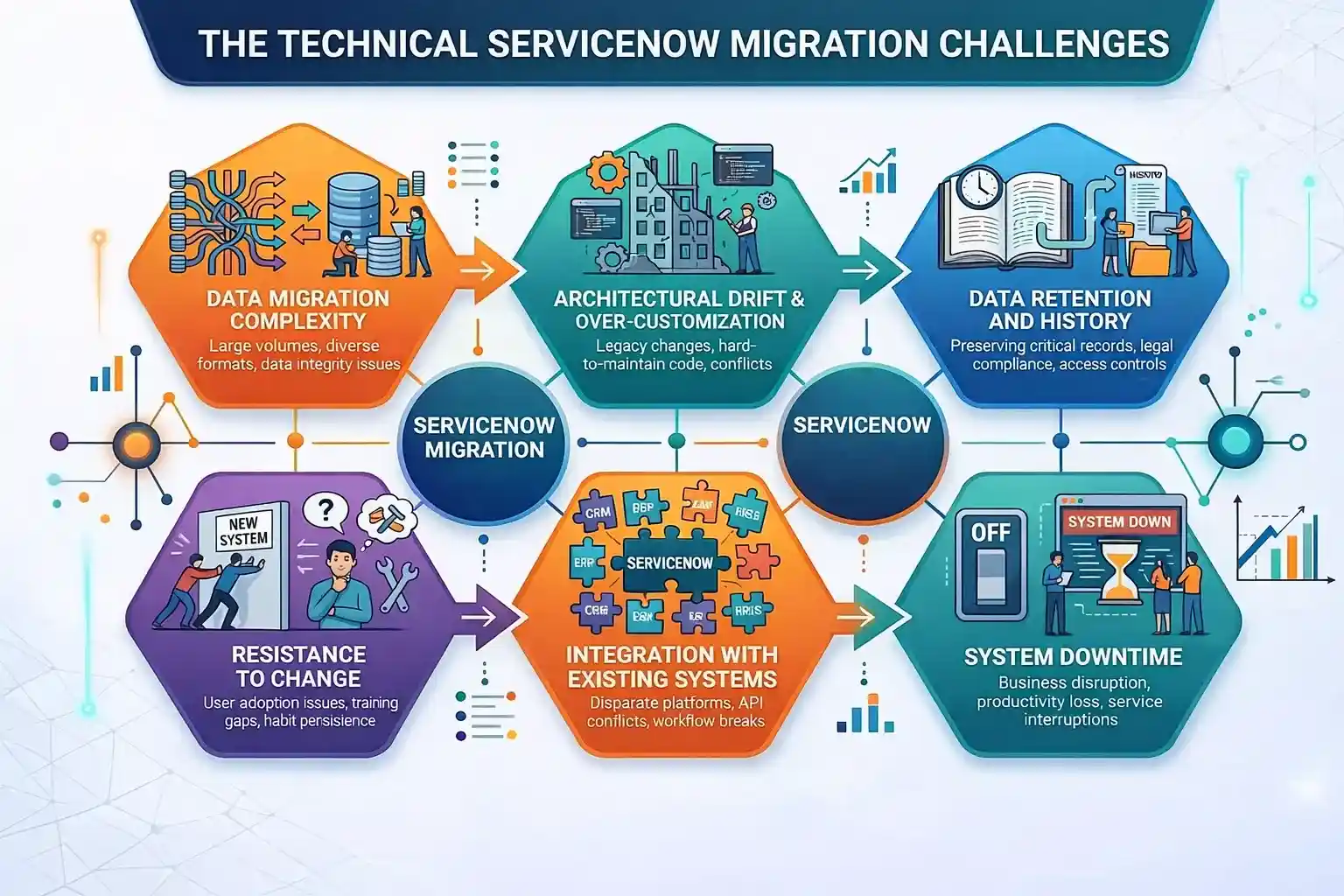
The most common ServiceNow migration challenges are:
Data Migration Complexity
The Challenge
Your legacy system is probably lacking the structured data integrity required by the Now Platform.
Data migration from an aging ITSM tool or a flat-file database into ServiceNow’s relational tables often results in data drift. If field character limits, reference loops, or types are not identical, critical information is lost during the transfer.
The Solution
A rigorous ETL (Extract, Transform, Load) protocol is essential. ServiceNow Import Sets become a staging area, ensuring data is cleansed and normalized before it ever reaches the production table.
Implementing Transform Maps with robust coalesce logic ensures duplicate records are merged rather than multiplied, preserving database integrity.
Architectural Drift & Over-Customization
The Challenge
Over-customization to make ServiceNow look and feel exactly like the system it is replacing leads to architectural drift.
What does that mean?
Developers write heavy client scripts and business rules to replicate the UI behavior of their legacy system. It creates a fragile ServiceNow instance that is difficult to maintain and often breaks during the semi-annual ServiceNow version upgrades.
The Solution
The primary solution is adhering to the Out-of-the-Box (OOTB) First mandate. The architecture remains clean when you stay aligned with the Common Service Data Model (CSDM).
All custom requirements must be vetted against a technical sobriety checklist to keep the platform ready for upgrades.
Data Retention and History
The Challenge
Internal compliance and legal mandates often require preservation of years of historical records, including audit trails, change logs, and incidents. Hoarding legacy data, however, is a major performance killer.
Attempting to ingest decades’ worth of unstructured history into a live ServiceNow production instance bloats the database. It slows global searches and may also lead to significant UI latency.
The Solution
The best solution is implementing a Tiered Data Archiving Strategy. Instead of a full-scale migration, only active data (typically of the last 12-18 months) is moved into the ServiceNow production tables.
Older historical records are offloaded to a searchable cold storage solution or a secondary ServiceNow archive table. Using this approach satisfies compliance and GDPR requirements, while keeping your primary platform lean and high-performing.
Resistance to Change
The Challenge
The most difficult part of data migration to ServiceNow is on the users’ end, rather than the code. Staff accustomed to a legacy tool often perceive ServiceNow as overly complex or restrictive.
If users feel the new system hinders their daily productivity, they may bypass official channels. It might create shadow IT silos that negate the platform’s visibility benefits.
The Solution
ServiceNow consultants choose an engineering-led adoption framework that emphasizes creating a Center of Excellence and Innovation (CoEI). It doesn’t just teach users where to click but configures the ServiceNow Service Portal to be more intuitive than the existing system.
The most tedious parts of your employee’s previous workflow, such as pre-filling forms, are automated via ServiceNow predictive intelligence. Thus, more users are inclined to adopt the platform as a tool for efficiency.
Integration with Existing Systems
The Challenge
A ServiceNow instance is the hub of your ecosystem. Legacy migrations often break the connecting threads between IT and HR (Workday), Finance (SAP), or DevOps (Jira).
It happens because most integrations are point-to-point and hard-coded. In short, they lack the error-handling and security protocols required for a modern cloud environment.
The Solution
By utilizing standardized, reusable Spokes, the legacy architecture migrates into the ServiceNow Integration Hub, towards a modular model. It enables real-time monitoring of all data flows, triggering an automated alert or retry logic without crashing the entire workflow if a third-party API fails.
System Downtime
The Challenge
Global enterprises work around the clock, and there is no time for an outage. A robust migration, where you shut down the old system and hope the new one works in a few days, is very risky.
83% of data migration projects exceed their timelines and budgets. Any unexpected configuration error during the cutover window can result in millions of dollars in lost productivity.
The Solution
The right approach here is a parallel run and orchestrated cutover. The right ServiceNow development solutions entail creating a data sync between the legacy system and the Now platform.
Both run in tandem during a transition period, allowing for a phased migration where departments are moved over in phases. If a critical issue is detected in the new environment, you still have the legacy system as a fallback, ensuring near-zero downtime and absolute business continuity during the transition.
Best Practices to Overcome ServiceNow Migration Challenges
Successfully navigating the transition from legacy systems, such as Cherwell, Jira Service Management, or BMC Remedy, to the Now Platform requires strategic planning. You must shift from reactive firefighting to a proactive approach.
Prioritizing data integrity and architectural sobriety from the start ensures your new platform is scalable for the next decade of innovation. Here’s a list of tried-and-tested best practices that help overcome ServiceNow migration challenges.
Plan and Prototype
The wisest decision is to move into production with a Proof of Concept (PoC), which you have complete clarity on upon hiring ServiceNow developers. Prototyping allows architects to test complex integrations and custom workflows in a sandboxed environment. It enables the identification of errors before they impact the broader enterprise.
Adopt OOTB (Out-of-the-Box)
ServiceNow instances that remain closest to the core are also the most resilient ones. Utilizing OOTB features secures future version upgrades. For instance, moving from Xanadu to the next release doesn’t take hundreds of hours of manual re-coding.
Data Cleansing
The perfect time for a digital cleaning is during migration. Audit your ServiceNow Configuration Management Database (CMDB) and user tables to eliminate abandoned records and normalize naming conventions. High-fidelity data is the prerequisite for AI and Predictive Intelligence.
Phased Approach
Migrating simultaneously from ITSM, HRSD, and CSM is risky. A better alternative is a multi-phased roadmap, so your teams can focus on quality. Start with a Minimum Viable Platform (MVP) and scale based on your user feedback. It reduces project risk and accelerates time-to-value.
Minimize ServiceNow Migration Risks With Aegis Softtech
A ServiceNow migration is too complex a process to leave to trial and error, especially when you are re-engineering how your business breathes. While the hurdles are real, you don’t necessarily have to go through them.
Choose a partner that secures an insurance policy against downtime and botched integrations. You need someone who can identify the risks before they appear.
This is where Aegis Softtech steps in.
We have spent around two decades in the trenches untangling the exact ServiceNow migration challenges that keep IT directors up at night. Our seasoned team focuses on lean architecture and a smooth transition.
Depending on the migration strategy that best fits your business scenario, the operations team may not even realize the shift. We keep you in the loop throughout, so you can be prepared for what’s ahead.
FAQs
Q1: What is the biggest risk in a ServiceNow data migration?
The biggest risk in a ServiceNow data migration is data loss or corruption. Critical records may get lost, altered, or become inaccessible due to transformation errors or network failures.
Q2: Should we migrate historical data or archive it?
Whether to migrate or archive historical data depends on whether the data is required for active use or simply for long-term retention and occasional reference. In most modern IT transformations (such as moving to a new ERP or CRM), a hybrid approach is recommended.
Q3: How long does a typical ServiceNow migration take?
A typical ServiceNow implementation or migration usually takes 8-12 weeks for mid-sized businesses using standard configurations. However, it can range from 3 to 12 months or more for complex or highly customized environments.
Q4: How are custom scripts handled during migration?
Handling custom scripts during a migration involves treating them as integrated components of the overall process. These are often incorporated into a structured migration workflow or managed with specialized tools.