Most teams don’t struggle with data because they lack dashboards. They struggle because getting a straight answer still feels like opening a support ticket.
Snowflake Intelligence is changing how teams interact with data. Instead of writing SQL, stitching dashboards together, or chasing analysts for answers, users can ask questions in plain language and receive traceable insights instantly.
Launched to general availability in November 2025, it marks Snowflake’s most significant step toward truly democratized analytics.
This guide breaks down how Snowflake Intelligence works, its features, pricing, limitations, and real-world use cases. We’ll also show you how to set up your first agent in minutes.
Key Takeaways
Snowflake Intelligence is Snowflake database’s built-in AI agent that lets anyone query structured + unstructured data using natural language.
Key Features:Natural-language insights, unified structured/unstructured retrieval, semantic modeling, auditable outputs, enterprise-grade security, and customizable branding.
Use Cases:Best suited for conversational analytics, ad-hoc reporting, customer insights, operational intelligence, and cross-functional analysis.
Limitations:Not ideal for heavy ML modeling, highly custom logic, or advanced statistical workflows.
Pricing:Pricing follows Snowflake’s existing credit + token consumption.
Snowflake Intelligence: What is It? How Does It Work?
Snowflake Intelligence is an enterprise-grade “intelligence agent” that lets any user interact with company data using plain English (or your native language).
It’s designed to democratize data access and turn natural language into governed, traceable answers.
You can access it today at ai.snowflake.com, with full release details in Snowflake’s documentation.
Watch the introduction video on Snowflake Intelligence here:
How Does Snowflake Intelligence Work?
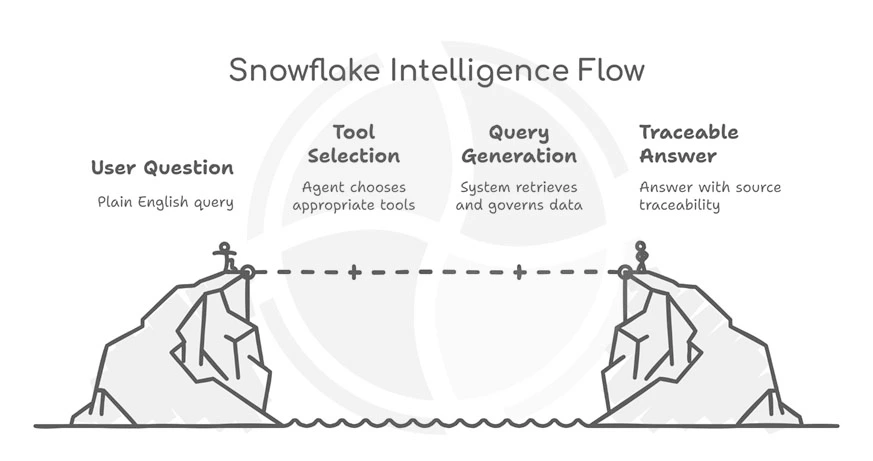
Here’s how Snowflake Intelligence works, simplified into four intuitive steps:
| Step | What Happens |
| 1. Ask | You type a business question in plain English. |
| 2. Decide Tools | The system picks the right “tool” behind the scenes—maybe Cortex Analyst for structured data, or Cortex Search for documents. |
| 3. Execute & Govern | Snowflake runs queries, fetches data (structured or unstructured), applies governance/RBAC, and respects access rights. |
| 4. Deliver Answer | You get a clear, traceable answer—often with charts or tables—and full provenance so you know where the data came from. |
Under the hood, Snowflake Intelligence relies on semantic models that map business concepts, like “revenue,” “churn,” and “customer lifetime value”. This way, the AI “speaks business,” not just raw columns.
For deeper dives, research mode enables complex, multi-layered queries that combine numbers, documents, and context into cohesive insights.
Snowflake Intelligence Architecture and Core Components
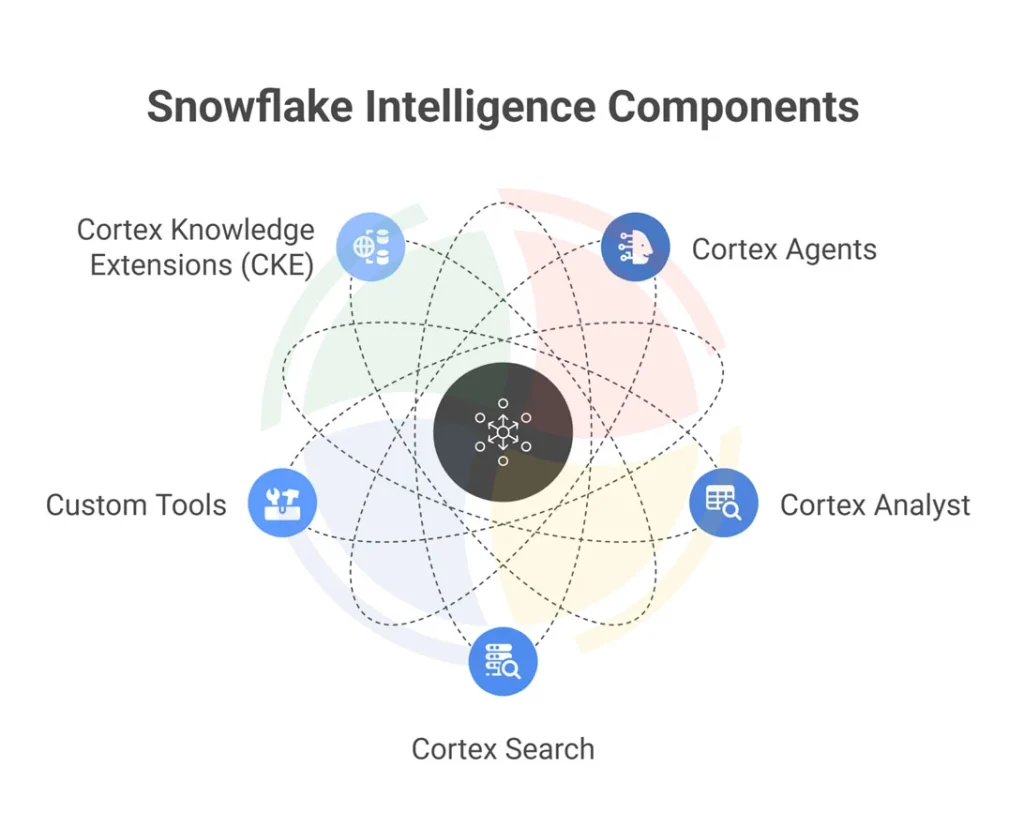
Snowflake Intelligence brings reasoning, retrieval, and automation into a single governed layer inside the Data Cloud. It eliminates the fragmentation that slows traditional AI deployments.
At its core, Snowflake Intelligence blends three capabilities: understanding, grounding, and execution.
Cortex Agents, Cortex Analyst, and Cortex Search form the “AI brain,” while custom tools and knowledge extensions expand its capabilities.
Together, they create an intelligence layer that works directly where your data lives.
Let’s take a look at each component in detail:
#1 – Cortex Agents
- The orchestration layer that interprets user questions
- Plans multi-step actions and coordinates tools
- Chooses the right models and retrieval paths for grounded answers
#2 – Cortex Analyst
- Converts natural language into accurate SQL
- Uses semantic modeling to understand business context
- Ideal for analysts and business teams who want instant insights without writing queries
#3 – Cortex Search
- Powers RAG workflows for unstructured content
- Supports semantic and keyword retrieval for documents, cases, tickets, and emails
- Fully managed embedding + indexing inside Snowflake
#4 – Custom Tools
- Extend Snowflake Intelligence beyond analytics
- Trigger workflows, send alerts, update CRM fields, and orchestrate business actions
- Perfect for building end-to-end AI copilots
#5 – Cortex Knowledge Extensions (CKE)
- Connects to external datasets through Snowflake Marketplace
- Examples: Associated Press content, Stack Overflow knowledge, and more
- Expands enterprise intelligence with a trusted third-party source
Snowflake Intelligence vs. Snowflake Cortex: What’s the Difference?
It’s time toclear up one of the biggest points of confusion: Snowflake Intelligence and Snowflake Cortex are not the same thing.
They’re connected, yes. However, they serve very different audiences and very different purposes.
Snowflake Cortex is the underlying AI/ML platform that houses LLM functions, vector search, ML models, and tooling. Snowflake Intelligence is the no-code, self-service layer built on top of Cortex. It uses Cortex functions, including LLM-powered search, embedding, vector search, and AI agents to ask questions, generate insights, or build workflows without writing code.
Now, let’s take a look at when to use Snowflake Cortex vs Intelligence:
| Scenario/Need | Use Cortex | Use Intelligence |
| Building custom AI-powered applications (RAG, agents, document AI, ML models) | ✅ Yes | ❌ Not ideal |
| Enabling analysts/business folks to query data with natural language and get visual insights | ❌ Too technical | ✅ Perfect fit |
| Rapid deployment, minimal setup, out-of-the-box integration | ❌ Requires setup | ✅ Plug-and-play |
| Complex custom logic, external integrations, tailored workflows | ✅ Yes | ❌ Limited to built-in capabilities |
| Data discovery, ad-hoc reporting, conversational data insights | ❌ Overkill | ✅ Exactly the use case |
Snowflake Intelligence FeaturesThat Set It Apart
Snowflake Intelligence elevates the Snowflake Data Cloud from a storage-and-processing engine into a fully conversational analytics platform.
Here are the key features that make it shine:
Natural Language to Actionable Insights
With Snowflake Intelligence, anyone can ask complex business questions and get detailed, accurate, and visual answers without using SQL.
Snowflake’s natural language layer goes far beyond simple keyword prompts. It understands nuance, context, and intent, which means it can handle questions. And, because it supports multi-turn conversations, users can drill deeper, too.
Unified Data Access: Structured Meets Unstructured
Snowflake Intelligence analyzes structured and unstructured data types together, delivering insights that traditionally required multiple tools.
The platform can read from databases, spreadsheets, PDFs, documents, and even images at the same time, eliminating the silos that slow down analytics workflows.
Lead Data Architect, Aegis Softtech
Trust Through Transparency
Every insight Snowflake Intelligence produces is auditable, explainable, and grounded in traceable sources.
Each answer includes citations that reference both SQL queries and the specific documents or passages used in the reasoning process.
Organizations can certify “golden questions” to guarantee consistent, validated answers for mission-critical topics.
Enterprise-Ready Security and Governance
Finally, one of the key Snowflake Intelligence features is that it inherits Snowflake’s enterprise security posture. It runs entirely within the Snowflake security perimeter, respecting RBAC, masking policies, and identity integrations with Okta or Entra ID.
Organizations can even add custom branding. This includes logos, colors, and naming conventions to build familiarity and trust across departments.
Snowflake Intelligence Use Cases
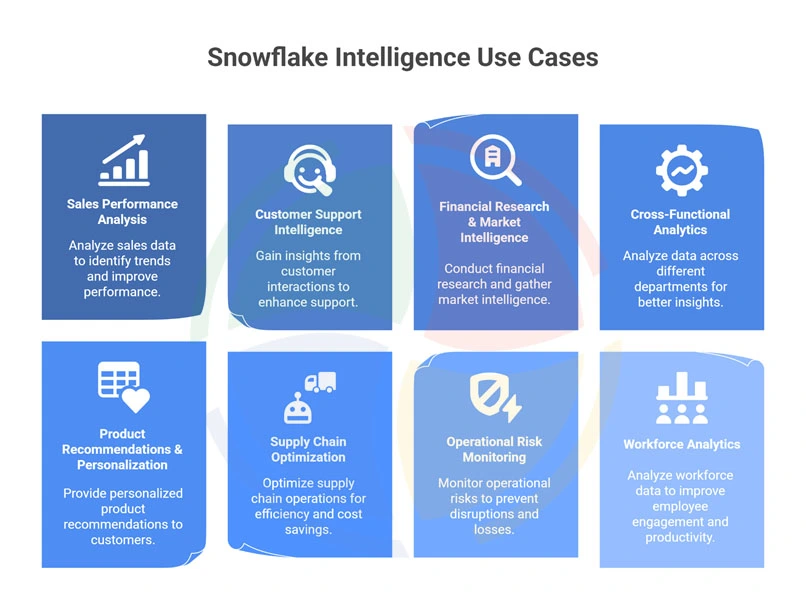
We know that Snowflake Intelligence turns raw, disconnected data into clear, reasoned answers.
But what does it translate to in real life?
Let’s take a look:
| Use Case Category | Example Questions/Outcomes |
| Sales Performance Analysis | “Why did Product X outperform Product Y last quarter?” with causal factors surfaced automatically |
| Customer Support Intelligence | Identify emerging product issues, churn risks, and recurring customer pain points |
| Financial Research & Market Intelligence | Market movement summaries, risk flags, investment insights |
| Cross-Functional Analytics | Measure true ROI of campaigns tied to downstream sales behavior |
| Product Recommendations & Personalization | Dynamic product suggestions, user-level personalization |
| Supply Chain Optimization | Predict stockouts, analyze supplier issues, optimize logistics |
| Operational Risk Monitoring | Detect unusual transactions, workflow breaks, or regulatory risks |
| Workforce Analytics | Turnover prediction, skill-gap detection, staffing optimization |
— Principal Data & AI Consultant, Aegis Softtech
Snowflake Intelligence LimitationsTo Watch Out For
Before you roll out Snowflake Intelligence, it’s sensible to know where it may fall short.
Here are the main Snowflake Intelligence limitations to keep in mind:
- Learning curve:
You’ll need a good understanding of your data structure to build a solid semantic model. If your data is scattered or unclear, setup takes longer.
- Query complexity:
More complex, multi-step questions may require prompt tuning to get the answer you expect.
- Token cost unpredictability:
Big or wide datasets can drive up token usage, which can lead to unexpected costs.
- Regional availability:
Snowflake Intelligence isn’t available in all Snowflake regions yet. Running queries across regions can add noticeable latency.
- Data quality dependency:
The tool can only work with the data you give it. If the data or the semantic model is weak, the answers will be too.
- Not built for deep analytics:
One of the other Snowflake Intelligence limitations is that it’s not built for heavy statistical modeling, forecasting, or complex ML work.
Snowflake Intelligence Pricingand Cost Considerations
Snowflake Intelligence sits on top of the standard Snowflake consumption-based pricing model.
Costs are incurred via several channels:
- Compute credits used by virtual warehouses when executing SQL generated by features like Cortex Analyst.
- Cortex Search allows for indexing, embedding generation, and query/serving compute when using the hybrid semantic + keyword search service.
- LLM model usage (token-based pricing) when using LLM-powered functions (text generation, summarization, classification, embeddings, etc.).
- There is no separate “Intelligence license”. Intelligence workloads draw from the same credit pool you already use for warehouses and compute.
Estimating Your Investment
Here’s a rough ballpark for incremental monthly cost, depending on your scale:
| Use Case/Scale | Estimated Monthly Incremental Spend* |
| Small team, occasional queries/basic analytics | US $500-$2,000 |
| Medium implementation: multi-agent usage, regular search & LLM tasks | US $2,000-$10,000 |
*These estimates depend heavily on query frequency, data volume, and how many Cortex services are active.
Variables that affect cost
- Query frequency & complexity (simple SELECT vs. heavy LLM tasks)
- Data volume used for semantic models and embeddings
- Number and size of Cortex Search services/warehouses
- Warehouse size configuration (X-Small vs Large, auto-suspend settings)
Cost Optimization Tips
Before you start scaling Snowflake Intelligence across teams, it’s smart to put a few cost controls in place.
We bake these cost optimization practices into every Snowflake development and consulting project. They keep workloads efficient, predictable, and scalable without surprise consumption spikes.
Here’s what we do:
- Right-size warehouses for agent workloads:
Start with the smallest viable warehouse for Snowflake Intelligence tasks and scale up only when concurrency or latency demands it. Most agent-driven processes don’t need XL compute out of the gate.
- Use query timeouts:
This prevents runaway jobs, especially helpful when agents or LLM-powered queries explore large datasets.
- Monitor token usage for LLM calls:
Snowflake Intelligence exposes usage metrics. Track tokens per request to catch inefficient prompts or overuse.
- Leverage resource monitors and alerts:
Set spend thresholds to automatically suspend warehouses or notify teams before budgets drift.
Snowflake Intelligence Setup: Build Your First Agent (in Under 15 Minutes)
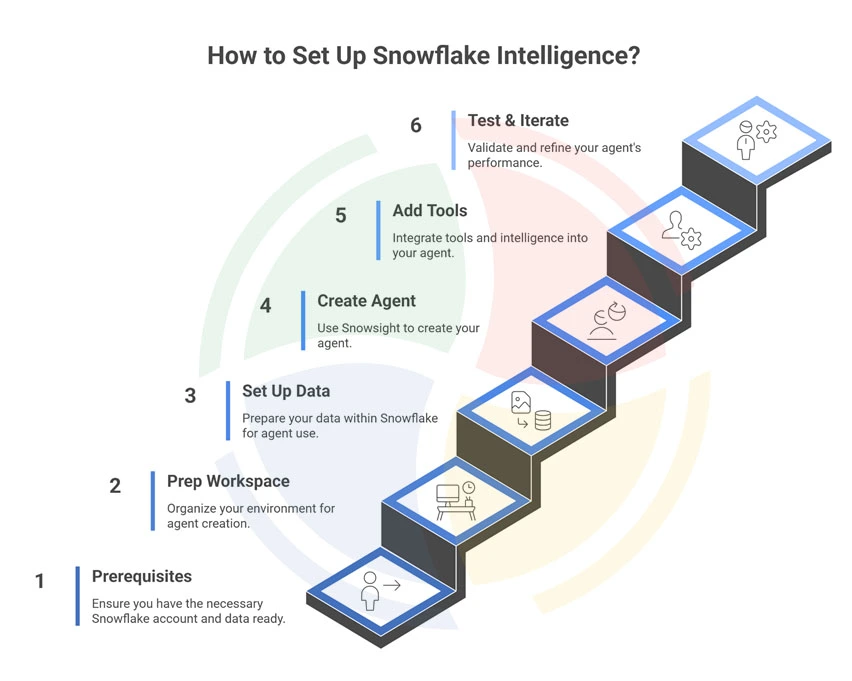
You can build your first Snowflake Intelligence agent in about 10–15 minutes. The process is beginner-friendly, fully guided in Snowsight, and requires no external infrastructure.
Here’s a step-by-step breakdown:
Prerequisites (2-3 min)
- You need a Snowflake account with privileges to create databases, schemas, and agents (e.g., using a role like SYSADMIN or a role with CREATE AGENT, schema usage rights, etc.)
- Data ready in Snowflake (structured tables for SQL queries, or documents/text for search) because your agent needs “knowledge” to work on.
Step 1: Prep Your Workspace (1-2 minutes)
Create a dedicated database + schema so your agents stay organized.
Run in a Snowflake worksheet:
CREATE DATABASE IF NOT EXISTS snowflake_intelligence;
CREATE SCHEMA IF NOT EXISTS snowflake_intelligence.agents;
Make sure your role has permissions like CREATE AGENT, USAGE on the schema, and if needed, usage on any Cortex Search Services you’ll connect.
Step 2: Set Up Your Data (2–4 minutes)
Decide what your agent will “think” with:
- Structured data:
Build or use existing semantic models/views so your agent can answer SQL-style questions.
- Unstructured data:
If you want document understanding, create a Cortex Search Service and load your PDFs, notes, FAQs, or text files for AI-driven retrieval.
This is the heart of the agent. Even simple data works great for a first test.
Step 3: Create the Agent in Snowsight (1–2 minutes)
In the Snowflake UI, go to AI & ML → Agents → Create Agent.
Give it a name, a friendly display label, a description, and (optional) an avatar or color.
Select your snowflake_intelligence.agents schema so everything stays tidy.
Step 4: Add Tools and Intelligence (3–5 minutes)
Edit the agent you just created → open Tools.
Here’s where you attach:
- Your Semantic Model (for SQL-backed insights)
- Your Cortex Search Service (for document understanding)
You can also add behavior instructions, custom guardrails, and sample user prompts to guide responses.
Step 5: Test, Validate, Iterate (1-2 minutes)
Open Snowflake Intelligence → Chat, select your agent, and start asking questions:
- “Summarize the last 30 days of customer feedback.”
- “Show sales trends by region.”
- “What insights can you pull from the Q4 performance report PDFs?”
Your agent will return grounded, governed answers, fully inside Snowflake, with no data movement and no extra infra.
Snowflake Intelligence News: What’s Next?
Snowflake Intelligence reached general availability on November 4, 2025, marking a pivotal shift from preview to enterprise-ready deployment.
The platform recently secured momentum through a $200 million multi-year partnership with Anthropic, integrating Claude Sonnet 4.5 and Opus 4.5 models to power agentic AI capabilities across 12,600+ enterprises.
This integration enables multi-step reasoning and complex analytics directly within the AI Data Cloud, uniting data, analytics, and generative AI under one governed platform.
Early adopters in financial services, retail, and healthcare are deploying custom AI agents for subscription analytics, compliance monitoring, and customer behavior analysis.
Recent enhancements include multi-source data reasoning, enhanced visualization capabilities, and expanded Cortex Knowledge Extensions partnerships with USA TODAY, The Associated Press, and Stack Overflow.
Make Snowflake Intelligence Enterprise-Ready With Aegis Softtech
Snowflake Intelligence introduces a new way to work with data. But its potential only becomes real when the foundation beneath it is solid.
To get reliable, repeatable answers—not brittle prototypes—you need clean semantics, strong governance, tuned warehouses, and an Intelligence layer that reflects how your business actually operates.
With our Snowflake implementation solutions, you can also combine end-to-end consulting and migration to ensure your DWH ecosystem is always ready for intelligent agents.
We get you a durable agent, not fragile demos.
So, if you want Snowflake Intelligence that works consistently, scales safely, and delivers measurable value rather than one-off demos, we can lead the way.
FAQs
1. How much does Snowflake Intelligence cost?
Snowflake Intelligence cost varies by workload scale and chosen consumption model. Most teams estimate costs through usage-based forecasting tools.
2. What are some Snowflake Intelligence custom toolsto use?
Snowflake Intelligence custom tools include notebooks, connectors, deployment pipelines, etc. The product integrates SDKs, APIs, and third-party model registries, showcasing varied Snowflake Intelligence features.
3. What are the core Snowflake data intelligence capabilities?
Snowflake data intelligence capabilities include unified storage, search, governance, and ML workflows. A resilient Snowflake Intelligence architecture couples scalable compute with cortex intelligence for inference.
4. What is Snowflake Intelligence GA?
Snowflake Intelligence GA refers to the general availability release of its advanced intelligence features. This milestone signals production-ready functionality backed by enterprise support and performance guarantees.
5. What can you do with Snowflake artificial intelligence?
You can generate predictions, automate decisions, and enrich applications using secure AI models on Snowflake’s artificial intelligence. These AI workflows integrate seamlessly with existing cloud data pipelines for continuous optimization.
6. What are the key benefits of Snowflake Intelligence?
Key benefits of Snowflake Intelligence include improved data quality, faster insights, and simplified governance across diverse workloads. Businesses also gain scalable intelligence capabilities that evolve with growing analytical demands.