Many data breaches involve data stored in the cloud. And if you’re thinking, “Well, that’s someone else’s problem,” it’s not.
Let’s give you an example of the Ticketmaster/Snowflake incident of May 2024.
A hacker group named ShinyHunters walked away with 560 million customer records.
The root cause? Not some sophisticated zero-day exploit. Just accounts that didn’t have multi-factor authentication enabled.
The cloud provider’s infrastructure was fine. The customer configurations? Not so much.
This is the reality of data security in cloud data warehouses today. Your warehouse vendor secures the plumbing; you secure what flows through it.
In this blog, we cover the core security pillars, common vulnerabilities, compliance requirements, and actionable best practices to protect your cloud data warehouse.
Key Takeaways
Companies incur costs of USD 6.08 million due to data breaches, which is 22% higher than the global average.
Shared Responsibility:Cloud providers secure infrastructure; you secure data, configurations, and access.
Core Pillars:- Identity & Access Management (IAM)
- Encryption
- Network security
- Granular access control
GDPR, HIPAA, SOC 2, PCI-DSS—your warehouse must meet them all.
Best Fit:Organizations storing PII, financial data, or regulated information in Snowflake, Redshift, or BigQuery.
Shared Responsibility Model for Cloud Data Warehouse Security
Think of the shared responsibility model like renting an apartment.
Your landlord (the cloud provider) maintains the building’s structure, electrical systems, and common areas. But if you leave your front door unlocked, that’s on you.
Cloud providers like AWS, GCP, and Snowflake handle the underlying infrastructure: physical data centers, hypervisors, and network backbone.
Your job is to secure the data itself, user access, configurations, and application-level controls.
The Ticketmaster breach in May 2024 is Exhibit A. Snowflake’s infrastructure wasn’t compromised. Customers who skipped MFA were.
The platform provided security capabilities. Those capabilities just weren’t turned on.
What are the Core Pillars of Data Security in Cloud Data Warehouses?
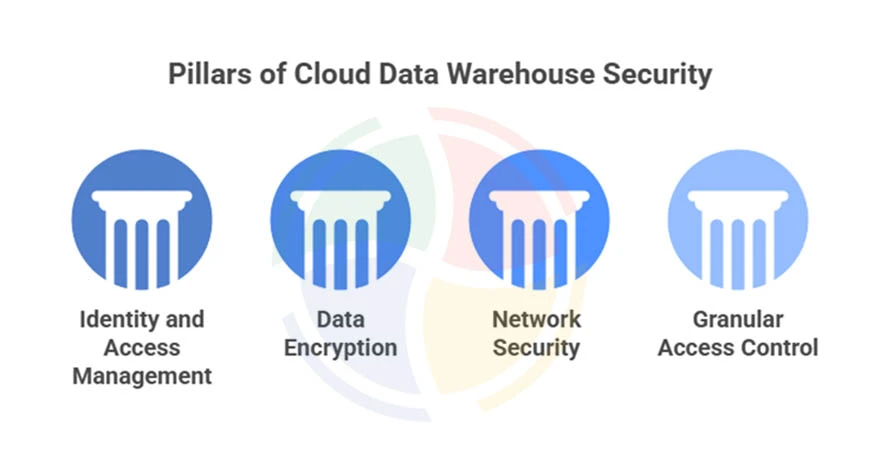
Data security in cloud data warehouses is a layered defense built on four pillars that work together.
1. Identity and Access Management (IAM)
IAM controls who can access your warehouse and what actions they can perform. Compromised credentials are one of the most common attack vectors that cost companies millions.
Key components of IAM:
- Principle of Least Privilege:
Grant only the minimum permissions required for each role. If an analyst only needs to read sales data, they shouldn’t have write access to finance tables.
- Multi-Factor Authentication (MFA):
Multi-Factor Authentication (MFA) is a security method that requires users to verify their identity using two or more independent factors. This is non-negotiable. The Snowflake breaches proved what happens when you skip this step.
- Single Sign-On (SSO):
Integrate with enterprise identity providers (Okta, Azure AD) for centralized control and audit trails.
- Regular access reviews:
Revoke dormant accounts within 30 days of inactivity. Attackers love stale credentials.
— Head of Cloud Security, Aegis Softtech
2. Data Encryption
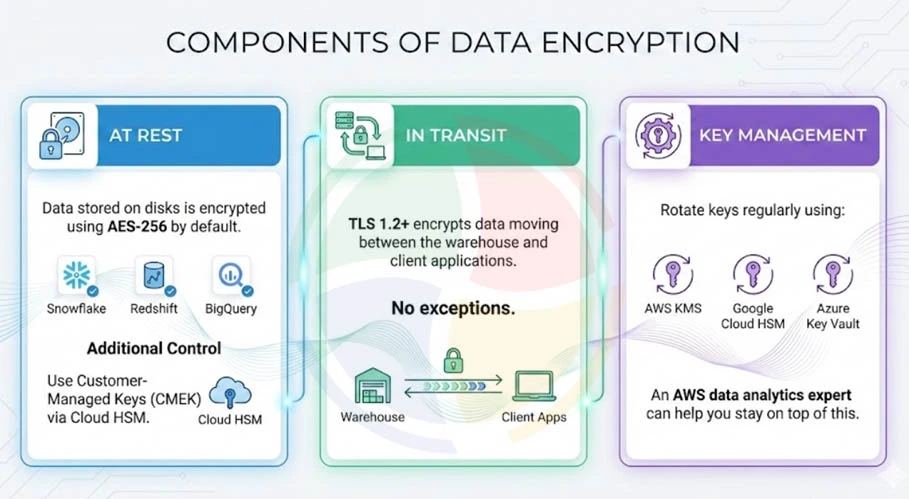
Encryption ensures that even if attackers breach your perimeter, the data they grab is unreadable without the keys.
Three main components of data encryption include:
- At Rest:
Data stored on disks is encrypted using AES-256 by default in Snowflake, Redshift, and BigQuery. For additional control, use Customer-Managed Keys (CMEK) via Cloud HSM.
- In Transit:
TLS 1.2+ encrypts data moving between the warehouse and client applications. No exceptions.
- Key management:
Rotate keys regularly using AWS KMS, Google Cloud HSM, or Azure Key Vault. An AWS data analytics expert can help you stay on top of this.
And don’t forget staging areas, logs, and backups. Encryption gaps are common attack vectors.
3. Network Security
Network security isolates your data warehouse from the public internet and controls who can reach it in the first place.
Here are the core elements included in network security:
- Virtual Private Cloud (VPC): Creates a private network perimeter around your warehouse.
- IP allow-listing: Restrict access to known corporate IPs only.
- Firewalls and security groups: Control inbound/outbound traffic at the port level.
- Enhanced VPC Routing: In Amazon Redshift and Google BigQuery, this routes traffic within AWS/GCP networks rather than the public internet.
4. Granular Access Control
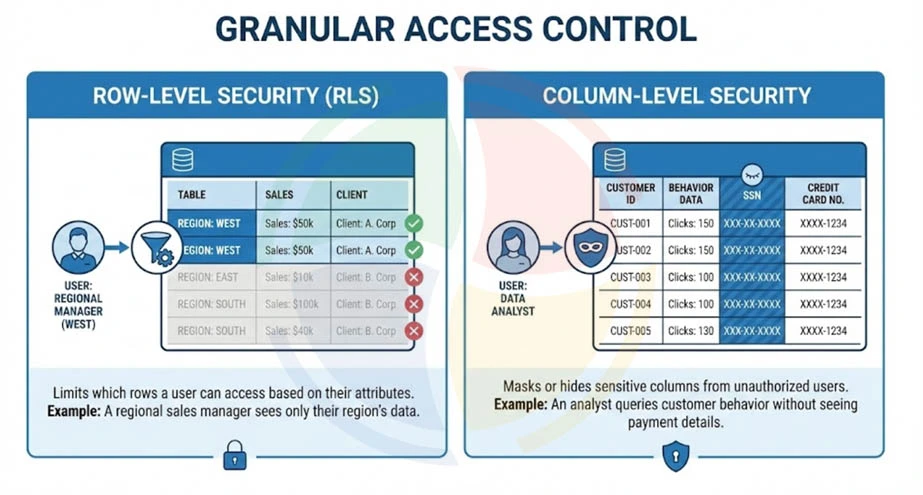
Granular access control restricts what specific users can see within tables, not just whether they can access the table at all.
There are two types of control:
- Row-Level Security (RLS):
Limits on which rows a user can access based on their attributes. A regional sales manager sees only their region’s data; the CFO sees everything.
- Column-Level Security (CLS):
Masks or hides sensitive columns (SSNs, credit card numbers) from unauthorized users. An analyst can query customer behavior without ever seeing payment details.
How Do You Monitor and Govern Data Warehouse Security?
Security without visibility is just hope. Monitoring and governance transform your warehouse from a black box into an auditable, responsive system.
Here’s what you should do to keep your data warehouse security airtight:
Auditing and Logging
Modern cloud data warehouse solutions automatically log every query, login attempt, and access event.
This data is essential for compliance audits (SOC 2, HIPAA) and detecting suspicious behavior before it becomes a breach.
Integrate your warehouse logs with SIEM (Security Information and Event Management) tools like Splunk or Sumo Logic for real-time alerting.
When an admin suddenly logs in from a new country at 3 AM, you want to know immediately (not three weeks later during an incident review).
For platform-specific logging:
- Snowflake uses the ACCOUNT_USAGE schema
- Redshift integrates with AWS CloudTrail
- BigQuery leverages Cloud Logging.
— Lead Data Architect, Aegis Softtech
Data Classification and Tagging
Automated data classification identifies and tags sensitive data (PII, PHI, financial records) so you can apply stricter protection policies without manual overhead.
Tools like Google Cloud DLP, AWS Macie, and Snowflake’s automatic data classification scan your warehouse and flag sensitive columns.
Once classified, you can enforce policies like automatically masking PII columns for non-privileged users.
Disaster Recovery and Backup
When you opt for professional data warehousing services, your DWH includes built-in disaster recovery features. However, understanding and testing them is also your responsibility.
Here’s what you should do for each platform:
- Snowflake:
Time Travel (up to 90 days of point-in-time recovery) + Fail-safe for additional protection
- Redshift:
Automated snapshots with cross-region replication
- BigQuery:
Built-in redundancy with automatic geo-replication
Test your recovery procedures quarterly. Backups are worthless if you discover they can’t be restored during an actual incident.
What Are the Compliance Standards for Cloud Data Warehouses?
Compliance helps in proving to regulators, auditors, and customers that you take data protection seriously.
Your cloud data warehouse needs to meet the standards relevant to your industry.
| Standard | Focus | Key Requirements |
| GDPR | EU data privacy | Data minimization, right to erasure, consent management, breach notification within 72 hours |
| HIPAA | US healthcare data | PHI encryption, access controls, audit logs, Business Associate Agreement with cloud provider |
| SOC 2 | Service organization controls | Security, availability, processing integrity, confidentiality, privacy |
| PCI-DSS | Payment card data | Cardholder data encryption, network segmentation, access restrictions |
Cloud data warehouses like Snowflake, Redshift, and BigQuery are certified for these standards.
However, certification alone isn’t compliance. You must configure the warehouse correctly and document your controls.
What are the Common Security Risks in Cloud Data Warehouses?
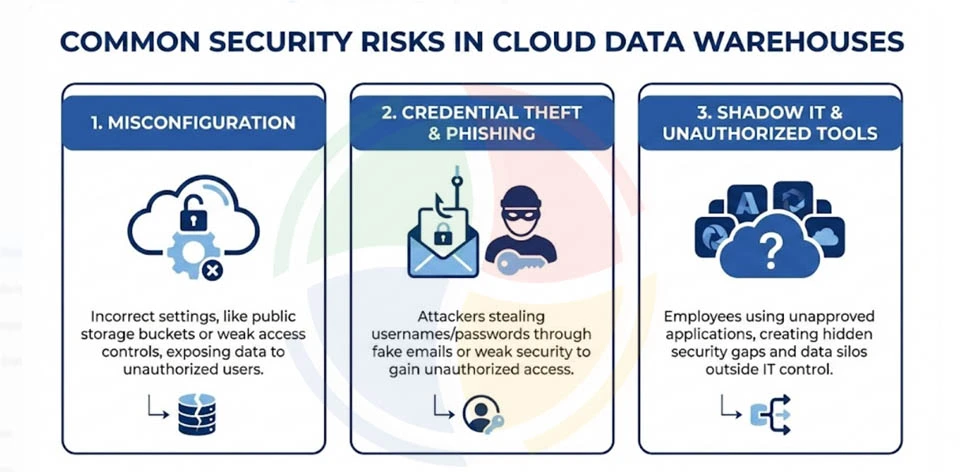
Knowing the threats is half the battle.
Here are the three risks that consistently show up in breach reports—and how to prevent them.
1. Misconfiguration
Misconfiguration is the #1 cause of cloud breaches.
For example, Toyota exposed 260,000 customer records in 2023 via a misconfigured cloud environment. The data sat exposed for years before discovery.
How to prevent misconfiguration in cloud data warehouses?
Use Infrastructure-as-Code (IaC) with policy validation to catch misconfigurations before deployment. Cloud Security Posture Management (CSPM) tools, like Prisma Cloud or Wiz, can continuously scan for drift from secure baselines.
— VP of Engineering, Aegis Softtech
2. Credential Theft and Phishing
The 2024 Snowflake campaign used credential stuffing on accounts without multi-factor authentication (MFA), not a platform vulnerability.
Attackers didn’t need to hack anything; they just logged in with stolen passwords.
How to prevent credential theft and phishing?
- Ensure mandatory MFA for all users (no exceptions for admins). They’re actually higher-risk targets.
- Do SSO integration with enterprise identity providers.
- Set up anomaly detection for unusual login patterns.
3. Shadow IT and Unauthorized Tools
Several data breaches involve shadow data. It is data stored in unmanaged sources outside formal governance. Employees using unapproved BI dashboards or data export utilities create blind spots in your audit logs and data lineage.
How to prevent shadow IT and unauthorized tools in cloud data warehouses?
Here are some things you can do:
- Data Loss Prevention (DLP) policies
- Authorized tool allowlists
- Egress monitoring to catch unauthorized data movement.
Best Practices for Securing Your Cloud Data Warehouse
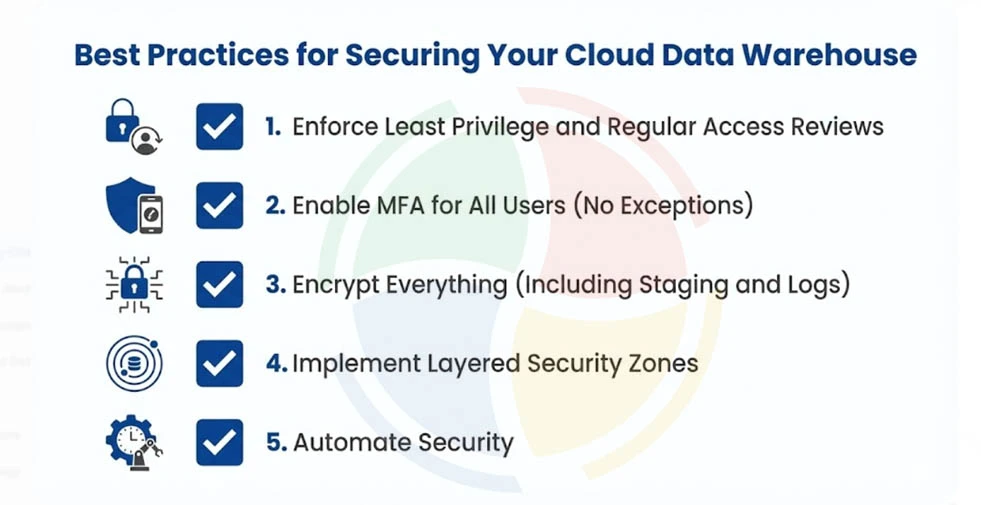
Here are the best practices that consistently separate secure organizations from breach headlines.
1. Enforce Least Privilege and Regular Access Reviews
Audit permissions quarterly. Revoke unused accounts within 30 days of inactivity. Every over-permissioned account is a breach waiting to happen.
2. Enable MFA for All Users (No Exceptions)
Prioritize admins, but enforce MFA for everyone. Basic users are often the initial access vector because they’re perceived as lower-value targets.
3. Encrypt Everything (Including Staging and Logs)
Don’t leave gaps that attackers can exploit. Temporary tables, staging areas, and log files often contain the same sensitive data as production tables.
4. Implement Layered Security Zones
Place sensitive datasets (PII, financial records) in restricted segments with additional access controls.
Less critical data can live in broader zones with standard protections.
5. Automate Security
Use Terraform, Pulumi, or CloudFormation with policy-as-code validation to prevent misconfigurations at deployment.
CSPM tools (Prisma Cloud, Wiz, Lacework) provide continuous posture monitoring and alert you when configurations drift from secure baselines.
— Director of Data Engineering, Aegis Softtech
Secure Your Cloud Data Warehouse with Aegis Softtech
Data security in cloud data warehouses requires a layered approach.
The shared responsibility model means your provider handles infrastructure; you handle everything else.
The organizations that avoid headlines aren’t necessarily the ones with the biggest security budgets. They’re the ones that treat security as an ongoing practice rather than a one-time configuration.
Aegis Softtech’s data warehouse consulting services help organizations design, implement, and maintain secure cloud data warehouse architectures.
Whether you’re running Snowflake, Redshift, or BigQuery, our certified data warehouse developers can help you:
- Security Architecture Design
- Implementation Services
- Compliance Readiness
- Managed Security Services
FAQs
1. What is data security in cloud data warehouses?
Data security in cloud data warehouses includes policies, technologies, and controls that protect stored data from unauthorized access and breaches. Core components include IAM, encryption, network isolation, and granular access controls working under a shared responsibility model.
2. Who is responsible for securing data in a cloud data warehouse?
Under the shared responsibility model, cloud providers secure underlying infrastructure like physical servers and networks. Customers are responsible for data protection, user access management, configuration security, and application-level controls.
3. What are common cloud data warehouse misconfigurations?
Common misconfigurations include disabled MFA, overly permissive IAM policies, public-facing storage buckets, and missing encryption on staging areas. These account for 23% of cloud breaches according to industry research.
4. What’s fine-grained access control in cloud data warehouses?
Fine-grained access control restricts data visibility at row and column levels within tables. Users see only data relevant to their role, protecting sensitive information like PII and financial records.
5. What is row-level security in cloud data warehouses?
Row-level security (RLS) limits which rows a user can access based on their attributes or roles. A regional manager sees only their region’s data, while executives see all rows. Snowflake, Redshift, and BigQuery support RLS natively.